Solved Chrome Virus Extension Refuses To Be Removed

logo897

New member
Member
VIP
Local time
3:48 AM
Messages
422
Hello all,

I have this extension called "search solutions" and I cannot manually remove it because it says it is managed by a system administrator. I've tried to scan with malwarebytes and superantispyware and no such luck.

What can I do to fix this? Are there scanners that are free that can actually remove this for me?

Thanks.
 

My Computer My Computer

At a glance

Windows 7 ProIntel Core i7 2600k @4.6Ghz16 GB DDR3 1600mhzEVGA GTX 980Ti
Computer type
PC/Desktop
Computer Manufacturer/Model Number
Maingear Custom PC
OS
Windows 7 Pro
CPU
Intel Core i7 2600k @4.6Ghz
Motherboard
Gigabyte GA-Z68X-UD4-B3
Memory
16 GB DDR3 1600mhz
Graphics Card(s)
EVGA GTX 980Ti
Sound Card
Onboard
Monitor(s) Displays
Curved MSI 144hz 1ms
Screen Resolution
1920x1080
Hard Drives
250GB Samsung 860 Evo SSD
PSU
Seasonic 650 Watts Gold Rating
Case
Custom Maingear Case
Cooling
60mm Maingear Liquid Cooling CPU
Keyboard
Basic Wireless Keyboard
Mouse
Basic Wireless Mouse
Antivirus
Microsoft Security Essentials
Browser
Google Chrome (Latest Version)
Looking at this on the Google product forums,

The Search Solutions Extension is a virus

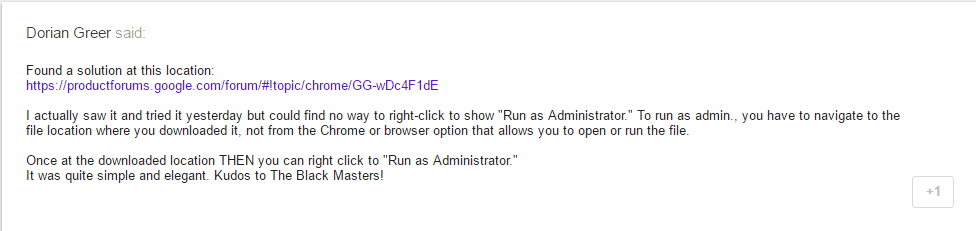
The one solution that was offered that seems to have worked is,

2016-06-23_20h59_21.png

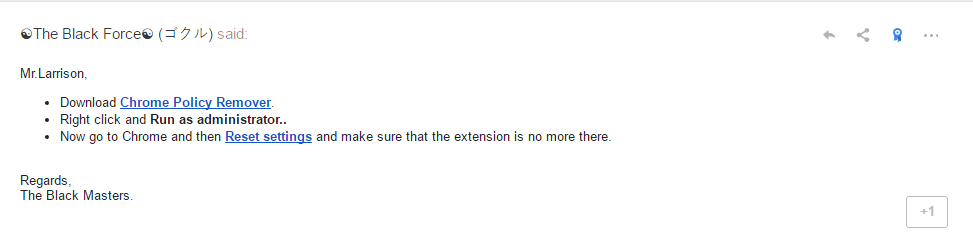
Which points to the Chrome Policy Remover in this link,

Why can't I remove a "Enterprise Installed Extension"?

2016-06-23_21h04_39.png

Which is a .bat file,

Code:
@echo off

IF NOT EXIST %WINDIR%\System32\GroupPolicy goto next

echo Deleting GroupPolicy folder...
RD /S /Q "%WINDIR%\System32\GroupPolicy" || goto error
echo.

:next
IF NOT EXIST %WINDIR%\System32\GroupPolicyUsers goto next2

echo Deleting GroupPolicyUsers folder...
RD /S /Q "%WINDIR%\System32\GroupPolicyUsers" || goto error
echo.

:next2
gpupdate /force

pause
exit

:error
echo.
echo An unexpected error has occurred. ¨Have opened the program as an administrator (right click, run as administrator)?
echo.
pause
exit
 

My Computer My Computer

At a glance

Win 10 Pro x64Intel I5-2500K @3.3GHz16GB G.Skill Ripjaws X (4x4GB)EVGA GeForce 750 Ti SC 2GB
Computer type
PC/Desktop
Computer Manufacturer/Model Number
Self Built
OS
Win 10 Pro x64
CPU
Intel I5-2500K @3.3GHz
Motherboard
Asrock P67 Extreme4
Memory
16GB G.Skill Ripjaws X (4x4GB)
Graphics Card(s)
EVGA GeForce 750 Ti SC 2GB
Sound Card
ASUS Xonar DG 5.1 Channels 24-bit 96KHz PCI Interface Sound
Monitor(s) Displays
auria eq2367
Screen Resolution
1920 x 1080
Hard Drives
250GB Samsung 850 EVO SSD
1TB WD Blue
1TB Hitachi
PSU
SeaSonic X 650W 80 Plus Gold
Case
Corsair Obsidian 750D
Cooling
Corsair H60, Three 140mm case fans
Keyboard
Logitech Wireless Keyboard K520
Mouse
Logitech Wireless Mouse M310
Internet Speed
Wave Broadband ~ 100 dn 5 up
Antivirus
Windows Defender, Malwarebytes Premium
Browser
Edge, IE11, Chrome
Other Info
Laptop specs: HP g7-1365dx /
CPU: AMD A6-3420M APU with Radeon(tm) HD Graphics /
RAM: Crucial 8Gb (2x4Gb) /
SSD: Crucial M4-CT128M4SSD2 ATA Device/ FW 000F /
GFX: AMD Radeon HD 6520G /
OS: Windows 10 Pro x64
Looking at this on the Google product forums,

The Search Solutions Extension is a virus

The one solution that was offered that seems to have worked is,

View attachment 388515

Which points to the Chrome Policy Remover in this link,

Why can't I remove a "Enterprise Installed Extension"?

View attachment 388516

Which is a .bat file,

Code:
@echo off

IF NOT EXIST %WINDIR%\System32\GroupPolicy goto next

echo Deleting GroupPolicy folder...
RD /S /Q "%WINDIR%\System32\GroupPolicy" || goto error
echo.

:next
IF NOT EXIST %WINDIR%\System32\GroupPolicyUsers goto next2

echo Deleting GroupPolicyUsers folder...
RD /S /Q "%WINDIR%\System32\GroupPolicyUsers" || goto error
echo.

:next2
gpupdate /force

pause
exit

:error
echo.
echo An unexpected error has occurred. ¨Have opened the program as an administrator (right click, run as administrator)?
echo.
pause
exit


That fixed it.

Thank you so much!
 

My Computer My Computer

At a glance

Windows 7 ProIntel Core i7 2600k @4.6Ghz16 GB DDR3 1600mhzEVGA GTX 980Ti
Computer type
PC/Desktop
Computer Manufacturer/Model Number
Maingear Custom PC
OS
Windows 7 Pro
CPU
Intel Core i7 2600k @4.6Ghz
Motherboard
Gigabyte GA-Z68X-UD4-B3
Memory
16 GB DDR3 1600mhz
Graphics Card(s)
EVGA GTX 980Ti
Sound Card
Onboard
Monitor(s) Displays
Curved MSI 144hz 1ms
Screen Resolution
1920x1080
Hard Drives
250GB Samsung 860 Evo SSD
PSU
Seasonic 650 Watts Gold Rating
Case
Custom Maingear Case
Cooling
60mm Maingear Liquid Cooling CPU
Keyboard
Basic Wireless Keyboard
Mouse
Basic Wireless Mouse
Antivirus
Microsoft Security Essentials
Browser
Google Chrome (Latest Version)
Awesome! Glad you got it sorted, you're welcome. :)
 

My Computer My Computer

At a glance

Win 10 Pro x64Intel I5-2500K @3.3GHz16GB G.Skill Ripjaws X (4x4GB)EVGA GeForce 750 Ti SC 2GB
Computer type
PC/Desktop
Computer Manufacturer/Model Number
Self Built
OS
Win 10 Pro x64
CPU
Intel I5-2500K @3.3GHz
Motherboard
Asrock P67 Extreme4
Memory
16GB G.Skill Ripjaws X (4x4GB)
Graphics Card(s)
EVGA GeForce 750 Ti SC 2GB
Sound Card
ASUS Xonar DG 5.1 Channels 24-bit 96KHz PCI Interface Sound
Monitor(s) Displays
auria eq2367
Screen Resolution
1920 x 1080
Hard Drives
250GB Samsung 850 EVO SSD
1TB WD Blue
1TB Hitachi
PSU
SeaSonic X 650W 80 Plus Gold
Case
Corsair Obsidian 750D
Cooling
Corsair H60, Three 140mm case fans
Keyboard
Logitech Wireless Keyboard K520
Mouse
Logitech Wireless Mouse M310
Internet Speed
Wave Broadband ~ 100 dn 5 up
Antivirus
Windows Defender, Malwarebytes Premium
Browser
Edge, IE11, Chrome
Other Info
Laptop specs: HP g7-1365dx /
CPU: AMD A6-3420M APU with Radeon(tm) HD Graphics /
RAM: Crucial 8Gb (2x4Gb) /
SSD: Crucial M4-CT128M4SSD2 ATA Device/ FW 000F /
GFX: AMD Radeon HD 6520G /
OS: Windows 10 Pro x64
Back
Top