Chrome

CJW

New member
Power User
VIP
Local time
11:34 AM
Messages
439
I'm trying out Chrome v49.0.2623.87 m & want to know how I copy my Bookmarks over to my Flash Drive?
In IE11, I just go to C:\Users\Z\Favorites & copy the folders & links over to the Flash Drive, but I cannot find a way to do this w/Chrome.
 

My Computer

Computer type
PC/Desktop
Computer Manufacturer/Model Number
Self built comfuser
OS
10 Pro. 64Bit
CPU
AMD FX 4100, 4-Core Black Edition. Socket AM3+ ~ 3.60GHz
Motherboard
ASUS M5A97 LE R2.0
Memory
2x 4GB Kingston HyperX DDR3-1866 (PC3-14900) - 8GB Total
Graphics Card(s)
ASUS Radeon HD 6670-2GD3
Sound Card
Onboard High Definition Audio Device
Monitor(s) Displays
HP 2009m LCD
Screen Resolution
1600x900, True Color (32bit), 60Hertz
Hard Drives
WD Blue - 1TB, 3D NAND - SATA SSD
PSU
XFX Pro 450W Core Edition - Fully Wired
Case
Antec Super Lanboy
Cooling
Stock CPU fan + 2 (1 front, 1 back) 120mm Antec fans
Keyboard
Logitech MK700/MK710
Mouse
Logitech M705
Internet Speed
Frontier FiOS 50/50
Antivirus
Windows Security
Browser
Vivaldi
Other Info
1x ASUS DRW-24B1ST Multi-DVD Rewriter
1x RocketFish AIO Media Card Reader
1x WD 1TB Passport USB External Drive
In the future, having a better title will allow more people to find your question and answer.

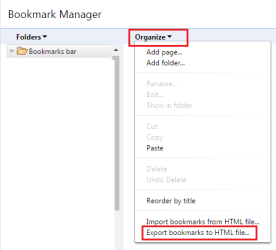
You can log in to Chrome with a Google account to automagically sync bookmarks. Or, if you're concerned about privacy, I believe there's an option on the ctrl+B bookmarks page to export them.
 

My Computer

Computer type
Laptop
Computer Manufacturer/Model Number
Lenovo Thinkpad E540
OS
Windows 7 Ultimate x64
CPU
i7-4702M
Antivirus
Norton 360
Browser
Pale Moon
I'm trying out Chrome v49.0.2623.87 m & want to know how I copy my Bookmarks over to my Flash Drive?
In IE11, I just go to C:\Users\Z\Favorites & copy the folders & links over to the Flash Drive, but I cannot find a way to do this w/Chrome.
In my opinion, all browsers should use a simple folder with shortcut files.

There must be some reason why most browsers don't do that.


For Chrome, "surf to" chrome://bookmarks/ and export your bookmarks.

CB.PNG

Sadly, that does not put them in a very useful format.

IE can do things that no other browser can.
 

My Computer

Computer type
Laptop
Computer Manufacturer/Model Number
Employer provided Dell Latitude
OS
W7 Pro SP1 64bit
CPU
i7
Memory
8GB
Graphics Card(s)
Intel HD Graphics
Hard Drives
crappy SSD
Antivirus
Employer mandated Symantec Endpoint Protection
Browser
Pale Moon 64bit, IE11 64bit & Chrome 64bit
You can always try the old method: Go to your profile folder (typicaly %appdata%\Google\Chrome\User Data\[Profile Name]), then to the "default" folder, in there you will find a "Bookmarks" file without extension, copy it to a thumb drive and restore to a new copy of Chrome or PC, it should work...
 

My Computer

Computer type
PC/Desktop
Computer Manufacturer/Model Number
Assembled Desktop PC
OS
Microsoft Windows 7 Home Premium SP1 64-bit Build 7600
CPU
AMD Athlon 64 X2 5200+ Dual Core CPU @ 2.7 Ghz (Brisbane)
Motherboard
PCChips A13G+ v3.0
Memory
2x2 GB DDR2 PC-5300 (667 Mhz) Kingston ValueRAM
Graphics Card(s)
XFX ATI Radeon HD 4350 GPU (512 MB + 512 MB HM)
Sound Card
Realtek High Definition Audio Driver ALC660 @ MCP61S
Monitor(s) Displays
HP S2031 20" LED HD Widescreen Display Monitor
Screen Resolution
1600 x 900 px
Hard Drives
Maxtor Diamond Max 10 (160 GB, 7200 RPM, SATA-II Hard Disk)
Western Digital Scorpion Blue (250 GB, 5400 RPM, SATA-II External Hard Disk - Personal Data)
Toshiba MQ01ABD050 (500 GB, 5400 RPM, SATA-II External Hard Disk - Software & ISOs)
PSU
Pixxo Transformer 850W 80+ Certification PSU
Case
Compaq 5BW353 Case
Cooling
Many solutions, see other info...
Keyboard
Green Leaf (Mitzu) Standard Keyboard
Mouse
Microsoft USB Lasser Pointing Device
Internet Speed
10 MB
Antivirus
Avast Antivirus Free
Browser
Firefox, Chrome, Internet Explorer
Other Info
Windows Experience Index Result: 3.8 of 7.9.

Cooling solutions:
- AVC @ 2000/5000 RPM Copper Heatpipes (For Athlon 64 X2 6000+ CPU used in an Athlon 64 X2 5200+)
- Rear Fan 80 mm @ 2700 RPM for heat extraction
- Manhatan Chipset Cooler @ 4700/7200 RPM (For nVidia Chipset in MoBo)
- Foxconn @ 2500 RPM (Old Pentium III heatsink fan) in XFX ATI Radeon HD 4350
After a few days, I'm not too fond of Chrome.
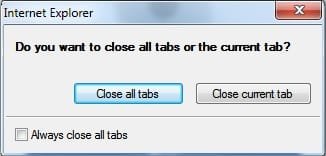
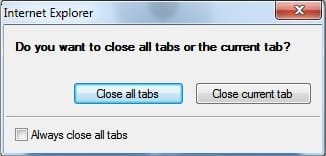
A little more complicated in saving & editing my Bookmarks than IE's Favorites, I can't place different Tabs side by side w/o having to use a downloaded Extension, every tab I open has my Bookmarks sitting right there below the Address Bar & if I have multiple tabs open when I press the Close button, I don't get a message about closing multiple Tabs as IE gives (pictured below).

Going to give Firefox a try.
 

Attachments

  • IE.jpg
    IE.jpg
    8.8 KB · Views: 30

My Computer

Computer type
PC/Desktop
Computer Manufacturer/Model Number
Self built comfuser
OS
10 Pro. 64Bit
CPU
AMD FX 4100, 4-Core Black Edition. Socket AM3+ ~ 3.60GHz
Motherboard
ASUS M5A97 LE R2.0
Memory
2x 4GB Kingston HyperX DDR3-1866 (PC3-14900) - 8GB Total
Graphics Card(s)
ASUS Radeon HD 6670-2GD3
Sound Card
Onboard High Definition Audio Device
Monitor(s) Displays
HP 2009m LCD
Screen Resolution
1600x900, True Color (32bit), 60Hertz
Hard Drives
WD Blue - 1TB, 3D NAND - SATA SSD
PSU
XFX Pro 450W Core Edition - Fully Wired
Case
Antec Super Lanboy
Cooling
Stock CPU fan + 2 (1 front, 1 back) 120mm Antec fans
Keyboard
Logitech MK700/MK710
Mouse
Logitech M705
Internet Speed
Frontier FiOS 50/50
Antivirus
Windows Security
Browser
Vivaldi
Other Info
1x ASUS DRW-24B1ST Multi-DVD Rewriter
1x RocketFish AIO Media Card Reader
1x WD 1TB Passport USB External Drive
If you like to use a group of tabs over and over, get Session Manager from Chrome Store -- I have 3 groups saved for use at two different job places and one at home. Firefox has a Session Manager on steroids, a very good one. IE, well, IE is IE [meaning I've never found a session mgr for it.
 

My Computer

Computer type
PC/Desktop
Computer Manufacturer/Model Number
Antec desktop; Acer Aspire laptops
OS
Windows 7 Professional 64-bit
CPU
Desktop i5; Acers i5 & i7
Memory
desktop 16GB; 1 Acer 8GB & 1 Acer 16GB
Hard Drives
1TB split into 2 equal partitions [OS and data] usable by RJS
Internet Speed
AT&T DSL
Browser
FF, GChrome, msIE
Other Info
Windows 7 Firewall, Emsisoft AM/AV, MSE [scan-only], SpywareBlaster, Ruiware/BillP combine
Session Manager is not what I need, I like having Tabs side by side sometimes & Chrome does not let me do that
w/o some downloaded extension.

Giving Firefox a try & liking it so far. But ...
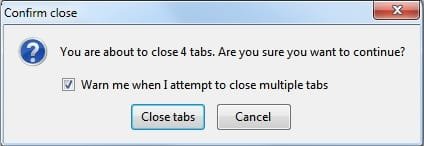
If I have multiple tabs open when I press the Close button, I do get a message, but selection is not as good as IE's selection (pictured below).
Also, I can't find a way to copy Bookmarked pages & folders to my Flash Drive the same way I did in IE.
 

Attachments

  • IE.jpg
    IE.jpg
    8.8 KB · Views: 23
  • Firefox.jpg
    Firefox.jpg
    9.8 KB · Views: 23

My Computer

Computer type
PC/Desktop
Computer Manufacturer/Model Number
Self built comfuser
OS
10 Pro. 64Bit
CPU
AMD FX 4100, 4-Core Black Edition. Socket AM3+ ~ 3.60GHz
Motherboard
ASUS M5A97 LE R2.0
Memory
2x 4GB Kingston HyperX DDR3-1866 (PC3-14900) - 8GB Total
Graphics Card(s)
ASUS Radeon HD 6670-2GD3
Sound Card
Onboard High Definition Audio Device
Monitor(s) Displays
HP 2009m LCD
Screen Resolution
1600x900, True Color (32bit), 60Hertz
Hard Drives
WD Blue - 1TB, 3D NAND - SATA SSD
PSU
XFX Pro 450W Core Edition - Fully Wired
Case
Antec Super Lanboy
Cooling
Stock CPU fan + 2 (1 front, 1 back) 120mm Antec fans
Keyboard
Logitech MK700/MK710
Mouse
Logitech M705
Internet Speed
Frontier FiOS 50/50
Antivirus
Windows Security
Browser
Vivaldi
Other Info
1x ASUS DRW-24B1ST Multi-DVD Rewriter
1x RocketFish AIO Media Card Reader
1x WD 1TB Passport USB External Drive

My Computer

Computer type
Laptop
Computer Manufacturer/Model Number
Employer provided Dell Latitude
OS
W7 Pro SP1 64bit
CPU
i7
Memory
8GB
Graphics Card(s)
Intel HD Graphics
Hard Drives
crappy SSD
Antivirus
Employer mandated Symantec Endpoint Protection
Browser
Pale Moon 64bit, IE11 64bit & Chrome 64bit
Session Manager is not what I need, I like having Tabs side by side sometimes & Chrome does not let me do that
w/o some downloaded extension.

Giving Firefox a try & liking it so far. But ...
If I have multiple tabs open when I press the Close button, I do get a message, but selection is not as good as IE's selection (pictured below).
Also, I can't find a way to copy Bookmarked pages & folders to my Flash Drive the same way I did in IE.
If you want to close just the one tab, click the close button on the tab itself.

I don't understand what you mean by "tabs side by side" either. Do you mean having two windows displaying two things side by side? You can open a new window in any of these browsers with ctrl+N and use aero snap to make them be side-by-side.

But it sounds like the main problem is none of the browsers are IE, which you're used to. There are ways to solve all of the issues you're having, or you could just stick with IE. It'll be supported until 2020 and is still in Windows 10, so if you don't want to switch, you don't have to.
 

My Computer

Computer type
Laptop
Computer Manufacturer/Model Number
Lenovo Thinkpad E540
OS
Windows 7 Ultimate x64
CPU
i7-4702M
Antivirus
Norton 360
Browser
Pale Moon
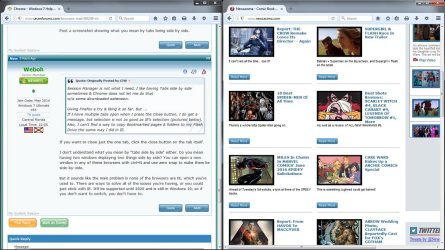
Below is a screenshot of Firefox & what I mean by 'side-by-side tabs'.
Still getting used to it, but I'll probably stick w/it.
 

Attachments

  • Tabs.jpg
    Tabs.jpg
    121.5 KB · Views: 2

My Computer

Computer type
PC/Desktop
Computer Manufacturer/Model Number
Self built comfuser
OS
10 Pro. 64Bit
CPU
AMD FX 4100, 4-Core Black Edition. Socket AM3+ ~ 3.60GHz
Motherboard
ASUS M5A97 LE R2.0
Memory
2x 4GB Kingston HyperX DDR3-1866 (PC3-14900) - 8GB Total
Graphics Card(s)
ASUS Radeon HD 6670-2GD3
Sound Card
Onboard High Definition Audio Device
Monitor(s) Displays
HP 2009m LCD
Screen Resolution
1600x900, True Color (32bit), 60Hertz
Hard Drives
WD Blue - 1TB, 3D NAND - SATA SSD
PSU
XFX Pro 450W Core Edition - Fully Wired
Case
Antec Super Lanboy
Cooling
Stock CPU fan + 2 (1 front, 1 back) 120mm Antec fans
Keyboard
Logitech MK700/MK710
Mouse
Logitech M705
Internet Speed
Frontier FiOS 50/50
Antivirus
Windows Security
Browser
Vivaldi
Other Info
1x ASUS DRW-24B1ST Multi-DVD Rewriter
1x RocketFish AIO Media Card Reader
1x WD 1TB Passport USB External Drive
Chrome, Firefox and IE can all have tabs* side by side.

*we call those windows. Technically, they are frames.

You can drag a tab away from its original window to create a new window.
 

My Computer

Computer type
Laptop
Computer Manufacturer/Model Number
Employer provided Dell Latitude
OS
W7 Pro SP1 64bit
CPU
i7
Memory
8GB
Graphics Card(s)
Intel HD Graphics
Hard Drives
crappy SSD
Antivirus
Employer mandated Symantec Endpoint Protection
Browser
Pale Moon 64bit, IE11 64bit & Chrome 64bit
Back
Top