Cisco SG200-26, Link Aggression Gigabit problem???

angelTDW

New member
Local time
5:23 PM
Messages
2
i have 12 computers running in my office,
9 at 2nd floor connected to Cisco SG200-26 port Gigabit Smart Switch
and 3 (including my file server) at the ground floor connected to Belkin 8 port gigabit unmanaged switch.

the entire connection is done using CAT-6 cables, for gigabit connection throughout...
i need to configure 4 of my pcs with link aggression (as only 4 LAGs can be created in SG200-26)
3 pcs on 2nd floor, and my file server on ground floor. the problem is

1st pc configured perfectly, (showing 2gbps connection),
and since my server is at ground level, so i pulled up 2 cat-6 cables directly from my cisco router to my server
so as to connect it in LAG, but the problem is, its only showing 200mbps connection rather then 2gbps connection...
the length per cable from cisco to server is around 21mts, so needed to know how to connect it to 2gbps connection??? am i doing something wrong or LAG doesnt work on so long cables???

help needed

thanx
 

My Computer My Computer

At a glance

Win 7 32Bit
OS
Win 7 32Bit
i have 12 computers running in my office,
9 at 2nd floor connected to Cisco SG200-26 port Gigabit Smart Switch
and 3 (including my file server) at the ground floor connected to Belkin 8 port gigabit unmanaged switch.

the entire connection is done using CAT-6 cables, for gigabit connection throughout...
i need to configure 4 of my pcs with link aggression (as only 4 LAGs can be created in SG200-26)
3 pcs on 2nd floor, and my file server on ground floor. the problem is

1st pc configured perfectly, (showing 2gbps connection),
and since my server is at ground level, so i pulled up 2 cat-6 cables directly from my cisco router to my server
so as to connect it in LAG, but the problem is, its only showing 200mbps connection rather then 2gbps connection...
the length per cable from cisco to server is around 21mts, so needed to know how to connect it to 2gbps connection??? am i doing something wrong or LAG doesnt work on so long cables???

help needed

thanx

Are you using auto-MDIX to automatically detect the speed and duplex settings? Sometimes it can fail and default to half duplex 100Mbps speed. If you haven't done so already I would hardcode the speed and duplex settings on both sides so that you know 1000Mbps is being used. I am confident that the link aggregation is working however it is just an issue with speed.

Also, are you using the CLI to manage your switch at all? Is it running IOS? If you can post a running-config that would be beneficial to see if any commands are potentially missing or mis-configured. If not using the CLI then can you post a screenshot of the GUI changes that you have made if you can.

Many Thanks,
Josh :)
 

My Computer My Computer

At a glance

Windows 7 Professional x64 SP1 ; Windows Serv...Intel Core i5 2400 @ 3.10GHz8.0GB DDR3 @ 665MHz (2GBx4)AMD Radeon HD 6870
Computer type
PC/Desktop
Computer Manufacturer/Model Number
Custom Built
OS
Windows 7 Professional x64 SP1 ; Windows Server 2012 R2 Standard
CPU
Intel Core i5 2400 @ 3.10GHz
Motherboard
Foxconn H67MP-S/-V/H67MP
Memory
8.0GB DDR3 @ 665MHz (2GBx4)
Graphics Card(s)
AMD Radeon HD 6870
Sound Card
Realtek High Definition Audio
Monitor(s) Displays
AOC 2243W & SMB1930NW
Screen Resolution
1440x900 & 1920x1080
Hard Drives
977GB Seagate ST31000524AS ATA Drive (SATA)
250GB WD iSCSI attached Drive
PSU
750W Gaming PSU
Case
Novatech Night
Cooling
Fan
Keyboard
Dell Standard PS/2 Keyboard
Mouse
R.A.T 07 Gaming Mouse
Internet Speed
Download: 10 Mbps Ping: 30ms Upload: 0.81 Mbps
Browser
Google Chrome
Other Info
Optiarc DVD RW AD-5260S ATA Device
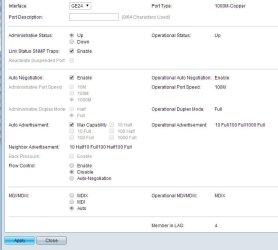
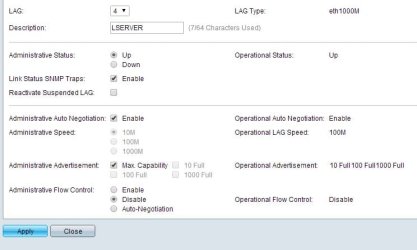
attached are the details as asked....
hope it helps... and anything more needed then just ask...

thanx for helping..
 

Attachments

  • Untitled-1.jpg
    Untitled-1.jpg
    56.9 KB · Views: 1
  • Untitled-2.jpg
    Untitled-2.jpg
    43.5 KB · Views: 1

My Computer My Computer

At a glance

Win 7 32Bit
OS
Win 7 32Bit
attached are the details as asked....
hope it helps... and anything more needed then just ask...

thanx for helping..

It is what I thought... Your port is running at 100 Mbps full duplex. What is bizarre is that a negotiation of 1000Mbps Full duplex was advertised down and I am not sure why it did not use it.

Under the "Auto Negotiation" option please de-select "enable" and then set it to "1000M" and the duplex underneath to "full".

Please then re-do this for the other ports in the link aggregation.

Now, on the computer side please manually set each NIC to run 1000 Mbps Full Duplex.

For a Windows device please follow the the steps outlined on this page to change the speed and duplex:

Ask IT Help Documents

Then repeat the same steps for the other NIC that is in the LAG.

After all link speeds and duplexes have been defined on each side for each port you should be good to go!

Hope This Helps,
Josh :)
 

My Computer My Computer

At a glance

Windows 7 Professional x64 SP1 ; Windows Serv...Intel Core i5 2400 @ 3.10GHz8.0GB DDR3 @ 665MHz (2GBx4)AMD Radeon HD 6870
Computer type
PC/Desktop
Computer Manufacturer/Model Number
Custom Built
OS
Windows 7 Professional x64 SP1 ; Windows Server 2012 R2 Standard
CPU
Intel Core i5 2400 @ 3.10GHz
Motherboard
Foxconn H67MP-S/-V/H67MP
Memory
8.0GB DDR3 @ 665MHz (2GBx4)
Graphics Card(s)
AMD Radeon HD 6870
Sound Card
Realtek High Definition Audio
Monitor(s) Displays
AOC 2243W & SMB1930NW
Screen Resolution
1440x900 & 1920x1080
Hard Drives
977GB Seagate ST31000524AS ATA Drive (SATA)
250GB WD iSCSI attached Drive
PSU
750W Gaming PSU
Case
Novatech Night
Cooling
Fan
Keyboard
Dell Standard PS/2 Keyboard
Mouse
R.A.T 07 Gaming Mouse
Internet Speed
Download: 10 Mbps Ping: 30ms Upload: 0.81 Mbps
Browser
Google Chrome
Other Info
Optiarc DVD RW AD-5260S ATA Device
Back
Top