Solved Clarification about moving bootmgr

iexample1

New member
Local time
5:52 PM
Messages
4
Hello all,

I had a friend help me install Windows on my custom build a long time ago using a free OS from my university. He installed both Windows 7 Professional and Windows 7 Ultimate in 2 partitions (and I have another, separate logical volume for a total of 3). At the time I thought nothing of it however I'm ready to install Windows 10 and would prefer to have only one single volume/partition.

I currently only boot my Windows 7 Pro and use it for everything and as such my plan was to simply delete my Windows 7 Ultimate partition and add it to my Pro (C: ) drive. I ran into complications when I found out that my bootmgr (active partition) is actually my Windows 7 Ultimate (D: ) drive. I browsed through this thread: http://www.sevenforums.com/tutorials/209885-bootmgr-move-c-easybcd.html and it seems simple enough to change.

My question is then: because I use my Pro for everything and EasyBCD is only free for non-commercial use (ie. my Ultimate) is my best course of action to boot into my Windows Ultimate(D: ) and move my bootmgr to my pro (C: ) drive?

While I have backed up all my important files I would just like clarification before proceeding. Will doing the above have any effect on my files on C:?

Would following this be any better: Move Windows 7 boot files to another drive ?

Any help is greatly appreciated.
 

My Computer

Computer type
PC/Desktop
Computer Manufacturer/Model Number
Custom Build
OS
Windows 7 Profession and Ultimate
EasyBCD is a good tool and what I would use.

As far as I know, it does not move boot files. It copies them--despite the title of the tutorial.

You say "I found out that my bootmgr (active partition) is actually my Windows 7 Ultimate (D: ) drive."

How did you find that out? What's the proof of that?

I'm just trying to make sure you are not going to get in a jam.

In a typical installation, boot files are NOT on the same partition as Windows. They might be, but normally aren't.

Best thing you can do is post a picture of Windows Disk Management.
 

My Computer

Computer type
PC/Desktop
Computer Manufacturer/Model Number
Ignatz Special; 4 speed manual gearbox; factory air conditioning; one of one
OS
Windows 7 Home Premium SP1, 64-bit
CPU
Intel Skylake i5-6600K, not overclocked
Motherboard
AsRock Z170M Extreme 4, micro ATX
Memory
8 GB HyperX DDR4-2666 (2 x 4 GB)
Graphics Card(s)
none; graphics are integrated on CPU
Sound Card
onboard: Realtek ALC1150; external: USB Behringer UF0-202
Monitor(s) Displays
Dell S2340M 23 inch IPS
Screen Resolution
1600 x 900
Hard Drives
System: Crucial MX100 series SSD, 128 GB;
Data: Samsung Spinpoint 103SJ, 1 TB;
Backup: WD Caviar Green WD30EZRX-00D8PB0, 3 TB
PSU
Rosewill SilentNight 500 watt fanless, semi-modular
Case
Antec Solo II
Cooling
Noctua NH-U12S; Noctua F12 intake, Noctua S12A exhaust
Keyboard
Microsoft 200 6JH-00001 USB
Mouse
Dell or Microsoft optical wired; USB
Antivirus
Microsoft Security Essentials and Malwarebytes Premium
Browser
Pale Moon
Other Info
All fans PWM; speeds at idle: CPU circa 500 rpm; intake circa 600 rpm; exhaust circa 600 rpm; CPU temps 27 idle and 47 C load in a warm room (27 C/81 F) when running Intel Extreme Tuning Utility stress test.
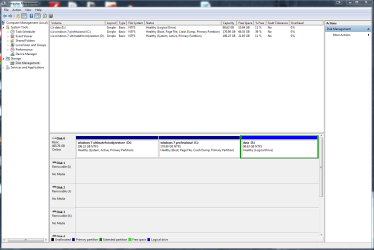
Thanks for the response and here is my picture of my disk management:

diskmgmt.png

I believe the drive marked active (D or my Ultimate) has the bootmgr files if I'm not mistaken.
 

My Computer

Computer type
PC/Desktop
Computer Manufacturer/Model Number
Custom Build
OS
Windows 7 Profession and Ultimate
OK.

Your boot files are on D because it is marked "system".

You can use EasyBCD to copy those files to C.

You'll also need to mark C as active and D as not active. You can do that in Disk Management.

Reboot and confirm that C is shown as system and active.

If it boots OK, you could then delete the D partition if there's nothing on it you want.

You would then need to use Partition Wizard to add the space now occupied by D to the C partition.

In the typical Windows install, a small partition named "System Reserved" will contain the boot files. But it's possible, as in your case, to do an install without System Reserved. I've never used System Reserved either, but it is the default.
 

My Computer

Computer type
PC/Desktop
Computer Manufacturer/Model Number
Ignatz Special; 4 speed manual gearbox; factory air conditioning; one of one
OS
Windows 7 Home Premium SP1, 64-bit
CPU
Intel Skylake i5-6600K, not overclocked
Motherboard
AsRock Z170M Extreme 4, micro ATX
Memory
8 GB HyperX DDR4-2666 (2 x 4 GB)
Graphics Card(s)
none; graphics are integrated on CPU
Sound Card
onboard: Realtek ALC1150; external: USB Behringer UF0-202
Monitor(s) Displays
Dell S2340M 23 inch IPS
Screen Resolution
1600 x 900
Hard Drives
System: Crucial MX100 series SSD, 128 GB;
Data: Samsung Spinpoint 103SJ, 1 TB;
Backup: WD Caviar Green WD30EZRX-00D8PB0, 3 TB
PSU
Rosewill SilentNight 500 watt fanless, semi-modular
Case
Antec Solo II
Cooling
Noctua NH-U12S; Noctua F12 intake, Noctua S12A exhaust
Keyboard
Microsoft 200 6JH-00001 USB
Mouse
Dell or Microsoft optical wired; USB
Antivirus
Microsoft Security Essentials and Malwarebytes Premium
Browser
Pale Moon
Other Info
All fans PWM; speeds at idle: CPU circa 500 rpm; intake circa 600 rpm; exhaust circa 600 rpm; CPU temps 27 idle and 47 C load in a warm room (27 C/81 F) when running Intel Extreme Tuning Utility stress test.
I would totally wipe out D and C, because C is in the middle of the hard drive.

And re install Windows Pro (whatever you have a key for) on the unallocated space or create a partition (my recommendation) to install it on.

Then upgrade to Windows 10, then reinstall any software.

I would also get your data off that logical partition and delete it too. Data on the same drive as windows ??? Only if it`s absolutely necessary.

Great idea, don`t get me wrong, but if you loose the drive, you loose the data.

If you don`t want to reinstall, then stick with your plan :)
 

My Computer

Computer type
PC/Desktop
Computer Manufacturer/Model Number
Skylake Special #666
OS
Windows 10 Pro x64
CPU
Intel Core i7 6700K
Motherboard
Asus Sabertooth Z170 Mark 1
Memory
GSkill TridentZ RGB 16GB 3600 16-16-16-36
Graphics Card(s)
EVGA GTX 980 Ti SC x2
Sound Card
Realtek High Definition
Monitor(s) Displays
AOC G2460PG
Screen Resolution
1920 x 1080 144Hz
Hard Drives
Samsung 860 Pro 256GB, Seagate Barracuda 4TB x2
PSU
EVGA 1000 P2, EVGA White Custom Braided Cables
Case
Corsair Vengeance C70 Gunmetal Black
Cooling
Corsair H100i v2, Corsair ML120 x2, Thermal Grizzly Kryonaut
Keyboard
Logitech G910 Orion Spectrum
Mouse
Logitech G700s
Internet Speed
Verizon Fios Quantum Gateway 75/75
Antivirus
Windows Defender, Malwarebytes Free 3.8.3
Browser
Chrome
Other Info
Corsair SP120 x4, LG Blu-ray Drive, Durabrand HT-395 100 Watt Dolby Digital Amp, Corsair H2100 Wireless 7.1 Headset
If you can manage to do it purchase or borrow another drive and perform a backup/image of C before you do anything. That way if things go really wrong for you there's the backup/image to at least get Win7 Pro and your files back.

Another option would be after you have the backup/image on another drive, do a format on the existing drive to clear everything off of it, boot from install media and image the now empty drive with your Win 7 Pro backup/image, then upgrade to W10. With Win7 Pro you get W10 Pro, and you'll still have a backup/image of your original Win7 Pro with all your stuff on it.

After doing that if you can't boot from the HDD you might have to boot from install media and perform startup repair to get the bootmgr in the right place.
 

My Computer

Computer type
PC/Desktop
Computer Manufacturer/Model Number
Self built
OS
Windows 11 Home x64
CPU
AMD Ryzen 5 5600G
Motherboard
ASUSTeK Prime B450M-A II
Memory
G.SKILL Ripjaws Gaming Series (2x8G) DDR4
Graphics Card(s)
None (AMD Radeon Graphics on MB and CPU)
Sound Card
None (integrated on MB)
Monitor(s) Displays
Acer S200HLAbd Black 20"
Screen Resolution
1600 x 900
Hard Drives
Samsung SSD 840 EVO 120GB (W10)
WD Blue 500G SATA 6G WDBAAX5000ENC-NRSN (Backup/Storage)
PSU
Corsair CX500 500W ATX12V v2.3 80 Plus Bronze Active PFC
Case
Unknown
Cooling
CPU-stock cooling fan, 1 extra 80mm case fan
Keyboard
Azio KB505U Large Print Tri-Color Illuminated USB Keyboard
Mouse
MS Optical Wheel Mouse (USB)
Internet Speed
ATT Fiber 5000/VOIP 5G down/5G up
Antivirus
Win Defender, SAS, Spyware Blaster all free editions
Browser
Firefox, Waterfox, sometimes Edge
Excellent advice :)
 

My Computer

Computer type
PC/Desktop
Computer Manufacturer/Model Number
Skylake Special #666
OS
Windows 10 Pro x64
CPU
Intel Core i7 6700K
Motherboard
Asus Sabertooth Z170 Mark 1
Memory
GSkill TridentZ RGB 16GB 3600 16-16-16-36
Graphics Card(s)
EVGA GTX 980 Ti SC x2
Sound Card
Realtek High Definition
Monitor(s) Displays
AOC G2460PG
Screen Resolution
1920 x 1080 144Hz
Hard Drives
Samsung 860 Pro 256GB, Seagate Barracuda 4TB x2
PSU
EVGA 1000 P2, EVGA White Custom Braided Cables
Case
Corsair Vengeance C70 Gunmetal Black
Cooling
Corsair H100i v2, Corsair ML120 x2, Thermal Grizzly Kryonaut
Keyboard
Logitech G910 Orion Spectrum
Mouse
Logitech G700s
Internet Speed
Verizon Fios Quantum Gateway 75/75
Antivirus
Windows Defender, Malwarebytes Free 3.8.3
Browser
Chrome
Other Info
Corsair SP120 x4, LG Blu-ray Drive, Durabrand HT-395 100 Watt Dolby Digital Amp, Corsair H2100 Wireless 7.1 Headset
Thanks all for the great advice, I'm going to give a proper update when I get my hands on another drive in order to save my backup/images before I proceed.
 

My Computer

Computer type
PC/Desktop
Computer Manufacturer/Model Number
Custom Build
OS
Windows 7 Profession and Ultimate
Thanks again for all the help it worked out great and now I'm running Windows 10 P. I think it's time to move to the Ten Forums :).
 

My Computer

Computer type
PC/Desktop
Computer Manufacturer/Model Number
Custom Build
OS
Windows 7 Profession and Ultimate
Thanks for posting back your results iexample1 :) When we resolve a problem and post back our results it will help others with a similar issue.

Just because you are on W10 you can still hang around on sevenforums, I'm more on tenforums these days but come back and check things out here once in a while.

Good to hear things worked out for you, if you haven't done so already you can now make a backup/image for W10 Pro.
 

My Computer

Computer type
PC/Desktop
Computer Manufacturer/Model Number
Self built
OS
Windows 11 Home x64
CPU
AMD Ryzen 5 5600G
Motherboard
ASUSTeK Prime B450M-A II
Memory
G.SKILL Ripjaws Gaming Series (2x8G) DDR4
Graphics Card(s)
None (AMD Radeon Graphics on MB and CPU)
Sound Card
None (integrated on MB)
Monitor(s) Displays
Acer S200HLAbd Black 20"
Screen Resolution
1600 x 900
Hard Drives
Samsung SSD 840 EVO 120GB (W10)
WD Blue 500G SATA 6G WDBAAX5000ENC-NRSN (Backup/Storage)
PSU
Corsair CX500 500W ATX12V v2.3 80 Plus Bronze Active PFC
Case
Unknown
Cooling
CPU-stock cooling fan, 1 extra 80mm case fan
Keyboard
Azio KB505U Large Print Tri-Color Illuminated USB Keyboard
Mouse
MS Optical Wheel Mouse (USB)
Internet Speed
ATT Fiber 5000/VOIP 5G down/5G up
Antivirus
Win Defender, SAS, Spyware Blaster all free editions
Browser
Firefox, Waterfox, sometimes Edge
Back
Top