
Classic problem with window parts overlayed - solution?

KnowledgeWorker

New member
Hi there,

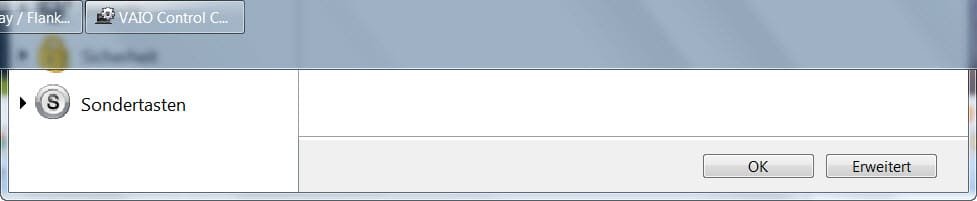
I do have the following problem as visualized by the screenshot.
This problem bugs me since Windows XP times, why is it still existant in Windows 7 and how do I restore / move such a overlayed/"hidden" window?

Thanks for your help in advance!

Kind regards
 

Attachments
  • window_taskbar.jpg
    window_taskbar.jpg
    23.4 KB · Views: 34

My Computer

Computer Manufacturer/Model Number
Self-built
OS
Windows 7 Professional (final) x64
CPU
INTEL Core2 Duo E8500
Motherboard
ASUS P5Q
Memory
OCZ Reaper HPC Edition 4GB PC2-8500U CL5-5-5-18
Graphics Card(s)
NVIDIA GeForce 8800GS
Sound Card
Creative X-Fi Soundblaster Music
Monitor(s) Displays
LG FLATRON W2252TE
Screen Resolution
1680x1050
Hard Drives
1x Intel SSD X25-M 160 GB
1x Samsung HD642JJ 640 GB (SpinPoint F1 DT)
PSU
OCZ ModXStream Pro OCZ500MXSP
Case
Lian Li PC-7F
Cooling
Apack Zerotherm FZ120 Nanoxia Edition
Keyboard
Logitech Media Keyboard Elite (2005 model)
Mouse
Logitech RX-1500 (2008)
Internet Speed
16.000 KB
Other Info
Plantronics GameCom® 377
SteelSeries Siberia In-Ear Headphones (black)
Give this a try:

Move your taskbar to the bottom of the screen

Right click the Start Orb> Left click properties> On taskbar tab check Set taskbar to autohide> Apply and/or OK your way out

Reboot PC

Repeat steps above, but unckeck Set taskbar to autohide

Reboot PC

Move your taskbar back to the top

See if that fixes it

A Guy
 

My Computer

Computer type
PC/Desktop
OS
Windows 10 Home x64
CPU
INTEL Core i5-750 Quad-Core 3.37GHz
Motherboard
ASUS P7P55D
Memory
HyperX Fury Black Series 8GB (2 x 4GB) 1866Mhz
Graphics Card(s)
EVGA GeForce GTX 750 Superclocked 1GB 128-Bit GDDR5
Monitor(s) Displays
LG 32MA68HY 32" IPS
Screen Resolution
1920 x 1080
Hard Drives
Samsung 840 Evo 120GB, SEAGATE 500GB Barracuda® 7200.12, SATA 3 Gb/s, 7200 RPM, 16MB cache
PSU
ANTEC TruePower New TP-550, 80 PLUS, 550W
Case
ANTEC Three Hundred Illusion
Cooling
COOLER MASTER Hyper 212 Plus, 4 x 120mm 1 x 140mm Noctua's
Internet Speed
85 + Mbps
Antivirus
Avast
Browser
Vivaldi
@A Guy: Yeah, obviously it does, most of the time. Yet you might understand I don't want to do this every time!! Because I consider this not a fix (!), but a workaround! Which costs too much time for an issue which shouldn't occur, even if I have my taskbar on top. When Microsoft offers this option, it should make sure, applications can't confuse it! Esp. when I consider this software was/is installed by Sony (and/or MS?) in the manufacturing/shipping process of my laptop!
 

My Computer

Computer Manufacturer/Model Number
Self-built
OS
Windows 7 Professional (final) x64
CPU
INTEL Core2 Duo E8500
Motherboard
ASUS P5Q
Memory
OCZ Reaper HPC Edition 4GB PC2-8500U CL5-5-5-18
Graphics Card(s)
NVIDIA GeForce 8800GS
Sound Card
Creative X-Fi Soundblaster Music
Monitor(s) Displays
LG FLATRON W2252TE
Screen Resolution
1680x1050
Hard Drives
1x Intel SSD X25-M 160 GB
1x Samsung HD642JJ 640 GB (SpinPoint F1 DT)
PSU
OCZ ModXStream Pro OCZ500MXSP
Case
Lian Li PC-7F
Cooling
Apack Zerotherm FZ120 Nanoxia Edition
Keyboard
Logitech Media Keyboard Elite (2005 model)
Mouse
Logitech RX-1500 (2008)
Internet Speed
16.000 KB
Other Info
Plantronics GameCom® 377
SteelSeries Siberia In-Ear Headphones (black)
I wasn't suggesting this as a workaround every time. For others this corrected the problem, not just for the moment. I hope others will have the fix for you.

A Guy
 

My Computer

Computer type
PC/Desktop
OS
Windows 10 Home x64
CPU
INTEL Core i5-750 Quad-Core 3.37GHz
Motherboard
ASUS P7P55D
Memory
HyperX Fury Black Series 8GB (2 x 4GB) 1866Mhz
Graphics Card(s)
EVGA GeForce GTX 750 Superclocked 1GB 128-Bit GDDR5
Monitor(s) Displays
LG 32MA68HY 32" IPS
Screen Resolution
1920 x 1080
Hard Drives
Samsung 840 Evo 120GB, SEAGATE 500GB Barracuda® 7200.12, SATA 3 Gb/s, 7200 RPM, 16MB cache
PSU
ANTEC TruePower New TP-550, 80 PLUS, 550W
Case
ANTEC Three Hundred Illusion
Cooling
COOLER MASTER Hyper 212 Plus, 4 x 120mm 1 x 140mm Noctua's
Internet Speed
85 + Mbps
Antivirus
Avast
Browser
Vivaldi
Back
Top