Solved Clean boot disabled aero theme & Internet connection, help?!

thys

New member
Local time
4:21 AM
Messages
4
I run a windows 7 64 bit home premium machine with a Nvidia Quadro 440 graphics card as well as a Nvidia inboard GeForce 7025 card I installed windows myself and its been working great for the last two years until a few days ago. First it wouldn't shut down properly and got stuck on the logging off screen for about two hours. Then I noticed it needed some 10 updates, which after some effort I managed to install, all apart from one non essential Nvidia update that wouldn't for the life of me update, so I just left it. Then I noticed iTunes not being responsive, it took several attempts for it to recognise my iPod and after various attempts taking some six hours I finally got my iPod updated, i have the latest version of iTunes. I decided to have a go at fixing this. Long story short, I performed a clean boot and now, after I enabled normal start up again;
1) My aero theme has been disabled and is un available for selection,
2) I have lost my Internet connection and the set up wizard isn't working,
3) I can't perform a restore,
4) The windows update service isn't running,
5) And my audio driver seem to have gone too.
6) And when I try to restart the computer, it switches from logging off to shut down no problem, but then gets stuck on shut down.

I need help please, any will be appreciated :cry:
 

My Computer

Computer type
PC/Desktop
Computer Manufacturer/Model Number
Custom
OS
Windows 7 home premium 64 bit
CPU
Don't know
Motherboard
Asroc something
Memory
Don't know
Graphics Card(s)
Nvidia Quadro NVS 440
Hard Drives
Don't know
Antivirus
Mcafee
Browser
Chrome
Hello thys and Welcome to Seven Forums.
You have some kind of corruption in the system files. This could be signs of a failing hard drive. Here are a couple of things to try
http://www.sevenforums.com/tutorials/1538-sfc-scannow-command-system-file-checker.html
Press the start button, navigate to the Command Prompt or type cmd in the search box. Right click on the Command prompt in the Start Menu and select Run as Administrator. Type :sfc/scannow and press Enter. Let in run and fix errors if any. Also download Download Hard Disk Sentinel and use the free trial to check out the hard drive.
Report back and post screenshots of the hard drive health.
Geeks are like London Busses there will be another one along shortly with further advice. :)
 

My Computer

Computer type
PC/Desktop
Computer Manufacturer/Model Number
Bluethunder II
OS
Windows 7 x64 Ultimate and numerous virtual machines
CPU
AMD FX-8350 Vishera 32nm Technology @ 4.2 GHz default
Motherboard
ASUSTeK COMPUTER INC. SABERTOOTH 990FX R2.0 (Socket 942)
Memory
G Skill 32.0GB Dual-Channel DDR3 @ 1204MHz (11-13-13-31)
Graphics Card(s)
EVGA GeForce GTX 960 4GB Super SC ACX 2.0+ with Back Plate
Sound Card
Creative X-Fi Titanium HD Audiophile PCIe
Monitor(s) Displays
LG L227WTG x 3
Screen Resolution
1680 x 1050 16:10
Hard Drives
238GB Samsung850 PRO SATA Disk Device (SSD)
1863GB Seagate ST2000DM 001-1CH164 (SATA)
1397GB Seagate ST1500DL 003-9VT16L(SATA)
466GB Western Digital WDC WD50 03AZEX-00K1GA0 (SATA) x 2
932GB Seagate ST310005 28AS SATA Disk Device (SATA)
PSU
Enermax Revolution87+ 1000 Watts Gold Certified Power Supply
Case
Rocketfish Full Tower
Cooling
Cooler Master Hyper 212 EVO Push Pull 120mm Fans
Keyboard
Logitech K740
Mouse
Logitech G100S Laser LED + Logitech Gamepad F310
Internet Speed
500 mbs down and 30mbs up
Antivirus
Malwarebytes Pro & Avast and MSE on certain Virtual Machines
Browser
Firefox (Main) Chrome, Internet Explorer (Back Up)
Other Info
Logitech X 230 2.1 Stereo System and 5.1 Yamaha RX V2090
B&W DM6 Monitor Speakers + Center and Surround Speakers
Using Mouse Without Borders (Google it)
Thanks, I'll give that a go, but I can't download anything, because even though the Internet cable is physically plugged in to the comper, the wizard doesn't seem to recognise it?
 

My Computer

Computer type
PC/Desktop
Computer Manufacturer/Model Number
Custom
OS
Windows 7 home premium 64 bit
CPU
Don't know
Motherboard
Asroc something
Memory
Don't know
Graphics Card(s)
Nvidia Quadro NVS 440
Hard Drives
Don't know
Antivirus
Mcafee
Browser
Chrome
Try the scan and file recovery and see if anything is corrupted first.
 

My Computer

Computer type
PC/Desktop
Computer Manufacturer/Model Number
Bluethunder II
OS
Windows 7 x64 Ultimate and numerous virtual machines
CPU
AMD FX-8350 Vishera 32nm Technology @ 4.2 GHz default
Motherboard
ASUSTeK COMPUTER INC. SABERTOOTH 990FX R2.0 (Socket 942)
Memory
G Skill 32.0GB Dual-Channel DDR3 @ 1204MHz (11-13-13-31)
Graphics Card(s)
EVGA GeForce GTX 960 4GB Super SC ACX 2.0+ with Back Plate
Sound Card
Creative X-Fi Titanium HD Audiophile PCIe
Monitor(s) Displays
LG L227WTG x 3
Screen Resolution
1680 x 1050 16:10
Hard Drives
238GB Samsung850 PRO SATA Disk Device (SSD)
1863GB Seagate ST2000DM 001-1CH164 (SATA)
1397GB Seagate ST1500DL 003-9VT16L(SATA)
466GB Western Digital WDC WD50 03AZEX-00K1GA0 (SATA) x 2
932GB Seagate ST310005 28AS SATA Disk Device (SATA)
PSU
Enermax Revolution87+ 1000 Watts Gold Certified Power Supply
Case
Rocketfish Full Tower
Cooling
Cooler Master Hyper 212 EVO Push Pull 120mm Fans
Keyboard
Logitech K740
Mouse
Logitech G100S Laser LED + Logitech Gamepad F310
Internet Speed
500 mbs down and 30mbs up
Antivirus
Malwarebytes Pro & Avast and MSE on certain Virtual Machines
Browser
Firefox (Main) Chrome, Internet Explorer (Back Up)
Other Info
Logitech X 230 2.1 Stereo System and 5.1 Yamaha RX V2090
B&W DM6 Monitor Speakers + Center and Surround Speakers
Using Mouse Without Borders (Google it)
You couldn't have turned off Aero or affected any system functions turning off 3rd party Startups in msconfig>Startup. Did you turn off anything in msconfig>Services without first hiding all MS Services?

Rightclick on the internet connection icon in bottom right System Tray to run the Troubleshooter, check Device Manager if the ethernet driver is installed.

Your sound would not stop working by turning off sound software at Startup. Check the driver in Device Manager to see if it needs updating.

In addition to working through Indiana's suggestions given before, here are other Troubleshooting Steps for Windows 7
 
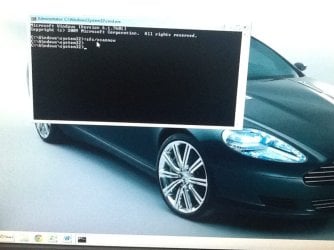
Thanks for the advice Greg but I don't even have Internet running in the tray. I've tried system file checker, but when I hit enter it just gives me another prompt and nothing happens. I've tried hiding and un hiding MS services and nothing again. I've also noticed, and it never done this before, every time I go to use either cmd or msconfig the user account control prompt pops up asking if I want them to make changes to my computer? As I've said, it never asked me for that before. Still in the dark here, any other suggestions??
 

Attachments

  • image.jpg
    image.jpg
    65.9 KB · Views: 9

My Computer

Computer type
PC/Desktop
Computer Manufacturer/Model Number
Custom
OS
Windows 7 home premium 64 bit
CPU
Don't know
Motherboard
Asroc something
Memory
Don't know
Graphics Card(s)
Nvidia Quadro NVS 440
Hard Drives
Don't know
Antivirus
Mcafee
Browser
Chrome
With the system file checker there should be a space between sfc and /scannow
sfc /scannow

Jerry
 

My Computer

Computer type
Laptop
Computer Manufacturer/Model Number
Sager NP9170
OS
Win 7 Pro x64 / Win 10 Pro
CPU
Intel(R) Core(TM) i7-3630QM CPU @ 2.40GHz
Motherboard
CLEVO P170EM
Memory
12 GB
Graphics Card(s)
(1) Intel(R) HD Graphics 4000 (2) NVIDIA GeForce GTX 675M
Sound Card
(1) Realtek High Definition Audio (2) Intel(R) Display Aud
Monitor(s) Displays
17.3
Screen Resolution
1920x1080
Hard Drives
(1) Samsung 860 EVO 500GB(OS) (1) Samsung 860 EVO 500GB(Data)
Keyboard
Backlite
Antivirus
MSE, Malwarebytes Pro
Browser
Firefox
Other Info
DESKTOP: Custom-built.
OS: Win 10 Pro x64.
CASE: Rosewill R5.
CPU: Intel I5 4670K CPU @ 3.40GHz.
CPU COOLER: Cool Master Hyper 212 EVO.
MOTHERBOARD: Asus Z87-A.
MEMORY: Kingston HyperX 2x4 GB.
GPU: Nvidia Geforce 650 TI.
PSU: Corsair TX750.
DRIVES: (1) Samsung 840 120 GB SSD (2) Western Digital blue 500 GB 7200 RPM.
The UAC setting has apparently increased. I would leave it there.

You will have a connection icon in the bottom right System Tray, rightclick it to run Troubleshooter.

Type Aero in Start Search box, run the Aero troubleshooter from results.

Run a full scan with Malwarebytes

Replace your AV with Microsoft Security Essentials and run a full scan. If you have a bloatware AV then google for its removal tool to get the whole mess out.

Report back on your progress on these and other Troubleshooting steps you should also be working through to go over it thoroughly.
 
Thanks for all the advice, I gave up eventually and just took it to a shop
 

My Computer

Computer type
PC/Desktop
Computer Manufacturer/Model Number
Custom
OS
Windows 7 home premium 64 bit
CPU
Don't know
Motherboard
Asroc something
Memory
Don't know
Graphics Card(s)
Nvidia Quadro NVS 440
Hard Drives
Don't know
Antivirus
Mcafee
Browser
Chrome
Back
Top