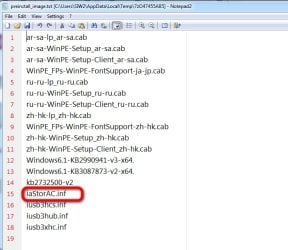
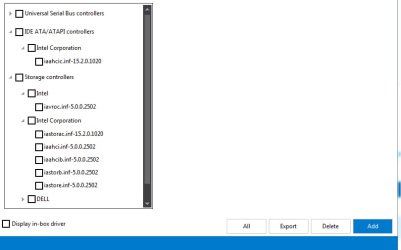
Solved Clean disks to avoid the missing driver error upon install ?

I can't just copy and paste the 7050 storage drivers from the zip file, can I? When I do this, the Win 7 installer is not able to see a signed driver.


So I need to go through some sort of formal extraction process before the 7050 storage drivers will appear as signed drivers?


Could it be that we really need to be using the 7040 storage drivers? On Dell's website, they provide the .exe driver download for the 7040, but not the 7050. That's why I was trying to figure out how to extract from Dell's .exe download.

- - - Updated - - -

Interesting, I downloaded Q270 drivers from Intel. When I tried the 200 Series Family SATA controller, it said it could not be installed because an updated one was needed. I'm kinda surprised my 2017 ISO was able to notice that anything needs to be updated.

- - - Updated - - -

Well, I tried running Dell's .exe on another computer, and it seems serious about wanting to install something on that drive. It has a re-boot pending for that install (so I'm thinking about running system restore to make sure I don't mess the other computer's system). Launching that .exe unpacked a lot of files, including ones that look like your drivers.


If I can't find any other way of extracting that download, then I guess I could re-install the Win 10 drive on the computer, and re-format the other disk where I was trying to install Win 7. Then install via Dell's .exe.


The key, what the Win 7 installer keeps objecting to, is that it can't find a "signed" driver. I wonder if Dell has recently implemented a policy of requiring us to run the .exe to get the "signed" driver? We won't get a "signed" driver until we unpack via Dell's .exe?

- - - Updated - - -

Dell's instruction pages don't come right out and say that you have to run the .exe, but reading between the lines, it seems like they're implying it, since they only allow extraction of .exe :


https://www.dell.com/support/kbdoc/...during-the-windows-installation-setup-process


https://www.dell.com/support/kbdoc/...during-the-windows-installation-setup-process
 

My Computers

System One System Two

  • Computer type
    PC/Desktop
    Computer Manufacturer/Model Number
    Dell Opti 7050
    OS
    10 trying for 7x64
    CPU
    i7 6th gen
    Memory
    32G
    Hard Drives
    1T SSD; 2T HDD
  • Computer type
    PC/Desktop
Thanks, but this is where I'm getting roadblocked. When I try to extract, it only gives me .exe.

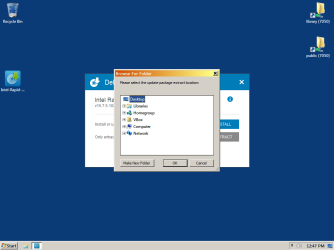
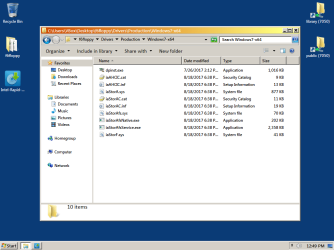
You're making this a whole lot more difficult than it is. When you launch the .exe it gives you a choice of "Install" or "Extract". Choose "Extract", select "Desktop", click "Make New Folder", and give it whatever name you want. It will extract everything to a folder on your desktop and bail. Inside that folder are the .inf, .sys, et al.

f6floppy-1.png

f6floppy-2.png

f6floppy-3.png


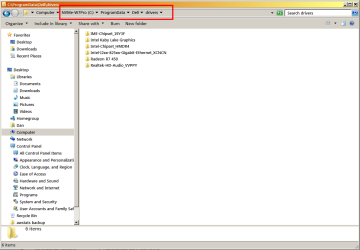
After extraction, you can move the folder somewhere else, if you want. IIRC, when you install the rest of Dell's drivers the .exes default to a folder in C:\ProgramData, so that may a place you'd like to store everything to keep it all in one place.

dell-drivers.png
 

My Computer

Computer type
PC/Desktop
Computer Manufacturer/Model Number
Dell Optiplex 7050
OS
Windows 7/8.1/10 multiboot
CPU
Intel Core i7-7700
Motherboard
Dell, Intel Q270 chipset
Memory
48GB (2x16GB Crucial DDR4-3200 + 2x8GB Hynix DDR4-2400)
Graphics Card(s)
Intel HD630 + AMD Radeon R7 450 PCIe
Monitor(s) Displays
Asus VC279 (27")
Screen Resolution
1920x1080
Hard Drives
Toshiba M.2 NVMe (256GB),
Samsung 960 Evo (500GB),
WD Red Plus 80EFBX (8TB)
They are already extracted in the .zip file I linked to which Muffin Top has ignored.
 

My Computers

System One System Two

  • Computer type
    PC/Desktop
    OS
    7 X64
    CPU
    i5 8400
    Motherboard
    gigabyte b365m ds3h
    Memory
    2x8gb 3200mhz
    Hard Drives
    various
    PSU
    pure power 11 400w cm
    Case
    Coolermaster
    Cooling
    cryorig m9i
  • Computer type
    PC/Desktop
    OS
    7x64
    CPU
    g5400
    Motherboard
    ga b365m ds3h
    Memory
    8gb ddr4 2400
    PSU
    xfx pro 450w
They are already extracted in the .zip file I linked to which Muffin Top has ignored.

. . . and which he, likewise, didn't need because he already had them in the exe.

Nonetheless, the point I illustrated applies to most of Dell's drivers, and that knowledge might be helpful when he gets around to installing the rest of them so he doesn't need to go casting about looking for alternative downloads.
 

My Computer

Computer type
PC/Desktop
Computer Manufacturer/Model Number
Dell Optiplex 7050
OS
Windows 7/8.1/10 multiboot
CPU
Intel Core i7-7700
Motherboard
Dell, Intel Q270 chipset
Memory
48GB (2x16GB Crucial DDR4-3200 + 2x8GB Hynix DDR4-2400)
Graphics Card(s)
Intel HD630 + AMD Radeon R7 450 PCIe
Monitor(s) Displays
Asus VC279 (27")
Screen Resolution
1920x1080
Hard Drives
Toshiba M.2 NVMe (256GB),
Samsung 960 Evo (500GB),
WD Red Plus 80EFBX (8TB)
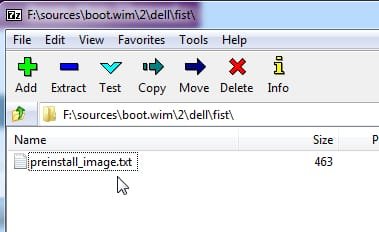
If the 2017 iso he has is

GDXKK_X8V66A00_W7SP1PRO64_ROW.iso

the storage drivers according to

dell-boowimjpg.jpg

dell-boowimjpg2.jpg

dell-boowimjpg3.jpg

dell-boowimjpg4.jpg

perhaps a slightly more recent version is needed or it may be something else
 

My Computers

System One System Two

  • Computer type
    PC/Desktop
    OS
    7 X64
    CPU
    i5 8400
    Motherboard
    gigabyte b365m ds3h
    Memory
    2x8gb 3200mhz
    Hard Drives
    various
    PSU
    pure power 11 400w cm
    Case
    Coolermaster
    Cooling
    cryorig m9i
  • Computer type
    PC/Desktop
    OS
    7x64
    CPU
    g5400
    Motherboard
    ga b365m ds3h
    Memory
    8gb ddr4 2400
    PSU
    xfx pro 450w
You're making this a whole lot more difficult than it is. When you launch the .exe it gives you a choice of "Install" or "Extract". Choose "Extract", select "Desktop", click "Make New Folder", and give it whatever name you want. It will extract everything to a folder on your desktop and bail. Inside that folder are the .inf, .sys, et al.

Thanks so much, I was tired this morning and somehow didn't register the extract option. You see it's grey, so in my foggy state this am I assumed greyed-out without clicking on it.


However, I was delinquent in not studying your install notes carefully enough earlier. I just noticed the part that says the drivers need to be on the boot stick, because the browse option never seems to work.

- - - Updated - - -

They are already extracted in the .zip file I linked to which Muffin Top has ignored.

I did not ignore. I was just trying to figure out why it didn't work for me, to minimize the amount of confusion I'm sharing with the forum.
 

My Computers

System One System Two

  • Computer type
    PC/Desktop
    Computer Manufacturer/Model Number
    Dell Opti 7050
    OS
    10 trying for 7x64
    CPU
    i7 6th gen
    Memory
    32G
    Hard Drives
    1T SSD; 2T HDD
  • Computer type
    PC/Desktop
That might not be the problem. Apparently the ms nvme kb can cause issues on that machine

Installing Windows 7 on Dell Optiplex 7050 - #13 by andrewwiggin1047 - Windows - Spiceworks Community
After doing this, installing a SATA HDD and setting the BIOS to “RAID on”*, I was able to see & install on the SSD, despite the error ‘Windows cannot be installed to this disk.

see my earlier post #16
you could try going into bios and switch between ahci and whatever the other mode is called - probably raid
 

My Computers

System One System Two

  • Computer type
    PC/Desktop
    OS
    7 X64
    CPU
    i5 8400
    Motherboard
    gigabyte b365m ds3h
    Memory
    2x8gb 3200mhz
    Hard Drives
    various
    PSU
    pure power 11 400w cm
    Case
    Coolermaster
    Cooling
    cryorig m9i
  • Computer type
    PC/Desktop
    OS
    7x64
    CPU
    g5400
    Motherboard
    ga b365m ds3h
    Memory
    8gb ddr4 2400
    PSU
    xfx pro 450w
Nonetheless, the point I illustrated applies to most of Dell's drivers, and that knowledge might be helpful when he gets around to installing the rest of them so he doesn't need to go casting about looking for alternative downloads.

Agreed, that's the way I like it. Extraction successful, and backed up on several sticks.


It will be a few more minutes before I can share the news, because my dusty old boot stick seems to have stopped registerring. Fortunately I've already gotten organized to make new ones.

- - - Updated - - -

you could try going into bios and switch between ahci and whatever the other mode is called - probably raid

Agreed, I've done so

- - - Updated - - -

If the 2017 iso he has is
GDXKK_X8V66A00_W7SP1PRO64_ROW.iso
the storage drivers according to
perhaps a slightly more recent version is needed or it may be something else

Yes, I used that ISO, and I also used the other 2017 ISO, which is slightly larger. Neither was able to see my HDD.


Thinking outside the box, could I use an earlier storage driver? Presumably the 2017 ISOs know the earlier 2017 storage driver?


I'm surprised that neither 2017 ISO recognizes the Sept 2017 storage driver. They didn't change the driver that much?


If there's no way of seeing the HDD, would I stand a better chance with a SATA SSD?

- - - Updated - - -

perhaps a slightly more recent version is needed or it may be something else

Well the Jan 2018 driver doesn't work, either, and Dell is not making it easy to download the earliest driver that was spec'd for the 7050


Maybe I should have formatted the HDD. I don't know if that would increase its visibility to the Win 7 installer. It doesn't seem like that's what the issue would be.


My only idea at this point is to try NTLite. Maybe its driver integration is what I needed, since browsing for a driver in the Win 7 installer never seemed to work.

- - - Updated - - -

My main machine is an Optiplex 7050, triple-booting Win 7/8.1/10. Main difference for me is I see absolutely no purpose at all in using UEFI, so I stick to MBR.

Maybe this is what I should do. If I do the exact same install as you did, then we know it should work. Do you remember by any chance which ISO you used?


I'm surprised the GibHub guide didn't work with the NVMe, since he says, "The Windows 7 Professional index of the install.wim was slipstreamed to include USB 3.0 drivers and NVMe drivers giving support for 6th Generation Intel (Skylake) Processors. Internet Explorer 11 was slipstreamed alongside a large number of security updates."


Since he slipstreamed in NVMe drivers, maybe I should re-install my NVMe. Maybe my CD/DVD error was caused by something other than the NVMe. If I need additional drivers, then I should go to NTLite to make this more efficient.
 

My Computers

System One System Two

  • Computer type
    PC/Desktop
    Computer Manufacturer/Model Number
    Dell Opti 7050
    OS
    10 trying for 7x64
    CPU
    i7 6th gen
    Memory
    32G
    Hard Drives
    1T SSD; 2T HDD
  • Computer type
    PC/Desktop
SIW2 said:
you could try going into bios and switch between ahci and whatever the other mode is called - probably raid

Agreed, I've done so

Correct. To use GPT/UEFI or NVMe, the 7050 BIOS must be set to RAID. I'm not saying other machines will be the same, but that's a requirement on the 7050.


could I use an earlier storage driver? Presumably the 2017 ISOs know the earlier 2017 storage driver?

No.

I'm surprised that neither 2017 ISO recognizes the Sept 2017 storage driver. They didn't change the driver that much?

No.

If there's no way of seeing the HDD, would I stand a better chance with a SATA SSD?

No.

Maybe I should have formatted the HDD. I don't know if that would increase its visibility to the Win 7 installer.

No.

Do you remember by any chance which ISO you used?

A Dell-branded Windows 7 SP1 DVD from 2009, subsequently patched with USB3 and NVMe drivers.

Maybe my CD/DVD error was caused by something other than the NVMe.

To repeat myself from upthread, it is caused by missing USB3 drivers.

Maybe its driver integration is what I needed, since browsing for a driver in the Win 7 installer never seemed to work.
[emphasis mine]

Exactly! I mention that in my installation notes, very first paragraph under "Patch USB installation media".

IME, you must embed the SATA driver in your installation ISO. Maybe someone else has found some convoluted workaround, but that hasn't been my experience.

I'm surprised the GibHub guide didn't work with the NVMe, since he says, "The Windows 7 Professional index of the install.wim was slipstreamed to include USB 3.0 drivers and NVMe drivers ..."

Why the surprise? From that quote, it's very clear he already patched his ISO. You haven't.

My only idea at this point is to try NTLite.

Or patch your ISO manually with the DISM commands in my installation notes.

Or patch your ISO using SIW2's tool and technique -- this is probably the easiest method.

NTLite will achieve exactly the same result, but I'd hazard to guess you'll get better support for SIW2's method in this forum than you will for NTLite.

Maybe this is what I should do. If I do the exact same install as you did, then we know it should work.

I don't think that's relevant. I'm not saying you can't use UEFI or boot from NVMe, since I haven't tried either on my 7050. All I said was I have other reasons for not liking UEFI, and because I have multipe disks I don't need the NVMe to be my boot disk. I'm not saying it has to be done the way I've configured mine.
 

My Computer

Computer type
PC/Desktop
Computer Manufacturer/Model Number
Dell Optiplex 7050
OS
Windows 7/8.1/10 multiboot
CPU
Intel Core i7-7700
Motherboard
Dell, Intel Q270 chipset
Memory
48GB (2x16GB Crucial DDR4-3200 + 2x8GB Hynix DDR4-2400)
Graphics Card(s)
Intel HD630 + AMD Radeon R7 450 PCIe
Monitor(s) Displays
Asus VC279 (27")
Screen Resolution
1920x1080
Hard Drives
Toshiba M.2 NVMe (256GB),
Samsung 960 Evo (500GB),
WD Red Plus 80EFBX (8TB)
That all makes sense, and I appreciate everyone's patience with a newbie picking this up for the first time !


Is your 7050 the micro? You guys comment as if you expect me only to have USB 3 ports. My tower also has USB 2 ports. That's why I didn't need to add any USB 3 ports to move this forward to trying to get the Win 7 installer to see my HDD.


I'm not saying I disagree with you guys about the USB 3 drivers, because the GitHub guy slipstreamed USB 3 drivers into his ISO, so that could be the reason why I'm no longer getting the CD/DVD error. If I used an ISO burned from my DVD (without Yip's USB 3 drivers), then I would still get that error.


Here's one of the key difficulties of being a newbie: in reviewing the thread, I'm not able to see SIW2's tool and technique. Evidently completely over my head. That's why I brought up NTLite. If I had been able to see SIW2's tool and technique, then I would have tried it.

- - - Updated - - -

Why the surprise? From that quote, it's very clear he already patched his ISO. You haven't.

Makes sense. His guide is worded to imply the ISOs he recommends have been patched. In retrospect, I suppose that's merely a result of an unfortunate choice of words in the guide.
 

My Computers

System One System Two

  • Computer type
    PC/Desktop
    Computer Manufacturer/Model Number
    Dell Opti 7050
    OS
    10 trying for 7x64
    CPU
    i7 6th gen
    Memory
    32G
    Hard Drives
    1T SSD; 2T HDD
  • Computer type
    PC/Desktop

My Computers

System One System Two

  • Computer type
    PC/Desktop
    OS
    7 X64
    CPU
    i5 8400
    Motherboard
    gigabyte b365m ds3h
    Memory
    2x8gb 3200mhz
    Hard Drives
    various
    PSU
    pure power 11 400w cm
    Case
    Coolermaster
    Cooling
    cryorig m9i
  • Computer type
    PC/Desktop
    OS
    7x64
    CPU
    g5400
    Motherboard
    ga b365m ds3h
    Memory
    8gb ddr4 2400
    PSU
    xfx pro 450w
Is your 7050 the micro? You guys comment as if you expect me only to have USB 3 ports. My tower also has USB 2 ports.

Mine is the 7050 Tower. (I need lots of disk space because I do some video editing, audio editing, multiboot 5 OS partitions, and also use VirtualBox with about a dozen virtual machines -- which requires tons of disk space. With the Tower I'm able to utilize a 256GB NVMe SSD, 500GB SATA SSD, 750GB SATA HDD, and a 8TB SATA HDD . . . not to mention an assortment of USB3 external drives.)

The issue isn't whether you have USB2 ports, the issue is having any USB3 ports at all. The presence of USB3 ports is what causes Setup to hang.

in reviewing the thread, I'm not able to see SIW2's tool and technique.

It's not in this thread. It's in the forum. There are already several other threads in this forum discussing slipstreaming or updating the installation media for drivers and Windows updates, so do a forum search for those threads. (I don't have links to those threads at the ready . . . SIW2 might, but I don't.)


(Edit: Aha, I see he's already given you a link.)
 

My Computer

Computer type
PC/Desktop
Computer Manufacturer/Model Number
Dell Optiplex 7050
OS
Windows 7/8.1/10 multiboot
CPU
Intel Core i7-7700
Motherboard
Dell, Intel Q270 chipset
Memory
48GB (2x16GB Crucial DDR4-3200 + 2x8GB Hynix DDR4-2400)
Graphics Card(s)
Intel HD630 + AMD Radeon R7 450 PCIe
Monitor(s) Displays
Asus VC279 (27")
Screen Resolution
1920x1080
Hard Drives
Toshiba M.2 NVMe (256GB),
Samsung 960 Evo (500GB),
WD Red Plus 80EFBX (8TB)
Thanks, it may take some time to understand all the information.

In the link's first post, step 3 says Copy and paste your windows 7 SP1 installation media to a hard disk or ssd - not to a usb stick.

Not sure I understand why.

In the link's 8th post, bigger than 4G and you cant use on a DVD or FAT32 flash drive.

It seems like a contradiction?
 

My Computers

System One System Two

  • Computer type
    PC/Desktop
    Computer Manufacturer/Model Number
    Dell Opti 7050
    OS
    10 trying for 7x64
    CPU
    i7 6th gen
    Memory
    32G
    Hard Drives
    1T SSD; 2T HDD
  • Computer type
    PC/Desktop
"Not sure I understand why."

You can't patch files that are on read-only media.

"you cant use on a DVD or FAT32 flash drive"

So use a NTFS-formatted flash drive.

IAC, move to that thread for questions about the slipstreaming process.
 

My Computer

Computer type
PC/Desktop
Computer Manufacturer/Model Number
Dell Optiplex 7050
OS
Windows 7/8.1/10 multiboot
CPU
Intel Core i7-7700
Motherboard
Dell, Intel Q270 chipset
Memory
48GB (2x16GB Crucial DDR4-3200 + 2x8GB Hynix DDR4-2400)
Graphics Card(s)
Intel HD630 + AMD Radeon R7 450 PCIe
Monitor(s) Displays
Asus VC279 (27")
Screen Resolution
1920x1080
Hard Drives
Toshiba M.2 NVMe (256GB),
Samsung 960 Evo (500GB),
WD Red Plus 80EFBX (8TB)
Thanks, it's beginning to make sense.

Initially I was intimidated by that other thread's use of words I haven't seen before, like H Simplex 7. It looks like given enough time I can figure it all out.
 

My Computers

System One System Two

  • Computer type
    PC/Desktop
    Computer Manufacturer/Model Number
    Dell Opti 7050
    OS
    10 trying for 7x64
    CPU
    i7 6th gen
    Memory
    32G
    Hard Drives
    1T SSD; 2T HDD
  • Computer type
    PC/Desktop
Thanks again everyone! It looks like I'm finally on a path that's going to work!

I'll quickly summarize what my solution was, and begin with why I didn't see it right away.

There's an impressive-looking guide in GitHub for installing Win 7 on the Optiplex 7050, via UEFI USB.His guide is deceptively simple for a couple reasons:
(1) He doesn't illustrate slipstreaming drivers. Reading between the lines, he did this, but doesn't illustrate it.
(2) He ignores a known issue, that sometimes Win 7 installer doesn't want to work with a disk that doesn't have a boot record and won't install to it (even though I have a driver for it embedded in my bootable Win 7 installation USB).


At the beginning, DG gave me a heads up that there was no reason to put myself through this UEFI hassle, but the guide on GitHub made it look so easy!

After going through the previous 3 pages of this thread, I did some belated hardware troubleshooting.

I discovered that in the Win 7 installer's dispart, I could see a NVMe disk that I don't have a driver for, but I couldn't see a SATA HDD that I did have a driver for !

Really, in the Win 7 installer's diskpart, I could see the PCIe NVMe GPT drive, even though I didn't have a driver installed for it !But I couldn't see the SATA HDD, also GPT, even though I did have a driver for it embedded in my bootable UEFI USB !

So I went back to DG's original suggestion and converted the unseen disk from GPT to MBR.

And it worked! Now the Win 7 installer can see my SATA HDD, so I won't be wasting my time creating a legacy bootstick and slipstreaming any drivers I still need.

So the result will be dual-booting via BIOS. I'll have Win 7 on the MBR HDD, and Win 10 on the UEFI NVMe.

One final note on the solution. When I was attempting the UEFI install, I had the BIOS set on RAID. However, to see the HDD after converting to MBR, I had to set the BIOS back to AHCI.

In other words, I needed Legacy+AHCI to see my SATA HDD. Legacy+RAID will not work on my MBR set-up (the RAID setting was for the UEFI attempt).

Thanks again everyone !
 

My Computers

System One System Two

  • Computer type
    PC/Desktop
    Computer Manufacturer/Model Number
    Dell Opti 7050
    OS
    10 trying for 7x64
    CPU
    i7 6th gen
    Memory
    32G
    Hard Drives
    1T SSD; 2T HDD
  • Computer type
    PC/Desktop
Back
Top