Clean Install - Album Art Corrupt

Elition

New member
Local time
8:43 AM
Messages
20
I just did a clean install of Win 7, and now my album art is corrupt. What do I do to fix this?
 

My Computer My Computer

Computer Manufacturer/Model Number
Custom
OS
Windows 7 Ultimate x64
CPU
Phenom II X3 720 with 4th Core Unlocked
Motherboard
GA-MA770T-UD3P
Memory
4GB G.Skill DDR3-1333
Graphics Card(s)
EVGA GTX 260-216 (NVIDIA)
Sound Card
Onboard
Monitor(s) Displays
19" ASUS 1680x1050 + 32" VIZIO HDTV 1336x768
Screen Resolution
19" ASUS 1680x1050 + 32" VIZIO HDTV 1336x768
Hard Drives
1 Western Digital 640GB
2 Western Digital 1TB
PSU
Corsair 650W
Case
CM-690
Cooling
Fans
Internet Speed
22 Mbps down, 5 mbps up.
I just did a clean install of Win 7, and now my album art is corrupt. What do I do to fix this?

Restore the folder from a backup. Or maybe re-index it somehow? not sure

Ken
 

My Computer My Computer

Computer Manufacturer/Model Number
HP Pavillion dv-7 1005 Tx
OS
Win 8 Release candidate 8400
CPU
[email protected]
Memory
4 gigs
Graphics Card(s)
Nvidia 9600M
Sound Card
HD built-in
Monitor(s) Displays
17" Wxga
Screen Resolution
1440x900
Cooling
none
Internet Speed
45Mb down 5Mb up
Appears my firefox is messed up as well. No fix yet..
 

My Computer My Computer

Computer Manufacturer/Model Number
Custom
OS
Windows 7 Ultimate x64
CPU
Phenom II X3 720 with 4th Core Unlocked
Motherboard
GA-MA770T-UD3P
Memory
4GB G.Skill DDR3-1333
Graphics Card(s)
EVGA GTX 260-216 (NVIDIA)
Sound Card
Onboard
Monitor(s) Displays
19" ASUS 1680x1050 + 32" VIZIO HDTV 1336x768
Screen Resolution
19" ASUS 1680x1050 + 32" VIZIO HDTV 1336x768
Hard Drives
1 Western Digital 640GB
2 Western Digital 1TB
PSU
Corsair 650W
Case
CM-690
Cooling
Fans
Internet Speed
22 Mbps down, 5 mbps up.

My Computer My Computer

Computer type
PC/Desktop
Computer Manufacturer/Model Number
Custom Built
OS
Windows 7 Enterprise x64
CPU
i7-5820K
Motherboard
Asus X99 A
Memory
16GB DDR4
Graphics Card(s)
ASUS 2GB Nvidia 960GTX OC'd
Monitor(s) Displays
24"
Screen Resolution
1920x1080
Hard Drives
Samsung 1TB 840 SSD
Western Digital 1TB Black Drive
Seagate 2TB NAS Drive
PSU
Antec Earthwatts 650w
Case
Antec DF-85
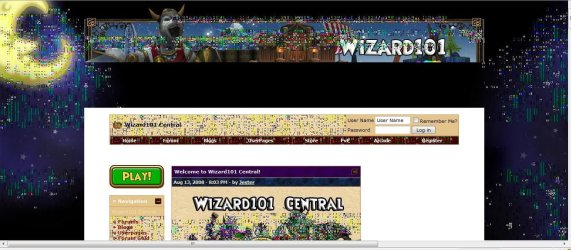
Windows Media Player and Firefox are displaying corrupt "bits" all over the screen. I at first thought high contrast was on, but apparently its not.
 

My Computer My Computer

Computer Manufacturer/Model Number
Custom
OS
Windows 7 Ultimate x64
CPU
Phenom II X3 720 with 4th Core Unlocked
Motherboard
GA-MA770T-UD3P
Memory
4GB G.Skill DDR3-1333
Graphics Card(s)
EVGA GTX 260-216 (NVIDIA)
Sound Card
Onboard
Monitor(s) Displays
19" ASUS 1680x1050 + 32" VIZIO HDTV 1336x768
Screen Resolution
19" ASUS 1680x1050 + 32" VIZIO HDTV 1336x768
Hard Drives
1 Western Digital 640GB
2 Western Digital 1TB
PSU
Corsair 650W
Case
CM-690
Cooling
Fans
Internet Speed
22 Mbps down, 5 mbps up.
might as well do a fresh install on both wmp and firefox..
 

My Computer My Computer

OS
window's 7
CPU
core 2 quad
Motherboard
gigabyte
Memory
2gb corsair
Graphics Card(s)
ati hd4850
Monitor(s) Displays
lg
Screen Resolution
1600 X 900
Case
power logic
Other Info
none of the spec above is accurate
I'm going to install vista then upgrade to win 7. That's what I did last time when Win 7 came out and it saved my settings so I didn't experience this mess. However, can people still post possible fix methods in this thread for people who google the questions "firefox image corrupt" or "windows media album art corrupt"

What I'm doing is a LAST resort but it will work, thankfully.
 

My Computer My Computer

Computer Manufacturer/Model Number
Custom
OS
Windows 7 Ultimate x64
CPU
Phenom II X3 720 with 4th Core Unlocked
Motherboard
GA-MA770T-UD3P
Memory
4GB G.Skill DDR3-1333
Graphics Card(s)
EVGA GTX 260-216 (NVIDIA)
Sound Card
Onboard
Monitor(s) Displays
19" ASUS 1680x1050 + 32" VIZIO HDTV 1336x768
Screen Resolution
19" ASUS 1680x1050 + 32" VIZIO HDTV 1336x768
Hard Drives
1 Western Digital 640GB
2 Western Digital 1TB
PSU
Corsair 650W
Case
CM-690
Cooling
Fans
Internet Speed
22 Mbps down, 5 mbps up.
I'm going to install vista then upgrade to win 7. That's what I did last time when Win 7 came out and it saved my settings so I didn't experience this mess. However, can people still post possible fix methods in this thread for people who google the questions "firefox image corrupt" or "windows media album art corrupt"

What I'm doing is a LAST resort but it will work, thankfully.

Can you take a screenshot so we see what it looks like? Look here for some help, it may help you.

Corrupted MP3 Album Art in WMP12 and WMC
Bill
 

My Computer My Computer

Computer type
PC/Desktop
Computer Manufacturer/Model Number
Custom Built
OS
Windows 7 Enterprise x64
CPU
i7-5820K
Motherboard
Asus X99 A
Memory
16GB DDR4
Graphics Card(s)
ASUS 2GB Nvidia 960GTX OC'd
Monitor(s) Displays
24"
Screen Resolution
1920x1080
Hard Drives
Samsung 1TB 840 SSD
Western Digital 1TB Black Drive
Seagate 2TB NAS Drive
PSU
Antec Earthwatts 650w
Case
Antec DF-85
Hi, Elition is my brother. He is unable to get to his computer at the moment because he swapped video cards thinking that could be the issue. It's not however. We've tried the latest drivers and drivers from two months ago. That did not fix the problem.

Here's the shot of what I'm seeing on Firefox and Chrome. We're not running in high contrast.

Thank you Bill.

Edit: We've formatted completely. We then installed Windows Vista x64. Then we installed Firefox and it appeared to be working for a bit but sooner or later those odd colors came back. Then we installed Google Chrome. Same thing happened.

Then we installed Shockwave, Flash, Java, C ++ Redistributable, we got the latest nvidia drivers and still nothing. We even tried the old nvidia drivers from a few months back.

Just to throw this out there, we're also getting an error when trying to update Windows. The error is 8E5E0442.
 

Attachments

  • Untitled.jpg
    Untitled.jpg
    147.9 KB · Views: 14
  • google chrome messed up.jpg
    google chrome messed up.jpg
    45.6 KB · Views: 12

My Computer My Computer

Computer type
PC/Desktop
Computer Manufacturer/Model Number
Custom build
OS
Windows 7 Home Premium x64
CPU
Intel Core i5-4690k
Motherboard
Gigabyte H97 SATA Express M.2 SSD UEFI DualBIOS DDR3 1600 LG
Memory
8GB
Graphics Card(s)
EVGA GeForce GTX 970
Monitor(s) Displays
2
Hard Drives
2:
- Samsung 850 EVO 250GB 2.5-Inch SATA III Internal SSD (MZ-75E250B/AM)
- Crucial MX300 275GB SATA 2.5 Inch Internal Solid State Drive - CT275MX300SSD1
PSU
Corsair 650x
Case
C70
Cooling
4 Fans
Internet Speed
Comcast Cable 22mbs
Antivirus
Microsoft Security Essentials
Browser
Chrome
Again, Elition is my brother that is why I am replying.

We've found the problem!!!
Here, all along, it was the fourth core that we enabled. :shock:............:sa:

We disabled it and the discoloration is gone!! All gone. We've done extensive tests, (as far as I know), and they're not back yet.

We removed the fourth core. No discoloration. We installed the drivers on Vista. Still no discoloration. We went into Chrome, refreshed, refreshed, went to sites. Did the same in Firefox. No discoloration. Restored my firefox themes, (which before caused extreme discoloration) is now just fine.

Also, the windows update was probably failing due to that fourth core.

So, basically, all our problems are to blame on that fourth core as far as we know.

Oh God, *sighs of relief*

Thanks for reading and caring Bill. I appreciate your time!
 

My Computer My Computer

Computer type
PC/Desktop
Computer Manufacturer/Model Number
Custom build
OS
Windows 7 Home Premium x64
CPU
Intel Core i5-4690k
Motherboard
Gigabyte H97 SATA Express M.2 SSD UEFI DualBIOS DDR3 1600 LG
Memory
8GB
Graphics Card(s)
EVGA GeForce GTX 970
Monitor(s) Displays
2
Hard Drives
2:
- Samsung 850 EVO 250GB 2.5-Inch SATA III Internal SSD (MZ-75E250B/AM)
- Crucial MX300 275GB SATA 2.5 Inch Internal Solid State Drive - CT275MX300SSD1
PSU
Corsair 650x
Case
C70
Cooling
4 Fans
Internet Speed
Comcast Cable 22mbs
Antivirus
Microsoft Security Essentials
Browser
Chrome
Glad it's all resolved guys. Didn't know you had the 4th core enabled... it can be dangerous!

Bill
 

My Computer My Computer

Computer type
PC/Desktop
Computer Manufacturer/Model Number
Custom Built
OS
Windows 7 Enterprise x64
CPU
i7-5820K
Motherboard
Asus X99 A
Memory
16GB DDR4
Graphics Card(s)
ASUS 2GB Nvidia 960GTX OC'd
Monitor(s) Displays
24"
Screen Resolution
1920x1080
Hard Drives
Samsung 1TB 840 SSD
Western Digital 1TB Black Drive
Seagate 2TB NAS Drive
PSU
Antec Earthwatts 650w
Case
Antec DF-85
We're glad that you have resolved your problem. The triple core AMD CPUs are, as you realise, in fact quad cores where one of the cores fails to work correctly. In some cases, these can be persuaded to work, but at a cost. However, there is no guarantee on this. As part of a cost-saving exercise, these chips are sold as triple core models.
 

My Computer My Computer

Computer type
PC/Desktop
Computer Manufacturer/Model Number
Dwarf Dwf/11/2012 r09/2013
OS
Windows 8.1 Pro RTM x64
CPU
Intel Core-i5-3570K 4-core @ 3.4GHz (Ivy Bridge) (OC 4.4GHz)
Motherboard
ASRock Z77 Extreme4-M
Memory
4 x 4GB DDR3-1600 Corsair Vengeance CMZ8GX3M2A1600C9B (16GB)
Graphics Card(s)
MSI GeForce GTX770 Gaming OC 2GB
Sound Card
Realtek High Definition on board solution (ALC 898)
Monitor(s) Displays
ViewSonic VA1912w Widescreen (VGA)
Screen Resolution
1440x900
Hard Drives
OCZ Agility 3 SSD 120GB SATA III x2 (RAID 0)
Samsung HD501LJ 500GB SATA II x2
Hitachi HDS721010CLA332 1TB SATA II
Iomega 1.5TB Ext USB 2.0
WD 2.0TB Ext USB 3.0
PSU
XFX Pro Series 850W Semi-Modular
Case
Gigabyte IF233
Cooling
1 x 120mm Front Inlet 1 x 120mm Rear Exhaust
Keyboard
Microsoft Comfort Curve Keyboard 3000 (USB)
Mouse
Microsoft Comfort Mouse 3000 for Business (USB)
Internet Speed
NetGear DG834Gv3 ADSL Modem/Router (Ethernet) ~4.0 Mb/s (O2)
Antivirus
Avast! 8.0.1497
Browser
IE 11
Other Info
Optical Drive: HL-DT-ST BD-RE BH10LS30 SATA Bluray
Lexmark S305 Printer/Scanner/Copier (USB)
WEI Score: 8.1/8.1/8.5/8.5/8.25
Asus Eee PC 1011PX Netbook (Windows 7 x86 Starter)
Glad it's all resolved guys. Didn't know you had the 4th core enabled... it can be dangerous!

Bill

Well, sorry I didn't mention it before but it is in Elition's specs and you were one who told him to add his specs.

But thank you.

We're glad that you have resolved your problem. The triple core AMD CPUs are, as you realise, in fact quad cores where one of the cores fails to work correctly. In some cases, these can be persuaded to work, but at a cost. However, there is no guarantee on this. As part of a cost-saving exercise, these chips are sold as triple core models.

The reason we did not blame this on the fourth core right away was because when we enabled this before the computer would not boot at all. This time it was booting. That's why we didn't think of it right away.

Thank you.
 

My Computer My Computer

Computer type
PC/Desktop
Computer Manufacturer/Model Number
Custom build
OS
Windows 7 Home Premium x64
CPU
Intel Core i5-4690k
Motherboard
Gigabyte H97 SATA Express M.2 SSD UEFI DualBIOS DDR3 1600 LG
Memory
8GB
Graphics Card(s)
EVGA GeForce GTX 970
Monitor(s) Displays
2
Hard Drives
2:
- Samsung 850 EVO 250GB 2.5-Inch SATA III Internal SSD (MZ-75E250B/AM)
- Crucial MX300 275GB SATA 2.5 Inch Internal Solid State Drive - CT275MX300SSD1
PSU
Corsair 650x
Case
C70
Cooling
4 Fans
Internet Speed
Comcast Cable 22mbs
Antivirus
Microsoft Security Essentials
Browser
Chrome
Back
Top