Clean install, creating Users folder on another drive, advice please

Alleyoop

Banned
Local time
11:39 PM
Messages
31
Hi, I'm going to perform a clean OS install, and this time I want to create the Users folders on a separate drive to my OS and Programs folders. I've read through the site tutorial on this and though I think I can do it, I'd like to confirm something.

When comes time to enter the script for the System Preparation Tool, my entry in line 4 'processor architecture' will be Intel64, not AMD64? My processor is an Intel I7. Is that exactly how I should type it?

Also, I can copy that script to a thumb drive and copy it off there during installation?

Thanks.
 

My Computer

OS
Windows 7 Professional 64 bit
CPU
Intel i7 3930k
Motherboard
P9X79 Pro
Memory
16 Gb
Graphics Card(s)
Nvidia Quadro 200
Monitor(s) Displays
2 x Samsung 21 inch
Hard Drives
Boot: Intel 520 Series 120Gb SSD
Data: WD Black Caviar 2 Tb
PSU
Corsair AX850
Case
Corsair 650D
I didn't get far. At 'Where do you want to install Windows' I get the message 'windows cannot be installed to this disk. The selected disk has an mbr partition table. On efi systems windows can only be installed on GPT disks.'
I have had Windows 7 installed on the disk up until a few minutes ago. What has changed?
Should I begin another thread for this issue?
 

My Computer

OS
Windows 7 Professional 64 bit
CPU
Intel i7 3930k
Motherboard
P9X79 Pro
Memory
16 Gb
Graphics Card(s)
Nvidia Quadro 200
Monitor(s) Displays
2 x Samsung 21 inch
Hard Drives
Boot: Intel 520 Series 120Gb SSD
Data: WD Black Caviar 2 Tb
PSU
Corsair AX850
Case
Corsair 650D
Alleyoop, AMD64 is the 64bit architecture, even for intel chips (yes i know confusing).
If you booted using Uefi it will force GPT over MBR (which may be what caused that error)
In regards to having your user folders in a different location it is possible but its a pain.
You can also move program files BUT it causes system instability and you would be surprised on how many installers force installing to C:\Program Files
 

My Computer

Computer Manufacturer/Model Number
SMN-Productions
OS
Windows 7 x86/x64, Server 2008r2, Web Server 2008
CPU
i7 v2 3930K Steping stone 2
Motherboard
ASUS Rampage IV Extreme
Memory
G.SKILL Ripjaws Z Series 32GB
Graphics Card(s)
AMD HD 5770
Monitor(s) Displays
Acer 21" and Samsung 20"
Hard Drives
Patriot Pyro 80GB
PSU
1000 Watt
Case
HAF-X
Cooling
4 Fans
Keyboard
Black Widow Ultimate
alleyoop,
First let's get you installed.

We have several tutorials on installing, covering all possibilities.

Personally, I always make a 100% clean install.

As far as moving the folders, I do such all of the time.

Do NOT move the program folders or program data folders.

Move such folders as Music, Videos, Pictures, Documents.

Helpful would be for us to know the sizes of the two disks that you will be using.

Put Windows, all programs and program data on one disk. After that, it's your call but there is no sense in putting small folders such as bookmarks on your larger drive.
 

My Computer

Computer Manufacturer/Model Number
Toshiba Satellite S875D-S7239 laptop
OS
MS Windows 7 Ultimate SP1 64-bit
CPU
AMD A10-4600M
Motherboard
AMD Pumori (Socket FT1)
Memory
6.00 GB Dual-Channel DDR3 @ 798MHz (11-11-12-28)
Graphics Card(s)
AMD Radeon HD 7660G
Sound Card
High Definition Audio Device
Monitor(s) Displays
Generic PnP Monitor (1600x900@60Hz)
Screen Resolution
1600x900@60Hz
Hard Drives
SSD 119GB Corsair CSSD-V128GB2 ATA Device
Keyboard
Standard PS/2 Keyboard
Mouse
HP Wireless Optical Mobile Mouse Model FHA-3410
Internet Speed
What the local pub, local coffee shop offers.
Other Info
Optical Drive:MATSHITA BD-CMB UJ160B ATA Device


Also have an Asus ha1002xp netbook with Win 7 Ultimate installed.
Thanks, understood on the AMD64.
It's not ultra necessary for me to move the User files, I just don't want to store any data on the SSD boot, but it's not the type of computer where I'll have lots of My Music and My Pictures etc., I should be able to keep it light. Maybe I should just leave Users on C.
Booted using EFI? I just booted from the Windows 7 install disk, didn't think I'd missed an option. How can I rectify?
 

My Computer

OS
Windows 7 Professional 64 bit
CPU
Intel i7 3930k
Motherboard
P9X79 Pro
Memory
16 Gb
Graphics Card(s)
Nvidia Quadro 200
Monitor(s) Displays
2 x Samsung 21 inch
Hard Drives
Boot: Intel 520 Series 120Gb SSD
Data: WD Black Caviar 2 Tb
PSU
Corsair AX850
Case
Corsair 650D
Alleyoop, one option is just add the directory you want to keep your music and movies on to your "library" much like I have

in regards to the installing part, you may have to remove all partions from your disk.... I had to when I reformatted my laptop earlier.
 

My Computer

Computer Manufacturer/Model Number
SMN-Productions
OS
Windows 7 x86/x64, Server 2008r2, Web Server 2008
CPU
i7 v2 3930K Steping stone 2
Motherboard
ASUS Rampage IV Extreme
Memory
G.SKILL Ripjaws Z Series 32GB
Graphics Card(s)
AMD HD 5770
Monitor(s) Displays
Acer 21" and Samsung 20"
Hard Drives
Patriot Pyro 80GB
PSU
1000 Watt
Case
HAF-X
Cooling
4 Fans
Keyboard
Black Widow Ultimate
Thanks, understood on the AMD64.
It's not ultra necessary for me to move the User files, I just don't want to store any data on the SSD boot, but it's not the type of computer where I'll have lots of My Music and My Pictures etc., I should be able to keep it light. Maybe I should just leave Users on C.
Booted using EFI? I just booted from the Windows 7 install disk, didn't think I'd missed an option. How can I rectify?

http://www.sevenforums.com/tutorials/1649-clean-install-windows-7-a.html

At the end of that tutorial, you find links for many special cases and situations.

Those tutorials are solid as a rock.
 

My Computer

Computer Manufacturer/Model Number
Toshiba Satellite S875D-S7239 laptop
OS
MS Windows 7 Ultimate SP1 64-bit
CPU
AMD A10-4600M
Motherboard
AMD Pumori (Socket FT1)
Memory
6.00 GB Dual-Channel DDR3 @ 798MHz (11-11-12-28)
Graphics Card(s)
AMD Radeon HD 7660G
Sound Card
High Definition Audio Device
Monitor(s) Displays
Generic PnP Monitor (1600x900@60Hz)
Screen Resolution
1600x900@60Hz
Hard Drives
SSD 119GB Corsair CSSD-V128GB2 ATA Device
Keyboard
Standard PS/2 Keyboard
Mouse
HP Wireless Optical Mobile Mouse Model FHA-3410
Internet Speed
What the local pub, local coffee shop offers.
Other Info
Optical Drive:MATSHITA BD-CMB UJ160B ATA Device


Also have an Asus ha1002xp netbook with Win 7 Ultimate installed.
alleyoop,
First let's get you installed.

We have several tutorials on installing, covering all possibilities.

Personally, I always make a 100% clean install.

As far as moving the folders, I do such all of the time.

Do NOT move the program folders or program data folders.

Move such folders as Music, Videos, Pictures, Documents.

Helpful would be for us to know the sizes of the two disks that you will be using.

Put Windows, all programs and program data on one disk. After that, it's your call but there is no sense in putting small folders such as bookmarks on your larger drive.

Yes, let's! :D

I was following one of the Tutorials.

I was doing a clean install.

Don't want to move Program folders.

My boot drive is a 120gb SSD, data drive is 2tb mechanical. I entered specs in my profile today.

Thanks for the help :).

Edit: That's the Tut I was following. I was up to Step 8 when I got the 'Windows cannot be installed' message
 
Last edited:

My Computer

OS
Windows 7 Professional 64 bit
CPU
Intel i7 3930k
Motherboard
P9X79 Pro
Memory
16 Gb
Graphics Card(s)
Nvidia Quadro 200
Monitor(s) Displays
2 x Samsung 21 inch
Hard Drives
Boot: Intel 520 Series 120Gb SSD
Data: WD Black Caviar 2 Tb
PSU
Corsair AX850
Case
Corsair 650D
Follow the tutorial to make a clean install.

Read and reread the tutorial. Print the tutorial out if you don't have the luxury of having a 2nd computer connected displaying the procedure for you.
 

My Computer

Computer Manufacturer/Model Number
Toshiba Satellite S875D-S7239 laptop
OS
MS Windows 7 Ultimate SP1 64-bit
CPU
AMD A10-4600M
Motherboard
AMD Pumori (Socket FT1)
Memory
6.00 GB Dual-Channel DDR3 @ 798MHz (11-11-12-28)
Graphics Card(s)
AMD Radeon HD 7660G
Sound Card
High Definition Audio Device
Monitor(s) Displays
Generic PnP Monitor (1600x900@60Hz)
Screen Resolution
1600x900@60Hz
Hard Drives
SSD 119GB Corsair CSSD-V128GB2 ATA Device
Keyboard
Standard PS/2 Keyboard
Mouse
HP Wireless Optical Mobile Mouse Model FHA-3410
Internet Speed
What the local pub, local coffee shop offers.
Other Info
Optical Drive:MATSHITA BD-CMB UJ160B ATA Device


Also have an Asus ha1002xp netbook with Win 7 Ultimate installed.
don't know if the tutorial mentions such, but you can avoid possible problems by disconnecting the 2 TB drive while installing and after the install is finished, power off and reconnect the 2 TB.
 

My Computer

Computer Manufacturer/Model Number
Toshiba Satellite S875D-S7239 laptop
OS
MS Windows 7 Ultimate SP1 64-bit
CPU
AMD A10-4600M
Motherboard
AMD Pumori (Socket FT1)
Memory
6.00 GB Dual-Channel DDR3 @ 798MHz (11-11-12-28)
Graphics Card(s)
AMD Radeon HD 7660G
Sound Card
High Definition Audio Device
Monitor(s) Displays
Generic PnP Monitor (1600x900@60Hz)
Screen Resolution
1600x900@60Hz
Hard Drives
SSD 119GB Corsair CSSD-V128GB2 ATA Device
Keyboard
Standard PS/2 Keyboard
Mouse
HP Wireless Optical Mobile Mouse Model FHA-3410
Internet Speed
What the local pub, local coffee shop offers.
Other Info
Optical Drive:MATSHITA BD-CMB UJ160B ATA Device


Also have an Asus ha1002xp netbook with Win 7 Ultimate installed.
The SSD is the only drive connected now, went through the steps again, still got the same message.
There were two partitions showing,
Partition 1, 100mb System Reserved
Partition 2 111.7 Gb primary.
I deleted Partition 1 and started again. This time it came up
Disk 0 Unallocated space
Disk 0 Partition 1 111.7 Gb Primary
and I can select Partition 1 without the 'cannot install' message, so I'll proceed to next or should I Format?
Edit: I deleted the other partition and went to Next, hopefully all smooth from here.
 
Last edited:

My Computer

OS
Windows 7 Professional 64 bit
CPU
Intel i7 3930k
Motherboard
P9X79 Pro
Memory
16 Gb
Graphics Card(s)
Nvidia Quadro 200
Monitor(s) Displays
2 x Samsung 21 inch
Hard Drives
Boot: Intel 520 Series 120Gb SSD
Data: WD Black Caviar 2 Tb
PSU
Corsair AX850
Case
Corsair 650D
OK, all went smoothly, cept I didn't get the Home Network page after setting time and date, but that can be done later.
I'll load drivers and updates tomorrow.
Thanks so much for the help, much appreciated.
 

My Computer

OS
Windows 7 Professional 64 bit
CPU
Intel i7 3930k
Motherboard
P9X79 Pro
Memory
16 Gb
Graphics Card(s)
Nvidia Quadro 200
Monitor(s) Displays
2 x Samsung 21 inch
Hard Drives
Boot: Intel 520 Series 120Gb SSD
Data: WD Black Caviar 2 Tb
PSU
Corsair AX850
Case
Corsair 650D
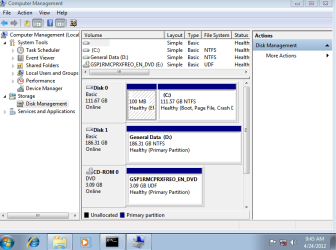
Please post back a screenshot of your maximized Disk Management drive map with listings, using the Snipping Tool in Start Menu.

Normally to avoid EFI installation you need to deselect the EFI Boot disk as first boot choice in your BIOS. Some BIOS have other settings. Can you find such a choice in your BIOS setup Boot Order listings?
 
Thanks, I believe the EFI problem I had was because I had Macrium installed as my backup program and it creates a 100mb partition on the boot drive. When I deleted that partition and restarted I had no problem.
With that solved, I think I'll now clean install again and persist with moving my User folders to my K Drive.
Would you still like a screenshot?
 

My Computer

OS
Windows 7 Professional 64 bit
CPU
Intel i7 3930k
Motherboard
P9X79 Pro
Memory
16 Gb
Graphics Card(s)
Nvidia Quadro 200
Monitor(s) Displays
2 x Samsung 21 inch
Hard Drives
Boot: Intel 520 Series 120Gb SSD
Data: WD Black Caviar 2 Tb
PSU
Corsair AX850
Case
Corsair 650D
Yes, most likely Macrium didn't create that partition. It sounds like the 100mb System Reserved partition which is created by Win7 when installed on a blank HD, to hold the System boot files.

If you didnt' take the EFI Boot disk out of the BIOS boot order then it would need a GPT disk to install and create several small partitions: EFI and Windows Boot partitions.
 
Yes, I saw that it was a Windows 7 partition when I went in to install again.
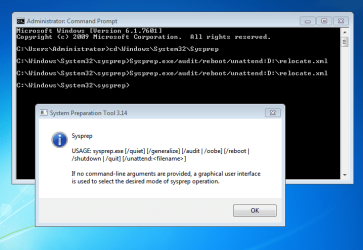
I'm in Audit Mode now. This is my Script.

<?xml version="1.0" encoding="utf-8"?>
<unattend xmlns="urn:schemas-microsoft-com:unattend">
<settings pass="oobeSystem">
<component name="Microsoft-Windows-Shell-Setup" processorArchitecture="amd64" publicKeyToken="31bf3856ad364e35" language="neutral" versionScope="nonSxS" xmlns:wcm="Error" xmlns:xsi="http://www.w3.org/2001/XMLSchema-instance">
<FolderLocations>
<ProfilesDirectory>d:\Users</ProfilesDirectory>
<ProgramData>d:\ProgramData</ProgramData>
</FolderLocations>
</component>
</settings>
<cpi:offlineImage cpi:source="wim:D:/sources/install.wim#Windows 7 PROFESSIONAL" xmlns:cpi="urn:schemas-microsoft-com:cpi" />
</unattend>

When I go to the Command prompt I get this message, (see attachment).
 

Attachments

  • Relocate Note.PNG
    Relocate Note.PNG
    28.1 KB · Views: 16
  • P9 Drive screenshot.PNG
    P9 Drive screenshot.PNG
    27.2 KB · Views: 17
Last edited:

My Computer

OS
Windows 7 Professional 64 bit
CPU
Intel i7 3930k
Motherboard
P9X79 Pro
Memory
16 Gb
Graphics Card(s)
Nvidia Quadro 200
Monitor(s) Displays
2 x Samsung 21 inch
Hard Drives
Boot: Intel 520 Series 120Gb SSD
Data: WD Black Caviar 2 Tb
PSU
Corsair AX850
Case
Corsair 650D
I agree with Greg.

Here is how to post a maximized diskmanagement:
HOW TO POST A SNAPSHOT OF DISK MANAGEMENT DISPLAY
Run disk management:
WIN |
type DISKMGMT.MSC | ENTER
WIN=
key with Microsoft logo on top.


Maximize the output of Disk Management:
ALT-Spacebar
key combo | X key (selects Maximize) |
Drag the field separators (such as between Status and Capacity) to show entire field.


Make a snapshot:
WIN |
type SNIPPING | ENTER | New
Drag the cursor around the area you want to snip.
File | Save as | select save location and name | Save


Post the snapshot:
Post a File or Screenshot in Seven Forums

=======================================
karl
 

My Computer

Computer Manufacturer/Model Number
Toshiba Satellite S875D-S7239 laptop
OS
MS Windows 7 Ultimate SP1 64-bit
CPU
AMD A10-4600M
Motherboard
AMD Pumori (Socket FT1)
Memory
6.00 GB Dual-Channel DDR3 @ 798MHz (11-11-12-28)
Graphics Card(s)
AMD Radeon HD 7660G
Sound Card
High Definition Audio Device
Monitor(s) Displays
Generic PnP Monitor (1600x900@60Hz)
Screen Resolution
1600x900@60Hz
Hard Drives
SSD 119GB Corsair CSSD-V128GB2 ATA Device
Keyboard
Standard PS/2 Keyboard
Mouse
HP Wireless Optical Mobile Mouse Model FHA-3410
Internet Speed
What the local pub, local coffee shop offers.
Other Info
Optical Drive:MATSHITA BD-CMB UJ160B ATA Device


Also have an Asus ha1002xp netbook with Win 7 Ultimate installed.
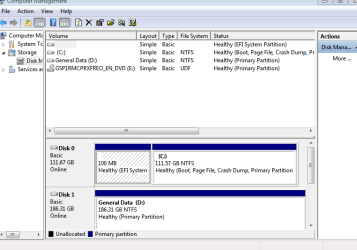
Thanks. Hope that's what you want.
Looks like I start again then.
 

Attachments

  • Disk Management 2.PNG
    Disk Management 2.PNG
    16.3 KB · Views: 13

My Computer

OS
Windows 7 Professional 64 bit
CPU
Intel i7 3930k
Motherboard
P9X79 Pro
Memory
16 Gb
Graphics Card(s)
Nvidia Quadro 200
Monitor(s) Displays
2 x Samsung 21 inch
Hard Drives
Boot: Intel 520 Series 120Gb SSD
Data: WD Black Caviar 2 Tb
PSU
Corsair AX850
Case
Corsair 650D
Read, read, and reread the post I gave on a Disk Management snapshot.

Use the procedure I gave, and not another.

Drag the field separators to fully show the contents of all fields (this is also mentioned in the write-up).
 

My Computer

Computer Manufacturer/Model Number
Toshiba Satellite S875D-S7239 laptop
OS
MS Windows 7 Ultimate SP1 64-bit
CPU
AMD A10-4600M
Motherboard
AMD Pumori (Socket FT1)
Memory
6.00 GB Dual-Channel DDR3 @ 798MHz (11-11-12-28)
Graphics Card(s)
AMD Radeon HD 7660G
Sound Card
High Definition Audio Device
Monitor(s) Displays
Generic PnP Monitor (1600x900@60Hz)
Screen Resolution
1600x900@60Hz
Hard Drives
SSD 119GB Corsair CSSD-V128GB2 ATA Device
Keyboard
Standard PS/2 Keyboard
Mouse
HP Wireless Optical Mobile Mouse Model FHA-3410
Internet Speed
What the local pub, local coffee shop offers.
Other Info
Optical Drive:MATSHITA BD-CMB UJ160B ATA Device


Also have an Asus ha1002xp netbook with Win 7 Ultimate installed.
Back
Top