Solved Clean Install of Win7 - Wipe Hard Drive Clean

MissSherlock

New member
Member
VIP
Local time
2:30 PM
Messages
131
Hi Folks,

I just did a clean install of Win7 and must have done something wrong. I found a file called Windows.old.:confused:

I would like to wipe my hard drive completely clean and then install a fresh copy of Windows 7 Home Premium.

How do I accomplish this task? It's a good time to start over because I'm just at the stage of adding the security software. Already did the drivers but don't mind doing those over again.

I have a Dell 5150, Pentium D820, Dual Core 2.8 GHz with 3 GBs memory.

Many thanks,

ms:)
 

My Computer My Computer

At a glance

Windows 7 Home Premium 64bitIntel Core i7-3770, CPU @ 3.4 GHz16 GB RM (4 cores)NVIDIA GeForce GT 630,
Computer type
PC/Desktop
Computer Manufacturer/Model Number
Asus CM-6870
OS
Windows 7 Home Premium 64bit
CPU
Intel Core i7-3770, CPU @ 3.4 GHz
Motherboard
Asus
Memory
16 GB RM (4 cores)
Graphics Card(s)
NVIDIA GeForce GT 630,
Sound Card
Realtek HD Audio standard
Monitor(s) Displays
Asus VE248Q
Screen Resolution
1920 x 1080
Hard Drives
2 TB
PSU
300W
Case
Asus
Cooling
Smart Cooling System and Q-Fan
Keyboard
Microsoft Wireless
Mouse
Microsoft Laser 3500 Wireless
Internet Speed
25 mbps or greater
Antivirus
Bitdefender Total Security 2018
Browser
Firefox/Chrome/IE
Other Info
Firewall - Bitdefender 2018
Printer: HP Officejet Pro 8600 Plus (wireless)
Do you a regular Windows 7 installation disk, with Product Key?

If so, boot from that disk by setting your DVD drive as the first boot device in the BIOS or by choosing the DVD drive from a menu. Do you know how to do that?

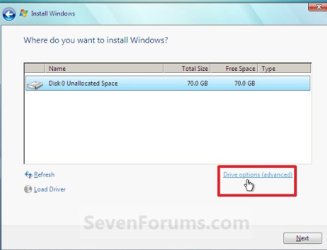
Midway in the installation process you will come to a screen that asks where you want to install Windows. Look for "drive options, advanced" or something very close to that. Take that choice.

At the next screen, all of your partitions will be shown. Delete them all.

That will leave you with nothing but "unallocated space".

When you install to the unallocated space, it will be automatically formatted by Windows and you should end up with a very small "System Reserved" partition and a large C partition covering the rest of the drive.

Back up your data before beginning.

Windows.old is your old installation. If you proceed as above, you won't get it.

With 3 GB of RAM, you should probably go with 32-bit.
 

My Computer My Computer

At a glance

Windows 7 Home Premium SP1, 64-bitIntel Skylake i5-6600K, not overclocked8 GB HyperX DDR4-2666 (2 x 4 GB)none; graphics are integrated on CPU
Computer type
PC/Desktop
Computer Manufacturer/Model Number
Ignatz Special; 4 speed manual gearbox; factory air conditioning; one of one
OS
Windows 7 Home Premium SP1, 64-bit
CPU
Intel Skylake i5-6600K, not overclocked
Motherboard
AsRock Z170M Extreme 4, micro ATX
Memory
8 GB HyperX DDR4-2666 (2 x 4 GB)
Graphics Card(s)
none; graphics are integrated on CPU
Sound Card
onboard: Realtek ALC1150; external: USB Behringer UF0-202
Monitor(s) Displays
Dell S2340M 23 inch IPS
Screen Resolution
1600 x 900
Hard Drives
System: Crucial MX100 series SSD, 128 GB;
Data: Samsung Spinpoint 103SJ, 1 TB;
Backup: WD Caviar Green WD30EZRX-00D8PB0, 3 TB
PSU
Rosewill SilentNight 500 watt fanless, semi-modular
Case
Antec Solo II
Cooling
Noctua NH-U12S; Noctua F12 intake, Noctua S12A exhaust
Keyboard
Microsoft 200 6JH-00001 USB
Mouse
Dell or Microsoft optical wired; USB
Antivirus
Microsoft Security Essentials and Malwarebytes Premium
Browser
Pale Moon
Other Info
All fans PWM; speeds at idle: CPU circa 500 rpm; intake circa 600 rpm; exhaust circa 600 rpm; CPU temps 27 idle and 47 C load in a warm room (27 C/81 F) when running Intel Extreme Tuning Utility stress test.
Hi ignatsatsonic,

Thanks for the quick reply. Yes, I have a Windows 7 Disk with Product Key.

Look for "drive options, advanced" or something very close to that. Take that choice.

At the next screen, all of your partitions will be shown. Delete them all.

This is probably the spot where I screwed up!:o I remember seeing two partitions. However, I don't remember seeing the "Advanced" portion. Maybe I missed it.

By chance would you or someone else have a screenshot.

Thanks, ms:D
 

My Computer My Computer

At a glance

Windows 7 Home Premium 64bitIntel Core i7-3770, CPU @ 3.4 GHz16 GB RM (4 cores)NVIDIA GeForce GT 630,
Computer type
PC/Desktop
Computer Manufacturer/Model Number
Asus CM-6870
OS
Windows 7 Home Premium 64bit
CPU
Intel Core i7-3770, CPU @ 3.4 GHz
Motherboard
Asus
Memory
16 GB RM (4 cores)
Graphics Card(s)
NVIDIA GeForce GT 630,
Sound Card
Realtek HD Audio standard
Monitor(s) Displays
Asus VE248Q
Screen Resolution
1920 x 1080
Hard Drives
2 TB
PSU
300W
Case
Asus
Cooling
Smart Cooling System and Q-Fan
Keyboard
Microsoft Wireless
Mouse
Microsoft Laser 3500 Wireless
Internet Speed
25 mbps or greater
Antivirus
Bitdefender Total Security 2018
Browser
Firefox/Chrome/IE
Other Info
Firewall - Bitdefender 2018
Printer: HP Officejet Pro 8600 Plus (wireless)

Attachments

  • Untitled-1.jpg
    Untitled-1.jpg
    42 KB · Views: 153

My Computer My Computer

At a glance

Windows 7 Home Premium SP1, 64-bitIntel Skylake i5-6600K, not overclocked8 GB HyperX DDR4-2666 (2 x 4 GB)none; graphics are integrated on CPU
Computer type
PC/Desktop
Computer Manufacturer/Model Number
Ignatz Special; 4 speed manual gearbox; factory air conditioning; one of one
OS
Windows 7 Home Premium SP1, 64-bit
CPU
Intel Skylake i5-6600K, not overclocked
Motherboard
AsRock Z170M Extreme 4, micro ATX
Memory
8 GB HyperX DDR4-2666 (2 x 4 GB)
Graphics Card(s)
none; graphics are integrated on CPU
Sound Card
onboard: Realtek ALC1150; external: USB Behringer UF0-202
Monitor(s) Displays
Dell S2340M 23 inch IPS
Screen Resolution
1600 x 900
Hard Drives
System: Crucial MX100 series SSD, 128 GB;
Data: Samsung Spinpoint 103SJ, 1 TB;
Backup: WD Caviar Green WD30EZRX-00D8PB0, 3 TB
PSU
Rosewill SilentNight 500 watt fanless, semi-modular
Case
Antec Solo II
Cooling
Noctua NH-U12S; Noctua F12 intake, Noctua S12A exhaust
Keyboard
Microsoft 200 6JH-00001 USB
Mouse
Dell or Microsoft optical wired; USB
Antivirus
Microsoft Security Essentials and Malwarebytes Premium
Browser
Pale Moon
Other Info
All fans PWM; speeds at idle: CPU circa 500 rpm; intake circa 600 rpm; exhaust circa 600 rpm; CPU temps 27 idle and 47 C load in a warm room (27 C/81 F) when running Intel Extreme Tuning Utility stress test.
Hi ignatzatsonic,

That's the spot. I didn't use the "Drive options/advanced" and delete the partitions. I'll be starting all over again.

Many many thanks,

ms

:) Successful installation. Now my system is much lighter and cleaner.
 
Last edited:

My Computer My Computer

At a glance

Windows 7 Home Premium 64bitIntel Core i7-3770, CPU @ 3.4 GHz16 GB RM (4 cores)NVIDIA GeForce GT 630,
Computer type
PC/Desktop
Computer Manufacturer/Model Number
Asus CM-6870
OS
Windows 7 Home Premium 64bit
CPU
Intel Core i7-3770, CPU @ 3.4 GHz
Motherboard
Asus
Memory
16 GB RM (4 cores)
Graphics Card(s)
NVIDIA GeForce GT 630,
Sound Card
Realtek HD Audio standard
Monitor(s) Displays
Asus VE248Q
Screen Resolution
1920 x 1080
Hard Drives
2 TB
PSU
300W
Case
Asus
Cooling
Smart Cooling System and Q-Fan
Keyboard
Microsoft Wireless
Mouse
Microsoft Laser 3500 Wireless
Internet Speed
25 mbps or greater
Antivirus
Bitdefender Total Security 2018
Browser
Firefox/Chrome/IE
Other Info
Firewall - Bitdefender 2018
Printer: HP Officejet Pro 8600 Plus (wireless)
Back
Top