
Clean install of Windows 7

PSCO2007

New member
Pro User
VIP
Local time
4:37 PM
Messages
1,261
Location
So Cal
I did a clean install and thought the necessary drivers would be on the Asus CD.

The install was terrible and I had a good install on an HDD.
I did a backup using Acronis Recovery and everything seems fine.

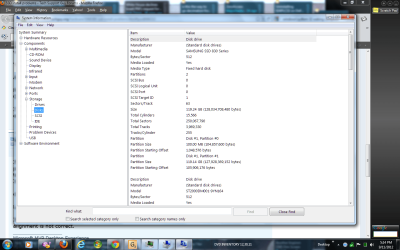
I was told that the Partition properties are wrong, due to going from HDD to SSD. Pic enclosed

Everything is fine, so I don't know if I should do another clean install.
The driver installation seems to be my problem on the clean install.

After using the Windows 7 CD and the Asus CD, I thought I was done. WRONG!!

Do I download the drivers from the Intel Site, and is that all I need?

Thanks

Paul
 

Attachments
  • SSD PARTITION INFO.png
    SSD PARTITION INFO.png
    95 KB · Views: 18

My Computer My Computer

Computer type
PC/Desktop
Computer Manufacturer/Model Number
Self-Built
OS
Windows 7 Professional X64
CPU
Core i7 (2nd gen) i7-2600K / 3.40GHz
Motherboard
ASUS P8Z77-V Intel 7 Series Motherboard
Memory
DDR3 2400MHz (OC) 16gb
Graphics Card(s)
Intel(R) HD Graphics 3000, -1988 Mb
Sound Card
8 ChannelsAudio Chipset Realtek ALC892
Monitor(s) Displays
LG 29UM65 Black 29"
Screen Resolution
2560 x 1080
Hard Drives
840 EVO 250 GB SSD ;2tb (2);Seagate;1tb Seagate; 750 gb Seagate; wd ext (2) 750 gb,WD 2tb X 2;WD 3TB Black
PSU
750 watt
Case
Thermaltake RX -1
Cooling
2120mm Fans Included 1Other Fan Ports 5x 200mm Fan Ports
Keyboard
Microsoft Digital Media Pro
Mouse
Microsoft Wireless 6000
Internet Speed
U-verse 18 mbps
Antivirus
MSE
Browser
Firefox, Chrome and my favorite: Pale Moon
Other Info
HdHomerun Dual Tuner.
SRS Audio Lab,
Pioneer BDR 208-DBK
PS3-What a difference in my Surround Sound Receiver!
HP 4540s - My new Toy.
Epson R280 Printer- To personalize my Dvds.
Canon MP 560 - For scanning.
You say the install was terrible. In what way and using what installation disc?

I don't know that I would have used the Asus disc at all, assuming you had a legit Windows installation disc.

What functionality do you lack---why do you think you need more drivers?

At first glance, that pic looks OK. What "properties" were you told looked wrong? The alignment is OK I think.

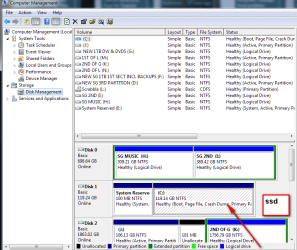
Post a pic of Windows Disk Management.

I assume you are now operating from a restored Acronis image and that pic represents that installation?
 

My Computer My Computer

Computer type
PC/Desktop
Computer Manufacturer/Model Number
Ignatz Special; 4 speed manual gearbox; factory air conditioning; one of one
OS
Windows 7 Home Premium SP1, 64-bit
CPU
Intel Skylake i5-6600K, not overclocked
Motherboard
AsRock Z170M Extreme 4, micro ATX
Memory
8 GB HyperX DDR4-2666 (2 x 4 GB)
Graphics Card(s)
none; graphics are integrated on CPU
Sound Card
onboard: Realtek ALC1150; external: USB Behringer UF0-202
Monitor(s) Displays
Dell S2340M 23 inch IPS
Screen Resolution
1600 x 900
Hard Drives
System: Crucial MX100 series SSD, 128 GB;
Data: Samsung Spinpoint 103SJ, 1 TB;
Backup: WD Caviar Green WD30EZRX-00D8PB0, 3 TB
PSU
Rosewill SilentNight 500 watt fanless, semi-modular
Case
Antec Solo II
Cooling
Noctua NH-U12S; Noctua F12 intake, Noctua S12A exhaust
Keyboard
Microsoft 200 6JH-00001 USB
Mouse
Dell or Microsoft optical wired; USB
Antivirus
Microsoft Security Essentials and Malwarebytes Premium
Browser
Pale Moon
Other Info
All fans PWM; speeds at idle: CPU circa 500 rpm; intake circa 600 rpm; exhaust circa 600 rpm; CPU temps 27 idle and 47 C load in a warm room (27 C/81 F) when running Intel Extreme Tuning Utility stress test.
You say the install was terrible. In what way and using what installation disc?

I don't know that I would have used the Asus disc at all, assuming you had a legit Windows installation disc.

What functionality do you lack---why do you think you need more drivers?

At first glance, that pic looks OK. What "properties" were you told looked wrong? The alignment is OK I think.

Post a pic of Windows Disk Management.

I assume you are now operating from a restored Acronis image and that pic represents that installation?

When I did the install (Legit Windows 7 cd) I didn't know I had to install drivers ( thought the Asus cd would do it).

I could not access radio stations, install printers or any other devices- kept saying error.

The pics are enclosed.
I was told that by doing an image restore from my good install on HDD was giving me partition problems due to the number returned.

This is what I was told :Look for your SSD and check the partition starting

offset.

It needs to be divisible by 4096 (ie return a whole

number when you divide by this) otherwise the

alignment is not correct.
 

Attachments

  • partition pic with  offset info.png
    partition pic with offset info.png
    40.4 KB · Views: 12
  • DISC MGMT 9,11,12.png
    DISC MGMT 9,11,12.png
    34.3 KB · Views: 13

My Computer My Computer

Computer type
PC/Desktop
Computer Manufacturer/Model Number
Self-Built
OS
Windows 7 Professional X64
CPU
Core i7 (2nd gen) i7-2600K / 3.40GHz
Motherboard
ASUS P8Z77-V Intel 7 Series Motherboard
Memory
DDR3 2400MHz (OC) 16gb
Graphics Card(s)
Intel(R) HD Graphics 3000, -1988 Mb
Sound Card
8 ChannelsAudio Chipset Realtek ALC892
Monitor(s) Displays
LG 29UM65 Black 29"
Screen Resolution
2560 x 1080
Hard Drives
840 EVO 250 GB SSD ;2tb (2);Seagate;1tb Seagate; 750 gb Seagate; wd ext (2) 750 gb,WD 2tb X 2;WD 3TB Black
PSU
750 watt
Case
Thermaltake RX -1
Cooling
2120mm Fans Included 1Other Fan Ports 5x 200mm Fan Ports
Keyboard
Microsoft Digital Media Pro
Mouse
Microsoft Wireless 6000
Internet Speed
U-verse 18 mbps
Antivirus
MSE
Browser
Firefox, Chrome and my favorite: Pale Moon
Other Info
HdHomerun Dual Tuner.
SRS Audio Lab,
Pioneer BDR 208-DBK
PS3-What a difference in my Surround Sound Receiver!
HP 4540s - My new Toy.
Epson R280 Printer- To personalize my Dvds.
Canon MP 560 - For scanning.
Regarding the partitions: my understanding is that those numbers you point out should be evenly divisible by 4. Both are. Both are also evenly divisible by 4096, but I am not sure that divisibility by 4096 matters.

Regarding the install, I would have done this:

Disconnect all peripherals and any hard drive not to receive Windows.

Then install to the SSD using a Windows disk, not an Asus disk.

Then inspect functionality by testing functions directly and looking in Device Manager.

If I lacked functionality or saw any errors in Device Manager, I would look for drivers. Otherwise, I would not look for drivers.

If I had to look for drivers, my first source would likely be the Asus web site, not an Asus disc. Failing that, I might look at other hardware manufacturer's sites---Intel, printer maker, etc.

I would not use any type of Asus disc for any purpose, other than in desperation.
 

My Computer My Computer

Computer type
PC/Desktop
Computer Manufacturer/Model Number
Ignatz Special; 4 speed manual gearbox; factory air conditioning; one of one
OS
Windows 7 Home Premium SP1, 64-bit
CPU
Intel Skylake i5-6600K, not overclocked
Motherboard
AsRock Z170M Extreme 4, micro ATX
Memory
8 GB HyperX DDR4-2666 (2 x 4 GB)
Graphics Card(s)
none; graphics are integrated on CPU
Sound Card
onboard: Realtek ALC1150; external: USB Behringer UF0-202
Monitor(s) Displays
Dell S2340M 23 inch IPS
Screen Resolution
1600 x 900
Hard Drives
System: Crucial MX100 series SSD, 128 GB;
Data: Samsung Spinpoint 103SJ, 1 TB;
Backup: WD Caviar Green WD30EZRX-00D8PB0, 3 TB
PSU
Rosewill SilentNight 500 watt fanless, semi-modular
Case
Antec Solo II
Cooling
Noctua NH-U12S; Noctua F12 intake, Noctua S12A exhaust
Keyboard
Microsoft 200 6JH-00001 USB
Mouse
Dell or Microsoft optical wired; USB
Antivirus
Microsoft Security Essentials and Malwarebytes Premium
Browser
Pale Moon
Other Info
All fans PWM; speeds at idle: CPU circa 500 rpm; intake circa 600 rpm; exhaust circa 600 rpm; CPU temps 27 idle and 47 C load in a warm room (27 C/81 F) when running Intel Extreme Tuning Utility stress test.
Ignatz is right , just use windows upgate to install any missing drivers, once you do all the updates, then and only then should you go to a vendors website to get any missing drivers.
 

My Computer My Computer

Computer type
PC/Desktop
Computer Manufacturer/Model Number
Skylake Special #666
OS
Windows 10 Pro x64
CPU
Intel Core i7 6700K
Motherboard
Asus Sabertooth Z170 Mark 1
Memory
GSkill TridentZ RGB 16GB 3600 16-16-16-36
Graphics Card(s)
EVGA GTX 980 Ti SC x2
Sound Card
Realtek High Definition
Monitor(s) Displays
AOC G2460PG
Screen Resolution
1920 x 1080 144Hz
Hard Drives
Samsung 860 Pro 256GB, Seagate Barracuda 4TB x2
PSU
EVGA 1000 P2, EVGA White Custom Braided Cables
Case
Corsair Vengeance C70 Gunmetal Black
Cooling
Corsair H100i v2, Corsair ML120 x2, Thermal Grizzly Kryonaut
Keyboard
Logitech G910 Orion Spectrum
Mouse
Logitech G700s
Internet Speed
Verizon Fios Quantum Gateway 75/75
Antivirus
Windows Defender, Malwarebytes Free 3.8.3
Browser
Chrome
Other Info
Corsair SP120 x4, LG Blu-ray Drive, Durabrand HT-395 100 Watt Dolby Digital Amp, Corsair H2100 Wireless 7.1 Headset
Follow these steps to get a perfect Clean Reinstall - Factory OEM Windows 7
which are the same Best Practices for retail or OEM.

Pay close attention to how drivers are handled in Win7 as it is not at all the same as XP. The drivers will be in the installer and quickly updated via optional Windows Updates. After all Updates are done check Device manager for any missing drivers to import from the Asus Support Downloads webpage for your model - not the disk which may be dated already.
 
Last edited:
Follow these steps to get a perfect Clean Reinstall - Factory OEM Windows 7.

Pay close attention to how drivers are handled in Win7 as it is not at all the same as XP. The drivers will be in the installer and quickly updated via optional Windows Updates. After all Updates are done check Device manager for any missing drivers to import from the Asus Support Downloads webpage for your model - not the disk which may be dated already.

Thanks Greg,

I think my problem was that after I did the install, I didn't install Intel drivers.

I just went to their site and see all the drivers I should have downloaded.

When I did the original install, I used the Asus cd to install what I thought were all the drivers I needed.

The device Mgr didn't show any yellow marks, so I thought I was good.

Other than the Intel drivers, are thre any others, not including printers and such).
 

My Computer My Computer

Computer type
PC/Desktop
Computer Manufacturer/Model Number
Self-Built
OS
Windows 7 Professional X64
CPU
Core i7 (2nd gen) i7-2600K / 3.40GHz
Motherboard
ASUS P8Z77-V Intel 7 Series Motherboard
Memory
DDR3 2400MHz (OC) 16gb
Graphics Card(s)
Intel(R) HD Graphics 3000, -1988 Mb
Sound Card
8 ChannelsAudio Chipset Realtek ALC892
Monitor(s) Displays
LG 29UM65 Black 29"
Screen Resolution
2560 x 1080
Hard Drives
840 EVO 250 GB SSD ;2tb (2);Seagate;1tb Seagate; 750 gb Seagate; wd ext (2) 750 gb,WD 2tb X 2;WD 3TB Black
PSU
750 watt
Case
Thermaltake RX -1
Cooling
2120mm Fans Included 1Other Fan Ports 5x 200mm Fan Ports
Keyboard
Microsoft Digital Media Pro
Mouse
Microsoft Wireless 6000
Internet Speed
U-verse 18 mbps
Antivirus
MSE
Browser
Firefox, Chrome and my favorite: Pale Moon
Other Info
HdHomerun Dual Tuner.
SRS Audio Lab,
Pioneer BDR 208-DBK
PS3-What a difference in my Surround Sound Receiver!
HP 4540s - My new Toy.
Epson R280 Printer- To personalize my Dvds.
Canon MP 560 - For scanning.
Did you even read what I just posted?

This is not XP. This is a whole new generation OS which provides its own drivers and doesn't need any others unless they are missing in Device Manager after ALL updates are done.

If you want a perfect install then follow the steps in the tutorial provided.
 
I did a clean install and thought the necessary drivers would be on the Asus CD.

The install was terrible and I had a good install on an HDD.
I did a backup using Acronis Recovery and everything seems fine.

I was told that the Partition properties are wrong, due to going from HDD to SSD. Pic enclosed

Everything is fine, so I don't know if I should do another clean install.
The driver installation seems to be my problem on the clean install.

After using the Windows 7 CD and the Asus CD, I thought I was done. WRONG!!

Do I download the drivers from the Intel Site, and is that all I need?

Thanks

Paul

I purchased the Asus P8Z68 motherboard last month which is very similiar to yours. I installed Windows 7 from the DVD, used the Asus DVD and was good to go. I did not have to go to any sites to get drivers. The Asus DVD and Win 7 DVD had all of them or else they came in Win updates. -- Tell me what sections of the Asus DVD you installed. == Why do you think your install is bad?
 

My Computer My Computer

Computer type
PC/Desktop
Computer Manufacturer/Model Number
Custom Build
OS
Windows 7 Home Premium 32-Bit - Build 7600 SP1
CPU
Intel Core i3-2120 3.30Ghz
Motherboard
Asus P8Z68-V LX Intel Z68 Socket H2 ATX
Memory
Kingston 4 GB DDR3 1333 mhz
Graphics Card(s)
AMD Radeon HD6670
Sound Card
Sound Blaster Audigy SE 24-Bit
Monitor(s) Displays
Asus VE228
Screen Resolution
1440 X 900
Hard Drives
OCZ Vertex 3 120 GB Sata 3 SSD ==
Kingston SH103/S3 120 G Hyper X 120 GB SSD ==
Western Digital 500 GB Caviar Green 7200 RPM ==
PSU
Corsair CX600M == 600 Watt
Case
NZXT Apollo - Silver with Clear Side Panel
Cooling
Three 120 mm Fans
Keyboard
Microsoft Natural 4000
Mouse
Microsoft Custom Optical 3000
Internet Speed
AT&T Fiber Optic Wireless Network
Antivirus
Microsoft Security Essentials
Browser
Chrome
Other Info
120 mm Blue LED Fan -- Three Blue LED Lazer Light Sticks
Did you even read what I just posted?

This is not XP. This is a whole new generation OS which provides its own drivers and doesn't need any others unless they are missing in Device Manager after ALL updates are done.

Yes, I read what you said.
When I did the original install and installed all updates, half my devices did not work - couldn't access radio stations, install printers, etc.

There were No yellow marks in Device Mgr and yet all I had was trouble.
I'll go to Intel this time and download all their drivers.
 

My Computer My Computer

Computer type
PC/Desktop
Computer Manufacturer/Model Number
Self-Built
OS
Windows 7 Professional X64
CPU
Core i7 (2nd gen) i7-2600K / 3.40GHz
Motherboard
ASUS P8Z77-V Intel 7 Series Motherboard
Memory
DDR3 2400MHz (OC) 16gb
Graphics Card(s)
Intel(R) HD Graphics 3000, -1988 Mb
Sound Card
8 ChannelsAudio Chipset Realtek ALC892
Monitor(s) Displays
LG 29UM65 Black 29"
Screen Resolution
2560 x 1080
Hard Drives
840 EVO 250 GB SSD ;2tb (2);Seagate;1tb Seagate; 750 gb Seagate; wd ext (2) 750 gb,WD 2tb X 2;WD 3TB Black
PSU
750 watt
Case
Thermaltake RX -1
Cooling
2120mm Fans Included 1Other Fan Ports 5x 200mm Fan Ports
Keyboard
Microsoft Digital Media Pro
Mouse
Microsoft Wireless 6000
Internet Speed
U-verse 18 mbps
Antivirus
MSE
Browser
Firefox, Chrome and my favorite: Pale Moon
Other Info
HdHomerun Dual Tuner.
SRS Audio Lab,
Pioneer BDR 208-DBK
PS3-What a difference in my Surround Sound Receiver!
HP 4540s - My new Toy.
Epson R280 Printer- To personalize my Dvds.
Canon MP 560 - For scanning.
Windows update will not install your printer drivers ( most likely ) so of course you would have to go to the website to download and install them.

What intel drivers do you need and why ??????
 

My Computer My Computer

Computer type
PC/Desktop
Computer Manufacturer/Model Number
Skylake Special #666
OS
Windows 10 Pro x64
CPU
Intel Core i7 6700K
Motherboard
Asus Sabertooth Z170 Mark 1
Memory
GSkill TridentZ RGB 16GB 3600 16-16-16-36
Graphics Card(s)
EVGA GTX 980 Ti SC x2
Sound Card
Realtek High Definition
Monitor(s) Displays
AOC G2460PG
Screen Resolution
1920 x 1080 144Hz
Hard Drives
Samsung 860 Pro 256GB, Seagate Barracuda 4TB x2
PSU
EVGA 1000 P2, EVGA White Custom Braided Cables
Case
Corsair Vengeance C70 Gunmetal Black
Cooling
Corsair H100i v2, Corsair ML120 x2, Thermal Grizzly Kryonaut
Keyboard
Logitech G910 Orion Spectrum
Mouse
Logitech G700s
Internet Speed
Verizon Fios Quantum Gateway 75/75
Antivirus
Windows Defender, Malwarebytes Free 3.8.3
Browser
Chrome
Other Info
Corsair SP120 x4, LG Blu-ray Drive, Durabrand HT-395 100 Watt Dolby Digital Amp, Corsair H2100 Wireless 7.1 Headset
I'll go to Intel this time and download all their drivers.

Intel made your processor. And nothing else that I can see.

Other than possibly for the chipset installation utility, I wouldn't think Intel would be the source for any missing drivers.

Why wouldn't you look at the Asus site first?
 

My Computer My Computer

Computer type
PC/Desktop
Computer Manufacturer/Model Number
Ignatz Special; 4 speed manual gearbox; factory air conditioning; one of one
OS
Windows 7 Home Premium SP1, 64-bit
CPU
Intel Skylake i5-6600K, not overclocked
Motherboard
AsRock Z170M Extreme 4, micro ATX
Memory
8 GB HyperX DDR4-2666 (2 x 4 GB)
Graphics Card(s)
none; graphics are integrated on CPU
Sound Card
onboard: Realtek ALC1150; external: USB Behringer UF0-202
Monitor(s) Displays
Dell S2340M 23 inch IPS
Screen Resolution
1600 x 900
Hard Drives
System: Crucial MX100 series SSD, 128 GB;
Data: Samsung Spinpoint 103SJ, 1 TB;
Backup: WD Caviar Green WD30EZRX-00D8PB0, 3 TB
PSU
Rosewill SilentNight 500 watt fanless, semi-modular
Case
Antec Solo II
Cooling
Noctua NH-U12S; Noctua F12 intake, Noctua S12A exhaust
Keyboard
Microsoft 200 6JH-00001 USB
Mouse
Dell or Microsoft optical wired; USB
Antivirus
Microsoft Security Essentials and Malwarebytes Premium
Browser
Pale Moon
Other Info
All fans PWM; speeds at idle: CPU circa 500 rpm; intake circa 600 rpm; exhaust circa 600 rpm; CPU temps 27 idle and 47 C load in a warm room (27 C/81 F) when running Intel Extreme Tuning Utility stress test.
Why did you come here asking for help if you reject everyone's advice and insist upon going to Intel's site to get drivers that are already in the Win7 installer?

I gave you the steps to get a perfect Clean Reinstall - Factory OEM Windows 7. Follow the steps and then if there are problems with a radio station player, browser or printer we will help you work through each one.

This is what we do, better than anyone else in the world. Take it or leave it.
 
Last edited:
Windows update will not install your printer drivers ( most likely ) so of course you would have to go to the website to download and install them.

What intel drivers do you need and why ??????
In simply running the Windows 7 cd and applying Windows updates, all I had was headaches.

I thought that was the correct procedure - didn't work for me.
I had a good install on an HDD ( this was installed when I had the computer assembled and was obviously done right).

I xsferred a backup image to the SSD and am using that now.

I was told that this is improper - going from hdd to ssd, so I thought I would try once again to do a clean install to the SSD.
 

My Computer My Computer

Computer type
PC/Desktop
Computer Manufacturer/Model Number
Self-Built
OS
Windows 7 Professional X64
CPU
Core i7 (2nd gen) i7-2600K / 3.40GHz
Motherboard
ASUS P8Z77-V Intel 7 Series Motherboard
Memory
DDR3 2400MHz (OC) 16gb
Graphics Card(s)
Intel(R) HD Graphics 3000, -1988 Mb
Sound Card
8 ChannelsAudio Chipset Realtek ALC892
Monitor(s) Displays
LG 29UM65 Black 29"
Screen Resolution
2560 x 1080
Hard Drives
840 EVO 250 GB SSD ;2tb (2);Seagate;1tb Seagate; 750 gb Seagate; wd ext (2) 750 gb,WD 2tb X 2;WD 3TB Black
PSU
750 watt
Case
Thermaltake RX -1
Cooling
2120mm Fans Included 1Other Fan Ports 5x 200mm Fan Ports
Keyboard
Microsoft Digital Media Pro
Mouse
Microsoft Wireless 6000
Internet Speed
U-verse 18 mbps
Antivirus
MSE
Browser
Firefox, Chrome and my favorite: Pale Moon
Other Info
HdHomerun Dual Tuner.
SRS Audio Lab,
Pioneer BDR 208-DBK
PS3-What a difference in my Surround Sound Receiver!
HP 4540s - My new Toy.
Epson R280 Printer- To personalize my Dvds.
Canon MP 560 - For scanning.
Why did you come here asking for help if you reject everyone's advice and come up with the idiotic idea that you must go to Intel's site to get drivers that are already in the Win7 installer?

I gave you the steps to get a perfect Clean Reinstall - Factory OEM Windows 7. Follow the steps and then if there are minor problems with a radio station program, browser or printer we will help you work through each one.

This is what we do, better than anyone else in the world. Take it or leave it.

Sorry to have bothered you.:sarc:
 

My Computer My Computer

Computer type
PC/Desktop
Computer Manufacturer/Model Number
Self-Built
OS
Windows 7 Professional X64
CPU
Core i7 (2nd gen) i7-2600K / 3.40GHz
Motherboard
ASUS P8Z77-V Intel 7 Series Motherboard
Memory
DDR3 2400MHz (OC) 16gb
Graphics Card(s)
Intel(R) HD Graphics 3000, -1988 Mb
Sound Card
8 ChannelsAudio Chipset Realtek ALC892
Monitor(s) Displays
LG 29UM65 Black 29"
Screen Resolution
2560 x 1080
Hard Drives
840 EVO 250 GB SSD ;2tb (2);Seagate;1tb Seagate; 750 gb Seagate; wd ext (2) 750 gb,WD 2tb X 2;WD 3TB Black
PSU
750 watt
Case
Thermaltake RX -1
Cooling
2120mm Fans Included 1Other Fan Ports 5x 200mm Fan Ports
Keyboard
Microsoft Digital Media Pro
Mouse
Microsoft Wireless 6000
Internet Speed
U-verse 18 mbps
Antivirus
MSE
Browser
Firefox, Chrome and my favorite: Pale Moon
Other Info
HdHomerun Dual Tuner.
SRS Audio Lab,
Pioneer BDR 208-DBK
PS3-What a difference in my Surround Sound Receiver!
HP 4540s - My new Toy.
Epson R280 Printer- To personalize my Dvds.
Canon MP 560 - For scanning.
And your current install from a backup image still has driver issues?

If it does not have issues and all is OK, I'd go with it.

You can always do a re-do a clean if you don't mind spending the time.
 

My Computer My Computer

Computer type
PC/Desktop
Computer Manufacturer/Model Number
Ignatz Special; 4 speed manual gearbox; factory air conditioning; one of one
OS
Windows 7 Home Premium SP1, 64-bit
CPU
Intel Skylake i5-6600K, not overclocked
Motherboard
AsRock Z170M Extreme 4, micro ATX
Memory
8 GB HyperX DDR4-2666 (2 x 4 GB)
Graphics Card(s)
none; graphics are integrated on CPU
Sound Card
onboard: Realtek ALC1150; external: USB Behringer UF0-202
Monitor(s) Displays
Dell S2340M 23 inch IPS
Screen Resolution
1600 x 900
Hard Drives
System: Crucial MX100 series SSD, 128 GB;
Data: Samsung Spinpoint 103SJ, 1 TB;
Backup: WD Caviar Green WD30EZRX-00D8PB0, 3 TB
PSU
Rosewill SilentNight 500 watt fanless, semi-modular
Case
Antec Solo II
Cooling
Noctua NH-U12S; Noctua F12 intake, Noctua S12A exhaust
Keyboard
Microsoft 200 6JH-00001 USB
Mouse
Dell or Microsoft optical wired; USB
Antivirus
Microsoft Security Essentials and Malwarebytes Premium
Browser
Pale Moon
Other Info
All fans PWM; speeds at idle: CPU circa 500 rpm; intake circa 600 rpm; exhaust circa 600 rpm; CPU temps 27 idle and 47 C load in a warm room (27 C/81 F) when running Intel Extreme Tuning Utility stress test.
:picnic::picnic::picnic:
 

My Computer My Computer

Computer type
PC/Desktop
Computer Manufacturer/Model Number
Skylake Special #666
OS
Windows 10 Pro x64
CPU
Intel Core i7 6700K
Motherboard
Asus Sabertooth Z170 Mark 1
Memory
GSkill TridentZ RGB 16GB 3600 16-16-16-36
Graphics Card(s)
EVGA GTX 980 Ti SC x2
Sound Card
Realtek High Definition
Monitor(s) Displays
AOC G2460PG
Screen Resolution
1920 x 1080 144Hz
Hard Drives
Samsung 860 Pro 256GB, Seagate Barracuda 4TB x2
PSU
EVGA 1000 P2, EVGA White Custom Braided Cables
Case
Corsair Vengeance C70 Gunmetal Black
Cooling
Corsair H100i v2, Corsair ML120 x2, Thermal Grizzly Kryonaut
Keyboard
Logitech G910 Orion Spectrum
Mouse
Logitech G700s
Internet Speed
Verizon Fios Quantum Gateway 75/75
Antivirus
Windows Defender, Malwarebytes Free 3.8.3
Browser
Chrome
Other Info
Corsair SP120 x4, LG Blu-ray Drive, Durabrand HT-395 100 Watt Dolby Digital Amp, Corsair H2100 Wireless 7.1 Headset
Sorry to have bothered you.:sarc:


It will not stop us from helping you. But you don't have to make it so difficult.

We successfully help tens of thousands of users here so we know what works and doesn't.
 
And your current install from a backup image still has driver issues?

If it does not have issues and all is OK, I'd go with it.

You can always do a re-do a clean if you don't mind spending the time.


My current install seems perfect.
What I am going to do as a test is try another install on a spare hdd and see if I can figure out what I did wrong.

Thanks for your help.:D
 

My Computer My Computer

Computer type
PC/Desktop
Computer Manufacturer/Model Number
Self-Built
OS
Windows 7 Professional X64
CPU
Core i7 (2nd gen) i7-2600K / 3.40GHz
Motherboard
ASUS P8Z77-V Intel 7 Series Motherboard
Memory
DDR3 2400MHz (OC) 16gb
Graphics Card(s)
Intel(R) HD Graphics 3000, -1988 Mb
Sound Card
8 ChannelsAudio Chipset Realtek ALC892
Monitor(s) Displays
LG 29UM65 Black 29"
Screen Resolution
2560 x 1080
Hard Drives
840 EVO 250 GB SSD ;2tb (2);Seagate;1tb Seagate; 750 gb Seagate; wd ext (2) 750 gb,WD 2tb X 2;WD 3TB Black
PSU
750 watt
Case
Thermaltake RX -1
Cooling
2120mm Fans Included 1Other Fan Ports 5x 200mm Fan Ports
Keyboard
Microsoft Digital Media Pro
Mouse
Microsoft Wireless 6000
Internet Speed
U-verse 18 mbps
Antivirus
MSE
Browser
Firefox, Chrome and my favorite: Pale Moon
Other Info
HdHomerun Dual Tuner.
SRS Audio Lab,
Pioneer BDR 208-DBK
PS3-What a difference in my Surround Sound Receiver!
HP 4540s - My new Toy.
Epson R280 Printer- To personalize my Dvds.
Canon MP 560 - For scanning.
]


My current install seems perfect.
What I am going to do as a test is try another install on a spare hdd and see if I can figure out what I did wrong.

Thanks for your help.:D

Good idea as a learning process. Good luck.
 

My Computer My Computer

Computer type
PC/Desktop
Computer Manufacturer/Model Number
Ignatz Special; 4 speed manual gearbox; factory air conditioning; one of one
OS
Windows 7 Home Premium SP1, 64-bit
CPU
Intel Skylake i5-6600K, not overclocked
Motherboard
AsRock Z170M Extreme 4, micro ATX
Memory
8 GB HyperX DDR4-2666 (2 x 4 GB)
Graphics Card(s)
none; graphics are integrated on CPU
Sound Card
onboard: Realtek ALC1150; external: USB Behringer UF0-202
Monitor(s) Displays
Dell S2340M 23 inch IPS
Screen Resolution
1600 x 900
Hard Drives
System: Crucial MX100 series SSD, 128 GB;
Data: Samsung Spinpoint 103SJ, 1 TB;
Backup: WD Caviar Green WD30EZRX-00D8PB0, 3 TB
PSU
Rosewill SilentNight 500 watt fanless, semi-modular
Case
Antec Solo II
Cooling
Noctua NH-U12S; Noctua F12 intake, Noctua S12A exhaust
Keyboard
Microsoft 200 6JH-00001 USB
Mouse
Dell or Microsoft optical wired; USB
Antivirus
Microsoft Security Essentials and Malwarebytes Premium
Browser
Pale Moon
Other Info
All fans PWM; speeds at idle: CPU circa 500 rpm; intake circa 600 rpm; exhaust circa 600 rpm; CPU temps 27 idle and 47 C load in a warm room (27 C/81 F) when running Intel Extreme Tuning Utility stress test.
Back
Top