Solved Clean install. Partition query

jasonp44

New member
Local time
3:13 PM
Messages
19
After advice given in previous post www.sevenforums.com/showthread.php?t=383781
I'm going to attempt a clean re install.
I have the disc and code number, and it seems fairly straightforward.
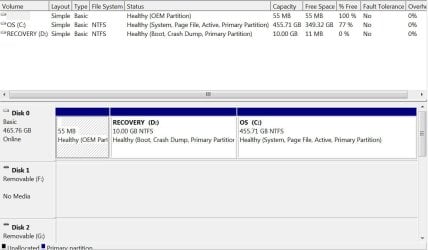
My question is, is it ok to select the so called "D" recovery partition to reinstall onto, or will I end up with the same problem?
I understand that this partition should never have been given a letter designation. Does the re install procedure format the partition to give a clean start? The capacity of the partition is 9.99GB (NFTS).
Many thanks in advance.
Jason
 

Attachments
  • drive partitions.JPG
    drive partitions.JPG
    114.9 KB · Views: 1

My Computer

Computer type
PC/Desktop
Computer Manufacturer/Model Number
dell
OS
windows 7 home premium 32bit
CPU
amd athlon x2
Motherboard
unknown
Memory
unknown
Graphics Card(s)
unknown
Hard Drives
Unknown
Antivirus
ms essentials
Browser
Firefox
Many thanks for prompt reply Copiman. As it appears at the moment, i have Win7 installed on the D recovery disc. If i reinstalled on C drive how can i make sure that it is the default, or would it be automatically? Or could I remove it from D altogether?.
Thanks,
Jason
 

My Computer

Computer type
PC/Desktop
Computer Manufacturer/Model Number
dell
OS
windows 7 home premium 32bit
CPU
amd athlon x2
Motherboard
unknown
Memory
unknown
Graphics Card(s)
unknown
Hard Drives
Unknown
Antivirus
ms essentials
Browser
Firefox
You do not want to install windows on the D partition, you want to install it on the C partition. Windows will not fit on a 10 GB partition, and you`d end up ruining your recovery partition.

You are correct that it should not have a letter. Partitions only have letters in windows, they do not have letters during an install.

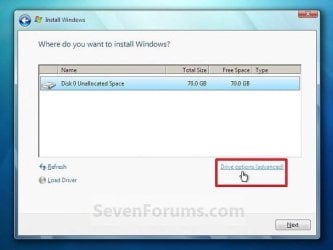
During the install you will see the partition page (what I call it) this is where you see the size of each partition, this way you know where you`re installing windows.

Example of a disk with no partitions, your window would show 3 partitions, you would choose the bottom partition, as you would see it has 455.71 GB.
 

Attachments

  • Capture.JPG
    Capture.JPG
    38.4 KB · Views: 26

My Computer

Computer type
PC/Desktop
Computer Manufacturer/Model Number
Skylake Special #666
OS
Windows 10 Pro x64
CPU
Intel Core i7 6700K
Motherboard
Asus Sabertooth Z170 Mark 1
Memory
GSkill TridentZ RGB 16GB 3600 16-16-16-36
Graphics Card(s)
EVGA GTX 980 Ti SC x2
Sound Card
Realtek High Definition
Monitor(s) Displays
AOC G2460PG
Screen Resolution
1920 x 1080 144Hz
Hard Drives
Samsung 860 Pro 256GB, Seagate Barracuda 4TB x2
PSU
EVGA 1000 P2, EVGA White Custom Braided Cables
Case
Corsair Vengeance C70 Gunmetal Black
Cooling
Corsair H100i v2, Corsair ML120 x2, Thermal Grizzly Kryonaut
Keyboard
Logitech G910 Orion Spectrum
Mouse
Logitech G700s
Internet Speed
Verizon Fios Quantum Gateway 75/75
Antivirus
Windows Defender, Malwarebytes Free 3.8.3
Browser
Chrome
Other Info
Corsair SP120 x4, LG Blu-ray Drive, Durabrand HT-395 100 Watt Dolby Digital Amp, Corsair H2100 Wireless 7.1 Headset
Thanks AddRAM. I will be installing it on the "C" partition. I'm still a bit concerned that the Win7 installed on the recovery "D" partition may cause problems.
 

My Computer

Computer type
PC/Desktop
Computer Manufacturer/Model Number
dell
OS
windows 7 home premium 32bit
CPU
amd athlon x2
Motherboard
unknown
Memory
unknown
Graphics Card(s)
unknown
Hard Drives
Unknown
Antivirus
ms essentials
Browser
Firefox
If you have already destroyed your Recovery partition, I would delete the entire drive down to unallocated space, then install windows on the unallocated space.

Or create a partition out of the unallocated space, then install windows on that partition.

All can be done by clicking "Drive Options"

If you create a partition for windows it should end up looking like this, along with a page file, I don`t use a page file. Ignore the size :)
 

Attachments

  • Samsung Drive.JPG
    Samsung Drive.JPG
    31.8 KB · Views: 3

My Computer

Computer type
PC/Desktop
Computer Manufacturer/Model Number
Skylake Special #666
OS
Windows 10 Pro x64
CPU
Intel Core i7 6700K
Motherboard
Asus Sabertooth Z170 Mark 1
Memory
GSkill TridentZ RGB 16GB 3600 16-16-16-36
Graphics Card(s)
EVGA GTX 980 Ti SC x2
Sound Card
Realtek High Definition
Monitor(s) Displays
AOC G2460PG
Screen Resolution
1920 x 1080 144Hz
Hard Drives
Samsung 860 Pro 256GB, Seagate Barracuda 4TB x2
PSU
EVGA 1000 P2, EVGA White Custom Braided Cables
Case
Corsair Vengeance C70 Gunmetal Black
Cooling
Corsair H100i v2, Corsair ML120 x2, Thermal Grizzly Kryonaut
Keyboard
Logitech G910 Orion Spectrum
Mouse
Logitech G700s
Internet Speed
Verizon Fios Quantum Gateway 75/75
Antivirus
Windows Defender, Malwarebytes Free 3.8.3
Browser
Chrome
Other Info
Corsair SP120 x4, LG Blu-ray Drive, Durabrand HT-395 100 Watt Dolby Digital Amp, Corsair H2100 Wireless 7.1 Headset
Thanks again AddRAM. Am i correct in assuming the "drive options" comes up in the installation procedure?
 

My Computer

Computer type
PC/Desktop
Computer Manufacturer/Model Number
dell
OS
windows 7 home premium 32bit
CPU
amd athlon x2
Motherboard
unknown
Memory
unknown
Graphics Card(s)
unknown
Hard Drives
Unknown
Antivirus
ms essentials
Browser
Firefox

My Computer

Computer type
PC/Desktop
Computer Manufacturer/Model Number
Skylake Special #666
OS
Windows 10 Pro x64
CPU
Intel Core i7 6700K
Motherboard
Asus Sabertooth Z170 Mark 1
Memory
GSkill TridentZ RGB 16GB 3600 16-16-16-36
Graphics Card(s)
EVGA GTX 980 Ti SC x2
Sound Card
Realtek High Definition
Monitor(s) Displays
AOC G2460PG
Screen Resolution
1920 x 1080 144Hz
Hard Drives
Samsung 860 Pro 256GB, Seagate Barracuda 4TB x2
PSU
EVGA 1000 P2, EVGA White Custom Braided Cables
Case
Corsair Vengeance C70 Gunmetal Black
Cooling
Corsair H100i v2, Corsair ML120 x2, Thermal Grizzly Kryonaut
Keyboard
Logitech G910 Orion Spectrum
Mouse
Logitech G700s
Internet Speed
Verizon Fios Quantum Gateway 75/75
Antivirus
Windows Defender, Malwarebytes Free 3.8.3
Browser
Chrome
Other Info
Corsair SP120 x4, LG Blu-ray Drive, Durabrand HT-395 100 Watt Dolby Digital Amp, Corsair H2100 Wireless 7.1 Headset
Install done and seems to be ok. I deleted the "D" partition and reinstalled on the 353GB of free space. I didn't bother with any partitions as it seemed an unecessary complication.
Many thanks to everyone who helped.
 

My Computer

Computer type
PC/Desktop
Computer Manufacturer/Model Number
dell
OS
windows 7 home premium 32bit
CPU
amd athlon x2
Motherboard
unknown
Memory
unknown
Graphics Card(s)
unknown
Hard Drives
Unknown
Antivirus
ms essentials
Browser
Firefox
353 GB ? How did you come up with that figure ?

Post a new shot of Disk Management.
 

My Computer

Computer type
PC/Desktop
Computer Manufacturer/Model Number
Skylake Special #666
OS
Windows 10 Pro x64
CPU
Intel Core i7 6700K
Motherboard
Asus Sabertooth Z170 Mark 1
Memory
GSkill TridentZ RGB 16GB 3600 16-16-16-36
Graphics Card(s)
EVGA GTX 980 Ti SC x2
Sound Card
Realtek High Definition
Monitor(s) Displays
AOC G2460PG
Screen Resolution
1920 x 1080 144Hz
Hard Drives
Samsung 860 Pro 256GB, Seagate Barracuda 4TB x2
PSU
EVGA 1000 P2, EVGA White Custom Braided Cables
Case
Corsair Vengeance C70 Gunmetal Black
Cooling
Corsair H100i v2, Corsair ML120 x2, Thermal Grizzly Kryonaut
Keyboard
Logitech G910 Orion Spectrum
Mouse
Logitech G700s
Internet Speed
Verizon Fios Quantum Gateway 75/75
Antivirus
Windows Defender, Malwarebytes Free 3.8.3
Browser
Chrome
Other Info
Corsair SP120 x4, LG Blu-ray Drive, Durabrand HT-395 100 Watt Dolby Digital Amp, Corsair H2100 Wireless 7.1 Headset
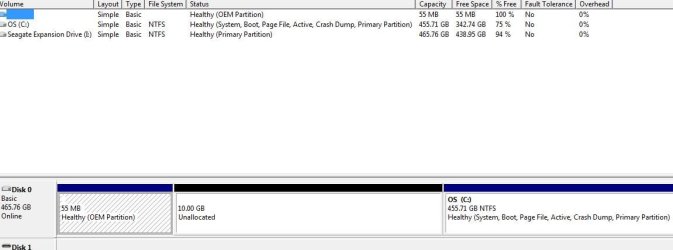
here it is
 

Attachments

  • disc management.JPG
    disc management.JPG
    59.8 KB · Views: 3

My Computer

Computer type
PC/Desktop
Computer Manufacturer/Model Number
dell
OS
windows 7 home premium 32bit
CPU
amd athlon x2
Motherboard
unknown
Memory
unknown
Graphics Card(s)
unknown
Hard Drives
Unknown
Antivirus
ms essentials
Browser
Firefox
The 55 MB is useless now, you might as well delete it too, and add the 10.55 GB of space to C.

No sense just leaving it sit there, unused.

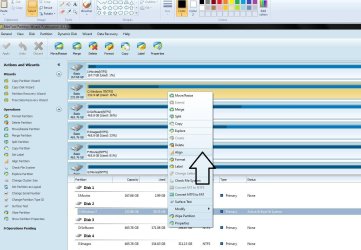
The hard drive should also be aligned, all can be done with Partition Wizard or Diskpart.
 

Attachments

  • Capture.JPG
    Capture.JPG
    314.1 KB · Views: 0

My Computer

Computer type
PC/Desktop
Computer Manufacturer/Model Number
Skylake Special #666
OS
Windows 10 Pro x64
CPU
Intel Core i7 6700K
Motherboard
Asus Sabertooth Z170 Mark 1
Memory
GSkill TridentZ RGB 16GB 3600 16-16-16-36
Graphics Card(s)
EVGA GTX 980 Ti SC x2
Sound Card
Realtek High Definition
Monitor(s) Displays
AOC G2460PG
Screen Resolution
1920 x 1080 144Hz
Hard Drives
Samsung 860 Pro 256GB, Seagate Barracuda 4TB x2
PSU
EVGA 1000 P2, EVGA White Custom Braided Cables
Case
Corsair Vengeance C70 Gunmetal Black
Cooling
Corsair H100i v2, Corsair ML120 x2, Thermal Grizzly Kryonaut
Keyboard
Logitech G910 Orion Spectrum
Mouse
Logitech G700s
Internet Speed
Verizon Fios Quantum Gateway 75/75
Antivirus
Windows Defender, Malwarebytes Free 3.8.3
Browser
Chrome
Other Info
Corsair SP120 x4, LG Blu-ray Drive, Durabrand HT-395 100 Watt Dolby Digital Amp, Corsair H2100 Wireless 7.1 Headset
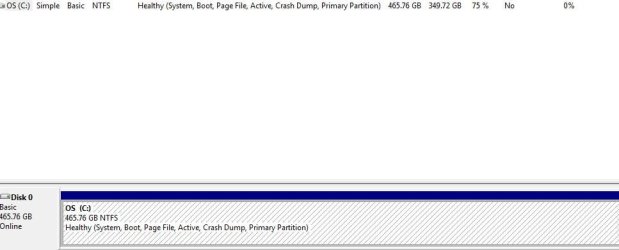
Finally managed to get all unallocated space into my C drive. (This is entirely thanks to AddRAM)
This is much tidier:)
 

Attachments

  • disc management2.JPG
    disc management2.JPG
    53 KB · Views: 1

My Computer

Computer type
PC/Desktop
Computer Manufacturer/Model Number
dell
OS
windows 7 home premium 32bit
CPU
amd athlon x2
Motherboard
unknown
Memory
unknown
Graphics Card(s)
unknown
Hard Drives
Unknown
Antivirus
ms essentials
Browser
Firefox
That is beautiful, good job. :D
 

My Computer

Computer type
PC/Desktop
Computer Manufacturer/Model Number
Skylake Special #666
OS
Windows 10 Pro x64
CPU
Intel Core i7 6700K
Motherboard
Asus Sabertooth Z170 Mark 1
Memory
GSkill TridentZ RGB 16GB 3600 16-16-16-36
Graphics Card(s)
EVGA GTX 980 Ti SC x2
Sound Card
Realtek High Definition
Monitor(s) Displays
AOC G2460PG
Screen Resolution
1920 x 1080 144Hz
Hard Drives
Samsung 860 Pro 256GB, Seagate Barracuda 4TB x2
PSU
EVGA 1000 P2, EVGA White Custom Braided Cables
Case
Corsair Vengeance C70 Gunmetal Black
Cooling
Corsair H100i v2, Corsair ML120 x2, Thermal Grizzly Kryonaut
Keyboard
Logitech G910 Orion Spectrum
Mouse
Logitech G700s
Internet Speed
Verizon Fios Quantum Gateway 75/75
Antivirus
Windows Defender, Malwarebytes Free 3.8.3
Browser
Chrome
Other Info
Corsair SP120 x4, LG Blu-ray Drive, Durabrand HT-395 100 Watt Dolby Digital Amp, Corsair H2100 Wireless 7.1 Headset
I am new to this as well, but that unallocated in between the two healthy partitions looks wrong.
(edit, I did not see the new posts on the next page)

The clean install needs to go into the partition immediately to the right of the not accessible system partition.

You would need to clean out the big partition and make it unallocated. Then you can create a new partition where it currently states unallocated.
This will become the C: partition during the clean install.

I was advised to make that C: partition smaller and thus restrict where Win7 puts it's not movable files.
They suggested 20GB to 40GB for the Win7 partition. Then all your data and apps can go into a separate partition. This extra partition can be created after your clean install.

Putting the install into it's own small partition makes future Restores and new clean installs much simpler. And the new clean install does not overwrite all your other partitions which still contain your data and apps (and your millions of music and videos).
 

My Computer

Computer type
PC/Desktop
Computer Manufacturer/Model Number
asus
OS
Win7 Home Premium 64bit
CPU
amd
Motherboard
fm2
Memory
16GB
Graphics Card(s)
integrated
Hard Drives
barracuda 750GB 2 off
Antivirus
MSE
Browser
ie11 or firefox
Thanks for advice wat721. Opinion seems to be divided about creating separate partition for OS. As my original problem was centred on such a partition i think i'll stick with what i've got and "quit while I'm ahead"
Thanks for input☺
 

My Computer

Computer type
PC/Desktop
Computer Manufacturer/Model Number
dell
OS
windows 7 home premium 32bit
CPU
amd athlon x2
Motherboard
unknown
Memory
unknown
Graphics Card(s)
unknown
Hard Drives
Unknown
Antivirus
ms essentials
Browser
Firefox
wat721, of course that is the right approach, but that`s not what we were trying to do, we talked about it through PM`s.

Now he can make a partition to the right of C for data, but it really makes no sense to store data on the same drive as windows.

But if that`s all you have to use, then that is fine also.
 

My Computer

Computer type
PC/Desktop
Computer Manufacturer/Model Number
Skylake Special #666
OS
Windows 10 Pro x64
CPU
Intel Core i7 6700K
Motherboard
Asus Sabertooth Z170 Mark 1
Memory
GSkill TridentZ RGB 16GB 3600 16-16-16-36
Graphics Card(s)
EVGA GTX 980 Ti SC x2
Sound Card
Realtek High Definition
Monitor(s) Displays
AOC G2460PG
Screen Resolution
1920 x 1080 144Hz
Hard Drives
Samsung 860 Pro 256GB, Seagate Barracuda 4TB x2
PSU
EVGA 1000 P2, EVGA White Custom Braided Cables
Case
Corsair Vengeance C70 Gunmetal Black
Cooling
Corsair H100i v2, Corsair ML120 x2, Thermal Grizzly Kryonaut
Keyboard
Logitech G910 Orion Spectrum
Mouse
Logitech G700s
Internet Speed
Verizon Fios Quantum Gateway 75/75
Antivirus
Windows Defender, Malwarebytes Free 3.8.3
Browser
Chrome
Other Info
Corsair SP120 x4, LG Blu-ray Drive, Durabrand HT-395 100 Watt Dolby Digital Amp, Corsair H2100 Wireless 7.1 Headset
Back
Top