I've tried installing the RC a few times, both as an upgrade to Vista and as a clean install to an empty disk. Every time the result is the same, Windows 7 installs, then at reboot I can (briefly) see two boot options, "Windows 7" and "Restore previous operating system" (or words to that effect) before the system chooses the second option and restores Vista.
Needless to say I had previously run the compatibility checker (it insisted I remvove McAfee for the upgrade) ....
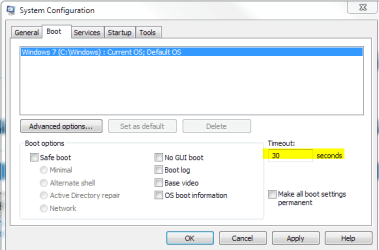
If Mercurial's suggestion doesn't work, when in Vista type msconfig in the start menu search box and hit enter. On the boot tab, make sure that the time to display boot menu is enough time for you to decide. Default is 30 seconds, but it may be different for some reason.
Tanks guys - you answers to the question of how to select a boot image are spot on (my "grace period" was set to 30 seconds - Windows wasn't waiting more than half a second max) - but that's not the problem ....
By removing my Vista disk and leaving Windows 7 no option but to try to boot off its own installation (which causes all the options with varying degrees of "safety" to be offered) I have determine that there is something in my configureation that is incompatible with Windows 7. I can't imagine what it is - my system isn't in any way exotic (and the compatibility check had given it a clean bill of health) - but I guess I'm stuck with Vista for now ...
The "Repair" option actually identifies a problem and produces a report - but doing an abortive clean install obviously means I have no network connection to use to send the bug report to MS - Catch 22 I guess



 instead of restoring vista =O