
Clean Install - VAIO Driver = Problem with battery

annasvi

New member
Local time
9:03 PM
Messages
3
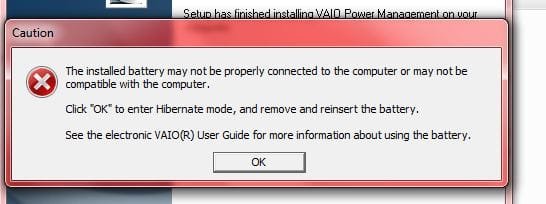
I made a clean install for VAIO (with a lot of problems) but everything seemed to be working fine and dandy. I was happy but then the screens' brighter and darker switches weren't working, so I decided to download some Utilities drivers from the Sony VAIO official website. I downloaded a couple (since I'm a cave man in all this) and didn't know which is what....and then after restarting I started getting this error message....I uninstalled all the SONY VAIO software, but I'm still getting this message and then after I click OK, the computer goes into hibernation mode (which was actually turned OFF in the first place).

What should I do!? Arrg. This is so frustrating..

(Attached is the error message).
 

Attachments
  • Capture.JPG
    Capture.JPG
    26 KB · Views: 400

My Computer

Computer Manufacturer/Model Number
VAIO CW
OS
Win 7
CPU
Centrino 2
Memory
4G RAM
Graphics Card(s)
Nividia
Hard Drives
500g 7200rpm (I believe)
Type System Restore in Start search box, find a Restore point before you copied the random files.

If the problems persist after restoring before it happened, then run sfc /scannow to see if you damaged system files.

As a last resort before clean install, run a http://www.sevenforums.com/tutorials/3413-repair-install.html?ltr=R

Next time post your exact issue here and ask which apps/drivers are needed, or call Sony tech support.
 
I have a recovery disk I made, can I just use it to restore everything? Also, I looked through the tutorials, but I'm confused which one to use. Can you please point me to the right one?

Thank you,

annasvi
 

My Computer

Computer Manufacturer/Model Number
VAIO CW
OS
Win 7
CPU
Centrino 2
Memory
4G RAM
Graphics Card(s)
Nividia
Hard Drives
500g 7200rpm (I believe)
Have you tried removing the battery and reinserting it?
 

My Computer

Computer Manufacturer/Model Number
Sony Vaio FZ21Z
OS
Windows 7 Ultimate x64 ®™
CPU
Intel Core 2 Duo (2.2 GHz)
Motherboard
Sony (Intel Chipset)
Memory
2x 2GB Corsair (667 MHz)
Graphics Card(s)
NVIDIA 8600M GS (256MB)
Sound Card
Sigmatel
Monitor(s) Displays
15.4" TFT X-Black
Screen Resolution
1280x800
Hard Drives
Western Digital 300GB Scorpio Black (7200rpm)
Mouse
Logitech Anywhere MX
Internet Speed
Sky 5MB
This sounds very stupid, I can't seem to get it out. Can't find a tutorial online for it either.
 

My Computer

Computer Manufacturer/Model Number
VAIO CW
OS
Win 7
CPU
Centrino 2
Memory
4G RAM
Graphics Card(s)
Nividia
Hard Drives
500g 7200rpm (I believe)
There should be a lock, and a release switch.....
 

Attachments

  • CWStandardBattery.jpg
    CWStandardBattery.jpg
    6.7 KB · Views: 47

My Computer

Computer Manufacturer/Model Number
Sony Vaio FZ21Z
OS
Windows 7 Ultimate x64 ®™
CPU
Intel Core 2 Duo (2.2 GHz)
Motherboard
Sony (Intel Chipset)
Memory
2x 2GB Corsair (667 MHz)
Graphics Card(s)
NVIDIA 8600M GS (256MB)
Sound Card
Sigmatel
Monitor(s) Displays
15.4" TFT X-Black
Screen Resolution
1280x800
Hard Drives
Western Digital 300GB Scorpio Black (7200rpm)
Mouse
Logitech Anywhere MX
Internet Speed
Sky 5MB
Back
Top