Clean install Win7 on external drive on different machine?

camner

New member
Local time
1:47 AM
Messages
37
I'm going to be rebuilding my wife's Dell Inspiron's Win7 installation because it is just dragging hopelessly (cursor can spin for 5 seconds upon right click of item in Windows Explorer). It will also be an opportunity to blow away all the cruft from the original Dell-supplied software that we never use!

This will take a while, and I'd like to minimize the down time for her.

Can I do the install (including drivers, etc.) on an external drive connected to my Win7 machine and then just image the result over to her boot drive (after suitable backups, of course!)?

A second question: I'm thinking of installing an SSD to speed things up for her, using a hard drive as the backup drive. What kind of capacity do I need to fit all of Win7 easily? Is 64GB enough, or do I need a 128GB to make sure there's enough room for apps on the SSD?

Thanks in advance for the help.
 

My Computer My Computer

Computer type
PC/Desktop
Computer Manufacturer/Model Number
Dell Inspiron 620
OS
Windows 7 Pro (64 bit)
CPU
i5
Memory
8GB
1. Installing on another system is possible but iffy. I would not do it. The little time you gain you may lose 10 times in trouble shooting.

2. I run all 3 of my desktops with 64GB SSDs (one since 4 years). But I would recommend 128GB. The price difference is not big. It gives you a bit more room - e.g. if you also want to run a virtual system. I am now upgrading this system to 240GB for that reason. I run Windows 8, Mint and Zorin in virtual on a Windows 7 host.
 

My Computer My Computer

Computer Manufacturer/Model Number
HP, Dell, Gateway, Toshiba - 4 laptops and 2 desktops
OS
Vista, Windows7, Mint Mate, Zorin, Windows 8
CPU
from 1.6GHz Duo to i7
Monitor(s) Displays
2x HP w2207
Hard Drives
5x HDD, 7x SSD, 12x Externals
Keyboard
with trackball - no mices
Mouse
Trackball mice
Internet Speed
DSL 6000
1. Installing on another system is possible but iffy. I would not do it. The little time you gain you may lose 10 times in trouble shooting.

2. I run all 3 of my desktops with 64GB SSDs (one since 4 years). But I would recommend 128GB. The price difference is not big. It gives you a bit more room - e.g. if you also want to run a virtual system. I am now upgrading this system to 240GB for that reason. I run Windows 8, Mint and Zorin in virtual on a Windows 7 host.

Thanks for your reply!

(I guess you signature "Keep it simple…" says it all!)
 

My Computer My Computer

Computer type
PC/Desktop
Computer Manufacturer/Model Number
Dell Inspiron 620
OS
Windows 7 Pro (64 bit)
CPU
i5
Memory
8GB
I'm going to be rebuilding my wife's Dell Inspiron's Win7 installation because it is just dragging hopelessly (cursor can spin for 5 seconds upon right click of item in Windows Explorer). It will also be an opportunity to blow away all the cruft from the original Dell-supplied software that we never use!

This will take a while, and I'd like to minimize the down time for her.

Can I do the install (including drivers, etc.) on an external drive connected to my Win7 machine and then just image the result over to her boot drive (after suitable backups, of course!)?

A second question: I'm thinking of installing an SSD to speed things up for her, using a hard drive as the backup drive. What kind of capacity do I need to fit all of Win7 easily? Is 64GB enough, or do I need a 128GB to make sure there's enough room for apps on the SSD?

Thanks in advance for the help.

Hi camner,

In addition to the information you have already received, you can purchase upgrades from your system at the below link:

Dell Inspiron Desktops Inspiron 620 Replacement Parts - Hard Drive, Memory, Battery & Motherboard | Dell

128 Gb should be better if you do not store alot of the data on the system.

If you have taken a backup then you can easily install windows:

http://dell.to/19boJUM

If not then you can create a bootable pen drive with the image of the windows:

http://www.sevenforums.com/tutorials/2432-usb-windows-7-installation-key-drive-create.html

Then clean install the windows as suggested by Greg. Once done install all the relevant drivers:

Updating Dell Drivers

Keep us posted with the results so we can advise you further.
 

My Computer My Computer

Computer type
PC/Desktop
OS
Winndows 7 32 bit
Thank you SandeepP. I'll take a look to see if I have a Dell backup of this machine.
 

My Computer My Computer

Computer type
PC/Desktop
Computer Manufacturer/Model Number
Dell Inspiron 620
OS
Windows 7 Pro (64 bit)
CPU
i5
Memory
8GB
Thank you SandeepP. I'll take a look to see if I have a Dell backup of this machine.

Hi camner,

Please check the same at your convenience and let us know. You can also request backup discs at the below link:

Request Backup Disks

Keep us posted with the results so we can advise you further.
 

My Computer My Computer

Computer type
PC/Desktop
OS
Winndows 7 32 bit
The computer is out of warranty and is therefore not eligible to get discs from Dell.
 

My Computer My Computer

Computer type
PC/Desktop
Computer Manufacturer/Model Number
Dell Inspiron 620
OS
Windows 7 Pro (64 bit)
CPU
i5
Memory
8GB


Then clean install the windows as suggested by Greg. Once done install all the relevant drivers:

Updating Dell Drivers

Keep us posted with the results so we can advise you further.

Thanks. I do have a followup question.

When going to the Dell support site for drivers, there are quite a number of "recommended" drivers that seem to be specific for a given hardware configuration. For example, just to pick two:

1. Under video drivers, there are 6 recommended drivers, including nVidia Graphics Driver, nVIDIA Geforce GT530 (M208n) Graphics Driver , Intel Graphics Controller, v.8.15.10.2291, A01 , AMD Turks XT Radeon HD6670 (M208), v.8.812, A00 , AMD Caicos Radeon HD6450 (1G DDR3, M116 & ML116), v.8.812-110104a-112217C, A00 , and nVidia Nvidia M207(D12M2-25) GT420 (1G DDR3), v.263.11, A01 .

Surely it does't make sense that I need them all! Should I install them all or determine what my video card (or onboard chipset) is and just install the driver(s) for them?

2. There are 3 recommended wireless drivers listed: Dell Wireless 1502 WLAN Driver , Realtek RTL81XX PCI-E Network Connection, v.7.038.0113.2011, A01 , Atheros Wireless 1502 WLAN Mini Card Desktops, v.9.1.0.328, A01 . Again, install them all?

Thank you.
 

My Computer My Computer

Computer type
PC/Desktop
Computer Manufacturer/Model Number
Dell Inspiron 620
OS
Windows 7 Pro (64 bit)
CPU
i5
Memory
8GB
Did you read it?

Yup! Cover to cover – twice. But, since you asked the question, I obviously didn't understand perfectly everything that I read. Just to verify what I think you're telling me, let me give it back to you.

After installing Windows 7 with the default drivers that came on the installation disk, as long as I set the windows update to include downloading and installing the latest drivers, I do not need to manually install any drivers myself (with possibly one exception – see below). Windows will take a look at my hardware and select the latest drivers for that hardware. Do I have that right?

After installing windows, I looked in device management, and I see that I have default drivers for all of the hardware with the exception of the ethernet connection. So it seems I will need to manually install from the Dell support site the ethernet drivers, and that led windows take care of the rest.
 

My Computer My Computer

Computer type
PC/Desktop
Computer Manufacturer/Model Number
Dell Inspiron 620
OS
Windows 7 Pro (64 bit)
CPU
i5
Memory
8GB
You'll need to actively run all rounds of Important and Optional Updates after enabling Automatically deliver drivers via Windows Update (Step 3).

After each requested reboot, check back for more Updates until there are no more.

Then import any drivers missing in Device Manager using your Dell Tag number.


There are other considerations too in Clean Reinstall - Factory OEM Windows 7 like whether all of your function keys work, enough camera functions, etc. Some software from Dell may be required for this. Run for awhile to be sure you need it first.
 
Last edited:
You'll need to actively run all rounds of Important and Optional Updates after enabling Automatically deliver drivers via Windows Update (Step 3).

After each requested reboot, check back for more Updates until there are no more.

Then import any missing in Device Manager using your Dell Tag number.

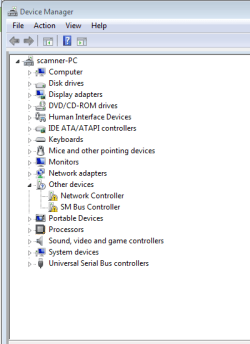
Done, except for a couple of devices that didn't auto update/install. (See screenshot)
Capture.PNG

I was able to do a Google search and discover that the "SM Bus Controller" seems to refer to the "chipset" and I found a "H61 chipset" driver, so I'm going to try that.

I have no idea which of the listed drivers on the Dell support site correspond to the "Network Controller" (which sounds very generic).

If I can avoid it, I'd rather not have to try to install the Dell drivers one by one (probably overwriting some of the newer drivers installed by the Win7 update manager).

Any thoughts?
 

My Computer My Computer

Computer type
PC/Desktop
Computer Manufacturer/Model Number
Dell Inspiron 620
OS
Windows 7 Pro (64 bit)
CPU
i5
Memory
8GB
Look under Network adapters. If you have your wireless already, then the missing one is likely the ethernet - and vice versa. If there's a bunch of models listed for your tag number, check the Hardware Identification.

Install the chipset to resolve SM Bus Controller.
 
Look under Network adapters. If you have your wireless already, then the missing one is likely the ethernet - and vice versa. If there's a bunch of models listed for your tag number, check the Hardware Identification.

Install the chipset to resolve SM Bus Controller.

Thank you!

[Are you triplets? You seem to respond in quick order no matter what the time of day!]
 

My Computer My Computer

Computer type
PC/Desktop
Computer Manufacturer/Model Number
Dell Inspiron 620
OS
Windows 7 Pro (64 bit)
CPU
i5
Memory
8GB
@gregrocker: I just finished rebuilding the system, and all seems well. I appreciate all the help you've given me on this project.
 

My Computer My Computer

Computer type
PC/Desktop
Computer Manufacturer/Model Number
Dell Inspiron 620
OS
Windows 7 Pro (64 bit)
CPU
i5
Memory
8GB


Then clean install the windows as suggested by Greg. Once done install all the relevant drivers:

Updating Dell Drivers

Keep us posted with the results so we can advise you further.

Thanks. I do have a followup question.

When going to the Dell support site for drivers, there are quite a number of "recommended" drivers that seem to be specific for a given hardware configuration. For example, just to pick two:

1. Under video drivers, there are 6 recommended drivers, including nVidia Graphics Driver, nVIDIA Geforce GT530 (M208n) Graphics Driver , Intel Graphics Controller, v.8.15.10.2291, A01 , AMD Turks XT Radeon HD6670 (M208), v.8.812, A00 , AMD Caicos Radeon HD6450 (1G DDR3, M116 & ML116), v.8.812-110104a-112217C, A00 , and nVidia Nvidia M207(D12M2-25) GT420 (1G DDR3), v.263.11, A01 .

Surely it does't make sense that I need them all! Should I install them all or determine what my video card (or onboard chipset) is and just install the driver(s) for them?

2. There are 3 recommended wireless drivers listed: Dell Wireless 1502 WLAN Driver , Realtek RTL81XX PCI-E Network Connection, v.7.038.0113.2011, A01 , Atheros Wireless 1502 WLAN Mini Card Desktops, v.9.1.0.328, A01 . Again, install them all?

Thank you.

Hi camner,

You do not need to install all the drivers only the ones that are applicable to your system. On the support site kindly enter the service tag of your system so it should show you the drivers respective for you system only.

Also, you can confirm which video card or wireless card you have on the system by checking system configuration:

Dell System Information / Dell Warranty Extensions & Upgrades / Dell Warranty Status

Enter your service tag to know the system configuration.

I believe all the drivers are installed now and system is working fine now. If required send me the service tag for your system on a private message and I would check if I can arrange the backup discs for you if required.

Keep us posted with the results so we can advise you further.
 

My Computer My Computer

Computer type
PC/Desktop
OS
Winndows 7 32 bit
Back
Top