
Clean Install with a Upgrade Windows 7 Version

How to Do a Clean Install with an Upgrade Windows 7 Version


   Information
This will show you how to do a Clean Install using a retail Upgrade Windows 7 installation disc.

   Warning
Remember that you need to legally own a valid qualifying previous version of Windows to use a Upgrade Windows 7, and to stop using (or uninstall) the qualifying OS while you have the upgrade installed. Microsoft only made doing a clean install from a upgrade Windows 7 possible to make it more convenient so you do not have to reinstall both the old Windows version (ex: Vista) and upgrade to Windows 7 everytime you needed or wanted to reinstall.

If you do not legally own a valid qualifying previous version of Windows, then you are violating the terms of Microsoft's Windows 7 End User License Agreement and could get your product key number invalidated by Microsoft. Plus, it is considered illegal.

For more about this, please see: Microsoft SMB Community Blog : Regardless of what any hack says, a Windows 7 Upgrade is an Upgrade. What you need to know.


OPTION ONE

A Normal Clean Install


1. Do a clean install at boot without checking the Automatically activate Windows when I'm online box during the installation process.

2. When the installation is finished, then manually activate Windows 7 with your product key number.

3. If your Windows should fail to activate, then pick up at step 2 in OPTION THREE below.


OPTION TWO

Through a Custom Install


   Note
This option will let you do a clean install of Windows 7 without formating the current Windows installation to have your current Windows installation backed up to the Windows.old folder during the installation of your retail upgrade Windows 7. This way you can copy any files back that you want from the C:\Windows.old folder (previous installation) back into your new installation afterwards.

1. Do a custom install at boot or from within your current Windows installation without checking the Automatically activate Windows when I'm online box during the installation process.

2. When the installation is finished, then manually activate Windows 7 with your product key number.

3. Copy any files that you want back from the C:\Windows.old folder into where you want it in you new installation.

4. You can now delete the Windows.old folder using Disk Cleanup to have a clean install now.


OPTION THREE

Clean Install with a Registry Workaround for Error Code 0xc004f061


   Note
If you get a activation error code 0xc004f061 while doing OPTION ONE or OPTION TWO above, then you will need to use this option instead
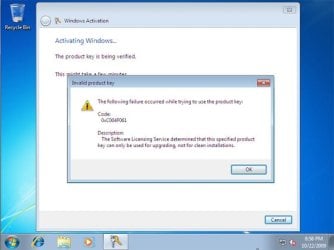
win7_upgrade_media_06.jpg


1. Do a clean install of your upgrade Windows 7 at boot without checking the Automatically activate Windows when I'm online box during the installation process.
NOTE: If you already did this from OPTION ONE above and got a activation error, then skip this step and just proceed to step 2 below instead. There's no need to reinstall again.

2. Click on the Download button below to download the .bat file below, and save it to your desktop.
Activate_Windows_Upgrade_after_Clean_Install.bat


Download


3. Right click on the downloaded .bat file, and click on Run as administrator.

4. If prompted, click/tap on Run and Yes (UAC).
NOTE: If you like, you can stop getting the Run prompt by unblocking the downloaded .bat file.

5. You will now notice a command prompt quickly open and close while applying the changes to your registry.

6. Click/tap on OK. (see screenshot below)
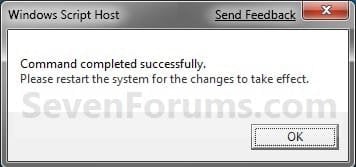
OK.jpg
7. Restart the computer.

8. When the computer is finished restarting, then manually activate Windows 7 with your product key number.


OPTION FOUR

Double Installing Windows 7


   Note
This option is the same that was used to do a clean install of an upgrade copy of Windows 7. It's more work, but if the options above did not work for you, then this should since this is the most reliable option.

1. Do a clean install of your upgrade Windows 7 at boot without checking the Automatically activate Windows when I'm online box during the installation process, and do not activate Windows 7. When finished with the clean install, do not or install any Windows Updates, drivers, or programs yet.

2. When finished with the clean install, start at step 4 at this link to do an in-place "upgrade" install with your upgrade Windows 7 installation disk from within the just now finished clean install of Windows 7.

3. When the in-place upgrade installation is completely finished, then manually activate Windows 7 with your product key number. You can now also install any Windows Updates drivers, and programs you like.
That's it,
Shawn


Attachments

Last edited:
3 cheers for .bat files.....

How do I give props to Brink? I tried and the system said I wasn't allowed. Have I no props to give?
Maybe I already did on another thread ~ ~ ~
 

My Computer

Computer type
PC/Desktop
Computer Manufacturer/Model Number
need to update!
OS
7 Ultimate 64 bit
Memory
2x4Gb DDR3-SDRAM
Graphics Card(s)
t750
Monitor(s) Displays
AOC 24" yee haw and Dell 19"
Screen Resolution
1680 x 1050 @60hz
Hard Drives
Samsung 840EVO
Internet Speed
100/20
Antivirus
MSE
Browser
Firefox
Hello Chris,

Just knowing that it was able to help is thanks enough. :)
 

My Computer

Computer type
PC/Desktop
Computer Manufacturer/Model Number
Self built custom
OS
64-bit Windows 11 Pro for Workstations
CPU
Intel i7-8700K OC'd to 5 GHz
Motherboard
ASUS ROG Maximus XI Formula Z390
Memory
64 GB (4x16GB) G.SKILL TridentZ RGB DDR4 3600 MHz
Graphics Card(s)
ASUS ROG-STRIX-GTX1080TI-O11G-GAMING
Sound Card
Integrated
Monitor(s) Displays
2 x Samsung Odyssey G7 27"
Screen Resolution
2560x1440
Hard Drives
1TB Samsung 990 PRO M.2,
4TB Samsung 990 PRO PRO M.2,
TerraMaster F8 SSD Plus NAS
PSU
Seasonic Prime Titanium 850W
Case
Thermaltake Core P3
Cooling
Corsair Hydro H115i
Keyboard
Logitech wireless K800
Mouse
Logitech MX Master 4
Internet Speed
2 Gb/s Download and 100 Mb/s Upload
Antivirus
Malwarebyte Anti-Malware Premium
Browser
Google Chrome
Other Info
Logitech Z625 speaker system,
Logitech BRIO 4K Pro webcam,
HP Color LaserJet Pro MFP M477fdn,
APC SMART-UPS RT 1000 XL - SURT1000XLI,
Galaxy S23 Plus phone
Mega-props. :D
Too funny, just as I hit send I got 'activate windows' on this machine. I put an SSD a while ago and completely forgot!
 

My Computer

Computer type
PC/Desktop
Computer Manufacturer/Model Number
need to update!
OS
7 Ultimate 64 bit
Memory
2x4Gb DDR3-SDRAM
Graphics Card(s)
t750
Monitor(s) Displays
AOC 24" yee haw and Dell 19"
Screen Resolution
1680 x 1050 @60hz
Hard Drives
Samsung 840EVO
Internet Speed
100/20
Antivirus
MSE
Browser
Firefox
i dont think option 4 is the right one because it says Do an Upgrade installation if:
Your computer is running Windows Vista with Service Pack 1.... BUT its not it is running windows 7 ultimate, service pack 1, 64 bit !!!
 

My Computer

Computer type
PC/Desktop
Computer Manufacturer/Model Number
toshiba qosmio G50 -115
OS
Microsoft Windows 7 Ultimate 64-bit 7601 Multiprocessor Free Service Pack 1
CPU
Intel(R) Core(TM)2 Duo CPU P8400 @ 2.26GHz
Motherboard
TOSHIBA Portable PC
Memory
4.00 GB
Graphics Card(s)
NVIDIA GeForce 9600M GT
Sound Card
Realtek High Definition Audio
Screen Resolution
1680 x 945 x 32 bits (4294967296 colors) @ 60 Hz
Hard Drives
(1) ST9250827AS ATA Device (2) ST9250827AS ATA Device (3) SanDisk Cruzer Micro USB Device
Hello phant0m,

You can use the steps inf OPTION FOUR if you like for your upgrade Windows 7.

Step 2 says to do it with your upgrade Windows 7 instead of Vista. ;)
 

My Computer

Computer type
PC/Desktop
Computer Manufacturer/Model Number
Self built custom
OS
64-bit Windows 11 Pro for Workstations
CPU
Intel i7-8700K OC'd to 5 GHz
Motherboard
ASUS ROG Maximus XI Formula Z390
Memory
64 GB (4x16GB) G.SKILL TridentZ RGB DDR4 3600 MHz
Graphics Card(s)
ASUS ROG-STRIX-GTX1080TI-O11G-GAMING
Sound Card
Integrated
Monitor(s) Displays
2 x Samsung Odyssey G7 27"
Screen Resolution
2560x1440
Hard Drives
1TB Samsung 990 PRO M.2,
4TB Samsung 990 PRO PRO M.2,
TerraMaster F8 SSD Plus NAS
PSU
Seasonic Prime Titanium 850W
Case
Thermaltake Core P3
Cooling
Corsair Hydro H115i
Keyboard
Logitech wireless K800
Mouse
Logitech MX Master 4
Internet Speed
2 Gb/s Download and 100 Mb/s Upload
Antivirus
Malwarebyte Anti-Malware Premium
Browser
Google Chrome
Other Info
Logitech Z625 speaker system,
Logitech BRIO 4K Pro webcam,
HP Color LaserJet Pro MFP M477fdn,
APC SMART-UPS RT 1000 XL - SURT1000XLI,
Galaxy S23 Plus phone
I've never read so many conflicting views on a topic in all of my life! For every post I have read today that said that you CAN do a clean install on a formatted HD of an UPGRADE version of Win 7, I read just as many that said it cannot be done, PERIOD! I don't know which to believe! I don't know if I should buy the UPGRADE of Win 7 Ultimate 64 bit I have found on ebay for my system to replace Win XP Pro 64 bit that is sadly no longer supported & full of security holes, forcing me to 'downgrade' to 7! That & the fact that my new printer will NOT work w/Win XP Pro 64 (ONLY 32 of XP, & 64 bit of every version of Windows POST XP!-THAT makes sense! NOT!). So, I just don't wanna spend $100 on a version of an OS that I will have to temporarily install my XP JUST to get 7 to install over it! So, if I formatted my HD totally, & wiped out the partition that XP is on in DOS to install 7, the UPGRADE version WILL install successfully & be able to be activated w/in Windows, or any which way? W/OUT me having to always install XP 1st on say a brand new drive which I am getting soon!

I also read something about an MSDN # or something that can or needs to be changed when instaling a new OS, & that the upgrade version won't do this, causing your serial key to become blacklisted or some crap like that. WTH?! The more I researched this today, the more confused I became! It's SUPPOSED to be the other way around! Please clarify this, has ANYONE actually totally formatted a HD & the installed Win 7 Ultimate Upgrade, & had no probs AT ALL afterwards?
 

My Computer

Computer type
PC/Desktop
Computer Manufacturer/Model Number
CUSTOM BUILD
OS
WIN XP PRO 64 (FOR NOW)
CPU
INTEL CORE I7 2600K, 3.80GHz Turbo
Motherboard
ASUS P8P67 (PIECE OF SHIT!)
Memory
PATRIOT VIPER EXTRM DIV. 2 8 GB 240 240 PIN DDR3 SDRAM 1600
Graphics Card(s)
EVGA GEFORCE GTX 570HD 1280MB 320BIT GDDRR5 PCIE2.0 X16 HDCP
Hard Drives
SAMSUNG SPINPOINT F1 322HJ 320GB 7200RPM SATAII, 16MB CACHE, 3.5" HD
Antivirus
C.I.S. PREMIUM 7.0.3
Browser
COMODO ICE DRAGON 26.0.0.2
I've done it personally.

Not with Ultimate, but with Home Premium. I have no reason at all to think Ultimate would be different. The 2 discs would not differ. They'd differ only in the Product Key.

No issues. I've installed twice. Once to a previously used HDD. Once to a brand new unused SSD.

I just put my eyes on my installation disc for the first time in a year or more. It's marked "upgrade".

If I were you, I'd be more than a little concerned about buying an Ultimate disk from Ebay. You're just begging for trouble. And I'm not sure why you'd want Ultimate anyway, even assuming it's a legit copy.
 

My Computer

Computer type
PC/Desktop
Computer Manufacturer/Model Number
Ignatz Special; 4 speed manual gearbox; factory air conditioning; one of one
OS
Windows 7 Home Premium SP1, 64-bit
CPU
Intel Skylake i5-6600K, not overclocked
Motherboard
AsRock Z170M Extreme 4, micro ATX
Memory
8 GB HyperX DDR4-2666 (2 x 4 GB)
Graphics Card(s)
none; graphics are integrated on CPU
Sound Card
onboard: Realtek ALC1150; external: USB Behringer UF0-202
Monitor(s) Displays
Dell S2340M 23 inch IPS
Screen Resolution
1600 x 900
Hard Drives
System: Crucial MX100 series SSD, 128 GB;
Data: Samsung Spinpoint 103SJ, 1 TB;
Backup: WD Caviar Green WD30EZRX-00D8PB0, 3 TB
PSU
Rosewill SilentNight 500 watt fanless, semi-modular
Case
Antec Solo II
Cooling
Noctua NH-U12S; Noctua F12 intake, Noctua S12A exhaust
Keyboard
Microsoft 200 6JH-00001 USB
Mouse
Dell or Microsoft optical wired; USB
Antivirus
Microsoft Security Essentials and Malwarebytes Premium
Browser
Pale Moon
Other Info
All fans PWM; speeds at idle: CPU circa 500 rpm; intake circa 600 rpm; exhaust circa 600 rpm; CPU temps 27 idle and 47 C load in a warm room (27 C/81 F) when running Intel Extreme Tuning Utility stress test.
Yes, I've read PLENTY about that. & well, every other online store is selling OEM ONLY of Win 7. & Some sellers who say that the COA is unavailable, or that they don't have a key for it, is suspicious to me! Or the one guy who's pic of the paper cover that goes inside the plastic case even said it was made by someone on deviantart.com, & had some obviously major spelling mistake to boot! But, I've seen some items that had a legit COA & SKU #, most of the fakes did not! If they even had them at all! & a few others I'd asked to either post the images of them or E-mail them to me-which is better to avoid some douche from just copying it & adding it to their ad! One seller did so, & it was an upgrade version, so I was like errrrrr!!!!! Also, I can never ever win actual auctions on ebay, I'm ALWAYS outbid at the very last second, so I prefer "Buy Now" options listings instead, which of course narrows my choices even further! & The majority of the "Buy Now" ones for Windows right now are like $200-$800+! & It's not worth more than $200! I REALLY wish I'd just bought it when 8 1st came out, I could've gotten the retail one on NewEgg for a REALLY good price, & would not be dealing w/this BS right now! Speaking of which, I can't understand why even sites like NewEgg , OverStock, etc, aren't carrying the retail versions of 7, but ONLY OEM! But, the thing is, at the time, I was dead set against using 7 when it came out, tried it on my parent's PC, & I hate all versions of Windows post XP, but not enough progs run on Linux's GUI based OS's even WITH WINE! But, I'm gonna have a dual boot of 7 & Linux Ubuntu v.14. & Why Ultimate? It has alot of features that Pro doesn't. More security features it seems, like the disk encrypter, which is a great thing w/security risks getting greater & greater these days, what w/hackers & viruses getting more & more powerful, etc. & I read the comparison of Pro vs. Ultimate, & it seems there are ALOT of great features beyond just multi-language & whatnot that Ultimate has that Pro does not. Why? Why do you think Ultimate is no good, or not worth the troubles/extra $/etc.? Not arguing, BTW,. just honestly curious. I've only used Win 7 Home on my gf's laptop, & my parent's PC trying to hlep them w/some crap on there.
 

My Computer

Computer type
PC/Desktop
Computer Manufacturer/Model Number
CUSTOM BUILD
OS
WIN XP PRO 64 (FOR NOW)
CPU
INTEL CORE I7 2600K, 3.80GHz Turbo
Motherboard
ASUS P8P67 (PIECE OF SHIT!)
Memory
PATRIOT VIPER EXTRM DIV. 2 8 GB 240 240 PIN DDR3 SDRAM 1600
Graphics Card(s)
EVGA GEFORCE GTX 570HD 1280MB 320BIT GDDRR5 PCIE2.0 X16 HDCP
Hard Drives
SAMSUNG SPINPOINT F1 322HJ 320GB 7200RPM SATAII, 16MB CACHE, 3.5" HD
Antivirus
C.I.S. PREMIUM 7.0.3
Browser
COMODO ICE DRAGON 26.0.0.2
Some of the fakes that are out there are good enough that even if you had them in front of you, you couldn't tell they were fake. You'd find out only when you got into licensing problems. So asking sellers for something or pictures does you little good.

Others are not fake. They are legit for certain purposes. But not for your average home user. The sellers usually but not always know that.

Retail versions of Windows 7 have been gone for quite a while. Ultimate OEM is $190 at Newegg. What's wrong with OEM specifically in your case?

I don't recall saying Ultimate is "no good". If you need the features listed below, you should get it. But actually, I think most people who buy Ultimate don't buy it for the features.


Here is what Ultimate has that is not available in Professional:

BitLocker, BitLocker To Go, AppLocker, Direct Access, Branche Cache, MUI language packs, boot from VHD.

Here is what Professional has that is not available in Home Premium:

Domain join, Remote Desktop host, location aware printing, EFS, Mobility Center, Presentation Mode, Offline Folders, Group Policy (GP) controls, advanced backup, XP Mode, support for 192 GB of RAM, and support for 2 CPU sockets.
 

My Computer

Computer type
PC/Desktop
Computer Manufacturer/Model Number
Ignatz Special; 4 speed manual gearbox; factory air conditioning; one of one
OS
Windows 7 Home Premium SP1, 64-bit
CPU
Intel Skylake i5-6600K, not overclocked
Motherboard
AsRock Z170M Extreme 4, micro ATX
Memory
8 GB HyperX DDR4-2666 (2 x 4 GB)
Graphics Card(s)
none; graphics are integrated on CPU
Sound Card
onboard: Realtek ALC1150; external: USB Behringer UF0-202
Monitor(s) Displays
Dell S2340M 23 inch IPS
Screen Resolution
1600 x 900
Hard Drives
System: Crucial MX100 series SSD, 128 GB;
Data: Samsung Spinpoint 103SJ, 1 TB;
Backup: WD Caviar Green WD30EZRX-00D8PB0, 3 TB
PSU
Rosewill SilentNight 500 watt fanless, semi-modular
Case
Antec Solo II
Cooling
Noctua NH-U12S; Noctua F12 intake, Noctua S12A exhaust
Keyboard
Microsoft 200 6JH-00001 USB
Mouse
Dell or Microsoft optical wired; USB
Antivirus
Microsoft Security Essentials and Malwarebytes Premium
Browser
Pale Moon
Other Info
All fans PWM; speeds at idle: CPU circa 500 rpm; intake circa 600 rpm; exhaust circa 600 rpm; CPU temps 27 idle and 47 C load in a warm room (27 C/81 F) when running Intel Extreme Tuning Utility stress test.
I don't want OEM, because if my mobo dies, & I can't deactivate it for that board, I don't wanna have to pay the greedy *******s at M$ for a new key! Plus, supposedly OEM's cannot be installed endlessly o the same system! Maybe it's like this w/7, I don't know. It was supposedly like this w/XP, but I'm on a system, w/an OEM 64 bit Windows I bought off of some dude on ebay, & the disc says DELL & this system is NOT a DELL! It's custom built by ME! & I've formatted & reinstalled it at LEAST a 1/2 dozen times since buying this OS a coupl'a years ago.I jst don't care or the limitations of what OEM is supposed to have, & like I said, perhaps it is mite strict on 7 than it was on XP, I don't know. & I knew what the diffs were between Ult & Pro 7. I read about it ALL day yesterday. Some of the stuff, I've no clue WTF it even means, & some I'd have no use for, but the features that Ult has that Pro doesn't that I did understand & would prefer having make it worth it. Would it be the end of the world & a tragedty if I DIDN'T have those features? No. I just m very picky about certain things, & once I make up my mind about something, well,..... Maybe it's my OCD?, I dunno!:rolleyes:

So, then, if you were in my shoes, & you didn't already have Win 7 & wanted it, what would YOU do? & seeing as how you can't got toWalmart, ******* Buy, or even NewEgg & get the version you want, then what? I Know there's a massive amount of fakes out there, but that doesn't mean that they ALL are! & some of the techniques that M$ emplyed tro make it know if it 's a fake otr not, are EXTREMELY difficult to fake, & would cost ALOT of $ to do so & make it undetectable! & I'd think that alone would drive up the cost of the software to a ridiculous level, too much so to make a profit off an outdated OS, don't you think? Maybe that is why some copies are going for as high as $800+ on ebay! but, the ones selling for only $80-a little over $100,...? The fakes would be much easier to spot.

Of course if M$ didn't cease & desist making any & all copies of a version of Windows the minute the next version hits the shelves, would help! Esp. given the fact that most people aren't gonna rush out & just dchange to the latest version-too costly! Esp. businiesses! Which is why MANY are STILL using XP! Who can afford to do so, when M$ seems to be pushing out a new version every 2-3 years!

Bottom line: XP is becoming less & less secure & stable even due to security holes being exploited by hackers due to no more newer updates, les & less newre sioftware & even hardware will even work w/XP! My old 32 bit version of Windows, the CD got so ****ed up I can't even install it, so I switched to the 64 one I bought. I was waiting to install it. 'till I replaced some older progs that wouldn't work in 64 bit Bit. But, now I've no choice, since the CD got all ****ed up! & my new printer will not even install in 64 bit Windows XP, only 32, & yet, it will work both 32 & 64 bit of Win Vi$ta-8! & I didn't spend nearly $200 for anew printer to just have a giant paperweight! If everything was open source & worked in Linux, I'd just use that & M$ could suck it! Maybe ONE day!?
 

My Computer

Computer type
PC/Desktop
Computer Manufacturer/Model Number
CUSTOM BUILD
OS
WIN XP PRO 64 (FOR NOW)
CPU
INTEL CORE I7 2600K, 3.80GHz Turbo
Motherboard
ASUS P8P67 (PIECE OF SHIT!)
Memory
PATRIOT VIPER EXTRM DIV. 2 8 GB 240 240 PIN DDR3 SDRAM 1600
Graphics Card(s)
EVGA GEFORCE GTX 570HD 1280MB 320BIT GDDRR5 PCIE2.0 X16 HDCP
Hard Drives
SAMSUNG SPINPOINT F1 322HJ 320GB 7200RPM SATAII, 16MB CACHE, 3.5" HD
Antivirus
C.I.S. PREMIUM 7.0.3
Browser
COMODO ICE DRAGON 26.0.0.2
For what it's worth, stories are around that MS is more tolerant of re-installing OEM on a new motherboard than it was a year or two ago. But it's still a chance. So I understand why you wouldn't want OEM.

You asked what I'd do in your shoes.

I see only 3 choices unless you get very lucky and find an ordinary retail copy of 7 Ultimate.

1: take a chance on a legit OEM at somewhere like Newegg. Hope you never have to reinstall and that if you do, MS will be lenient.

2: take a chance on a copy on Ebay or elsewhere.

3: Go with Win 8.1

In your shoes, I'd take the last choice, no contest. Taking a chance on Ebay would be my last choice. Buying 7 OEM would be my second choice.

I assume you don't want 8.1 for some reason. Expense? You don't like the Metro interface? Whatever.

You can easily get back the start menu so it looks very much like 7. Win 8 is slightly superior to 7 in some respects. I didn't upgrade because 7 is fine for me and I don't want to go through re-installing apps and reconfiguring everything.

I'll probably get Win 9 shortly after its released next spring, but I assume you can't wait.

Considering your distaste for Microsoft and all things related, you might be better off fighting Linux issues or giving up and going Apple.
 

My Computer

Computer type
PC/Desktop
Computer Manufacturer/Model Number
Ignatz Special; 4 speed manual gearbox; factory air conditioning; one of one
OS
Windows 7 Home Premium SP1, 64-bit
CPU
Intel Skylake i5-6600K, not overclocked
Motherboard
AsRock Z170M Extreme 4, micro ATX
Memory
8 GB HyperX DDR4-2666 (2 x 4 GB)
Graphics Card(s)
none; graphics are integrated on CPU
Sound Card
onboard: Realtek ALC1150; external: USB Behringer UF0-202
Monitor(s) Displays
Dell S2340M 23 inch IPS
Screen Resolution
1600 x 900
Hard Drives
System: Crucial MX100 series SSD, 128 GB;
Data: Samsung Spinpoint 103SJ, 1 TB;
Backup: WD Caviar Green WD30EZRX-00D8PB0, 3 TB
PSU
Rosewill SilentNight 500 watt fanless, semi-modular
Case
Antec Solo II
Cooling
Noctua NH-U12S; Noctua F12 intake, Noctua S12A exhaust
Keyboard
Microsoft 200 6JH-00001 USB
Mouse
Dell or Microsoft optical wired; USB
Antivirus
Microsoft Security Essentials and Malwarebytes Premium
Browser
Pale Moon
Other Info
All fans PWM; speeds at idle: CPU circa 500 rpm; intake circa 600 rpm; exhaust circa 600 rpm; CPU temps 27 idle and 47 C load in a warm room (27 C/81 F) when running Intel Extreme Tuning Utility stress test.
Win 8 is all touchscreen! I HATE touchscreen! It's everywhere these days & irritates me to no end! Call me old fashioned, but I like buttons, knobs, switches, etc, & on a computer I prefer using the keyboard & mouse! I don't wanna feel like I am at the ATM using my computer! Plus, my arms would get tired having to hold them in the air to do all that crap on the screen! **** that!

I thought about Mac but I'd have to buy a whole new computer which I cannot afford right now! I just spent $1,300 on this one at the end of 2011, & wasn't ale to assemble it 'till early 2012, & have had major mobo probs, so I have to RMA it, get it fixed or hopefully replaced! I'll never again buy another ASUS mobo! ****ing BIOS chip issue from day one, & they couldn't tell me in the 1/2 dozen calls about all the probs I had w/it? Seriously?! & I flashed the BIOS w/what wound up being the wrong one, becauise they are retarded & put it in the worng section on the site, like I'M supposed to know this shit? & that just amped up the probs! & now my HD is ****ing dying too, &other misc. BS probs! I have the worst luck w/mobos, & it spreads like a virus to all the other components! Same BS w/my last PC, too many HD failures (**** WD!), & then my vid card died, RAM got all ****ed up! I swear, I could spend $20,000 on a computer & STILL have a billion & one probs w/it! Pisses me off too! I don't have ALOT of $, & $1,300 is ALOT of $ for me! My vid card alone was $400! IT WOULD'VE been a nice systsme if ASUS wasn't retarded! I think next time I might try MSI or EVGA mobo! Or maybe even an AMD chipped board! I switched to ASUS from Intel as they lied & said that old mobo for this rig was fully compatible w/XP! *bullshit!* Computers are a necessary evil, but I am REALLY starting to hate them! & I used to love them too!

I'm gonna try w/a retail version. Ebay stands by sales, if what you get is not what was supposed to be! If not, I guess OEM & there's not a snowball's chance in HELL I won't have to format & reinstall. It's inevitable to need to be done a few times a year or more! It's Micro$uck afterall! Corruption happens, viruses, etc.!
 

My Computer

Computer type
PC/Desktop
Computer Manufacturer/Model Number
CUSTOM BUILD
OS
WIN XP PRO 64 (FOR NOW)
CPU
INTEL CORE I7 2600K, 3.80GHz Turbo
Motherboard
ASUS P8P67 (PIECE OF SHIT!)
Memory
PATRIOT VIPER EXTRM DIV. 2 8 GB 240 240 PIN DDR3 SDRAM 1600
Graphics Card(s)
EVGA GEFORCE GTX 570HD 1280MB 320BIT GDDRR5 PCIE2.0 X16 HDCP
Hard Drives
SAMSUNG SPINPOINT F1 322HJ 320GB 7200RPM SATAII, 16MB CACHE, 3.5" HD
Antivirus
C.I.S. PREMIUM 7.0.3
Browser
COMODO ICE DRAGON 26.0.0.2
People who use 8 regularly tell me they can avoid touchscreen entirely. I'm like you, I will never use a touch screen, strictly keyboard and mouse. I used Windows 8 for a couple of days with no touch screen at all. You can avoid it, if you care to. I'm not sure why you think you must use a touchscreen, but so be it.

I haven't reinstalled in probably 8 years other than when I wanted to---when I bought a new motherboard, OS, or hard drive.

The only motherboard I ever had fail was an Asus. I've used Intel and Gigabyte with no issues.

Good luck on Ebay. You might run into a situation where you get a non-counterfeit "good" disc that will install perfectly and even activate. Then find out months later that MS decides your installation is unauthorized and illegal because the disc you bought has the wrong type of license.

But suit yourself.
 

My Computer

Computer type
PC/Desktop
Computer Manufacturer/Model Number
Ignatz Special; 4 speed manual gearbox; factory air conditioning; one of one
OS
Windows 7 Home Premium SP1, 64-bit
CPU
Intel Skylake i5-6600K, not overclocked
Motherboard
AsRock Z170M Extreme 4, micro ATX
Memory
8 GB HyperX DDR4-2666 (2 x 4 GB)
Graphics Card(s)
none; graphics are integrated on CPU
Sound Card
onboard: Realtek ALC1150; external: USB Behringer UF0-202
Monitor(s) Displays
Dell S2340M 23 inch IPS
Screen Resolution
1600 x 900
Hard Drives
System: Crucial MX100 series SSD, 128 GB;
Data: Samsung Spinpoint 103SJ, 1 TB;
Backup: WD Caviar Green WD30EZRX-00D8PB0, 3 TB
PSU
Rosewill SilentNight 500 watt fanless, semi-modular
Case
Antec Solo II
Cooling
Noctua NH-U12S; Noctua F12 intake, Noctua S12A exhaust
Keyboard
Microsoft 200 6JH-00001 USB
Mouse
Dell or Microsoft optical wired; USB
Antivirus
Microsoft Security Essentials and Malwarebytes Premium
Browser
Pale Moon
Other Info
All fans PWM; speeds at idle: CPU circa 500 rpm; intake circa 600 rpm; exhaust circa 600 rpm; CPU temps 27 idle and 47 C load in a warm room (27 C/81 F) when running Intel Extreme Tuning Utility stress test.
I used this "Clean Install with a Upgrade Windows 7 Version" tutorial to install Windows 7. After installation I ran into a activation Error Code: 0xc004f061, when I typed in the product key. The Option 3, step 2 .bat file worked and allowed the product key to be entered and activated. So thanks Brink/Seven Forums for the tutorial and .bat file worked well for me.

Not sure if I should ask this here or start a new thread somewhere else? But I installed Win 7 Upgrade on a new SSHD. I have one System Reserved 100 MB NTFS partition and a Local Disk (C:) drive (Boot, Page File, Crash Dump, Primary Partition).

My question is: Can I partition this type of SSHD disk into separate partitions, ie: OS, (D:) DATA, and a recovery partition? Which I haven't done yet. Or just leave it the way it is?

Thanks, Vista32toWin7.


My Computer

Computer type
Laptop
Computer Manufacturer/Model Number
HP Windows 10
OS
64 bit OS?
CPU
Intel Core 13 8th Generation
Motherboard
Acer, Inc. Chapala [U2E1]
Memory
4GB DDR2, 2 Crucial memory upgrade sticks
Hard Drives
128GB SSD
Cooling
Ice
Mouse
Laptop finger pad and mouse
Internet Speed
Embarq
Antivirus
MalewareBytes
Browser
Firefox
Hello Vista32toWin7,

Sure you could shrink your C: drive if you like to create unallocated space to use to create new partitions with. :)
 

My Computer

Computer type
PC/Desktop
Computer Manufacturer/Model Number
Self built custom
OS
64-bit Windows 11 Pro for Workstations
CPU
Intel i7-8700K OC'd to 5 GHz
Motherboard
ASUS ROG Maximus XI Formula Z390
Memory
64 GB (4x16GB) G.SKILL TridentZ RGB DDR4 3600 MHz
Graphics Card(s)
ASUS ROG-STRIX-GTX1080TI-O11G-GAMING
Sound Card
Integrated
Monitor(s) Displays
2 x Samsung Odyssey G7 27"
Screen Resolution
2560x1440
Hard Drives
1TB Samsung 990 PRO M.2,
4TB Samsung 990 PRO PRO M.2,
TerraMaster F8 SSD Plus NAS
PSU
Seasonic Prime Titanium 850W
Case
Thermaltake Core P3
Cooling
Corsair Hydro H115i
Keyboard
Logitech wireless K800
Mouse
Logitech MX Master 4
Internet Speed
2 Gb/s Download and 100 Mb/s Upload
Antivirus
Malwarebyte Anti-Malware Premium
Browser
Google Chrome
Other Info
Logitech Z625 speaker system,
Logitech BRIO 4K Pro webcam,
HP Color LaserJet Pro MFP M477fdn,
APC SMART-UPS RT 1000 XL - SURT1000XLI,
Galaxy S23 Plus phone
Hello, I used your method with the Error Code: 0xc004f061 to activate Windows with my Upgrade key, but it didn't work because the trial version of Windows had changed from Windows 7 professional (the version that's on the upgrade CD) to Windows 7 Ultimate when i restarted my pc and then Windows wouldn't accept my key of Windows 7 professional. Do you know how to fix this?
 

My Computer

Computer type
PC/Desktop
OS
windows 7 professional 64bit
Hello Piethein, and welcome to Seven Forums.

Yeah, you would need to have the same Windows installed on your PC as what the product key is for. :(
 

My Computer

Computer type
PC/Desktop
Computer Manufacturer/Model Number
Self built custom
OS
64-bit Windows 11 Pro for Workstations
CPU
Intel i7-8700K OC'd to 5 GHz
Motherboard
ASUS ROG Maximus XI Formula Z390
Memory
64 GB (4x16GB) G.SKILL TridentZ RGB DDR4 3600 MHz
Graphics Card(s)
ASUS ROG-STRIX-GTX1080TI-O11G-GAMING
Sound Card
Integrated
Monitor(s) Displays
2 x Samsung Odyssey G7 27"
Screen Resolution
2560x1440
Hard Drives
1TB Samsung 990 PRO M.2,
4TB Samsung 990 PRO PRO M.2,
TerraMaster F8 SSD Plus NAS
PSU
Seasonic Prime Titanium 850W
Case
Thermaltake Core P3
Cooling
Corsair Hydro H115i
Keyboard
Logitech wireless K800
Mouse
Logitech MX Master 4
Internet Speed
2 Gb/s Download and 100 Mb/s Upload
Antivirus
Malwarebyte Anti-Malware Premium
Browser
Google Chrome
Other Info
Logitech Z625 speaker system,
Logitech BRIO 4K Pro webcam,
HP Color LaserJet Pro MFP M477fdn,
APC SMART-UPS RT 1000 XL - SURT1000XLI,
Galaxy S23 Plus phone
Haha, yes I know but the version changed when I ran that bat.file and I restarted my PC. Do you know how I change it back?
 

My Computer

Computer type
PC/Desktop
OS
windows 7 professional 64bit
The .bat file only does this below to add the MediaBootInstall DWORD with a value of 0 to the OOBE key to fool Windows 7 into thinking Windows 7 had been installed as an upgrade from inside Windows, then it resets Windows rearm count.

Code:
REG ADD HKLM\SOFTWARE\Microsoft\Windows\CurrentVersion\Setup\OOBE /V MediaBootInstall /T REG_DWORD /D 0 /F
 
slmgr /rearm

What did you use to install Windows with?
 

My Computer

Computer type
PC/Desktop
Computer Manufacturer/Model Number
Self built custom
OS
64-bit Windows 11 Pro for Workstations
CPU
Intel i7-8700K OC'd to 5 GHz
Motherboard
ASUS ROG Maximus XI Formula Z390
Memory
64 GB (4x16GB) G.SKILL TridentZ RGB DDR4 3600 MHz
Graphics Card(s)
ASUS ROG-STRIX-GTX1080TI-O11G-GAMING
Sound Card
Integrated
Monitor(s) Displays
2 x Samsung Odyssey G7 27"
Screen Resolution
2560x1440
Hard Drives
1TB Samsung 990 PRO M.2,
4TB Samsung 990 PRO PRO M.2,
TerraMaster F8 SSD Plus NAS
PSU
Seasonic Prime Titanium 850W
Case
Thermaltake Core P3
Cooling
Corsair Hydro H115i
Keyboard
Logitech wireless K800
Mouse
Logitech MX Master 4
Internet Speed
2 Gb/s Download and 100 Mb/s Upload
Antivirus
Malwarebyte Anti-Malware Premium
Browser
Google Chrome
Other Info
Logitech Z625 speaker system,
Logitech BRIO 4K Pro webcam,
HP Color LaserJet Pro MFP M477fdn,
APC SMART-UPS RT 1000 XL - SURT1000XLI,
Galaxy S23 Plus phone
I did a clean install with a student upgrade cd of Windows 7 professional 64 bit.
 

My Computer

Computer type
PC/Desktop
OS
windows 7 professional 64bit
Back
Top