
Clean Install with a Upgrade Windows 7 Version

How to Do a Clean Install with an Upgrade Windows 7 Version


   Information
This will show you how to do a Clean Install using a retail Upgrade Windows 7 installation disc.

   Warning
Remember that you need to legally own a valid qualifying previous version of Windows to use a Upgrade Windows 7, and to stop using (or uninstall) the qualifying OS while you have the upgrade installed. Microsoft only made doing a clean install from a upgrade Windows 7 possible to make it more convenient so you do not have to reinstall both the old Windows version (ex: Vista) and upgrade to Windows 7 everytime you needed or wanted to reinstall.

If you do not legally own a valid qualifying previous version of Windows, then you are violating the terms of Microsoft's Windows 7 End User License Agreement and could get your product key number invalidated by Microsoft. Plus, it is considered illegal.

For more about this, please see: Microsoft SMB Community Blog : Regardless of what any hack says, a Windows 7 Upgrade is an Upgrade. What you need to know.


OPTION ONE

A Normal Clean Install


1. Do a clean install at boot without checking the Automatically activate Windows when I'm online box during the installation process.

2. When the installation is finished, then manually activate Windows 7 with your product key number.

3. If your Windows should fail to activate, then pick up at step 2 in OPTION THREE below.


OPTION TWO

Through a Custom Install


   Note
This option will let you do a clean install of Windows 7 without formating the current Windows installation to have your current Windows installation backed up to the Windows.old folder during the installation of your retail upgrade Windows 7. This way you can copy any files back that you want from the C:\Windows.old folder (previous installation) back into your new installation afterwards.

1. Do a custom install at boot or from within your current Windows installation without checking the Automatically activate Windows when I'm online box during the installation process.

2. When the installation is finished, then manually activate Windows 7 with your product key number.

3. Copy any files that you want back from the C:\Windows.old folder into where you want it in you new installation.

4. You can now delete the Windows.old folder using Disk Cleanup to have a clean install now.


OPTION THREE

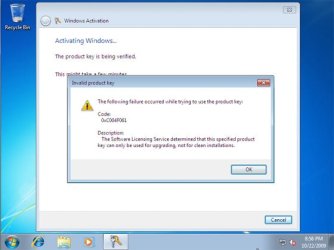
Clean Install with a Registry Workaround for Error Code 0xc004f061


   Note
If you get a activation error code 0xc004f061 while doing OPTION ONE or OPTION TWO above, then you will need to use this option instead
win7_upgrade_media_06.jpg


1. Do a clean install of your upgrade Windows 7 at boot without checking the Automatically activate Windows when I'm online box during the installation process.
NOTE: If you already did this from OPTION ONE above and got a activation error, then skip this step and just proceed to step 2 below instead. There's no need to reinstall again.

2. Click on the Download button below to download the .bat file below, and save it to your desktop.
Activate_Windows_Upgrade_after_Clean_Install.bat


Download


3. Right click on the downloaded .bat file, and click on Run as administrator.

4. If prompted, click/tap on Run and Yes (UAC).
NOTE: If you like, you can stop getting the Run prompt by unblocking the downloaded .bat file.

5. You will now notice a command prompt quickly open and close while applying the changes to your registry.

6. Click/tap on OK. (see screenshot below)
OK.jpg
7. Restart the computer.

8. When the computer is finished restarting, then manually activate Windows 7 with your product key number.


OPTION FOUR

Double Installing Windows 7


   Note
This option is the same that was used to do a clean install of an upgrade copy of Windows 7. It's more work, but if the options above did not work for you, then this should since this is the most reliable option.

1. Do a clean install of your upgrade Windows 7 at boot without checking the Automatically activate Windows when I'm online box during the installation process, and do not activate Windows 7. When finished with the clean install, do not or install any Windows Updates, drivers, or programs yet.

2. When finished with the clean install, start at step 4 at this link to do an in-place "upgrade" install with your upgrade Windows 7 installation disk from within the just now finished clean install of Windows 7.

3. When the in-place upgrade installation is completely finished, then manually activate Windows 7 with your product key number. You can now also install any Windows Updates drivers, and programs you like.
That's it,
Shawn


Attachments

Last edited:
You're most welcome. :)
 

My Computer

Computer type
PC/Desktop
Computer Manufacturer/Model Number
Self built custom
OS
64-bit Windows 11 Pro for Workstations
CPU
Intel i7-8700K OC'd to 5 GHz
Motherboard
ASUS ROG Maximus XI Formula Z390
Memory
64 GB (4x16GB) G.SKILL TridentZ RGB DDR4 3600 MHz
Graphics Card(s)
ASUS ROG-STRIX-GTX1080TI-O11G-GAMING
Sound Card
Integrated
Monitor(s) Displays
2 x Samsung Odyssey G7 27"
Screen Resolution
2560x1440
Hard Drives
1TB Samsung 990 PRO M.2,
4TB Samsung 990 PRO PRO M.2,
TerraMaster F8 SSD Plus NAS
PSU
Seasonic Prime Titanium 850W
Case
Thermaltake Core P3
Cooling
Corsair Hydro H115i
Keyboard
Logitech wireless K800
Mouse
Logitech MX Master 4
Internet Speed
2 Gb/s Download and 100 Mb/s Upload
Antivirus
Malwarebyte Anti-Malware Premium
Browser
Google Chrome
Other Info
Logitech Z625 speaker system,
Logitech BRIO 4K Pro webcam,
HP Color LaserJet Pro MFP M477fdn,
APC SMART-UPS RT 1000 XL - SURT1000XLI,
Galaxy S23 Plus phone
Ok well got the new system up and running. I ran into the upgrade error. So I did what the tutorial said to do in the CMD prompt and its now activated.

Thanks a bunch guys. You saved me a chuck of change.
 

My Computer

Computer type
PC/Desktop
Computer Manufacturer/Model Number
Home Built
OS
Windows 7 Home Premium 64bit SP2
CPU
Intel Core i5-2500k
Motherboard
ASRock Z68 Extreme3 Gen3
Memory
G.Skill Sniper 16GB (4x4GB) DDR3-1600
Graphics Card(s)
EVGA Nvidia GTX 560Ti
Sound Card
OnBoard HD Audio
Monitor(s) Displays
LG 37" 720p HDTV
Hard Drives
Corsair Force Series 3 120GB SSD
Western Digital Caviar Blue 500GB
Western Digital Caviar Black 1TB
PSU
OCZ ModXStream Pro 700w Modular
Case
Thermaltake Commander MS-I ID ATX Mid Tower
Cooling
Corsair Hydro H60
Internet Speed
Cox HSI Preferred 25Mbt
Antivirus
Kaspersky Internet Security 2013
Browser
Waterfox 64Bit 18.1
You're most welcome Raven. Thank you for posting back with your results. :)
 

My Computer

Computer type
PC/Desktop
Computer Manufacturer/Model Number
Self built custom
OS
64-bit Windows 11 Pro for Workstations
CPU
Intel i7-8700K OC'd to 5 GHz
Motherboard
ASUS ROG Maximus XI Formula Z390
Memory
64 GB (4x16GB) G.SKILL TridentZ RGB DDR4 3600 MHz
Graphics Card(s)
ASUS ROG-STRIX-GTX1080TI-O11G-GAMING
Sound Card
Integrated
Monitor(s) Displays
2 x Samsung Odyssey G7 27"
Screen Resolution
2560x1440
Hard Drives
1TB Samsung 990 PRO M.2,
4TB Samsung 990 PRO PRO M.2,
TerraMaster F8 SSD Plus NAS
PSU
Seasonic Prime Titanium 850W
Case
Thermaltake Core P3
Cooling
Corsair Hydro H115i
Keyboard
Logitech wireless K800
Mouse
Logitech MX Master 4
Internet Speed
2 Gb/s Download and 100 Mb/s Upload
Antivirus
Malwarebyte Anti-Malware Premium
Browser
Google Chrome
Other Info
Logitech Z625 speaker system,
Logitech BRIO 4K Pro webcam,
HP Color LaserJet Pro MFP M477fdn,
APC SMART-UPS RT 1000 XL - SURT1000XLI,
Galaxy S23 Plus phone
Shawn,
The Paul Thurott link now produces a 404 error.

Do you happen know which particular blog of his wherein he documented doing a clean install from upgrade media?

Do you have any references I can use verifying that the upgrade install is legal?

I've got a chap who is as hard-headed as I am which what drove me to looking for the article from Thurott.

Any suggestions will be appreciated.

thanks,
karl
 

My Computer

Computer Manufacturer/Model Number
Toshiba Satellite S875D-S7239 laptop
OS
MS Windows 7 Ultimate SP1 64-bit
CPU
AMD A10-4600M
Motherboard
AMD Pumori (Socket FT1)
Memory
6.00 GB Dual-Channel DDR3 @ 798MHz (11-11-12-28)
Graphics Card(s)
AMD Radeon HD 7660G
Sound Card
High Definition Audio Device
Monitor(s) Displays
Generic PnP Monitor (1600x900@60Hz)
Screen Resolution
1600x900@60Hz
Hard Drives
SSD 119GB Corsair CSSD-V128GB2 ATA Device
Keyboard
Standard PS/2 Keyboard
Mouse
HP Wireless Optical Mobile Mouse Model FHA-3410
Internet Speed
What the local pub, local coffee shop offers.
Other Info
Optical Drive:MATSHITA BD-CMB UJ160B ATA Device


Also have an Asus ha1002xp netbook with Win 7 Ultimate installed.
Hello Karl,

Here's a link to another post of his that's basically for the same thing in Method #2 there. We've used the same method here as well. I just provided a REG file to make it easier to do instead.

Clean Install Windows 7 with Upgrade Media

As long as the user meets the requirements in the red Warning box at the top of this tutorial, then it is perfectly legal. Microsoft left this option available for their customers that meet these requirements so that they will not have to say install Vista first, then upgrade to Windows 7. :)
 

My Computer

Computer type
PC/Desktop
Computer Manufacturer/Model Number
Self built custom
OS
64-bit Windows 11 Pro for Workstations
CPU
Intel i7-8700K OC'd to 5 GHz
Motherboard
ASUS ROG Maximus XI Formula Z390
Memory
64 GB (4x16GB) G.SKILL TridentZ RGB DDR4 3600 MHz
Graphics Card(s)
ASUS ROG-STRIX-GTX1080TI-O11G-GAMING
Sound Card
Integrated
Monitor(s) Displays
2 x Samsung Odyssey G7 27"
Screen Resolution
2560x1440
Hard Drives
1TB Samsung 990 PRO M.2,
4TB Samsung 990 PRO PRO M.2,
TerraMaster F8 SSD Plus NAS
PSU
Seasonic Prime Titanium 850W
Case
Thermaltake Core P3
Cooling
Corsair Hydro H115i
Keyboard
Logitech wireless K800
Mouse
Logitech MX Master 4
Internet Speed
2 Gb/s Download and 100 Mb/s Upload
Antivirus
Malwarebyte Anti-Malware Premium
Browser
Google Chrome
Other Info
Logitech Z625 speaker system,
Logitech BRIO 4K Pro webcam,
HP Color LaserJet Pro MFP M477fdn,
APC SMART-UPS RT 1000 XL - SURT1000XLI,
Galaxy S23 Plus phone
Shawn,
The only shortcoming there is that the blogpost is not the full writeup which I had seen from him before.

I'm trying to gather as much info as possible so I can fire a real volley at this guy.

Many thanks,
karl
 

My Computer

Computer Manufacturer/Model Number
Toshiba Satellite S875D-S7239 laptop
OS
MS Windows 7 Ultimate SP1 64-bit
CPU
AMD A10-4600M
Motherboard
AMD Pumori (Socket FT1)
Memory
6.00 GB Dual-Channel DDR3 @ 798MHz (11-11-12-28)
Graphics Card(s)
AMD Radeon HD 7660G
Sound Card
High Definition Audio Device
Monitor(s) Displays
Generic PnP Monitor (1600x900@60Hz)
Screen Resolution
1600x900@60Hz
Hard Drives
SSD 119GB Corsair CSSD-V128GB2 ATA Device
Keyboard
Standard PS/2 Keyboard
Mouse
HP Wireless Optical Mobile Mouse Model FHA-3410
Internet Speed
What the local pub, local coffee shop offers.
Other Info
Optical Drive:MATSHITA BD-CMB UJ160B ATA Device


Also have an Asus ha1002xp netbook with Win 7 Ultimate installed.
Yeah, it seems that he has removed the original article from his site that I linked to in the tutorial. I Googled for the original article as well, but it appears to be gone now. The link above is the closest I could find for it where he references this.
 

My Computer

Computer type
PC/Desktop
Computer Manufacturer/Model Number
Self built custom
OS
64-bit Windows 11 Pro for Workstations
CPU
Intel i7-8700K OC'd to 5 GHz
Motherboard
ASUS ROG Maximus XI Formula Z390
Memory
64 GB (4x16GB) G.SKILL TridentZ RGB DDR4 3600 MHz
Graphics Card(s)
ASUS ROG-STRIX-GTX1080TI-O11G-GAMING
Sound Card
Integrated
Monitor(s) Displays
2 x Samsung Odyssey G7 27"
Screen Resolution
2560x1440
Hard Drives
1TB Samsung 990 PRO M.2,
4TB Samsung 990 PRO PRO M.2,
TerraMaster F8 SSD Plus NAS
PSU
Seasonic Prime Titanium 850W
Case
Thermaltake Core P3
Cooling
Corsair Hydro H115i
Keyboard
Logitech wireless K800
Mouse
Logitech MX Master 4
Internet Speed
2 Gb/s Download and 100 Mb/s Upload
Antivirus
Malwarebyte Anti-Malware Premium
Browser
Google Chrome
Other Info
Logitech Z625 speaker system,
Logitech BRIO 4K Pro webcam,
HP Color LaserJet Pro MFP M477fdn,
APC SMART-UPS RT 1000 XL - SURT1000XLI,
Galaxy S23 Plus phone

My Computer

Computer Manufacturer/Model Number
Toshiba Satellite S875D-S7239 laptop
OS
MS Windows 7 Ultimate SP1 64-bit
CPU
AMD A10-4600M
Motherboard
AMD Pumori (Socket FT1)
Memory
6.00 GB Dual-Channel DDR3 @ 798MHz (11-11-12-28)
Graphics Card(s)
AMD Radeon HD 7660G
Sound Card
High Definition Audio Device
Monitor(s) Displays
Generic PnP Monitor (1600x900@60Hz)
Screen Resolution
1600x900@60Hz
Hard Drives
SSD 119GB Corsair CSSD-V128GB2 ATA Device
Keyboard
Standard PS/2 Keyboard
Mouse
HP Wireless Optical Mobile Mouse Model FHA-3410
Internet Speed
What the local pub, local coffee shop offers.
Other Info
Optical Drive:MATSHITA BD-CMB UJ160B ATA Device


Also have an Asus ha1002xp netbook with Win 7 Ultimate installed.
LOL, that's the same article that I linked to in my post above. :p
 

My Computer

Computer type
PC/Desktop
Computer Manufacturer/Model Number
Self built custom
OS
64-bit Windows 11 Pro for Workstations
CPU
Intel i7-8700K OC'd to 5 GHz
Motherboard
ASUS ROG Maximus XI Formula Z390
Memory
64 GB (4x16GB) G.SKILL TridentZ RGB DDR4 3600 MHz
Graphics Card(s)
ASUS ROG-STRIX-GTX1080TI-O11G-GAMING
Sound Card
Integrated
Monitor(s) Displays
2 x Samsung Odyssey G7 27"
Screen Resolution
2560x1440
Hard Drives
1TB Samsung 990 PRO M.2,
4TB Samsung 990 PRO PRO M.2,
TerraMaster F8 SSD Plus NAS
PSU
Seasonic Prime Titanium 850W
Case
Thermaltake Core P3
Cooling
Corsair Hydro H115i
Keyboard
Logitech wireless K800
Mouse
Logitech MX Master 4
Internet Speed
2 Gb/s Download and 100 Mb/s Upload
Antivirus
Malwarebyte Anti-Malware Premium
Browser
Google Chrome
Other Info
Logitech Z625 speaker system,
Logitech BRIO 4K Pro webcam,
HP Color LaserJet Pro MFP M477fdn,
APC SMART-UPS RT 1000 XL - SURT1000XLI,
Galaxy S23 Plus phone
somewhere i must have goofed before, because what i got was a very abbreviated version.

Wonder how I managed to do it? Oh well, all's well that ends will.
 

My Computer

Computer Manufacturer/Model Number
Toshiba Satellite S875D-S7239 laptop
OS
MS Windows 7 Ultimate SP1 64-bit
CPU
AMD A10-4600M
Motherboard
AMD Pumori (Socket FT1)
Memory
6.00 GB Dual-Channel DDR3 @ 798MHz (11-11-12-28)
Graphics Card(s)
AMD Radeon HD 7660G
Sound Card
High Definition Audio Device
Monitor(s) Displays
Generic PnP Monitor (1600x900@60Hz)
Screen Resolution
1600x900@60Hz
Hard Drives
SSD 119GB Corsair CSSD-V128GB2 ATA Device
Keyboard
Standard PS/2 Keyboard
Mouse
HP Wireless Optical Mobile Mouse Model FHA-3410
Internet Speed
What the local pub, local coffee shop offers.
Other Info
Optical Drive:MATSHITA BD-CMB UJ160B ATA Device


Also have an Asus ha1002xp netbook with Win 7 Ultimate installed.
somewhere i must have goofed before, because what i got was a very abbreviated version.

Wonder how I managed to do it? Oh well, all's well that ends will.

LOL, I don't know either. :)
 
Last edited:

My Computer

Computer type
PC/Desktop
Computer Manufacturer/Model Number
Self built custom
OS
64-bit Windows 11 Pro for Workstations
CPU
Intel i7-8700K OC'd to 5 GHz
Motherboard
ASUS ROG Maximus XI Formula Z390
Memory
64 GB (4x16GB) G.SKILL TridentZ RGB DDR4 3600 MHz
Graphics Card(s)
ASUS ROG-STRIX-GTX1080TI-O11G-GAMING
Sound Card
Integrated
Monitor(s) Displays
2 x Samsung Odyssey G7 27"
Screen Resolution
2560x1440
Hard Drives
1TB Samsung 990 PRO M.2,
4TB Samsung 990 PRO PRO M.2,
TerraMaster F8 SSD Plus NAS
PSU
Seasonic Prime Titanium 850W
Case
Thermaltake Core P3
Cooling
Corsair Hydro H115i
Keyboard
Logitech wireless K800
Mouse
Logitech MX Master 4
Internet Speed
2 Gb/s Download and 100 Mb/s Upload
Antivirus
Malwarebyte Anti-Malware Premium
Browser
Google Chrome
Other Info
Logitech Z625 speaker system,
Logitech BRIO 4K Pro webcam,
HP Color LaserJet Pro MFP M477fdn,
APC SMART-UPS RT 1000 XL - SURT1000XLI,
Galaxy S23 Plus phone

My Computer

Computer type
PC/Desktop
Computer Manufacturer/Model Number
Evga X58
OS
Windows 7 Ultimate x64
CPU
Core i7 950 - 3.06 GHz
Motherboard
EVGA X58 SLI
Memory
Corsair XMS3 Dominator CMP12GX3M3A1600C9 12GB
Graphics Card(s)
eVGA GTX 550 TI-FPB 1GB
Sound Card
High Definition Audio
Monitor(s) Displays
ASUS VH242H 24 LCD
Screen Resolution
1920 X 1080
Hard Drives
2x - Seagate 1000GB Hard Drive SATA 3Gb/s 32MB Cache
Seagate 750GB Barracuda 7200.12 SATA II w/ 32MB Cache
WDC WD2500AAJB-00J3A0 ATA Device
PSU
OCZ ZX Series 1250W PSU
Case
ANTEC NINE HUNDRED TWO
Cooling
Zalman Reserator 3 MAX Dual CPU Cooler
Keyboard
Logitech
Mouse
Logitech
Other Info
2 x- HL-DT-ST DVDRAM GH24NS50 ATA Device
Thank you Windrider. That was it. I updated the link in the tutorial with this one for reference. :)
 

My Computer

Computer type
PC/Desktop
Computer Manufacturer/Model Number
Self built custom
OS
64-bit Windows 11 Pro for Workstations
CPU
Intel i7-8700K OC'd to 5 GHz
Motherboard
ASUS ROG Maximus XI Formula Z390
Memory
64 GB (4x16GB) G.SKILL TridentZ RGB DDR4 3600 MHz
Graphics Card(s)
ASUS ROG-STRIX-GTX1080TI-O11G-GAMING
Sound Card
Integrated
Monitor(s) Displays
2 x Samsung Odyssey G7 27"
Screen Resolution
2560x1440
Hard Drives
1TB Samsung 990 PRO M.2,
4TB Samsung 990 PRO PRO M.2,
TerraMaster F8 SSD Plus NAS
PSU
Seasonic Prime Titanium 850W
Case
Thermaltake Core P3
Cooling
Corsair Hydro H115i
Keyboard
Logitech wireless K800
Mouse
Logitech MX Master 4
Internet Speed
2 Gb/s Download and 100 Mb/s Upload
Antivirus
Malwarebyte Anti-Malware Premium
Browser
Google Chrome
Other Info
Logitech Z625 speaker system,
Logitech BRIO 4K Pro webcam,
HP Color LaserJet Pro MFP M477fdn,
APC SMART-UPS RT 1000 XL - SURT1000XLI,
Galaxy S23 Plus phone
Shawn,
Actually, you don't want to use the link from Windrider. That's the one with the abbrevaited presentaion of the problem.
 

My Computer

Computer Manufacturer/Model Number
Toshiba Satellite S875D-S7239 laptop
OS
MS Windows 7 Ultimate SP1 64-bit
CPU
AMD A10-4600M
Motherboard
AMD Pumori (Socket FT1)
Memory
6.00 GB Dual-Channel DDR3 @ 798MHz (11-11-12-28)
Graphics Card(s)
AMD Radeon HD 7660G
Sound Card
High Definition Audio Device
Monitor(s) Displays
Generic PnP Monitor (1600x900@60Hz)
Screen Resolution
1600x900@60Hz
Hard Drives
SSD 119GB Corsair CSSD-V128GB2 ATA Device
Keyboard
Standard PS/2 Keyboard
Mouse
HP Wireless Optical Mobile Mouse Model FHA-3410
Internet Speed
What the local pub, local coffee shop offers.
Other Info
Optical Drive:MATSHITA BD-CMB UJ160B ATA Device


Also have an Asus ha1002xp netbook with Win 7 Ultimate installed.
True, but with the original missing/removed, that link will do for now since it has what I quoted in our tutorial here and the other one didn't.
 

My Computer

Computer type
PC/Desktop
Computer Manufacturer/Model Number
Self built custom
OS
64-bit Windows 11 Pro for Workstations
CPU
Intel i7-8700K OC'd to 5 GHz
Motherboard
ASUS ROG Maximus XI Formula Z390
Memory
64 GB (4x16GB) G.SKILL TridentZ RGB DDR4 3600 MHz
Graphics Card(s)
ASUS ROG-STRIX-GTX1080TI-O11G-GAMING
Sound Card
Integrated
Monitor(s) Displays
2 x Samsung Odyssey G7 27"
Screen Resolution
2560x1440
Hard Drives
1TB Samsung 990 PRO M.2,
4TB Samsung 990 PRO PRO M.2,
TerraMaster F8 SSD Plus NAS
PSU
Seasonic Prime Titanium 850W
Case
Thermaltake Core P3
Cooling
Corsair Hydro H115i
Keyboard
Logitech wireless K800
Mouse
Logitech MX Master 4
Internet Speed
2 Gb/s Download and 100 Mb/s Upload
Antivirus
Malwarebyte Anti-Malware Premium
Browser
Google Chrome
Other Info
Logitech Z625 speaker system,
Logitech BRIO 4K Pro webcam,
HP Color LaserJet Pro MFP M477fdn,
APC SMART-UPS RT 1000 XL - SURT1000XLI,
Galaxy S23 Plus phone
Thank you Windrider. That was it. I updated the link in the tutorial with this one for reference. :)


Your welcome Brink.. I have had to use that method for quite a few tutorials in the past that don't exist anymore.
 

My Computer

Computer type
PC/Desktop
Computer Manufacturer/Model Number
Evga X58
OS
Windows 7 Ultimate x64
CPU
Core i7 950 - 3.06 GHz
Motherboard
EVGA X58 SLI
Memory
Corsair XMS3 Dominator CMP12GX3M3A1600C9 12GB
Graphics Card(s)
eVGA GTX 550 TI-FPB 1GB
Sound Card
High Definition Audio
Monitor(s) Displays
ASUS VH242H 24 LCD
Screen Resolution
1920 X 1080
Hard Drives
2x - Seagate 1000GB Hard Drive SATA 3Gb/s 32MB Cache
Seagate 750GB Barracuda 7200.12 SATA II w/ 32MB Cache
WDC WD2500AAJB-00J3A0 ATA Device
PSU
OCZ ZX Series 1250W PSU
Case
ANTEC NINE HUNDRED TWO
Cooling
Zalman Reserator 3 MAX Dual CPU Cooler
Keyboard
Logitech
Mouse
Logitech
Other Info
2 x- HL-DT-ST DVDRAM GH24NS50 ATA Device
Clean Install with Upgrade Media with SP1

Is there a way to do a clean install with upgrade media using a Windows installation DVD that has been slipstreamed with SP1? I tried this and got an error message on the second pass saying I was trying to upgrade a version newer than the DVD. Used the same DVD for both passes.
 

My Computer

OS
Windows XP
CPU
AMD Athlon 5000+
Motherboard
MSI K9N Neo V2/V3
Memory
2 GB
Graphics Card(s)
MSI NX 8500GT
Monitor(s) Displays
Acer 19" LCD
Hard Drives
2 SATA drives of 320GB each, one Western Digital and one Seagate.
Hello Ray,

You might give OPTION THREE a try to see if it may work for you instead. :)
 

My Computer

Computer type
PC/Desktop
Computer Manufacturer/Model Number
Self built custom
OS
64-bit Windows 11 Pro for Workstations
CPU
Intel i7-8700K OC'd to 5 GHz
Motherboard
ASUS ROG Maximus XI Formula Z390
Memory
64 GB (4x16GB) G.SKILL TridentZ RGB DDR4 3600 MHz
Graphics Card(s)
ASUS ROG-STRIX-GTX1080TI-O11G-GAMING
Sound Card
Integrated
Monitor(s) Displays
2 x Samsung Odyssey G7 27"
Screen Resolution
2560x1440
Hard Drives
1TB Samsung 990 PRO M.2,
4TB Samsung 990 PRO PRO M.2,
TerraMaster F8 SSD Plus NAS
PSU
Seasonic Prime Titanium 850W
Case
Thermaltake Core P3
Cooling
Corsair Hydro H115i
Keyboard
Logitech wireless K800
Mouse
Logitech MX Master 4
Internet Speed
2 Gb/s Download and 100 Mb/s Upload
Antivirus
Malwarebyte Anti-Malware Premium
Browser
Google Chrome
Other Info
Logitech Z625 speaker system,
Logitech BRIO 4K Pro webcam,
HP Color LaserJet Pro MFP M477fdn,
APC SMART-UPS RT 1000 XL - SURT1000XLI,
Galaxy S23 Plus phone
Windows 7 Home Basic (Brazil) Upgrade Options?

Hi there! New kid in town, be gentle! Not a reply but a question: bought an HP dv4-2112br laptop in Brazil with W7 Home Basic (32bit). What are my upgrade/clean install options if any? As I reside in the UK, can I use UK purchased W7 say Home Premium OS? What might be the restrictions?? Any advice gratefully received. Thanks.
 

My Computer

OS
W7 32b Home Basic
Hello Dixietech, and welcome to Seven Forums.

If it's a retail upgrade copy, then sure you could do a clean install with is using an option in the tutorial. :)
 

My Computer

Computer type
PC/Desktop
Computer Manufacturer/Model Number
Self built custom
OS
64-bit Windows 11 Pro for Workstations
CPU
Intel i7-8700K OC'd to 5 GHz
Motherboard
ASUS ROG Maximus XI Formula Z390
Memory
64 GB (4x16GB) G.SKILL TridentZ RGB DDR4 3600 MHz
Graphics Card(s)
ASUS ROG-STRIX-GTX1080TI-O11G-GAMING
Sound Card
Integrated
Monitor(s) Displays
2 x Samsung Odyssey G7 27"
Screen Resolution
2560x1440
Hard Drives
1TB Samsung 990 PRO M.2,
4TB Samsung 990 PRO PRO M.2,
TerraMaster F8 SSD Plus NAS
PSU
Seasonic Prime Titanium 850W
Case
Thermaltake Core P3
Cooling
Corsair Hydro H115i
Keyboard
Logitech wireless K800
Mouse
Logitech MX Master 4
Internet Speed
2 Gb/s Download and 100 Mb/s Upload
Antivirus
Malwarebyte Anti-Malware Premium
Browser
Google Chrome
Other Info
Logitech Z625 speaker system,
Logitech BRIO 4K Pro webcam,
HP Color LaserJet Pro MFP M477fdn,
APC SMART-UPS RT 1000 XL - SURT1000XLI,
Galaxy S23 Plus phone
Back
Top