
Clean Install with a Upgrade Windows 7 Version

How to Do a Clean Install with an Upgrade Windows 7 Version


   Information
This will show you how to do a Clean Install using a retail Upgrade Windows 7 installation disc.

   Warning
Remember that you need to legally own a valid qualifying previous version of Windows to use a Upgrade Windows 7, and to stop using (or uninstall) the qualifying OS while you have the upgrade installed. Microsoft only made doing a clean install from a upgrade Windows 7 possible to make it more convenient so you do not have to reinstall both the old Windows version (ex: Vista) and upgrade to Windows 7 everytime you needed or wanted to reinstall.

If you do not legally own a valid qualifying previous version of Windows, then you are violating the terms of Microsoft's Windows 7 End User License Agreement and could get your product key number invalidated by Microsoft. Plus, it is considered illegal.

For more about this, please see: Microsoft SMB Community Blog : Regardless of what any hack says, a Windows 7 Upgrade is an Upgrade. What you need to know.


OPTION ONE

A Normal Clean Install


1. Do a clean install at boot without checking the Automatically activate Windows when I'm online box during the installation process.

2. When the installation is finished, then manually activate Windows 7 with your product key number.

3. If your Windows should fail to activate, then pick up at step 2 in OPTION THREE below.


OPTION TWO

Through a Custom Install


   Note
This option will let you do a clean install of Windows 7 without formating the current Windows installation to have your current Windows installation backed up to the Windows.old folder during the installation of your retail upgrade Windows 7. This way you can copy any files back that you want from the C:\Windows.old folder (previous installation) back into your new installation afterwards.

1. Do a custom install at boot or from within your current Windows installation without checking the Automatically activate Windows when I'm online box during the installation process.

2. When the installation is finished, then manually activate Windows 7 with your product key number.

3. Copy any files that you want back from the C:\Windows.old folder into where you want it in you new installation.

4. You can now delete the Windows.old folder using Disk Cleanup to have a clean install now.


OPTION THREE

Clean Install with a Registry Workaround for Error Code 0xc004f061


   Note
If you get a activation error code 0xc004f061 while doing OPTION ONE or OPTION TWO above, then you will need to use this option instead
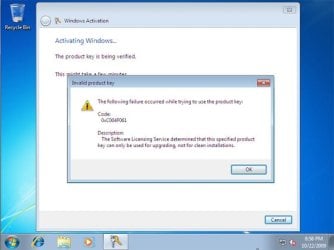
win7_upgrade_media_06.jpg


1. Do a clean install of your upgrade Windows 7 at boot without checking the Automatically activate Windows when I'm online box during the installation process.
NOTE: If you already did this from OPTION ONE above and got a activation error, then skip this step and just proceed to step 2 below instead. There's no need to reinstall again.

2. Click on the Download button below to download the .bat file below, and save it to your desktop.
Activate_Windows_Upgrade_after_Clean_Install.bat


Download


3. Right click on the downloaded .bat file, and click on Run as administrator.

4. If prompted, click/tap on Run and Yes (UAC).
NOTE: If you like, you can stop getting the Run prompt by unblocking the downloaded .bat file.

5. You will now notice a command prompt quickly open and close while applying the changes to your registry.

6. Click/tap on OK. (see screenshot below)
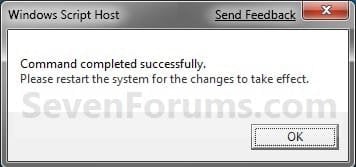
OK.jpg
7. Restart the computer.

8. When the computer is finished restarting, then manually activate Windows 7 with your product key number.


OPTION FOUR

Double Installing Windows 7


   Note
This option is the same that was used to do a clean install of an upgrade copy of Windows 7. It's more work, but if the options above did not work for you, then this should since this is the most reliable option.

1. Do a clean install of your upgrade Windows 7 at boot without checking the Automatically activate Windows when I'm online box during the installation process, and do not activate Windows 7. When finished with the clean install, do not or install any Windows Updates, drivers, or programs yet.

2. When finished with the clean install, start at step 4 at this link to do an in-place "upgrade" install with your upgrade Windows 7 installation disk from within the just now finished clean install of Windows 7.

3. When the in-place upgrade installation is completely finished, then manually activate Windows 7 with your product key number. You can now also install any Windows Updates drivers, and programs you like.
That's it,
Shawn


Attachments

Last edited:
Wow! Thanks Brink for quick response. Just to be clear though, this was a Brazillian W7 HB OS (in Portuguse!). Does it matter that the key is not for the UK? Thanks again.
 

My Computer My Computer

OS
W7 32b Home Basic
The UK Windows 7 Home Premium OS that you purchase should come with it's own product key number that you will use to activate it with instead. :)
 

My Computer My Computer

Computer type
PC/Desktop
Computer Manufacturer/Model Number
Self built custom
OS
64-bit Windows 11 Pro for Workstations
CPU
Intel i7-8700K OC'd to 5 GHz
Motherboard
ASUS ROG Maximus XI Formula Z390
Memory
64 GB (4x16GB) G.SKILL TridentZ RGB DDR4 3600 MHz
Graphics Card(s)
ASUS ROG-STRIX-GTX1080TI-O11G-GAMING
Sound Card
Integrated
Monitor(s) Displays
2 x Samsung Odyssey G7 27"
Screen Resolution
2560x1440
Hard Drives
1TB Samsung 990 PRO M.2,
4TB Samsung 990 PRO PRO M.2,
TerraMaster F8 SSD Plus NAS
PSU
Seasonic Prime Titanium 850W
Case
Thermaltake Core P3
Cooling
Corsair Hydro H115i
Keyboard
Logitech wireless K800
Mouse
Logitech MX Master 4
Internet Speed
2 Gb/s Download and 100 Mb/s Upload
Antivirus
Malwarebyte Anti-Malware Premium
Browser
Google Chrome
Other Info
Logitech Z625 speaker system,
Logitech BRIO 4K Pro webcam,
HP Color LaserJet Pro MFP M477fdn,
APC SMART-UPS RT 1000 XL - SURT1000XLI,
Galaxy S23 Plus phone
Windows 7 Home Basic (Brazil) Upgrade Options?

Thanks for your help Brink - really. I'll give this a try and let you know. Cheers! :D
 

My Computer My Computer

OS
W7 32b Home Basic
You're welcome. I hope it goes smoothly for you. :)
 

My Computer My Computer

Computer type
PC/Desktop
Computer Manufacturer/Model Number
Self built custom
OS
64-bit Windows 11 Pro for Workstations
CPU
Intel i7-8700K OC'd to 5 GHz
Motherboard
ASUS ROG Maximus XI Formula Z390
Memory
64 GB (4x16GB) G.SKILL TridentZ RGB DDR4 3600 MHz
Graphics Card(s)
ASUS ROG-STRIX-GTX1080TI-O11G-GAMING
Sound Card
Integrated
Monitor(s) Displays
2 x Samsung Odyssey G7 27"
Screen Resolution
2560x1440
Hard Drives
1TB Samsung 990 PRO M.2,
4TB Samsung 990 PRO PRO M.2,
TerraMaster F8 SSD Plus NAS
PSU
Seasonic Prime Titanium 850W
Case
Thermaltake Core P3
Cooling
Corsair Hydro H115i
Keyboard
Logitech wireless K800
Mouse
Logitech MX Master 4
Internet Speed
2 Gb/s Download and 100 Mb/s Upload
Antivirus
Malwarebyte Anti-Malware Premium
Browser
Google Chrome
Other Info
Logitech Z625 speaker system,
Logitech BRIO 4K Pro webcam,
HP Color LaserJet Pro MFP M477fdn,
APC SMART-UPS RT 1000 XL - SURT1000XLI,
Galaxy S23 Plus phone
Registered just to drop a word of thanks to Brink.

I upgraded my wife's computer from WinXP to 7, figured to do a clean install. After all apps and files reloaded, I tried to activate and was denied. I used Option #3 to great relief.

Thank you!

Edit, Option #3, not 4!
 

My Computer My Computer

OS
New Mexico
You're most welcome Stebog, and welcome to Seven Forums. :)
 

My Computer My Computer

Computer type
PC/Desktop
Computer Manufacturer/Model Number
Self built custom
OS
64-bit Windows 11 Pro for Workstations
CPU
Intel i7-8700K OC'd to 5 GHz
Motherboard
ASUS ROG Maximus XI Formula Z390
Memory
64 GB (4x16GB) G.SKILL TridentZ RGB DDR4 3600 MHz
Graphics Card(s)
ASUS ROG-STRIX-GTX1080TI-O11G-GAMING
Sound Card
Integrated
Monitor(s) Displays
2 x Samsung Odyssey G7 27"
Screen Resolution
2560x1440
Hard Drives
1TB Samsung 990 PRO M.2,
4TB Samsung 990 PRO PRO M.2,
TerraMaster F8 SSD Plus NAS
PSU
Seasonic Prime Titanium 850W
Case
Thermaltake Core P3
Cooling
Corsair Hydro H115i
Keyboard
Logitech wireless K800
Mouse
Logitech MX Master 4
Internet Speed
2 Gb/s Download and 100 Mb/s Upload
Antivirus
Malwarebyte Anti-Malware Premium
Browser
Google Chrome
Other Info
Logitech Z625 speaker system,
Logitech BRIO 4K Pro webcam,
HP Color LaserJet Pro MFP M477fdn,
APC SMART-UPS RT 1000 XL - SURT1000XLI,
Galaxy S23 Plus phone
Thank you so very much for this information. I used option 3 after hours of reinstalling and entering keys, while talking to Microsoft to no avail. Option 3 worked right away. I wish I would have found this earlier. Thanks again.
 

My Computer My Computer

OS
Microsoft 7
You're most welcome Roy, and welcome to Seven Forums.
smile.gif
 

My Computer My Computer

Computer type
PC/Desktop
Computer Manufacturer/Model Number
Self built custom
OS
64-bit Windows 11 Pro for Workstations
CPU
Intel i7-8700K OC'd to 5 GHz
Motherboard
ASUS ROG Maximus XI Formula Z390
Memory
64 GB (4x16GB) G.SKILL TridentZ RGB DDR4 3600 MHz
Graphics Card(s)
ASUS ROG-STRIX-GTX1080TI-O11G-GAMING
Sound Card
Integrated
Monitor(s) Displays
2 x Samsung Odyssey G7 27"
Screen Resolution
2560x1440
Hard Drives
1TB Samsung 990 PRO M.2,
4TB Samsung 990 PRO PRO M.2,
TerraMaster F8 SSD Plus NAS
PSU
Seasonic Prime Titanium 850W
Case
Thermaltake Core P3
Cooling
Corsair Hydro H115i
Keyboard
Logitech wireless K800
Mouse
Logitech MX Master 4
Internet Speed
2 Gb/s Download and 100 Mb/s Upload
Antivirus
Malwarebyte Anti-Malware Premium
Browser
Google Chrome
Other Info
Logitech Z625 speaker system,
Logitech BRIO 4K Pro webcam,
HP Color LaserJet Pro MFP M477fdn,
APC SMART-UPS RT 1000 XL - SURT1000XLI,
Galaxy S23 Plus phone
Questions from a noob

Hi,

I've been reading the forums and have the sense that all the info I need is there...but I don't have enough understanding to tie all the pieces together. Sorry I'm a bit slow with technology.

I bought my refurb ACER desktop pre-installed with Vista, and it qualified for a windows 7 upgrade to home premium, which I recieved about a week later, and installed. I've been having some problems with programs and we also have a couple programs with passwords on them that we'd like to remove but can't remember the passwords. With a "clean install" (I'm still trying to grasp the difference between kinds of installs) I figured we might be able to remove those programs without having to remember the passwords, and that things in general might clean up a bit.

The upgrade media came with two DVD's: a Microsoft Windows 7 Upgrade MEdia disc containing the 64-bit software with product key/proof of license, and an ACER Upgrade DVD containing Acer Upgrade Wizard and Applications/Drivers for Windows 7.

Does it sound like the two upgrade DVDs are sufficient to reinstall windows 7? I'm wary of putting the discs in and risking a partially botched process with discs that won't work, since my computer is working okay currently albeit with frequent irritating glitches.

Thanks for any insight! And sorry again that my questions are probably so basic!
 

My Computer My Computer

OS
w 7 home 64 bit

My Computer My Computer

Computer type
PC/Desktop
Computer Manufacturer/Model Number
Self built custom
OS
64-bit Windows 11 Pro for Workstations
CPU
Intel i7-8700K OC'd to 5 GHz
Motherboard
ASUS ROG Maximus XI Formula Z390
Memory
64 GB (4x16GB) G.SKILL TridentZ RGB DDR4 3600 MHz
Graphics Card(s)
ASUS ROG-STRIX-GTX1080TI-O11G-GAMING
Sound Card
Integrated
Monitor(s) Displays
2 x Samsung Odyssey G7 27"
Screen Resolution
2560x1440
Hard Drives
1TB Samsung 990 PRO M.2,
4TB Samsung 990 PRO PRO M.2,
TerraMaster F8 SSD Plus NAS
PSU
Seasonic Prime Titanium 850W
Case
Thermaltake Core P3
Cooling
Corsair Hydro H115i
Keyboard
Logitech wireless K800
Mouse
Logitech MX Master 4
Internet Speed
2 Gb/s Download and 100 Mb/s Upload
Antivirus
Malwarebyte Anti-Malware Premium
Browser
Google Chrome
Other Info
Logitech Z625 speaker system,
Logitech BRIO 4K Pro webcam,
HP Color LaserJet Pro MFP M477fdn,
APC SMART-UPS RT 1000 XL - SURT1000XLI,
Galaxy S23 Plus phone
Wow, Brink, you're fast. Awesome!

On trying to uninstall, we get a message requiring a password, and my wife thinks it's linked to an e-mail account she deleted, so we can't do the "forgot password" thing. There might be other ways in, but...

But even more than that, we've been getting blue-screen crashes and programs quitting suddenly and other weird quirks...not every day, but enough to be obnoxious. I know re-installing isn't a cure-all, but since we already have everything backed up we figured we wanted to give it a try and just see how it goes.

Thanks for weighing in!
 

My Computer My Computer

OS
w 7 home 64 bit
You're welcome. Please let us know how it went. :)
 

My Computer My Computer

Computer type
PC/Desktop
Computer Manufacturer/Model Number
Self built custom
OS
64-bit Windows 11 Pro for Workstations
CPU
Intel i7-8700K OC'd to 5 GHz
Motherboard
ASUS ROG Maximus XI Formula Z390
Memory
64 GB (4x16GB) G.SKILL TridentZ RGB DDR4 3600 MHz
Graphics Card(s)
ASUS ROG-STRIX-GTX1080TI-O11G-GAMING
Sound Card
Integrated
Monitor(s) Displays
2 x Samsung Odyssey G7 27"
Screen Resolution
2560x1440
Hard Drives
1TB Samsung 990 PRO M.2,
4TB Samsung 990 PRO PRO M.2,
TerraMaster F8 SSD Plus NAS
PSU
Seasonic Prime Titanium 850W
Case
Thermaltake Core P3
Cooling
Corsair Hydro H115i
Keyboard
Logitech wireless K800
Mouse
Logitech MX Master 4
Internet Speed
2 Gb/s Download and 100 Mb/s Upload
Antivirus
Malwarebyte Anti-Malware Premium
Browser
Google Chrome
Other Info
Logitech Z625 speaker system,
Logitech BRIO 4K Pro webcam,
HP Color LaserJet Pro MFP M477fdn,
APC SMART-UPS RT 1000 XL - SURT1000XLI,
Galaxy S23 Plus phone
Looks like the install is going ok...but I'm not actually sure where to install windows 7.

I have 3 partitions that look like this:

Disk 0 partition 1: PQSERVICE Total Size: 14.7 GB Free Space: 3.4 GB Type: OEM (Reserved)

Disk 0 parition 2: ACER Total Size: 290.7 GB Free Space: 26.3 GB Type: System

Disk 0 partition 3: DATA Total Size: 290.8 GB Free Space: 227.5 GB Type: Primary

I know that partition 2 is where all of my stuff goes by default, and I just started filling up partition 3 with overflow data. Can I or should I install anything in the reserved partition? What is it anyway? And why is it so big? My assumption is that I should go ahead and put windows in the partition 2 for my clean install (don't worry, I have everything backed up on external drives).

Thanks!
 

My Computer My Computer

OS
w 7 home 64 bit
Neal,

The problem is that you are going to need something like another HDD or external HDD big enough to backup anything that you do not want to lose to be safe.

After backing up to be safe, you might consider using the ACER upgrade DVD, and running the Acer Upgrade Wizard to upgrade to Windows 7. This way you will have all the drivers installed with it, and hopefully not lose anything you already have in Vista.
 

My Computer My Computer

Computer type
PC/Desktop
Computer Manufacturer/Model Number
Self built custom
OS
64-bit Windows 11 Pro for Workstations
CPU
Intel i7-8700K OC'd to 5 GHz
Motherboard
ASUS ROG Maximus XI Formula Z390
Memory
64 GB (4x16GB) G.SKILL TridentZ RGB DDR4 3600 MHz
Graphics Card(s)
ASUS ROG-STRIX-GTX1080TI-O11G-GAMING
Sound Card
Integrated
Monitor(s) Displays
2 x Samsung Odyssey G7 27"
Screen Resolution
2560x1440
Hard Drives
1TB Samsung 990 PRO M.2,
4TB Samsung 990 PRO PRO M.2,
TerraMaster F8 SSD Plus NAS
PSU
Seasonic Prime Titanium 850W
Case
Thermaltake Core P3
Cooling
Corsair Hydro H115i
Keyboard
Logitech wireless K800
Mouse
Logitech MX Master 4
Internet Speed
2 Gb/s Download and 100 Mb/s Upload
Antivirus
Malwarebyte Anti-Malware Premium
Browser
Google Chrome
Other Info
Logitech Z625 speaker system,
Logitech BRIO 4K Pro webcam,
HP Color LaserJet Pro MFP M477fdn,
APC SMART-UPS RT 1000 XL - SURT1000XLI,
Galaxy S23 Plus phone
i've got everything in all 3 partitions backed up on external media and with carbonite, so I'm not worried about any of the data. It can all be erased or whatever.

Also, I should make clear that i've already got windows 7 installed, I'm just re-installing.

Brink, are you suggesting I cancel out of the windows installation where I used the Microsoft upgrade DVD, and instead see if it will run with the ACER DVD?

Also, whichever I end up choosing, which partition sounds like the appropriate one to install the OS in? I don't really know what the reserved partition is for.

Thanks!
 

My Computer My Computer

OS
w 7 home 64 bit
The reservered partition is what Acer uses for you to be able to reinstall the OS that came with it back to factory conditions.

It's up to you which DVD you would like to do, but here's what they will do to help decide. :)

The Acer DVD will do a OEM factory installation of Windows 7 with your HDD laid out pretty much how it is now.

The Microsoft DVD will be like installing it with a retail copy of Windows 7. With it, you could delete all partitions on the disk until it is unallocated, and select the unallocated disk to install Windows 7 to.
 

My Computer My Computer

Computer type
PC/Desktop
Computer Manufacturer/Model Number
Self built custom
OS
64-bit Windows 11 Pro for Workstations
CPU
Intel i7-8700K OC'd to 5 GHz
Motherboard
ASUS ROG Maximus XI Formula Z390
Memory
64 GB (4x16GB) G.SKILL TridentZ RGB DDR4 3600 MHz
Graphics Card(s)
ASUS ROG-STRIX-GTX1080TI-O11G-GAMING
Sound Card
Integrated
Monitor(s) Displays
2 x Samsung Odyssey G7 27"
Screen Resolution
2560x1440
Hard Drives
1TB Samsung 990 PRO M.2,
4TB Samsung 990 PRO PRO M.2,
TerraMaster F8 SSD Plus NAS
PSU
Seasonic Prime Titanium 850W
Case
Thermaltake Core P3
Cooling
Corsair Hydro H115i
Keyboard
Logitech wireless K800
Mouse
Logitech MX Master 4
Internet Speed
2 Gb/s Download and 100 Mb/s Upload
Antivirus
Malwarebyte Anti-Malware Premium
Browser
Google Chrome
Other Info
Logitech Z625 speaker system,
Logitech BRIO 4K Pro webcam,
HP Color LaserJet Pro MFP M477fdn,
APC SMART-UPS RT 1000 XL - SURT1000XLI,
Galaxy S23 Plus phone
Fair enough. Went ahead and did the microsoft install, everything seems to have worked fine, although I didn't get rid of that EOM partition.

Anyway, thanks for answering my beginner's questions!
 

My Computer My Computer

OS
w 7 home 64 bit
For some reason, Acer splits up the hard drive into 2 partitions of equal size. In your case, those are disc 0 partition 2 and disc 0 partition 3, both about 291 GB. Acer provides you with 2 partitions, which is a good idea, but makes them the same size, which is silly or wasteful.

When you got the Acer, Windows was on disc 0, partition 2, and that is presumably where you directed the reinstall to go.

You don't have to accept those partition sizes. You can make C smaller or larger as you see fit and you can delete that disc 0 partition 3 partition entirely if you want to, and then expand C into the newly available space.
 

My Computer My Computer

Computer type
PC/Desktop
Computer Manufacturer/Model Number
Ignatz Special; 4 speed manual gearbox; factory air conditioning; one of one
OS
Windows 7 Home Premium SP1, 64-bit
CPU
Intel Skylake i5-6600K, not overclocked
Motherboard
AsRock Z170M Extreme 4, micro ATX
Memory
8 GB HyperX DDR4-2666 (2 x 4 GB)
Graphics Card(s)
none; graphics are integrated on CPU
Sound Card
onboard: Realtek ALC1150; external: USB Behringer UF0-202
Monitor(s) Displays
Dell S2340M 23 inch IPS
Screen Resolution
1600 x 900
Hard Drives
System: Crucial MX100 series SSD, 128 GB;
Data: Samsung Spinpoint 103SJ, 1 TB;
Backup: WD Caviar Green WD30EZRX-00D8PB0, 3 TB
PSU
Rosewill SilentNight 500 watt fanless, semi-modular
Case
Antec Solo II
Cooling
Noctua NH-U12S; Noctua F12 intake, Noctua S12A exhaust
Keyboard
Microsoft 200 6JH-00001 USB
Mouse
Dell or Microsoft optical wired; USB
Antivirus
Microsoft Security Essentials and Malwarebytes Premium
Browser
Pale Moon
Other Info
All fans PWM; speeds at idle: CPU circa 500 rpm; intake circa 600 rpm; exhaust circa 600 rpm; CPU temps 27 idle and 47 C load in a warm room (27 C/81 F) when running Intel Extreme Tuning Utility stress test.
You're welcome Neal. Please let us know if you have any further questions about this. :)
 

My Computer My Computer

Computer type
PC/Desktop
Computer Manufacturer/Model Number
Self built custom
OS
64-bit Windows 11 Pro for Workstations
CPU
Intel i7-8700K OC'd to 5 GHz
Motherboard
ASUS ROG Maximus XI Formula Z390
Memory
64 GB (4x16GB) G.SKILL TridentZ RGB DDR4 3600 MHz
Graphics Card(s)
ASUS ROG-STRIX-GTX1080TI-O11G-GAMING
Sound Card
Integrated
Monitor(s) Displays
2 x Samsung Odyssey G7 27"
Screen Resolution
2560x1440
Hard Drives
1TB Samsung 990 PRO M.2,
4TB Samsung 990 PRO PRO M.2,
TerraMaster F8 SSD Plus NAS
PSU
Seasonic Prime Titanium 850W
Case
Thermaltake Core P3
Cooling
Corsair Hydro H115i
Keyboard
Logitech wireless K800
Mouse
Logitech MX Master 4
Internet Speed
2 Gb/s Download and 100 Mb/s Upload
Antivirus
Malwarebyte Anti-Malware Premium
Browser
Google Chrome
Other Info
Logitech Z625 speaker system,
Logitech BRIO 4K Pro webcam,
HP Color LaserJet Pro MFP M477fdn,
APC SMART-UPS RT 1000 XL - SURT1000XLI,
Galaxy S23 Plus phone
Hello,

i want to make a clean install on a blank hard disk by using an upgrade version of seven and windows 95. Is it possible ? THX
 

My Computer My Computer

OS
windows xp 32 bit
Back
Top