Clean install with partition

dannet

New member
Local time
6:46 PM
Messages
60
I'm currently running the 7100 build and I'm wanting to install 7127 using a new partition.

Basically my idea was to create a new partition and install 7127 on that and then uninstall 7100 but keeping my files so I can move then across to the new partition. Thus having a clean install but without losing any files.

Is this possible? Will I be able to uninstall the 7100 without deleting my files?

Also can I change the size of the new partition after I have made it - in order to resemble the set up I have now (ie: 2x 250GB).

Thanks in advance :)
 

My Computer My Computer

At a glance

Windows 7 Professional x86Intel Core 2 Duo - P8400 @ 2.26Ghz2.998GBNVIDIA GeForce 9600M GT
Computer Manufacturer/Model Number
HP / Pavilion dv7 1135ea
OS
Windows 7 Professional x86
CPU
Intel Core 2 Duo - P8400 @ 2.26Ghz
Memory
2.998GB
Graphics Card(s)
NVIDIA GeForce 9600M GT
Screen Resolution
1440x900
Hard Drives
2x Serial ATA-150 (2x 250GB)
Case
HP Vader 1.0a apparently ;)
Internet Speed
10MB/s
Yes to everything, possible. I upgraded from RC as I always do, so that is a valid option if you want to save some time.


Acronis Disk Director Suite is excellent for partition editing and altering, even on a partition with an OS installed already.
 

My Computer My Computer

At a glance

7600.20510 x86P4 550 3.4 GHz HT running at 3.5 GHzOCZ 2 GB(2x1GB) DDR400mHz running @ 414 mHzHIS Radeon HD 3850 IceQ 3 Turbo HDMI Dual DL-...
Computer Manufacturer/Model Number
self built
OS
7600.20510 x86
CPU
P4 550 3.4 GHz HT running at 3.5 GHz
Motherboard
MSI PM8M3-V (MS-7211 v1.x) Micro-ATX mainboard
Memory
OCZ 2 GB(2x1GB) DDR400mHz running @ 414 mHz
Graphics Card(s)
HIS Radeon HD 3850 IceQ 3 Turbo HDMI Dual DL-DVI AGP
Sound Card
MOTU Traveler firewire studio interface 192 kHz 24 bit
Monitor(s) Displays
22" widescreen Acer X223W LCD, 17" Compaq P75 CRT
Screen Resolution
1680x1050 and 1280x1024
Hard Drives
SATA I x2 WD, 400 GB and 120 GB, SATA 2 WD Caviar Black 1 TB
PSU
350W generic
Case
Cybertronpc, it glows blue
Cooling
stock cpu fan, Ice-Q 3 gpu and system, many case fans
Keyboard
Logitch Classical Keyboard 200
Mouse
Logitech Mediaplay cordless
Internet Speed
1792/448 kbits/sec
Other Info
SATA II PCI fake RAID adapter, 1 GB Readyboost, original ATI Remote Wonder (even works with WMC perfectly), Logitech Rumblepad 2 game controller x2
Thanks I'm going to download that now :D.

One other thing how would I go about uninstalling the 7100 OS once I want to change to the new one? Can I do that in Acronis?
 

My Computer My Computer

At a glance

Windows 7 Professional x86Intel Core 2 Duo - P8400 @ 2.26Ghz2.998GBNVIDIA GeForce 9600M GT
Computer Manufacturer/Model Number
HP / Pavilion dv7 1135ea
OS
Windows 7 Professional x86
CPU
Intel Core 2 Duo - P8400 @ 2.26Ghz
Memory
2.998GB
Graphics Card(s)
NVIDIA GeForce 9600M GT
Screen Resolution
1440x900
Hard Drives
2x Serial ATA-150 (2x 250GB)
Case
HP Vader 1.0a apparently ;)
Internet Speed
10MB/s
Hi,

Acronis are the market leaders in drive imaging, but Paragon is the one to go for in terms of hard drive partitioning and management.

If you are going to buy one, may be worth bearing in mind. They both do programs incorporating imaging and partitioning, so take your pick. I use several Paragon products and they are excellent.

If you go for the Acronis - stay away from the disk selector - causes havoc on 7.
 

My Computers My Computers

  • At a glance

    7 X64i5 84002x8gb 3200mhz
    Computer type
    PC/Desktop
    OS
    7 X64
    CPU
    i5 8400
    Motherboard
    gigabyte b365m ds3h
    Memory
    2x8gb 3200mhz
    Hard Drives
    various
    PSU
    pure power 11 400w cm
    Case
    Coolermaster
    Cooling
    cryorig m9i
  • At a glance

    7x64g54008gb ddr4 2400
    Computer type
    PC/Desktop
    OS
    7x64
    CPU
    g5400
    Motherboard
    ga b365m ds3h
    Memory
    8gb ddr4 2400
    PSU
    xfx pro 450w
Hi Guys.

In about 27 hours I'll hopefully have build 7127 downloaded and burned to disk.

Going from 7057 to 7100 I reformatted and did a fresh install and I'm loving it.
Do you think it's wise to do this with 7127?

Alternatively I could create a new partition for 7127 with gparted and put 7127 there.
That doesn't appeal as I'll either love 7127 and use it all time or not so why complicate my life?

Another option would be upgrade. Others have said a fresh install is best but I seem to have spent more time installing and setting up lately than using my pc and I'm getting fed up with it.

What're your thoughts?

John:D
 

My Computer My Computer

At a glance

Windows 7 Home Premium 64 biti7 [email protected]2x4GB Corsair Vegeance DDR3XFX GTX 260 Black Edition
Computer Manufacturer/Model Number
The Monolith. 3.1
OS
Windows 7 Home Premium 64 bit
CPU
i7 [email protected]
Motherboard
Gigabyte Z77-D3H
Memory
2x4GB Corsair Vegeance DDR3
Graphics Card(s)
XFX GTX 260 Black Edition
Sound Card
none-through large stereo hi fi
Monitor(s) Displays
Croosover 27MDP LED IPS Dell 2408 WFP
Screen Resolution
2560x1440 1920x1200
Hard Drives
1x Samsung 840Pro 128GB SSD
1x Samsung Spinpoint F1 1TB
PSU
Corsair AX 850 Watt
Case
Cooler Master ACTS 840
Cooling
Be Quiet! Dark Rock Pro
Keyboard
Enermax Aurora
Mouse
Logitech Ballmouse
Internet Speed
20MBPS
Hi John,

I always clean install.

Any reason why you want to use GParted?

Vista Disk Management will do the job - assuming Vista is on the first partition now.
 

My Computers My Computers

  • At a glance

    7 X64i5 84002x8gb 3200mhz
    Computer type
    PC/Desktop
    OS
    7 X64
    CPU
    i5 8400
    Motherboard
    gigabyte b365m ds3h
    Memory
    2x8gb 3200mhz
    Hard Drives
    various
    PSU
    pure power 11 400w cm
    Case
    Coolermaster
    Cooling
    cryorig m9i
  • At a glance

    7x64g54008gb ddr4 2400
    Computer type
    PC/Desktop
    OS
    7x64
    CPU
    g5400
    Motherboard
    ga b365m ds3h
    Memory
    8gb ddr4 2400
    PSU
    xfx pro 450w
Hello SIW2,

When this frenzy first started and I wanted to do a dual boot I tried shrinking my Vista install using Windows and it would only give me a tiny amount, nowhere near enough to put the beta on.

Maybe I was going about it the wrong way.

Anyway I used gparted and it worked ok.

Thanks for the gift, John:D
 

My Computer My Computer

At a glance

Windows 7 Home Premium 64 biti7 [email protected]2x4GB Corsair Vegeance DDR3XFX GTX 260 Black Edition
Computer Manufacturer/Model Number
The Monolith. 3.1
OS
Windows 7 Home Premium 64 bit
CPU
i7 [email protected]
Motherboard
Gigabyte Z77-D3H
Memory
2x4GB Corsair Vegeance DDR3
Graphics Card(s)
XFX GTX 260 Black Edition
Sound Card
none-through large stereo hi fi
Monitor(s) Displays
Croosover 27MDP LED IPS Dell 2408 WFP
Screen Resolution
2560x1440 1920x1200
Hard Drives
1x Samsung 840Pro 128GB SSD
1x Samsung Spinpoint F1 1TB
PSU
Corsair AX 850 Watt
Case
Cooler Master ACTS 840
Cooling
Be Quiet! Dark Rock Pro
Keyboard
Enermax Aurora
Mouse
Logitech Ballmouse
Internet Speed
20MBPS
Ah, yes , sometimes system files are far along the drive - Disk Management won't move them and only reports a small amount of shrink available.

3rd party programs can move those.

If Disk Management reports there is enough space, I always use that, and only resort to 3rd party apps. for things Disk Management can't do.

I see why you want to try the upgrade, but I always clean install - unexpected problems are not unusual following upgrade installs - more so with beta o/s.

First, you might want to make another partition on the right of the drive, then make an image of your existing 7100 partition and store it on there. ( Use an external HD if you have one).

You can always restore the image in a few minutes by using the imaging apps. boot disc - just in case something goes wrong.

If you use the normal or best compression levels for the image, it takes up less than half the used space of the source partition.
 

My Computers My Computers

  • At a glance

    7 X64i5 84002x8gb 3200mhz
    Computer type
    PC/Desktop
    OS
    7 X64
    CPU
    i5 8400
    Motherboard
    gigabyte b365m ds3h
    Memory
    2x8gb 3200mhz
    Hard Drives
    various
    PSU
    pure power 11 400w cm
    Case
    Coolermaster
    Cooling
    cryorig m9i
  • At a glance

    7x64g54008gb ddr4 2400
    Computer type
    PC/Desktop
    OS
    7x64
    CPU
    g5400
    Motherboard
    ga b365m ds3h
    Memory
    8gb ddr4 2400
    PSU
    xfx pro 450w
Seeing as I'm doing a clean install on another fresh partition but keeping my files on the other partitions is it possible to extract the iso and install directly with the setup exe rather than burning the install on a CD or onto a USB stick?

I did this when upgrading from vista to 7100... but then I was installing on the same partition..

Could I extract the iso to the new partition and do it that way?
 

My Computer My Computer

At a glance

Windows 7 Professional x86Intel Core 2 Duo - P8400 @ 2.26Ghz2.998GBNVIDIA GeForce 9600M GT
Computer Manufacturer/Model Number
HP / Pavilion dv7 1135ea
OS
Windows 7 Professional x86
CPU
Intel Core 2 Duo - P8400 @ 2.26Ghz
Memory
2.998GB
Graphics Card(s)
NVIDIA GeForce 9600M GT
Screen Resolution
1440x900
Hard Drives
2x Serial ATA-150 (2x 250GB)
Case
HP Vader 1.0a apparently ;)
Internet Speed
10MB/s
You can certainly extract the install.wim with imagex , if that's what you mean.

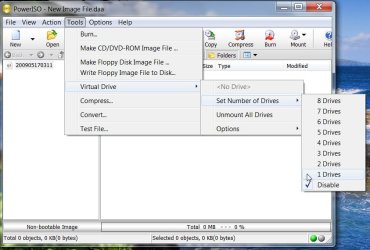
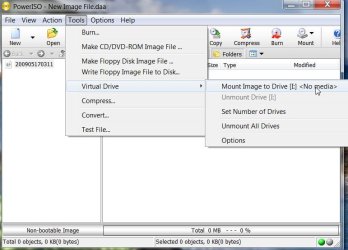
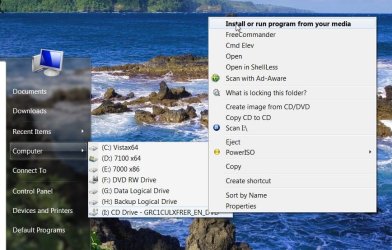
Probably easier to run it from a virtual drive. Create and format the new partition first. Then install PowerIso ( free version will do it ) on your existing 7100 partition .

Get it to set 1 virtual drive :

PowerIso-1-2009-05-17_031206.jpg

PowerIso-2-2009-05-17_031313.jpg

PowerIso-4-2009-05-17_031536.jpg

PowerIso-5-2009-05-17_031615.jpg


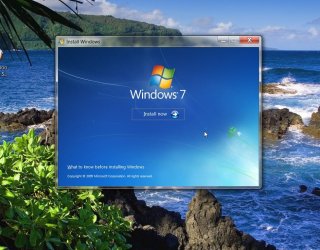
Mount the .iso in the drive and run the installation - you will be able to select the partition to install during the installation process.

The unregistered (free) version will not let you edit large files, but you can use it to mount and run as well as burn - so you only need the unregistered version to install from

http://www.poweriso.com/download.htm
 

My Computers My Computers

  • At a glance

    7 X64i5 84002x8gb 3200mhz
    Computer type
    PC/Desktop
    OS
    7 X64
    CPU
    i5 8400
    Motherboard
    gigabyte b365m ds3h
    Memory
    2x8gb 3200mhz
    Hard Drives
    various
    PSU
    pure power 11 400w cm
    Case
    Coolermaster
    Cooling
    cryorig m9i
  • At a glance

    7x64g54008gb ddr4 2400
    Computer type
    PC/Desktop
    OS
    7x64
    CPU
    g5400
    Motherboard
    ga b365m ds3h
    Memory
    8gb ddr4 2400
    PSU
    xfx pro 450w
Thanks I'll try that.... Paragon has added some files to the partition in a 'BOOTWIZ' folder. Do I need to keep these or can I format it before install?

If you go for the Acronis - stay away from the disk selector - causes havoc on 7.

Yeah you were right about that! I'd already installed it before I read but so decided not to use Acronis. However, I didn't uninstall it and now it runs every time I boot. I can't even uninstall it because it keeps teling me no OS is present :mad: :sarc: .
 

My Computer My Computer

At a glance

Windows 7 Professional x86Intel Core 2 Duo - P8400 @ 2.26Ghz2.998GBNVIDIA GeForce 9600M GT
Computer Manufacturer/Model Number
HP / Pavilion dv7 1135ea
OS
Windows 7 Professional x86
CPU
Intel Core 2 Duo - P8400 @ 2.26Ghz
Memory
2.998GB
Graphics Card(s)
NVIDIA GeForce 9600M GT
Screen Resolution
1440x900
Hard Drives
2x Serial ATA-150 (2x 250GB)
Case
HP Vader 1.0a apparently ;)
Internet Speed
10MB/s
I don't know what those are - BOOTWIZ? - you can copy them to the partition you are keeping, in case you want them later.

The Disk selector is probably on the mbr. It might get in the way during the installation. Try rewriting the mbr.
 

My Computers My Computers

  • At a glance

    7 X64i5 84002x8gb 3200mhz
    Computer type
    PC/Desktop
    OS
    7 X64
    CPU
    i5 8400
    Motherboard
    gigabyte b365m ds3h
    Memory
    2x8gb 3200mhz
    Hard Drives
    various
    PSU
    pure power 11 400w cm
    Case
    Coolermaster
    Cooling
    cryorig m9i
  • At a glance

    7x64g54008gb ddr4 2400
    Computer type
    PC/Desktop
    OS
    7x64
    CPU
    g5400
    Motherboard
    ga b365m ds3h
    Memory
    8gb ddr4 2400
    PSU
    xfx pro 450w
Thanks for the detailed instructions they make it much simpler! Nice background by the way :D.

Well here goes - hopefully my next post will be from 7127 if it works!

Is changing the mbr easy?
 

My Computer My Computer

At a glance

Windows 7 Professional x86Intel Core 2 Duo - P8400 @ 2.26Ghz2.998GBNVIDIA GeForce 9600M GT
Computer Manufacturer/Model Number
HP / Pavilion dv7 1135ea
OS
Windows 7 Professional x86
CPU
Intel Core 2 Duo - P8400 @ 2.26Ghz
Memory
2.998GB
Graphics Card(s)
NVIDIA GeForce 9600M GT
Screen Resolution
1440x900
Hard Drives
2x Serial ATA-150 (2x 250GB)
Case
HP Vader 1.0a apparently ;)
Internet Speed
10MB/s
Hold it!

Rewrite the mbr first.

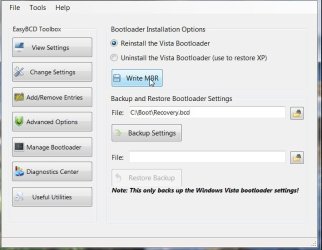
Use the free easybcd :

Download EasyBCD 1.7.2 - NeoSmart Technologies

Click Manage Bootloader from the first menu, select "Reinstall Vista Bootloader" , then click "Write MBR"

WRITEMBR2009-05-17_053019.jpg

Reboot to test all is ok and Disk Selector has gone.
 

My Computers My Computers

  • At a glance

    7 X64i5 84002x8gb 3200mhz
    Computer type
    PC/Desktop
    OS
    7 X64
    CPU
    i5 8400
    Motherboard
    gigabyte b365m ds3h
    Memory
    2x8gb 3200mhz
    Hard Drives
    various
    PSU
    pure power 11 400w cm
    Case
    Coolermaster
    Cooling
    cryorig m9i
  • At a glance

    7x64g54008gb ddr4 2400
    Computer type
    PC/Desktop
    OS
    7x64
    CPU
    g5400
    Motherboard
    ga b365m ds3h
    Memory
    8gb ddr4 2400
    PSU
    xfx pro 450w
Okay I installed the new build successfully on a new partition (G) and was being given the option on boot-up to choose between the two OSs. However my plan was the remove the older build and just use the new one as my sole OS.

I had the brilliant idea of formatting C drive through 7127 thinking that my computer would just utilise the new OS on G drive and now my computer won't boot...

I don't know if there are some necessary boot files on C that I've inadvertently removed or something else but I just assumed the OS on G: would kind of take over things

On boot-up I get the message: "NTDLR is missing". By the way I don't have a vista disk because HPs come with an on-board recovery drive.. but I do have 7127 on disk.
 

My Computer My Computer

At a glance

Windows 7 Professional x86Intel Core 2 Duo - P8400 @ 2.26Ghz2.998GBNVIDIA GeForce 9600M GT
Computer Manufacturer/Model Number
HP / Pavilion dv7 1135ea
OS
Windows 7 Professional x86
CPU
Intel Core 2 Duo - P8400 @ 2.26Ghz
Memory
2.998GB
Graphics Card(s)
NVIDIA GeForce 9600M GT
Screen Resolution
1440x900
Hard Drives
2x Serial ATA-150 (2x 250GB)
Case
HP Vader 1.0a apparently ;)
Internet Speed
10MB/s
LOL. After all that you decided to get rid of 7100.

The boot files were on the active partition - where 7100 was - you are right.

Easiest thing to do now is:

Boot the 7127 dvd - chose Custom Install , Drive Options (advanced), delete and format the 7100 partition and install 7127 on that.

You could delete the 7127 you had already installed at that point, or after you have booted into the new installation - up to you.
 

My Computers My Computers

  • At a glance

    7 X64i5 84002x8gb 3200mhz
    Computer type
    PC/Desktop
    OS
    7 X64
    CPU
    i5 8400
    Motherboard
    gigabyte b365m ds3h
    Memory
    2x8gb 3200mhz
    Hard Drives
    various
    PSU
    pure power 11 400w cm
    Case
    Coolermaster
    Cooling
    cryorig m9i
  • At a glance

    7x64g54008gb ddr4 2400
    Computer type
    PC/Desktop
    OS
    7x64
    CPU
    g5400
    Motherboard
    ga b365m ds3h
    Memory
    8gb ddr4 2400
    PSU
    xfx pro 450w
LOL yeah it was pretty stupid of me ;) . Had a load of files strewn across all my partitions which I didn't want to lose so I wanted to duel boot to make sure the 7127 would go without it messing up and losing any files but seeing as it was working fine I thought I might as well get rid of 7100 now I know the new build runs smoothly. I've placed any of my important files in the 2nd 'data' HD now anyway.

You're right looks like I might as well done it the easy way in the end ha ha.

Well I'll see what happens anyway.. Thanks again!
 

My Computer My Computer

At a glance

Windows 7 Professional x86Intel Core 2 Duo - P8400 @ 2.26Ghz2.998GBNVIDIA GeForce 9600M GT
Computer Manufacturer/Model Number
HP / Pavilion dv7 1135ea
OS
Windows 7 Professional x86
CPU
Intel Core 2 Duo - P8400 @ 2.26Ghz
Memory
2.998GB
Graphics Card(s)
NVIDIA GeForce 9600M GT
Screen Resolution
1440x900
Hard Drives
2x Serial ATA-150 (2x 250GB)
Case
HP Vader 1.0a apparently ;)
Internet Speed
10MB/s
Finally - all sorted. Everything's running fine and thanks to the clean install everthing's running smoother than ever :D.

Thanks for all your help!
 

My Computer My Computer

At a glance

Windows 7 Professional x86Intel Core 2 Duo - P8400 @ 2.26Ghz2.998GBNVIDIA GeForce 9600M GT
Computer Manufacturer/Model Number
HP / Pavilion dv7 1135ea
OS
Windows 7 Professional x86
CPU
Intel Core 2 Duo - P8400 @ 2.26Ghz
Memory
2.998GB
Graphics Card(s)
NVIDIA GeForce 9600M GT
Screen Resolution
1440x900
Hard Drives
2x Serial ATA-150 (2x 250GB)
Case
HP Vader 1.0a apparently ;)
Internet Speed
10MB/s
You're welcome - have fun.:D
 

My Computers My Computers

  • At a glance

    7 X64i5 84002x8gb 3200mhz
    Computer type
    PC/Desktop
    OS
    7 X64
    CPU
    i5 8400
    Motherboard
    gigabyte b365m ds3h
    Memory
    2x8gb 3200mhz
    Hard Drives
    various
    PSU
    pure power 11 400w cm
    Case
    Coolermaster
    Cooling
    cryorig m9i
  • At a glance

    7x64g54008gb ddr4 2400
    Computer type
    PC/Desktop
    OS
    7x64
    CPU
    g5400
    Motherboard
    ga b365m ds3h
    Memory
    8gb ddr4 2400
    PSU
    xfx pro 450w
Back
Top