Clean Install with Windows 7 Upgrade disc.

Yeah just the whole drive as one. Fantastic!!! I'll try that tomorrow after work and see how I get on. Thank you for the information it is very much appreciated.

Jacka
 

My Computer My Computer

Computer Manufacturer/Model Number
Mesh
OS
Windows 7 Home 64bit
CPU
AMD Phenom II 925
Motherboard
Asus M2N68-VM
Memory
4GB
Graphics Card(s)
onboard GeForce 7050 GPU Northbridge
Sound Card
Onboard
Monitor(s) Displays
IIyama prolite 24"
Screen Resolution
1920 x 1080
Hard Drives
1 TB
PSU
330w
Keyboard
Wireless Logitech
Mouse
Wireless Logitech
Internet Speed
8mb
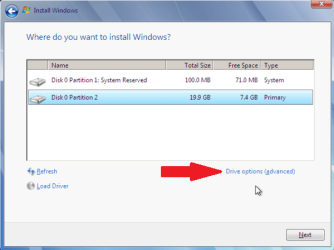
Since you're going to back up the data externally, just boot the Win7 DVD to clean reinstall, choose Custom Install, then delete all partitions, then with Win7 all you need to do is click Next and it will format the HD creating the 100mb System Reserved boot partition, with the rest as the Win7 partition as you say you want.

Follow these steps to get a perfect install: Reinstalling Windows 7
 
Don't want to have any partition at all. Just one big free drive. I'll try the above from ignatzatsonic and see how I get on.

Hopefully it will sort it
 

My Computer My Computer

Computer Manufacturer/Model Number
Mesh
OS
Windows 7 Home 64bit
CPU
AMD Phenom II 925
Motherboard
Asus M2N68-VM
Memory
4GB
Graphics Card(s)
onboard GeForce 7050 GPU Northbridge
Sound Card
Onboard
Monitor(s) Displays
IIyama prolite 24"
Screen Resolution
1920 x 1080
Hard Drives
1 TB
PSU
330w
Keyboard
Wireless Logitech
Mouse
Wireless Logitech
Internet Speed
8mb
If you really do want one partition, it can be done without resorting to Diskpart.

Boot into your Windows DVD and go for the Custom install. When you get to where you can create a partition, delete any partitions already on the drive, and then ask Windows to create a new partition.

You'll be prompted that Windows will need to create a system reserved partition as well. Let Windows do that, but then delete the new partition you created, and then extend the 100 Mb system reserved partition to take up all the unallocated space on your hard drive.

You now have one active partition for the hard drive that will contain the master boot record, Windows 7 and your applications when you install them.
 

My Computer My Computer

Computer Manufacturer/Model Number
HP Pavilion Elite 495UK
OS
Windows 7 Ultimate SP1 64-Bit
CPU
Intel Core i7 870 @ 2.93GHz
Motherboard
MSI 2A9C (CPU1)
Memory
8Gb Dual-Channel DDR3 @ 664MHz
Graphics Card(s)
nVidia GeForce GTX 460 1024MB dedicated RAM
Sound Card
Realtek HD Audio
Monitor(s) Displays
HP2310i
Screen Resolution
1920 x 1080
Hard Drives
1x1954GB Hitachi HDS22020ALA 330 (RAID), 1x1954GB Hitachi External for backup and storage
PSU
460W
Case
HP Elite
Cooling
Air cooled
Keyboard
Logitech K750 solar-powered keyboard
Mouse
Logitech Wireless M180 mouse
Internet Speed
2Mb
Other Info
Pure Avanti Flow Internet Radio with iPod Dock, 64Gb iPod, HP USB Speakers, Sony MDR-V500 Headphones, Sony Vaio F-Series Laptop
I’m really confused now. You must all be speaking to me in 0s and 1s.

This is what I had:

I had one partition with 36gb which held stuff on from the PC manufacturer (as in Mesh)
I then had 892gb which was my main hard-drive filled with my music, videos etc etc.

What I want to do is reclaim that 36gb and have one full drive again so....

I went to delete the 36gb in the windows 7 setup it wouldn’t let me. I then went into diskpart and deleted it.

I now have one drive which is the part with 892gb on it. I’ll post pictures later if needs be.

If I perform the new installation without creating any more partitions and doing anything else will I just get one space that will show 928gb (892gb+36gb) or will I need to do as ignatzatsonic has described?.

When you say boot from disc does that mean switch the PC with the disc in?

Cheers for the help

Jacka
 

My Computer My Computer

Computer Manufacturer/Model Number
Mesh
OS
Windows 7 Home 64bit
CPU
AMD Phenom II 925
Motherboard
Asus M2N68-VM
Memory
4GB
Graphics Card(s)
onboard GeForce 7050 GPU Northbridge
Sound Card
Onboard
Monitor(s) Displays
IIyama prolite 24"
Screen Resolution
1920 x 1080
Hard Drives
1 TB
PSU
330w
Keyboard
Wireless Logitech
Mouse
Wireless Logitech
Internet Speed
8mb
You are making this much more difficult than it needs to be.

If you want ONE repeat ONE partition covering the entire drive, follow my instructions. That will create one partition.

You won't be in diskpart for more than a minute or so and then you will be dropped back into the installation.

You could also use Gregrocker's method. That will leave you with TWO repeat TWO partitions. A little tiny one of about 200 mb for your boot files and another one covering the entire remainder of the drive.

Either way works.

Don't agonize over the method.

You said you wanted ONE partition. My instructions using Diskpart witll do EXACTLY that.

You have to boot from the install disc.
 

My Computer My Computer

Computer type
PC/Desktop
Computer Manufacturer/Model Number
Ignatz Special; 4 speed manual gearbox; factory air conditioning; one of one
OS
Windows 7 Home Premium SP1, 64-bit
CPU
Intel Skylake i5-6600K, not overclocked
Motherboard
AsRock Z170M Extreme 4, micro ATX
Memory
8 GB HyperX DDR4-2666 (2 x 4 GB)
Graphics Card(s)
none; graphics are integrated on CPU
Sound Card
onboard: Realtek ALC1150; external: USB Behringer UF0-202
Monitor(s) Displays
Dell S2340M 23 inch IPS
Screen Resolution
1600 x 900
Hard Drives
System: Crucial MX100 series SSD, 128 GB;
Data: Samsung Spinpoint 103SJ, 1 TB;
Backup: WD Caviar Green WD30EZRX-00D8PB0, 3 TB
PSU
Rosewill SilentNight 500 watt fanless, semi-modular
Case
Antec Solo II
Cooling
Noctua NH-U12S; Noctua F12 intake, Noctua S12A exhaust
Keyboard
Microsoft 200 6JH-00001 USB
Mouse
Dell or Microsoft optical wired; USB
Antivirus
Microsoft Security Essentials and Malwarebytes Premium
Browser
Pale Moon
Other Info
All fans PWM; speeds at idle: CPU circa 500 rpm; intake circa 600 rpm; exhaust circa 600 rpm; CPU temps 27 idle and 47 C load in a warm room (27 C/81 F) when running Intel Extreme Tuning Utility stress test.
LOL

Apologies I know I am, just confused with the different methods. I will follow you're method and go from there.

Cheers

:thumbsup:Jacka
 

My Computer My Computer

Computer Manufacturer/Model Number
Mesh
OS
Windows 7 Home 64bit
CPU
AMD Phenom II 925
Motherboard
Asus M2N68-VM
Memory
4GB
Graphics Card(s)
onboard GeForce 7050 GPU Northbridge
Sound Card
Onboard
Monitor(s) Displays
IIyama prolite 24"
Screen Resolution
1920 x 1080
Hard Drives
1 TB
PSU
330w
Keyboard
Wireless Logitech
Mouse
Wireless Logitech
Internet Speed
8mb
Well you may have guessed it... I mucked up somewhere.

Set the installtion away from windows (as I couldn't do it from booting the pc up) pressed custom install, there was on the one drive showing 892gb clicked next and it started the installation. Never asked for language settings until the end when it asked about region.

I tried doing the clean in diskpart at that point but it wouldn't let me as it contained "current boot system".

Any ideas??
 

My Computer My Computer

Computer Manufacturer/Model Number
Mesh
OS
Windows 7 Home 64bit
CPU
AMD Phenom II 925
Motherboard
Asus M2N68-VM
Memory
4GB
Graphics Card(s)
onboard GeForce 7050 GPU Northbridge
Sound Card
Onboard
Monitor(s) Displays
IIyama prolite 24"
Screen Resolution
1920 x 1080
Hard Drives
1 TB
PSU
330w
Keyboard
Wireless Logitech
Mouse
Wireless Logitech
Internet Speed
8mb
Sounds to me like you are NOT booting from the installation disc.

Did you go into the BIOS and ensure that your PC is set to boot from the DVD drive first, rather than from the hard drive?

You can certainly use Gregrocker's method and end up with 2 partitions. It hardly matters.

But you have to boot from the DVD.
 

My Computer My Computer

Computer type
PC/Desktop
Computer Manufacturer/Model Number
Ignatz Special; 4 speed manual gearbox; factory air conditioning; one of one
OS
Windows 7 Home Premium SP1, 64-bit
CPU
Intel Skylake i5-6600K, not overclocked
Motherboard
AsRock Z170M Extreme 4, micro ATX
Memory
8 GB HyperX DDR4-2666 (2 x 4 GB)
Graphics Card(s)
none; graphics are integrated on CPU
Sound Card
onboard: Realtek ALC1150; external: USB Behringer UF0-202
Monitor(s) Displays
Dell S2340M 23 inch IPS
Screen Resolution
1600 x 900
Hard Drives
System: Crucial MX100 series SSD, 128 GB;
Data: Samsung Spinpoint 103SJ, 1 TB;
Backup: WD Caviar Green WD30EZRX-00D8PB0, 3 TB
PSU
Rosewill SilentNight 500 watt fanless, semi-modular
Case
Antec Solo II
Cooling
Noctua NH-U12S; Noctua F12 intake, Noctua S12A exhaust
Keyboard
Microsoft 200 6JH-00001 USB
Mouse
Dell or Microsoft optical wired; USB
Antivirus
Microsoft Security Essentials and Malwarebytes Premium
Browser
Pale Moon
Other Info
All fans PWM; speeds at idle: CPU circa 500 rpm; intake circa 600 rpm; exhaust circa 600 rpm; CPU temps 27 idle and 47 C load in a warm room (27 C/81 F) when running Intel Extreme Tuning Utility stress test.
I didn't but will try that now. I did reset bios a few weeks ago so that maybe why it won't do it.

I'll try again and let you know
 

My Computer My Computer

Computer Manufacturer/Model Number
Mesh
OS
Windows 7 Home 64bit
CPU
AMD Phenom II 925
Motherboard
Asus M2N68-VM
Memory
4GB
Graphics Card(s)
onboard GeForce 7050 GPU Northbridge
Sound Card
Onboard
Monitor(s) Displays
IIyama prolite 24"
Screen Resolution
1920 x 1080
Hard Drives
1 TB
PSU
330w
Keyboard
Wireless Logitech
Mouse
Wireless Logitech
Internet Speed
8mb
You might be able to use F12 key to bring up a menu that will allow you to choose the DVD drive as the boot drive on a one-time only basis. Tap the F12 key repeatedly during a normal Windows boot attempt to find out if this is available.
 

My Computer My Computer

Computer type
PC/Desktop
Computer Manufacturer/Model Number
Ignatz Special; 4 speed manual gearbox; factory air conditioning; one of one
OS
Windows 7 Home Premium SP1, 64-bit
CPU
Intel Skylake i5-6600K, not overclocked
Motherboard
AsRock Z170M Extreme 4, micro ATX
Memory
8 GB HyperX DDR4-2666 (2 x 4 GB)
Graphics Card(s)
none; graphics are integrated on CPU
Sound Card
onboard: Realtek ALC1150; external: USB Behringer UF0-202
Monitor(s) Displays
Dell S2340M 23 inch IPS
Screen Resolution
1600 x 900
Hard Drives
System: Crucial MX100 series SSD, 128 GB;
Data: Samsung Spinpoint 103SJ, 1 TB;
Backup: WD Caviar Green WD30EZRX-00D8PB0, 3 TB
PSU
Rosewill SilentNight 500 watt fanless, semi-modular
Case
Antec Solo II
Cooling
Noctua NH-U12S; Noctua F12 intake, Noctua S12A exhaust
Keyboard
Microsoft 200 6JH-00001 USB
Mouse
Dell or Microsoft optical wired; USB
Antivirus
Microsoft Security Essentials and Malwarebytes Premium
Browser
Pale Moon
Other Info
All fans PWM; speeds at idle: CPU circa 500 rpm; intake circa 600 rpm; exhaust circa 600 rpm; CPU temps 27 idle and 47 C load in a warm room (27 C/81 F) when running Intel Extreme Tuning Utility stress test.
I do now! F8 on startup gave me the option. Currently firing on all cylinders. Will let you know how I get on!
 

My Computer My Computer

Computer Manufacturer/Model Number
Mesh
OS
Windows 7 Home 64bit
CPU
AMD Phenom II 925
Motherboard
Asus M2N68-VM
Memory
4GB
Graphics Card(s)
onboard GeForce 7050 GPU Northbridge
Sound Card
Onboard
Monitor(s) Displays
IIyama prolite 24"
Screen Resolution
1920 x 1080
Hard Drives
1 TB
PSU
330w
Keyboard
Wireless Logitech
Mouse
Wireless Logitech
Internet Speed
8mb
All sorted!!! Fresh as a new born! At what point is it best to create a back up image?

After I install programs music etc or before?

Is there a way to donate to the seven site??
 

My Computer My Computer

Computer Manufacturer/Model Number
Mesh
OS
Windows 7 Home 64bit
CPU
AMD Phenom II 925
Motherboard
Asus M2N68-VM
Memory
4GB
Graphics Card(s)
onboard GeForce 7050 GPU Northbridge
Sound Card
Onboard
Monitor(s) Displays
IIyama prolite 24"
Screen Resolution
1920 x 1080
Hard Drives
1 TB
PSU
330w
Keyboard
Wireless Logitech
Mouse
Wireless Logitech
Internet Speed
8mb
First thing you should do is get antivirus running and then update Windows, at least for important and critical items. I'd get Service Pack 1 installed too. You might want to download it directly from Microsoft rather than getting it through Windows update.

Then make sure all your stuff is working properly--printer, monitor, external drives, etc.

Do you see any yellow exclamation points in Device Manager?

Some would make an image immediately after Windows is updated. Others would wait a few days till you have all your applications installed and working OK. You could do either or both.

Take a look at Disk Management. Do you see just one big partition?
 

My Computer My Computer

Computer type
PC/Desktop
Computer Manufacturer/Model Number
Ignatz Special; 4 speed manual gearbox; factory air conditioning; one of one
OS
Windows 7 Home Premium SP1, 64-bit
CPU
Intel Skylake i5-6600K, not overclocked
Motherboard
AsRock Z170M Extreme 4, micro ATX
Memory
8 GB HyperX DDR4-2666 (2 x 4 GB)
Graphics Card(s)
none; graphics are integrated on CPU
Sound Card
onboard: Realtek ALC1150; external: USB Behringer UF0-202
Monitor(s) Displays
Dell S2340M 23 inch IPS
Screen Resolution
1600 x 900
Hard Drives
System: Crucial MX100 series SSD, 128 GB;
Data: Samsung Spinpoint 103SJ, 1 TB;
Backup: WD Caviar Green WD30EZRX-00D8PB0, 3 TB
PSU
Rosewill SilentNight 500 watt fanless, semi-modular
Case
Antec Solo II
Cooling
Noctua NH-U12S; Noctua F12 intake, Noctua S12A exhaust
Keyboard
Microsoft 200 6JH-00001 USB
Mouse
Dell or Microsoft optical wired; USB
Antivirus
Microsoft Security Essentials and Malwarebytes Premium
Browser
Pale Moon
Other Info
All fans PWM; speeds at idle: CPU circa 500 rpm; intake circa 600 rpm; exhaust circa 600 rpm; CPU temps 27 idle and 47 C load in a warm room (27 C/81 F) when running Intel Extreme Tuning Utility stress test.
Point taken!
 

My Computer My Computer

Computer Manufacturer/Model Number
Mesh
OS
Windows 7 Home 64bit
CPU
AMD Phenom II 925
Motherboard
Asus M2N68-VM
Memory
4GB
Graphics Card(s)
onboard GeForce 7050 GPU Northbridge
Sound Card
Onboard
Monitor(s) Displays
IIyama prolite 24"
Screen Resolution
1920 x 1080
Hard Drives
1 TB
PSU
330w
Keyboard
Wireless Logitech
Mouse
Wireless Logitech
Internet Speed
8mb
Back
Top