Solved Clean reinstall Windows 7 x64 Retail on laptop with Windows 7 x86 OA

kaler0

New member
Local time
5:30 PM
Messages
14
Hi, my laptop came with Windows 7 Home Premium OA x86 pre-installed and no Windows disk. After many years of use, I want to do a clean reinstall but I'd like to switch to the x64 Windows, so I've downloaded a retail ISO of Windows 7 Home Premium x64.

With that, a few questions come to my mind:

1- Will I be able to install this retail ISO using my OA key (it is on a sticker under the laptop's battery) or should I modify the ISO's ei.cfg file?

2- Will I be able to activate Windows with my OA license, considering that my laptop originally came with the 32 bits Windows pre-installed and I'll try to activate a 64 bits one?

Thanks in advance.
 

My Computer My Computer

At a glance

Windows 7 Home Premium SP1 64biti54GBNvidia
Computer type
Laptop
Computer Manufacturer/Model Number
Dell Vostro 3500
OS
Windows 7 Home Premium SP1 64bit
CPU
i5
Memory
4GB
Graphics Card(s)
Nvidia
1- Will I be able to install this retail ISO using my OA key (it is on a sticker under the laptop's battery) or should I modify the ISO's ei.cfg file?

If it is a "Home Premium" iso, the ei.cfg will already state that. You can delete the ei.cfg if you like, which will make it ask what edition you want to install.

2- Will I be able to activate Windows with my OA license, considering that my laptop originally came with the 32 bits Windows pre-installed and I'll try to activate a 64 bits one?

Yes. But it is not necessary. You can back up your current activation and then restore it after you have installed the 64 bit version

SEE HERE
 

My Computers My Computers

  • At a glance

    7 X64i5 84002x8gb 3200mhz
    Computer type
    PC/Desktop
    OS
    7 X64
    CPU
    i5 8400
    Motherboard
    gigabyte b365m ds3h
    Memory
    2x8gb 3200mhz
    Hard Drives
    various
    PSU
    pure power 11 400w cm
    Case
    Coolermaster
    Cooling
    cryorig m9i
  • At a glance

    7x64g54008gb ddr4 2400
    Computer type
    PC/Desktop
    OS
    7x64
    CPU
    g5400
    Motherboard
    ga b365m ds3h
    Memory
    8gb ddr4 2400
    PSU
    xfx pro 450w
If you tell which dell model it is, we might be able to find the official dell media for it. Though most dell installation media which is still available is Pro edition because of the so called "downgrade rights".
 

My Computers My Computers

  • At a glance

    7 X64i5 84002x8gb 3200mhz
    Computer type
    PC/Desktop
    OS
    7 X64
    CPU
    i5 8400
    Motherboard
    gigabyte b365m ds3h
    Memory
    2x8gb 3200mhz
    Hard Drives
    various
    PSU
    pure power 11 400w cm
    Case
    Coolermaster
    Cooling
    cryorig m9i
  • At a glance

    7x64g54008gb ddr4 2400
    Computer type
    PC/Desktop
    OS
    7x64
    CPU
    g5400
    Motherboard
    ga b365m ds3h
    Memory
    8gb ddr4 2400
    PSU
    xfx pro 450w
If it is a "Home Premium" iso, the ei.cfg will already state that. You can delete the ei.cfg if you like, which will make it ask what edition you want to install.


Yes. But it is not necessary. You can back up your current activation and then restore it after you have installed the 64 bit version

SEE HERE

Thanks for your reply.

Yes, it is a Windows 7 Home Premium x64 Retail ISO. I asked if I should edit the ei.cfg file because I've read that you can mark it as an OEM edition modifying the "Channel" entry, so I wondered if it'd be necessary, considering I'm gonna use a retail ISO with an OA license.

Regarding the second point, I've already formatted the system partition, so I can't back up the activation. I hope I will be able to activate it; I wondered if it wouldn't work for a x64 activation, but the OA key has only been used for activating this laptop's Windows. I've read maybe I should do it by phone. I don't know.

Thanks.
 

My Computer My Computer

At a glance

Windows 7 Home Premium SP1 64biti54GBNvidia
Computer type
Laptop
Computer Manufacturer/Model Number
Dell Vostro 3500
OS
Windows 7 Home Premium SP1 64bit
CPU
i5
Memory
4GB
Graphics Card(s)
Nvidia
Doesn't matter if ei.cfg says retail or oem.

Skip entering the product key during install. You can enter it later.

Activation is not dependent on the bit version.

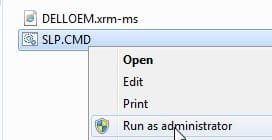
There are two ways to activate on oem preinstall machines. One way is to run the little command file that inserts the oem.xrm-ms code and product key
( this is what the official media from dell does and it is called slp activation ).

dell-oem.jpg


The other way is to enter the coa code from sticker.
 

My Computers My Computers

  • At a glance

    7 X64i5 84002x8gb 3200mhz
    Computer type
    PC/Desktop
    OS
    7 X64
    CPU
    i5 8400
    Motherboard
    gigabyte b365m ds3h
    Memory
    2x8gb 3200mhz
    Hard Drives
    various
    PSU
    pure power 11 400w cm
    Case
    Coolermaster
    Cooling
    cryorig m9i
  • At a glance

    7x64g54008gb ddr4 2400
    Computer type
    PC/Desktop
    OS
    7x64
    CPU
    g5400
    Motherboard
    ga b365m ds3h
    Memory
    8gb ddr4 2400
    PSU
    xfx pro 450w
Doesn't matter if ei.cfg says retail or oem.

Skip entering the product key during install. You can enter it later.

Activation is not dependent on the bit version.

There are two ways to activate on oem preinstall machines. One way is to run the little command file that inserts the oem.xrm-ms code and product key
( this is what the official media from dell does and it is called slp activation ).

View attachment 413316


The other way is to enter the coa code from sticker.

Nice! So, just out of curiosity, what would happen if I entered the product key during install, without having edited the ei.cfg? Would it reject the key?

So if I want to activate Windows using Microsoft's method, will I be able to do it by Internet with my product key and COA code or should I do it by phone?

Thanks again.
 

My Computer My Computer

At a glance

Windows 7 Home Premium SP1 64biti54GBNvidia
Computer type
Laptop
Computer Manufacturer/Model Number
Dell Vostro 3500
OS
Windows 7 Home Premium SP1 64bit
CPU
i5
Memory
4GB
Graphics Card(s)
Nvidia
what would happen if I entered the product key during install, without having edited the ei.cfg?


Try it and find out.

So if I want to activate Windows using Microsoft's method, will I be able to do it by Internet with my product key and COA code

You might need to ring the MS freefone number.
 

My Computers My Computers

  • At a glance

    7 X64i5 84002x8gb 3200mhz
    Computer type
    PC/Desktop
    OS
    7 X64
    CPU
    i5 8400
    Motherboard
    gigabyte b365m ds3h
    Memory
    2x8gb 3200mhz
    Hard Drives
    various
    PSU
    pure power 11 400w cm
    Case
    Coolermaster
    Cooling
    cryorig m9i
  • At a glance

    7x64g54008gb ddr4 2400
    Computer type
    PC/Desktop
    OS
    7x64
    CPU
    g5400
    Motherboard
    ga b365m ds3h
    Memory
    8gb ddr4 2400
    PSU
    xfx pro 450w
Try it and find out.


You might need to ring the MS freefone number.

Thanks. I'll try it tonight and let you know.
 

My Computer My Computer

At a glance

Windows 7 Home Premium SP1 64biti54GBNvidia
Computer type
Laptop
Computer Manufacturer/Model Number
Dell Vostro 3500
OS
Windows 7 Home Premium SP1 64bit
CPU
i5
Memory
4GB
Graphics Card(s)
Nvidia
It worked like a charm :) After skipping entering the product key during installation, I could activate Windows by phone.

Now I'm facing a problem: when I search for updates, I get an error (80072efe). I've read that it's usually related to connection problems, but I can ping whatever and access any website, although I get a "Windows couldn't detect automatically the proxy configuration" (or something like that) if I click on troubleshooting network problems. I don't know if it's because drivers are missing (I didn't install any of them yet), but I think this is a problem for a new post.

Thanks so much.
 

My Computer My Computer

At a glance

Windows 7 Home Premium SP1 64biti54GBNvidia
Computer type
Laptop
Computer Manufacturer/Model Number
Dell Vostro 3500
OS
Windows 7 Home Premium SP1 64bit
CPU
i5
Memory
4GB
Graphics Card(s)
Nvidia

My Computer My Computer

At a glance

Windows 7 Home Premium SP1 64biti54GBNvidia
Computer type
Laptop
Computer Manufacturer/Model Number
Dell Vostro 3500
OS
Windows 7 Home Premium SP1 64bit
CPU
i5
Memory
4GB
Graphics Card(s)
Nvidia

My Computers My Computers

  • At a glance

    Windows 7 HP 64i5 6600K - 800MHz to 4200MHz4+4G GSkill DDR4 3000IG - Intel 530
    Computer type
    PC/Desktop
    Computer Manufacturer/Model Number
    custom build
    OS
    Windows 7 HP 64
    CPU
    i5 6600K - 800MHz to 4200MHz
    Motherboard
    GA-Z170-HD3P
    Memory
    4+4G GSkill DDR4 3000
    Graphics Card(s)
    IG - Intel 530
    Monitor(s) Displays
    Samsung 226BW
    Screen Resolution
    1680x1050
    Hard Drives
    (1) -1 SM951 – 128GB M.2 AHCI PCIe SSD drive for Windows 7 and Lubuntu
    (2) -1 WD SATA 3 - 1T for Data
    (3) -1 WD SATA 3 - 1T for backup
    PSU
    Thermaltake 450W TR2 gold
    Keyboard
    Old and good Chicony mechanical keyboard
    Mouse
    Logitech mX performance - 9 buttons (had to disable some)
    Internet Speed
    500Mb/s
    Browser
    Firefox 64
    Other Info
    TinyWall firewall
  • At a glance

    Windows 7 Proi7-4500U 800MHz to 3.0GHz(4+4)G DDR3 1600IG intel 4400 + NVIDIA GeForce GT 745M
    Computer type
    Laptop
    System Manufacturer/Model Number
    Asus Q550LF
    OS
    Windows 7 Pro
    CPU
    i7-4500U 800MHz to 3.0GHz
    Motherboard
    Asus Q550LF
    Memory
    (4+4)G DDR3 1600
    Graphics Card(s)
    IG intel 4400 + NVIDIA GeForce GT 745M
    Sound Card
    Realtek
    Monitor(s) Displays
    LG Display LP156WF4-SPH1
    Screen Resolution
    1920 x 1080
    Hard Drives
    BX500 120G SSD for Windows and programs +
    1T HDD for data
    Internet Speed
    500 Mb/s
    Browser
    Firefox
    Other Info
    TinyWall firewall

My Computer My Computer

At a glance

Windows 7 Home Premium SP1 64biti54GBNvidia
Computer type
Laptop
Computer Manufacturer/Model Number
Dell Vostro 3500
OS
Windows 7 Home Premium SP1 64bit
CPU
i5
Memory
4GB
Graphics Card(s)
Nvidia
No.
 

My Computer My Computer

At a glance

Windows 7 Home Premium
Computer type
PC/Desktop
OS
Windows 7 Home Premium
Hi, all worked fine after installing the newer Windows Update Agent except for updates kb4534310 and kb4539601; they keep failing on install. Do you know why and how could I solve it? Thanks.

The answer my friend is in post #12 - Simplix
 

My Computers My Computers

  • At a glance

    Windows 7 HP 64i5 6600K - 800MHz to 4200MHz4+4G GSkill DDR4 3000IG - Intel 530
    Computer type
    PC/Desktop
    Computer Manufacturer/Model Number
    custom build
    OS
    Windows 7 HP 64
    CPU
    i5 6600K - 800MHz to 4200MHz
    Motherboard
    GA-Z170-HD3P
    Memory
    4+4G GSkill DDR4 3000
    Graphics Card(s)
    IG - Intel 530
    Monitor(s) Displays
    Samsung 226BW
    Screen Resolution
    1680x1050
    Hard Drives
    (1) -1 SM951 – 128GB M.2 AHCI PCIe SSD drive for Windows 7 and Lubuntu
    (2) -1 WD SATA 3 - 1T for Data
    (3) -1 WD SATA 3 - 1T for backup
    PSU
    Thermaltake 450W TR2 gold
    Keyboard
    Old and good Chicony mechanical keyboard
    Mouse
    Logitech mX performance - 9 buttons (had to disable some)
    Internet Speed
    500Mb/s
    Browser
    Firefox 64
    Other Info
    TinyWall firewall
  • At a glance

    Windows 7 Proi7-4500U 800MHz to 3.0GHz(4+4)G DDR3 1600IG intel 4400 + NVIDIA GeForce GT 745M
    Computer type
    Laptop
    System Manufacturer/Model Number
    Asus Q550LF
    OS
    Windows 7 Pro
    CPU
    i7-4500U 800MHz to 3.0GHz
    Motherboard
    Asus Q550LF
    Memory
    (4+4)G DDR3 1600
    Graphics Card(s)
    IG intel 4400 + NVIDIA GeForce GT 745M
    Sound Card
    Realtek
    Monitor(s) Displays
    LG Display LP156WF4-SPH1
    Screen Resolution
    1920 x 1080
    Hard Drives
    BX500 120G SSD for Windows and programs +
    1T HDD for data
    Internet Speed
    500 Mb/s
    Browser
    Firefox
    Other Info
    TinyWall firewall
Back
Top