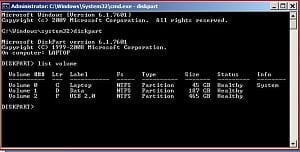
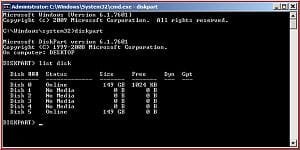
Your photos could confuse folks because they are from 2 different computers.
"List Disk" will show the actual physical hard disk drives attached to the computer. This is the one you use to select the hard drive you want to clean. You must be very certain that it is the correct drive based upon the known size or other identifiable feature.
"List Volume" will show the partitions on one individual hard drive. It is redundant with the "List Partition" command. You can use "List Volume" to see if you recognize the partitions to be sure it is the correct drive.
My Computer
Computer type
PC/Desktop
Computer Manufacturer/Model Number
Home Built - Jan 2013
OS
Windows 7 64 Bit Home Premium SP1
CPU
i7-3820
Motherboard
Asus P9X79-PRO - Bios 4608
Memory
GSkill F3-14900CL9Q - 16GB
Graphics Card(s)
EVGA GeForce GTX660 - Driver 352.86
Sound Card
On board Realtek ALC898
Monitor(s) Displays
Acer S271HL
Screen Resolution
1920 x 1080
Hard Drives
#1- Samsung 840 Pro Series
#2- Western Digital WD1002FAEX Sata3 Black
#3- Western Digital WD1002FAEX Sata3 Black
PSU
Corsair CMPSU-850TX-V2 - 850 watt (by Seasonic)
Case
Corsair Obsidian 550D
Cooling
Standard 3 120mm case fans, Cooler Master Hyper 212 EVO
I knew my images were from 2 different computers but did not think it would matter, all I wanted was to shows the 2 results using different commands. I thought 'list volume' would make it easier to select the correct drive.