Cleaning Chrome - apparently not easy...

zapp22

New member
Power User
VIP
Local time
1:39 PM
Messages
730
Location
Tejas, northern Mexico
I love using Google Chrome for a variety of reasons but I am finding it a bit complex to actually cleanup personal data. Anyone ever really looked closely at what Chrome keeps? Its a lot. And when things go wobbly, the cache or "bloom" can rapidly escalate.

I like Ccleaner and both use it and recommend to others I help. But even though its developers specifically target Chrome and IE and Firefox, what it cleans in Chrome seems to be the obvious recent lists of files, sites, cookies if you wish. Chrome encodes your browsing information and stashes these ever-expanding 'blooms' and cache's in database files.

Now why would I be concerned with this? Here are just a few reasons:
1. I do work for others, and for many reasons people do sometimes want their personal data purged. My job is to make the customer happy with their computer
2. Google's founding is well-known, having been in part funded and supported by Federal 'spook' agency ops. They've struck deals with the Chinese government and other repressive governments - infamously so. If they'll cut deals with obvious human rights abusers, would they share your personal data with those who want to know? I dunno the answers, I just wonder.
3. Bugs can [and have] cause those stashes to balloon out of control. In the past I have seen these grow to many GB and actually push the hard drive to the max where it was throwing up flags, despite using the builtin purging feature of Chrome AND using Ccleaner. finally had to nuke the db files.

just wonderin' ....
 

My Computer

Computer Manufacturer/Model Number
HP DC7600, HP DC7600[2], HP DC7100, Samsung NC10
OS
Windows XP Pro SP3, Windows 7 Pro 32-bit, Windows 7 Ultimate 64bit, Windows XP Home SP3
CPU
Pentium 4 3.2GHz, Pentium 4 3.4GHz 64bit, Atom,
Motherboard
Dunno
Memory
4GB matched, 1GB, 2.5GB, 4.0 GB
Graphics Card(s)
Geforce 8400 GS and others
Sound Card
RealteK ALC260 and others
Monitor(s) Displays
Asus HD
Screen Resolution
1920x1080
Hard Drives
WD Caviar 640gb SATA
Cooling
We Be Cool
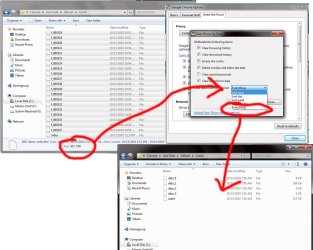
Nope. I have the cache limit at 100 MB. I'm using? 96.7 MB

Clearing the cache?
 

Attachments

  • clearchrome.jpg
    clearchrome.jpg
    167.4 KB · Views: 67

My Computer

Computer Manufacturer/Model Number
Pugh Technologies
OS
W7 Professional x64
CPU
AMD Athlon II X3 445 Rana 3.10 GHz
Motherboard
MSI 870A-G54
Memory
PNY XLR DDR3 1600 4x2GB
Graphics Card(s)
NVIDIA GeForce GTS 450 (fermi) 1GB GDDR5
Sound Card
Realtek ALC892 onboard
Monitor(s) Displays
ASUS VE205t, Viewsonic VX2035WM
Screen Resolution
1600x900, 1600x1050
Hard Drives
977GB Hitachi Hitachi HDS721010CLA332
244GB Western Digital WDC WD2500AAJS-65B4A0
488GB Western Digital WDC WD5000AAJS-00A8B0
488GB Western Digital WDC WD5000AAKS-00UU3A0
PSU
Antec EarthWatts EA650 650W
Case
ThermalTake Armor A90 Mid Tower
Cooling
3x 120mm in, 1x 120mm & 200mm out, self built hydro-cooler
Keyboard
Logitec 55
Mouse
Razer Deathadder
Internet Speed
20 Mbps D/L, 9 Mbps U/L
Nope. I have the cache limit at 100 MB. I'm using? 96.7 MB

Clearing the cache?


How did you limit the cache? I'm using Chrome 7.0 and would like to limit my cache as well. I'm an average user, so any detailed info would be appreciated!!
 

My Computer

OS
Windows 7 Home Premium x64 SP1
You might try Click&Clean (don't use Chrome personally, so not tested by me)

Click&Clean

A Guy
 

My Computer

Computer type
PC/Desktop
OS
Windows 10 Home x64
CPU
INTEL Core i5-750 Quad-Core 3.37GHz
Motherboard
ASUS P7P55D
Memory
HyperX Fury Black Series 8GB (2 x 4GB) 1866Mhz
Graphics Card(s)
EVGA GeForce GTX 750 Superclocked 1GB 128-Bit GDDR5
Monitor(s) Displays
LG 32MA68HY 32" IPS
Screen Resolution
1920 x 1080
Hard Drives
Samsung 840 Evo 120GB, SEAGATE 500GB Barracuda® 7200.12, SATA 3 Gb/s, 7200 RPM, 16MB cache
PSU
ANTEC TruePower New TP-550, 80 PLUS, 550W
Case
ANTEC Three Hundred Illusion
Cooling
COOLER MASTER Hyper 212 Plus, 4 x 120mm 1 x 140mm Noctua's
Internet Speed
85 + Mbps
Antivirus
Avast
Browser
Vivaldi
Crap, my computer froze when I was posting my reply, and I forgot I didn't :P

Anywho, if you Rclick your shortcut to chrome, and under the target field you add " --disk-cache-size=N" where N is the size you want to limit the cache to in Bytes.

So the shortcut target field would look like ".../chrome.exe --disk-cache-size=N"

To set the cache location you use the same tag, but DIR replaces the word size. (--disk-cache-dir="CACHE_DIR")
 

My Computer

Computer Manufacturer/Model Number
Pugh Technologies
OS
W7 Professional x64
CPU
AMD Athlon II X3 445 Rana 3.10 GHz
Motherboard
MSI 870A-G54
Memory
PNY XLR DDR3 1600 4x2GB
Graphics Card(s)
NVIDIA GeForce GTS 450 (fermi) 1GB GDDR5
Sound Card
Realtek ALC892 onboard
Monitor(s) Displays
ASUS VE205t, Viewsonic VX2035WM
Screen Resolution
1600x900, 1600x1050
Hard Drives
977GB Hitachi Hitachi HDS721010CLA332
244GB Western Digital WDC WD2500AAJS-65B4A0
488GB Western Digital WDC WD5000AAJS-00A8B0
488GB Western Digital WDC WD5000AAKS-00UU3A0
PSU
Antec EarthWatts EA650 650W
Case
ThermalTake Armor A90 Mid Tower
Cooling
3x 120mm in, 1x 120mm & 200mm out, self built hydro-cooler
Keyboard
Logitec 55
Mouse
Razer Deathadder
Internet Speed
20 Mbps D/L, 9 Mbps U/L
I read the details of Click&Clean mentioned above - its fairly smart. I have not tried it and measured the results.

how many "blooms" do you have? and their size? And crash folders? Apparently it generates a folder for each crash instance. They are not large - just clutter.
 

My Computer

Computer Manufacturer/Model Number
HP DC7600, HP DC7600[2], HP DC7100, Samsung NC10
OS
Windows XP Pro SP3, Windows 7 Pro 32-bit, Windows 7 Ultimate 64bit, Windows XP Home SP3
CPU
Pentium 4 3.2GHz, Pentium 4 3.4GHz 64bit, Atom,
Motherboard
Dunno
Memory
4GB matched, 1GB, 2.5GB, 4.0 GB
Graphics Card(s)
Geforce 8400 GS and others
Sound Card
RealteK ALC260 and others
Monitor(s) Displays
Asus HD
Screen Resolution
1920x1080
Hard Drives
WD Caviar 640gb SATA
Cooling
We Be Cool
I haven't been able to locate crash folders. Where are your files getting stored?
 

My Computer

Computer Manufacturer/Model Number
Pugh Technologies
OS
W7 Professional x64
CPU
AMD Athlon II X3 445 Rana 3.10 GHz
Motherboard
MSI 870A-G54
Memory
PNY XLR DDR3 1600 4x2GB
Graphics Card(s)
NVIDIA GeForce GTS 450 (fermi) 1GB GDDR5
Sound Card
Realtek ALC892 onboard
Monitor(s) Displays
ASUS VE205t, Viewsonic VX2035WM
Screen Resolution
1600x900, 1600x1050
Hard Drives
977GB Hitachi Hitachi HDS721010CLA332
244GB Western Digital WDC WD2500AAJS-65B4A0
488GB Western Digital WDC WD5000AAJS-00A8B0
488GB Western Digital WDC WD5000AAKS-00UU3A0
PSU
Antec EarthWatts EA650 650W
Case
ThermalTake Armor A90 Mid Tower
Cooling
3x 120mm in, 1x 120mm & 200mm out, self built hydro-cooler
Keyboard
Logitec 55
Mouse
Razer Deathadder
Internet Speed
20 Mbps D/L, 9 Mbps U/L
Back
Top