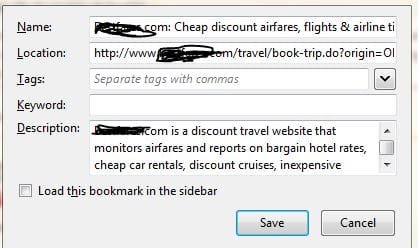
I have been participating in Windows 10 and as a result, have exported my bookmarks into a HTML format for easy transfer to the new browser etc.
When viewing the resulting data, there is an untold amount of tag along marketing. i.e. one travel company has "xx has the travel savings you're looking for. Our low prices on airfares, hotel rooms and car rentals make travel affordable." blah blah blah!.
My bookmarks/favorites is 638K and I am looking to reduce that amount. Is there an easy way to remove this or do I have to edit each entry and remove the "Blah" ?
When viewing the resulting data, there is an untold amount of tag along marketing. i.e. one travel company has "xx has the travel savings you're looking for. Our low prices on airfares, hotel rooms and car rentals make travel affordable." blah blah blah!.
My bookmarks/favorites is 638K and I am looking to reduce that amount. Is there an easy way to remove this or do I have to edit each entry and remove the "Blah" ?
My Computer
- Computer type
- PC/Desktop
- Computer Manufacturer/Model Number
- Self Build
- OS
- Windows 7 Professional X64 Service Pack 1
- CPU
- AMD Phenom II X4 955 3.20GHz
- Motherboard
- Gigabyte GA-MA790X-UD4P
- Memory
- 8G
- Graphics Card(s)
- GX550 Ti
- Sound Card
- On board
- Monitor(s) Displays
- Asus VW246H & Syncmaster 2243swx
- Screen Resolution
- 1920x1080 & 1920x1080
- Hard Drives
- M4-CT128 SSD2, Samsung 840 256GB, 1 WDC 1TB
- PSU
- Corsair TX750W-V2
- Case
- Antec
- Cooling
- 2 120mm fan
- Keyboard
- Microsoft Wireless 3050
- Mouse
- Microsoft Wireless 5000
- Internet Speed
- 72/6Mbs (Cable)
- Other Info
- Asus AC1900 router, 8 port Trendnet Switch - Logitech Webcam Pro 9000