Cleaning Virtual PC junk?

JorgeO

New member
Member
Local time
7:03 PM
Messages
35
Hello,

Win 7 64

I need to install a Win98 virtual machine, and my first option was to use Virtual PC.

I went to DL it from MS site (opted for the VPC without XP), but as there wasn't anything I could call VPC I DL'd it a few times.
Decided to uninstall it
Found out about removing the VPC update as uninstall.

Then I tried VPC 2007, 32 bits. At the installation time, I got an error message I had to use the 64 bits version. Uninstalled it
When I tried to install the 64 bit version, there was an error message satating a VPC was already installed.

Tried to clean leftovers to no avail.

Thanks for your help.
 

My Computer

Computer type
Laptop
Computer Manufacturer/Model Number
Acer V3-571-6652
OS
Microsoft Windows 7 Home Premium 64-bit 7601 Multiprocessor Free Service Pack 1
CPU
Intel(R) Core(TM) i3-2370M CPU @ 2.40GHz
Motherboard
Acer VA50_HC_HR
Memory
4GB
Graphics Card(s)
-
Sound Card
-
Case
Cooler Master
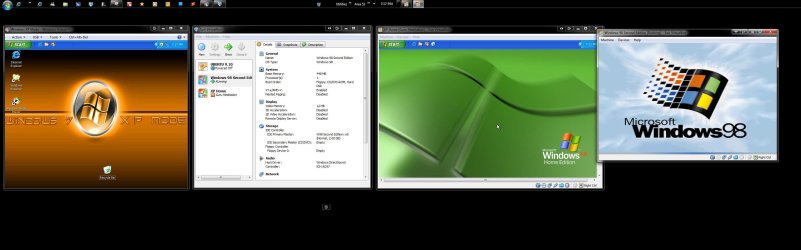
The only thing I was able to see 98SE custom installed onto was Oracle's VirtualBox not the MS VPC. That took a bit of work even with a floppy on the old case at the time since VM wares expect bootable optical media.

For removing the Virtual PC you have to go into the Control Panel>Windows Updates and look over the Installed Updates to scroll to the bottom there. You then right click to uninstall followed by a full system restart.

As for the old Legacy installer that will not see the virtual hard disk without a little help! When trying this out on VBox I first had to copy the setup.exe file over to the VHD directly and run that by itself which stalls immediately. When then double clicking on the same as I browsed the 98 cd the Windows installer actually saw the vhd and went to work.

You can see the results in the attached image here.You'll notice the XP Mode on the left, XP Home and 98SE in two VMs running on VBox at the same time. :D
 

Attachments

  • Multi Multi Tasking OSs for sure.jpg
    Multi Multi Tasking OSs for sure.jpg
    186.7 KB · Views: 24

My Computers

System One System Two

  • Computer type
    PC/Desktop
    Computer Manufacturer/Model Number
    Custom builds = 2
    OS
    W7 Ultimate x64/W10 Pro x64/W11 Pro Triple Boot - Main PC W7 Remote PC Micro ATX W7 Pro x64/W11 Pro
    CPU
    AMD Phenom II X4 975 Deneb 3.6ghz - 965 2nd remote pc
    Motherboard
    Gigabyte GA-790XTA-UD4-Gigabyte GA-880GM-D2H remote pc
    Memory
    Kingston Hyper X DDR3 1600 1.5v 16gb - Hyper X Fury 8gb 2nd
    Graphics Card(s)
    MSI HD Radeon 5750 1gb - MSI HD Radeon 6450 on mini tower
    Sound Card
    Creative Labs X-Fi Xtreme Audio P - Realtek onooard 2nd case
    Monitor(s) Displays
    ASUS VW199T-P 19" HP 2082a Main-HP 2082a 20" remote pc
    Screen Resolution
    Asus 1440x900 - HP 1600x900
    Hard Drives
    WD Black 1TB HD per OS W7, W10, and pending W11 presently on 500gb OS Drive - Pending Triple 1TB HDs for Spanned Storage/backup volume
    Single 2TB external USB enclosure, single 1TB System 7 Host/Boot drive, Pending 8TB external HD for system image b
    PSU
    Corsair 750TX - primary / Corsair CX600 - second
    Case
    Antec 900-2 - SSD compatible / NZXT Vulcan mini tower
    Cooling
    Zalman CNPS9900A
    Keyboard
    AZIO L70 Backlit Letters Gaming - ONN Cordless/USB
    Mouse
    MSI DS200 Programmable, Logitech Cordless
    Internet Speed
    30mbps upgrade - primary hard wired - mini tower usb WiFi
    Antivirus
    GFI VIPRE Internet Security 2014 on W7 2016 beta on W10,
    Browser
    Cyberfox, WaterFox 64bit FF variants, FireFox x64, Pale Moon
    Other Info
    Accomdata fan cooled usb 2.0 PIDE/Sata II, III external enclosure.
    Sambient usb/eSata PATA/Sata II, III external enclosure.
  • Computer type
    PC/Desktop
    System Manufacturer/Model Number
    CUSTOM ASSEMBLY
    OS
    W7 Pro x64/W11 Pro
    CPU
    AMD Deneb 3.6ghz - 965
    Motherboard
    Gigabyte GA-880GM-D2H remote pc
    Memory
    Kingston Hyper X Fury 8gb
    Graphics Card(s)
    MSI HD Radeon 6450 DVI Output
    Sound Card
    Realtek onooard Creative or Other separate PENDING
    Monitor(s) Displays
    VIZIO 32" LCD TV Separate LCD Pending
    Screen Resolution
    1600x1080
    Hard Drives
    WD 500GB OS Host/Boot WD Green 1TB Storage/Backup
    PSU
    Corsair 600W - THERMALTAKE 600W spare case
    Case
    NZXT Vulcan mini tower
    Cooling
    Twin 120mm Top Fans - 240mm Side Cover
    Keyboard
    ONN Cordless/USB Logitech Cordless
    Mouse
    ONN USB/Cordless - Logitech Cordless
    Internet Speed
    DSL 5G
    Browser
    MS Edge, FireFox, WaterFox x64, FireFox Nightly
    Other Info
    OS Testing-Remote Access to Main TeamViewer

My Computer

Computer type
Laptop
Computer Manufacturer/Model Number
Acer V3-571-6652
OS
Microsoft Windows 7 Home Premium 64-bit 7601 Multiprocessor Free Service Pack 1
CPU
Intel(R) Core(TM) i3-2370M CPU @ 2.40GHz
Motherboard
Acer VA50_HC_HR
Memory
4GB
Graphics Card(s)
-
Sound Card
-
Case
Cooler Master
I haven't tried to get 98 on VMware Lite at all. For the VPC however XP for the 2007 and Vista or 7 for the 2009 updated version would be the requirement for Windows.

The SUN Oracle VBox is a typically found a bit more flexible since you can also run open source OSs as well as older versions of Windows with some work involved. It would be interesting to find out just the same if you see results on the other VM wares! ;)
 

My Computers

System One System Two

  • Computer type
    PC/Desktop
    Computer Manufacturer/Model Number
    Custom builds = 2
    OS
    W7 Ultimate x64/W10 Pro x64/W11 Pro Triple Boot - Main PC W7 Remote PC Micro ATX W7 Pro x64/W11 Pro
    CPU
    AMD Phenom II X4 975 Deneb 3.6ghz - 965 2nd remote pc
    Motherboard
    Gigabyte GA-790XTA-UD4-Gigabyte GA-880GM-D2H remote pc
    Memory
    Kingston Hyper X DDR3 1600 1.5v 16gb - Hyper X Fury 8gb 2nd
    Graphics Card(s)
    MSI HD Radeon 5750 1gb - MSI HD Radeon 6450 on mini tower
    Sound Card
    Creative Labs X-Fi Xtreme Audio P - Realtek onooard 2nd case
    Monitor(s) Displays
    ASUS VW199T-P 19" HP 2082a Main-HP 2082a 20" remote pc
    Screen Resolution
    Asus 1440x900 - HP 1600x900
    Hard Drives
    WD Black 1TB HD per OS W7, W10, and pending W11 presently on 500gb OS Drive - Pending Triple 1TB HDs for Spanned Storage/backup volume
    Single 2TB external USB enclosure, single 1TB System 7 Host/Boot drive, Pending 8TB external HD for system image b
    PSU
    Corsair 750TX - primary / Corsair CX600 - second
    Case
    Antec 900-2 - SSD compatible / NZXT Vulcan mini tower
    Cooling
    Zalman CNPS9900A
    Keyboard
    AZIO L70 Backlit Letters Gaming - ONN Cordless/USB
    Mouse
    MSI DS200 Programmable, Logitech Cordless
    Internet Speed
    30mbps upgrade - primary hard wired - mini tower usb WiFi
    Antivirus
    GFI VIPRE Internet Security 2014 on W7 2016 beta on W10,
    Browser
    Cyberfox, WaterFox 64bit FF variants, FireFox x64, Pale Moon
    Other Info
    Accomdata fan cooled usb 2.0 PIDE/Sata II, III external enclosure.
    Sambient usb/eSata PATA/Sata II, III external enclosure.
  • Computer type
    PC/Desktop
    System Manufacturer/Model Number
    CUSTOM ASSEMBLY
    OS
    W7 Pro x64/W11 Pro
    CPU
    AMD Deneb 3.6ghz - 965
    Motherboard
    Gigabyte GA-880GM-D2H remote pc
    Memory
    Kingston Hyper X Fury 8gb
    Graphics Card(s)
    MSI HD Radeon 6450 DVI Output
    Sound Card
    Realtek onooard Creative or Other separate PENDING
    Monitor(s) Displays
    VIZIO 32" LCD TV Separate LCD Pending
    Screen Resolution
    1600x1080
    Hard Drives
    WD 500GB OS Host/Boot WD Green 1TB Storage/Backup
    PSU
    Corsair 600W - THERMALTAKE 600W spare case
    Case
    NZXT Vulcan mini tower
    Cooling
    Twin 120mm Top Fans - 240mm Side Cover
    Keyboard
    ONN Cordless/USB Logitech Cordless
    Mouse
    ONN USB/Cordless - Logitech Cordless
    Internet Speed
    DSL 5G
    Browser
    MS Edge, FireFox, WaterFox x64, FireFox Nightly
    Other Info
    OS Testing-Remote Access to Main TeamViewer
I have just installed Windows 98SE as a guest OS VM on Microsoft Virtual PC running on Windows XP, from an ISO source on a USB external hard drive. It took abut 45 minutes from start to running the introductory "Welcome" presentation.

I installed Windows 98SE on a Toshiba Satellite CDT 400 laptop (800MB HDD, 40MB RAM) from 1995 a couple of weeks ago - it took about 2 hours from CD.

About 15 minutes ago, I started the same on Windows Virtual PC on Windows7, and it is just coming up for the first login, and "Welcome" show started 19 minutes after starting. Noticeably, this has much worse sound than the other VM.

However, Windows 98 seems to install and run fine as a VHD under Microsoft and Windows VPCs. I was surprised by the speed of the Windows 7 VPC.
 

My Computer

Computer Manufacturer/Model Number
Acer 7520, Packard Bell dot se, Acer travelmate 2423
OS
Win 7 Ult + Starter, XP Pro +Home, 2kAS, Linux Mint 8, SuperOS
CPU
AMD 64 Athlon X2 , Intel Atom N450, Intel Celeron M 1.50 Ghz
Motherboard
Acer Fuquene
Memory
2.5GB ; 1GB; 2GB
Graphics Card(s)
Nvidia GeForce7000m; Intel; Intel
Sound Card
Realtek AC57
Monitor(s) Displays
17" ;10.1"; 19"
Screen Resolution
1440x900;1024x600;1440x900;
Hard Drives
WD 80, WD 320;
PSU
19v
Case
Laptop
Cooling
Air
Internet Speed
9.7Mb/s down 0.99Mb/s up
Other Info
ISP VIRGINMEDIA 10M cable broadband - D-Link DIR615 wireless router, 3Com OfficeConnect ASDL router used as wireless extender switch
Night Hawk

I've installed Win98SE on a VMWare player V3.1.4 (free)

Had some problem with a boot disk (my Win98 CD is not bootable) but after that all went fine. Took some 30 min after the CD started to load.

At first reboot, blue screen of death...
mad.png


Removed the old VM, unistalled/reinstalled the player just in case, reinstalled Win98SE, same as before.
This time, after a few reboots, all seems stable.

My use of Win98 is just for an old film scanner that has not drivers for anything newer than 98/ME, so I have not tested sound or smooth video, etc.

.Take care,
 

My Computer

Computer type
Laptop
Computer Manufacturer/Model Number
Acer V3-571-6652
OS
Microsoft Windows 7 Home Premium 64-bit 7601 Multiprocessor Free Service Pack 1
CPU
Intel(R) Core(TM) i3-2370M CPU @ 2.40GHz
Motherboard
Acer VA50_HC_HR
Memory
4GB
Graphics Card(s)
-
Sound Card
-
Case
Cooler Master
Thanks, Night Hawk

I will go the VMWare way.

Hi there IMO the best solution.

Once you've powered off the Virtual machine go to vm settings in the menu and choose DELETE FROM DISK.

Entire VM is now gone -- 100% cleaned.

Cheers
jimbo
 

My Computer

Computer type
PC/Desktop
Computer Manufacturer/Model Number
Custom built, several laptops HP/ASUS
OS
Linux CENTOS 7 / various Windows OS'es and servers
CPU
Intel i7 Intel i5
Memory
8GB, 16GB
Graphics Card(s)
On Motherboard
Sound Card
Realtek HD audio
Monitor(s) Displays
Apple Cinema display, Samsung LCD
Screen Resolution
1920 X 1080
Hard Drives
4 X 1TB SATA
Mouse
Toshiba wireless laser
Internet Speed
> 20MB up
Night Hawk

I've installed Win98SE on a VMWare player V3.1.4 (free)

Had some problem with a boot disk (my Win98 CD is not bootable) but after that all went fine. Took some 30 min after the CD started to load.

At first reboot, blue screen of death...
mad.png


Removed the old VM, unistalled/reinstalled the player just in case, reinstalled Win98SE, same as before.
This time, after a few reboots, all seems stable.

My use of Win98 is just for an old film scanner that has not drivers for anything newer than 98/ME, so I have not tested sound or smooth video, etc.

.Take care,

I told you it wouldb't be that easy but at least you were able to get 98 running. ;) As for video playback and sound? That will be a good one if you are able to manage it!

The old 98SE cd here wasn't bootable either. In those days boot floppy first with cd rom support selected during the install. Floppy images haven't worked so far for any other attempts.

Bootable iso burned to disk? VMs like bootable optical media.

You can't really install device drivers on VMs like you would see normally done on a regular install to drive. You'll be using it by compatibility only there. That's one of the unfortunated drawbacks with any VM player including the XP Mode which actually relies on the host OS's sound source.

As for no updated drivers for an addon device? I know that one only too well even changing ISP's due to no network adapter drivers newer then 2000/XP in order to connect with the 64bit 7. old printers, tv tuner cards, etc.

Let us know how it goes.
 

My Computers

System One System Two

  • Computer type
    PC/Desktop
    Computer Manufacturer/Model Number
    Custom builds = 2
    OS
    W7 Ultimate x64/W10 Pro x64/W11 Pro Triple Boot - Main PC W7 Remote PC Micro ATX W7 Pro x64/W11 Pro
    CPU
    AMD Phenom II X4 975 Deneb 3.6ghz - 965 2nd remote pc
    Motherboard
    Gigabyte GA-790XTA-UD4-Gigabyte GA-880GM-D2H remote pc
    Memory
    Kingston Hyper X DDR3 1600 1.5v 16gb - Hyper X Fury 8gb 2nd
    Graphics Card(s)
    MSI HD Radeon 5750 1gb - MSI HD Radeon 6450 on mini tower
    Sound Card
    Creative Labs X-Fi Xtreme Audio P - Realtek onooard 2nd case
    Monitor(s) Displays
    ASUS VW199T-P 19" HP 2082a Main-HP 2082a 20" remote pc
    Screen Resolution
    Asus 1440x900 - HP 1600x900
    Hard Drives
    WD Black 1TB HD per OS W7, W10, and pending W11 presently on 500gb OS Drive - Pending Triple 1TB HDs for Spanned Storage/backup volume
    Single 2TB external USB enclosure, single 1TB System 7 Host/Boot drive, Pending 8TB external HD for system image b
    PSU
    Corsair 750TX - primary / Corsair CX600 - second
    Case
    Antec 900-2 - SSD compatible / NZXT Vulcan mini tower
    Cooling
    Zalman CNPS9900A
    Keyboard
    AZIO L70 Backlit Letters Gaming - ONN Cordless/USB
    Mouse
    MSI DS200 Programmable, Logitech Cordless
    Internet Speed
    30mbps upgrade - primary hard wired - mini tower usb WiFi
    Antivirus
    GFI VIPRE Internet Security 2014 on W7 2016 beta on W10,
    Browser
    Cyberfox, WaterFox 64bit FF variants, FireFox x64, Pale Moon
    Other Info
    Accomdata fan cooled usb 2.0 PIDE/Sata II, III external enclosure.
    Sambient usb/eSata PATA/Sata II, III external enclosure.
  • Computer type
    PC/Desktop
    System Manufacturer/Model Number
    CUSTOM ASSEMBLY
    OS
    W7 Pro x64/W11 Pro
    CPU
    AMD Deneb 3.6ghz - 965
    Motherboard
    Gigabyte GA-880GM-D2H remote pc
    Memory
    Kingston Hyper X Fury 8gb
    Graphics Card(s)
    MSI HD Radeon 6450 DVI Output
    Sound Card
    Realtek onooard Creative or Other separate PENDING
    Monitor(s) Displays
    VIZIO 32" LCD TV Separate LCD Pending
    Screen Resolution
    1600x1080
    Hard Drives
    WD 500GB OS Host/Boot WD Green 1TB Storage/Backup
    PSU
    Corsair 600W - THERMALTAKE 600W spare case
    Case
    NZXT Vulcan mini tower
    Cooling
    Twin 120mm Top Fans - 240mm Side Cover
    Keyboard
    ONN Cordless/USB Logitech Cordless
    Mouse
    ONN USB/Cordless - Logitech Cordless
    Internet Speed
    DSL 5G
    Browser
    MS Edge, FireFox, WaterFox x64, FireFox Nightly
    Other Info
    OS Testing-Remote Access to Main TeamViewer
Back
Top