Clear Folder icons

Canadagates

New member
Local time
3:40 AM
Messages
5
Hello,
I like how Windows 7 shows a preview of a folder's contents by having little icons stick out of the folder. However, I put a picture into a desktop folder that I no longer want looking out at me every day. I took the picture out of the folder but that little icon carries on unchanged. I tried putting a different picture in the folder, but it is still that original one peeking out of the folder. How do I reset this?
Thanks, Gordon
 

My Computer

OS
Windows 7 64 bit
Hello,
I like how Windows 7 shows a preview of a folder's contents by having little icons stick out of the folder. However, I put a picture into a desktop folder that I no longer want looking out at me every day. I took the picture out of the folder but that little icon carries on unchanged. I tried putting a different picture in the folder, but it is still that original one peeking out of the folder. How do I reset this?
Thanks, Gordon

Could it be in Control Panel=>Options Folders, check the box "Always Show Icons Never Thumbnails"

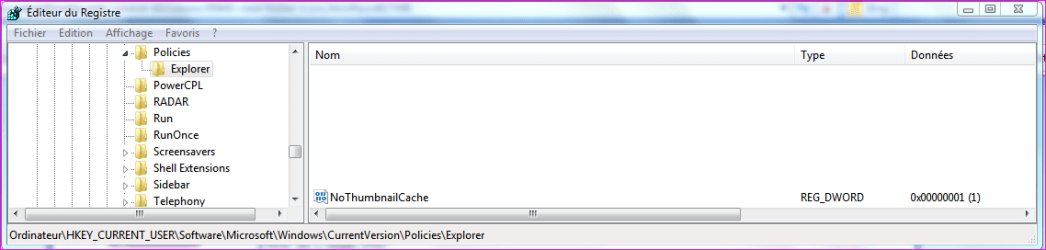
You can either Disable Thumbnails Cache if you need in registry.. (attached thumbnail for the path)
Create a Dword 32bits "NoThumbnailCache" set to 1, log Off log On.


But saw Brink had more soft solutions for you on next post!
 

Attachments

  • Capture.PNG
    Capture.PNG
    19.3 KB · Views: 28

My Computer

Computer type
PC/Desktop
Computer Manufacturer/Model Number
Custom Build
OS
Windows 7 Professional SP1 - x64 [Non-UEFI Boot]
CPU
Ivy Bridge Core i5 3570K (Delidded)
Motherboard
Asus P8Z77-V LE PLUS
Memory
G.Skill "Ares" DDR3 PC3-12800 - 1600MHz (16Gb)
Graphics Card(s)
Asus Dual-RX480-O4G
Sound Card
Creative Sound Blaster Z w/5.1 sound system
Monitor(s) Displays
Asus IPS 23"
Screen Resolution
16/9
Hard Drives
Internal:
500Go Sata 6Gb/s (x2)
500Go Sata 3Gb/s (x2)
SSD 60Go Sata 6Gb/s
PSU
In Win C 900W Series 80+ Platinum
Case
Thermaltake Chaser A71
Cooling
Custom Water Cooling Loop
Keyboard
Cooler Master QuickFire XTi
Mouse
Razer Imperator 2012 (4G)
Antivirus
MSE
Browser
IE 11.0.xxx Rtm
Other Info
"Raid0" with Intel Smart Response Technology (HDD/SSD)
Hello Gordon, and welcome to Seven Forums.

If you do not have any other images in the folder, then you may just need to right click on the desktop and click on Refresh to update the folder icon.

If that doesn't help, then rebuilding the icon cache may.


In addition in case you changed the folder preview picture using the method below.

Folder Preview Picture Change - Vista Forums


Hope this helps,
Shawn
 

My Computer

Computer type
PC/Desktop
Computer Manufacturer/Model Number
Self built custom
OS
64-bit Windows 11 Pro for Workstations
CPU
Intel i7-8700K OC'd to 5 GHz
Motherboard
ASUS ROG Maximus XI Formula Z390
Memory
64 GB (4x16GB) G.SKILL TridentZ RGB DDR4 3600 MHz
Graphics Card(s)
ASUS ROG-STRIX-GTX1080TI-O11G-GAMING
Sound Card
Integrated
Monitor(s) Displays
2 x Samsung Odyssey G7 27"
Screen Resolution
2560x1440
Hard Drives
1TB Samsung 990 PRO M.2,
4TB Samsung 990 PRO PRO M.2,
TerraMaster F8 SSD Plus NAS
PSU
Seasonic Prime Titanium 850W
Case
Thermaltake Core P3
Cooling
Corsair Hydro H115i
Keyboard
Logitech wireless K800
Mouse
Logitech MX Master 4
Internet Speed
2 Gb/s Download and 100 Mb/s Upload
Antivirus
Malwarebyte Anti-Malware Premium
Browser
Google Chrome
Other Info
Logitech Z625 speaker system,
Logitech BRIO 4K Pro webcam,
HP Color LaserJet Pro MFP M477fdn,
APC SMART-UPS RT 1000 XL - SURT1000XLI,
Galaxy S23 Plus phone
Thanks

I'll try these solutions as soon as I get home tonight. You guys are amazing.
Thanks, Gord
 

My Computer

OS
Windows 7 64 bit
Any ideas for shutting that "feature" off altogether? I find it most annoying. Where is the information kept?...... Especially on a USB flash drive? (one of the fixes says it won't work on a USB drive)

I tried using Regedit, following the path that NON provided, but the "policies" folder isn't a folder on my system, just a file/entry....... it's not expandable.

I could do as suggested and check the "always use icons" box, but then I loose all my thumbnails!!! I LIKE thumbnails (for files mostly), I just want them to be accurate.
 

My Computer

Computer Manufacturer/Model Number
Me
OS
Windows 7
CPU
AMD something or other
Motherboard
Gigabyte
Memory
yes
Graphics Card(s)
on board
Sound Card
onboard
Monitor(s) Displays
NEC
Hard Drives
WD 300gb SATA2
PSU
Antec
Case
late 90's tower I bought used after not liking a Lian-Li HT
Cooling
a fan
Any ideas for shutting that "feature" off altogether? I find it most annoying. Where is the information kept?...... Especially on a USB flash drive? (one of the fixes says it won't work on a USB drive)

I tried using Regedit, following the path that NON provided, but the "policies" folder isn't a folder on my system, just a file/entry....... it's not expandable.

I could do as suggested and check the "always use icons" box, but then I loose all my thumbnails!!! I LIKE thumbnails (for files mostly), I just want them to be accurate.

You could uncheck "Always Show Icons..." then, do/let the registry tweak...this will force the Thumbnail Cache to regenerate itself each time it open a foder.

For the drive you can use "cmd" to paste in your USB drive, open it in administrator right then paste this command, enter...this will clean the file "thumbs.db"

As exemple, my drive is F:\
Open "Cmd" admin prompt pointed to that drive, type: del /ash /s thumbs.db
then enter. Could be the same for icons: type: del /ash /s IconCache.db
 

Attachments

  • Capture.PNG
    Capture.PNG
    10.5 KB · Views: 13

My Computer

Computer type
PC/Desktop
Computer Manufacturer/Model Number
Custom Build
OS
Windows 7 Professional SP1 - x64 [Non-UEFI Boot]
CPU
Ivy Bridge Core i5 3570K (Delidded)
Motherboard
Asus P8Z77-V LE PLUS
Memory
G.Skill "Ares" DDR3 PC3-12800 - 1600MHz (16Gb)
Graphics Card(s)
Asus Dual-RX480-O4G
Sound Card
Creative Sound Blaster Z w/5.1 sound system
Monitor(s) Displays
Asus IPS 23"
Screen Resolution
16/9
Hard Drives
Internal:
500Go Sata 6Gb/s (x2)
500Go Sata 3Gb/s (x2)
SSD 60Go Sata 6Gb/s
PSU
In Win C 900W Series 80+ Platinum
Case
Thermaltake Chaser A71
Cooling
Custom Water Cooling Loop
Keyboard
Cooler Master QuickFire XTi
Mouse
Razer Imperator 2012 (4G)
Antivirus
MSE
Browser
IE 11.0.xxx Rtm
Other Info
"Raid0" with Intel Smart Response Technology (HDD/SSD)
Tick "Thumbnails" in Disk Cleanup to clear your past, err, thumbnails! ;)
 

My Computer

OS
Windows 7 x64
Tick "Thumbnails" in Disk Cleanup to clear your past, err, thumbnails! ;)

Yes, it is another solution (less hassle)!;)
It can be done with CCleaner aswell...
 

My Computer

Computer type
PC/Desktop
Computer Manufacturer/Model Number
Custom Build
OS
Windows 7 Professional SP1 - x64 [Non-UEFI Boot]
CPU
Ivy Bridge Core i5 3570K (Delidded)
Motherboard
Asus P8Z77-V LE PLUS
Memory
G.Skill "Ares" DDR3 PC3-12800 - 1600MHz (16Gb)
Graphics Card(s)
Asus Dual-RX480-O4G
Sound Card
Creative Sound Blaster Z w/5.1 sound system
Monitor(s) Displays
Asus IPS 23"
Screen Resolution
16/9
Hard Drives
Internal:
500Go Sata 6Gb/s (x2)
500Go Sata 3Gb/s (x2)
SSD 60Go Sata 6Gb/s
PSU
In Win C 900W Series 80+ Platinum
Case
Thermaltake Chaser A71
Cooling
Custom Water Cooling Loop
Keyboard
Cooler Master QuickFire XTi
Mouse
Razer Imperator 2012 (4G)
Antivirus
MSE
Browser
IE 11.0.xxx Rtm
Other Info
"Raid0" with Intel Smart Response Technology (HDD/SSD)
I tried using Regedit, following the path that NON provided, but the "policies" folder isn't a folder on my system, just a file/entry....... it's not expandable.

You could uncheck "Always Show Icons..." then, do/let the registry tweak...this will force the Thumbnail Cache to regenerate itself each time it open a foder.

Please explain how I'm supposed to do this "tweak". I already tried following the path you provided and found that it's not present on my computer.
 

My Computer

Computer Manufacturer/Model Number
Me
OS
Windows 7
CPU
AMD something or other
Motherboard
Gigabyte
Memory
yes
Graphics Card(s)
on board
Sound Card
onboard
Monitor(s) Displays
NEC
Hard Drives
WD 300gb SATA2
PSU
Antec
Case
late 90's tower I bought used after not liking a Lian-Li HT
Cooling
a fan
Tick "Thumbnails" in Disk Cleanup to clear your past, err, thumbnails! ;)

Could you tell me where I can select that? All I'm presented with is a choice of drives.
 

My Computer

Computer Manufacturer/Model Number
Me
OS
Windows 7
CPU
AMD something or other
Motherboard
Gigabyte
Memory
yes
Graphics Card(s)
on board
Sound Card
onboard
Monitor(s) Displays
NEC
Hard Drives
WD 300gb SATA2
PSU
Antec
Case
late 90's tower I bought used after not liking a Lian-Li HT
Cooling
a fan
I tried using Regedit, following the path that NON provided, but the "policies" folder isn't a folder on my system, just a file/entry....... it's not expandable.

You could uncheck "Always Show Icons..." then, do/let the registry tweak...this will force the Thumbnail Cache to regenerate itself each time it open a foder.

Please explain how I'm supposed to do this "tweak". I already tried following the path you provided and found that it's not present on my computer.

In the registry you could create the Key under the one "Policies" (it must be there!!) and name it "Explorer" then right click to new Dword32bits and name the key "NoThumbnailCache" and set to 1.
 

My Computer

Computer type
PC/Desktop
Computer Manufacturer/Model Number
Custom Build
OS
Windows 7 Professional SP1 - x64 [Non-UEFI Boot]
CPU
Ivy Bridge Core i5 3570K (Delidded)
Motherboard
Asus P8Z77-V LE PLUS
Memory
G.Skill "Ares" DDR3 PC3-12800 - 1600MHz (16Gb)
Graphics Card(s)
Asus Dual-RX480-O4G
Sound Card
Creative Sound Blaster Z w/5.1 sound system
Monitor(s) Displays
Asus IPS 23"
Screen Resolution
16/9
Hard Drives
Internal:
500Go Sata 6Gb/s (x2)
500Go Sata 3Gb/s (x2)
SSD 60Go Sata 6Gb/s
PSU
In Win C 900W Series 80+ Platinum
Case
Thermaltake Chaser A71
Cooling
Custom Water Cooling Loop
Keyboard
Cooler Master QuickFire XTi
Mouse
Razer Imperator 2012 (4G)
Antivirus
MSE
Browser
IE 11.0.xxx Rtm
Other Info
"Raid0" with Intel Smart Response Technology (HDD/SSD)
Tick "Thumbnails" in Disk Cleanup to clear your past, err, thumbnails! ;)

Could you tell me where I can select that? All I'm presented with is a choice of drives.
Press Start, Computer, Right click C drive (your Main or System Drive)Properties, Click Disk Clean Up. It will do a search and then show you what it has found that you can clean up. Thumbnails is an option in there.
 
Last edited by a moderator:

My Computer

OS
Windows 7 x64
Tick "Thumbnails" in Disk Cleanup to clear your past, err, thumbnails! ;)

Could you tell me where I can select that? All I'm presented with is a choice of drives.
Press Start, Computer, Right click C drive (your Main or System Drive)Properties, Click Disk Clean Up. It will do a search and then show you what it has found that you can clean up. Thumbnails is an option in there.

Ok Thanks, I found it. I was going through the Start Menu under accessories and system tools.
 

My Computer

Computer Manufacturer/Model Number
Me
OS
Windows 7
CPU
AMD something or other
Motherboard
Gigabyte
Memory
yes
Graphics Card(s)
on board
Sound Card
onboard
Monitor(s) Displays
NEC
Hard Drives
WD 300gb SATA2
PSU
Antec
Case
late 90's tower I bought used after not liking a Lian-Li HT
Cooling
a fan
In the registry you could create the Key under the one "Policies" (it must be there!!) and name it "Explorer" then right click to new Dword32bits and name the key "NoThumbnailCache" and set to 1.

Okay, thanks........ I had never made a new entry before. I assume I'll have to reboot before it does anything correct?
 

My Computer

Computer Manufacturer/Model Number
Me
OS
Windows 7
CPU
AMD something or other
Motherboard
Gigabyte
Memory
yes
Graphics Card(s)
on board
Sound Card
onboard
Monitor(s) Displays
NEC
Hard Drives
WD 300gb SATA2
PSU
Antec
Case
late 90's tower I bought used after not liking a Lian-Li HT
Cooling
a fan
In the registry you could create the Key under the one "Policies" (it must be there!!) and name it "Explorer" then right click to new Dword32bits and name the key "NoThumbnailCache" and set to 1.

Okay, thanks........ I had never made a new entry before. I assume I'll have to reboot before it does anything correct?

Yes, you should... keep us in touch!
 

My Computer

Computer type
PC/Desktop
Computer Manufacturer/Model Number
Custom Build
OS
Windows 7 Professional SP1 - x64 [Non-UEFI Boot]
CPU
Ivy Bridge Core i5 3570K (Delidded)
Motherboard
Asus P8Z77-V LE PLUS
Memory
G.Skill "Ares" DDR3 PC3-12800 - 1600MHz (16Gb)
Graphics Card(s)
Asus Dual-RX480-O4G
Sound Card
Creative Sound Blaster Z w/5.1 sound system
Monitor(s) Displays
Asus IPS 23"
Screen Resolution
16/9
Hard Drives
Internal:
500Go Sata 6Gb/s (x2)
500Go Sata 3Gb/s (x2)
SSD 60Go Sata 6Gb/s
PSU
In Win C 900W Series 80+ Platinum
Case
Thermaltake Chaser A71
Cooling
Custom Water Cooling Loop
Keyboard
Cooler Master QuickFire XTi
Mouse
Razer Imperator 2012 (4G)
Antivirus
MSE
Browser
IE 11.0.xxx Rtm
Other Info
"Raid0" with Intel Smart Response Technology (HDD/SSD)
Ok, I seem to be all set with this. The folder icons are always regenerating, so they do follow the contents. If I delete something in the folder it's no longer displayed on/in the folder icon. Thanks everybody!
 

My Computer

Computer Manufacturer/Model Number
Me
OS
Windows 7
CPU
AMD something or other
Motherboard
Gigabyte
Memory
yes
Graphics Card(s)
on board
Sound Card
onboard
Monitor(s) Displays
NEC
Hard Drives
WD 300gb SATA2
PSU
Antec
Case
late 90's tower I bought used after not liking a Lian-Li HT
Cooling
a fan
Back
Top