

Benjamin Hall
I AM IRON MAN
I have been faced with a bit of a dilemna. One one hand, I love to use Windows Dreamscene. On the other hand, however, I hate what it does to the fonts on my desktop icons.
See the picture.
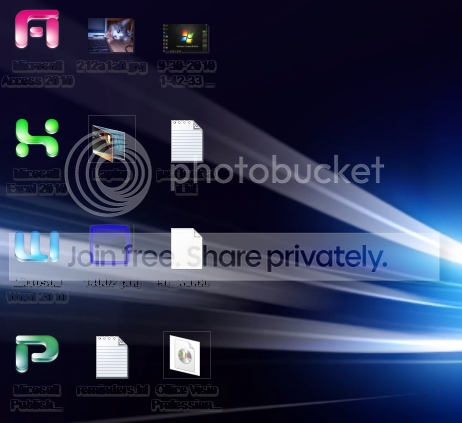
I'm curious as to how I get those set so they're not clear like that.
I've tried going into CP>Personalize>Widows Color and Appearance>Advanced to set it to a regular color, but it disabled the ability to choose a color.
And so, I am curious if there is a registry fix for this or not.
Or a fix of any sort, for that matter. Anything would really help a lot, thank you.
See the picture.
I'm curious as to how I get those set so they're not clear like that.
I've tried going into CP>Personalize>Widows Color and Appearance>Advanced to set it to a regular color, but it disabled the ability to choose a color.
And so, I am curious if there is a registry fix for this or not.
Or a fix of any sort, for that matter. Anything would really help a lot, thank you.
My Computer
- Computer Manufacturer/Model Number
- HP Pavilion dv4i-2100
- OS
- Windows 7 Ultimate x86
- CPU
- Intel Core i3 M350 @ 2.27 GHz
- Motherboard
- Stock
- Memory
- 3.00 GB
- Graphics Card(s)
- Intel 1GB HDMI Graphics Card
- Sound Card
- Stock
- Monitor(s) Displays
- 14.6" HD
- Screen Resolution
- 1200x800 current setting.
- Hard Drives
- 320GB samsung internal
500GB ADATA portable
- PSU
- Stock
- Case
- Stock
- Cooling
- Targus twin-fan chill mat.
- Internet Speed
- At home, 300kb/sec downloads. At work, 1028kb/sec downloads.
- Other Info
- Purchased through HP direct, custom build. I highly recommend HP to anyone.