
You are using an out of date browser. It may not display this or other websites correctly.
You should upgrade or use an alternative browser.
You should upgrade or use an alternative browser.
Clevo Probook w651sf | Cant install win7 in uefi mode
- Thread starter n0br4n
- Start date

- Local time
- 11:26 AM
- Messages
- 50,634
If this is a WIndows 8 PC you must disable Secure Boot in BIOS setup, then boot the Win7 DVD as a UEFI DVD drive. Delete all partitions during the install.
A flash stick installer must be formatted for UEFI using only Option One of UEFI Bootable USB Flash Drive - Create in Windows
Downgrade Windows 8 to Windows 7
UEFI (Unified Extensible Firmware Interface) - Install Windows 7 with - Windows 7 Forums
A flash stick installer must be formatted for UEFI using only Option One of UEFI Bootable USB Flash Drive - Create in Windows
Downgrade Windows 8 to Windows 7
UEFI (Unified Extensible Firmware Interface) - Install Windows 7 with - Windows 7 Forums
Secure boot is disabled already and i made usb stick by rufus with gpt mode for uefi. I think i didn't miss anything but idk why i got this errorIf this is a WIndows 8 PC you must disable Secure Boot in BIOS setup, then boot the Win7 DVD as a UEFI DVD drive. Delete all partitions during the install.
A flash stick installer must be formatted for UEFI using only Option One of UEFI Bootable USB Flash Drive - Create in Windows
Downgrade Windows 8 to Windows 7
UEFI (Unified Extensible Firmware Interface) - Install Windows 7 with - Windows 7 Forums
My Computer
At a glance
win8.1 pro x64
- Computer type
- Laptop
- Computer Manufacturer/Model Number
- clevo
- OS
- win8.1 pro x64
- Local time
- 11:26 AM
- Messages
- 50,634
Then we need to take a look at your BIOS settings choices for CSM, UEFI, Legacy BIOS and BIOS Boot order. Also are there Reset to Defaults for Other OS or Windows 7? Pictures can help.
Did you boot the installer as a UEFI flash stick device?
Do the stick over using Option One and make sure the settings don't jump any when you add the iSO. Compare it to the picture exactly before completing.
Did you boot the installer as a UEFI flash stick device?
Do the stick over using Option One and make sure the settings don't jump any when you add the iSO. Compare it to the picture exactly before completing.
all bios options are here >Then we need to take a look at your BIOS settings choices for CSM, UEFI, Legacy BIOS and BIOS Boot order. Also are there Reset to Defaults for Other OS or Windows 7? Pictures can help.
Did you boot the installer as a UEFI flash stick device?
Do the stick over using Option One and make sure the settings don't jump any when you add the iSO. Compare it to the picture exactly before completing.
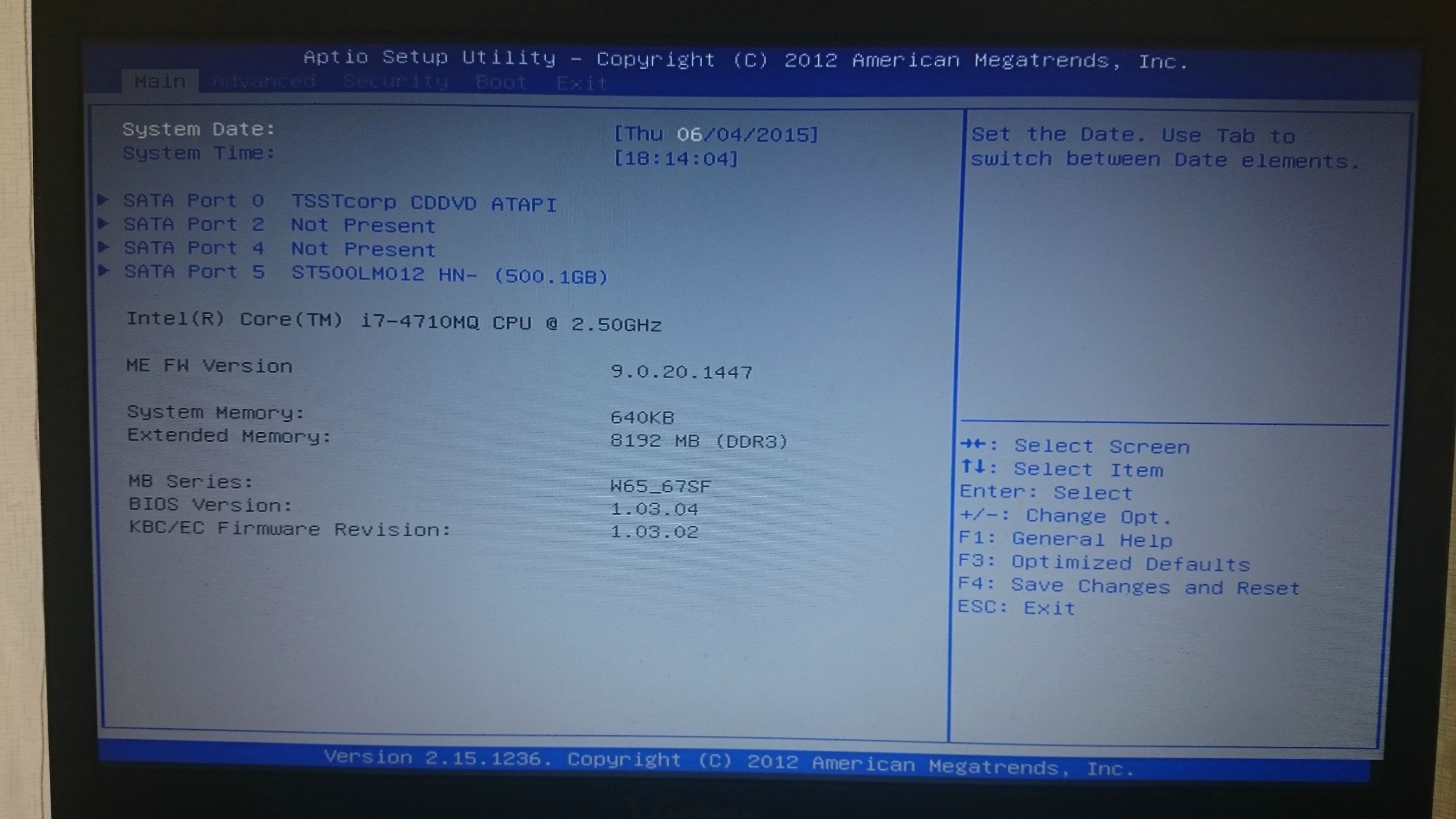
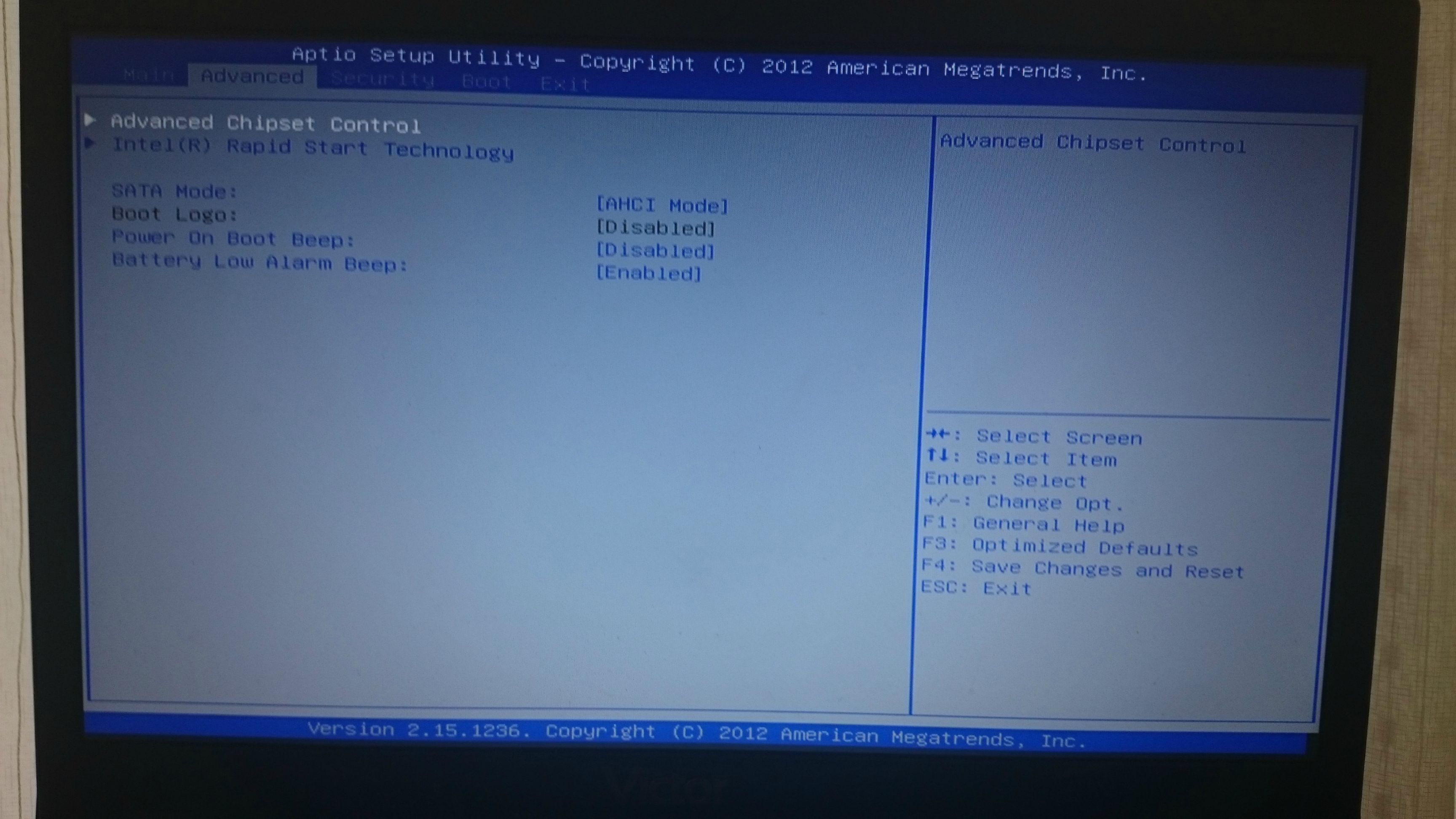
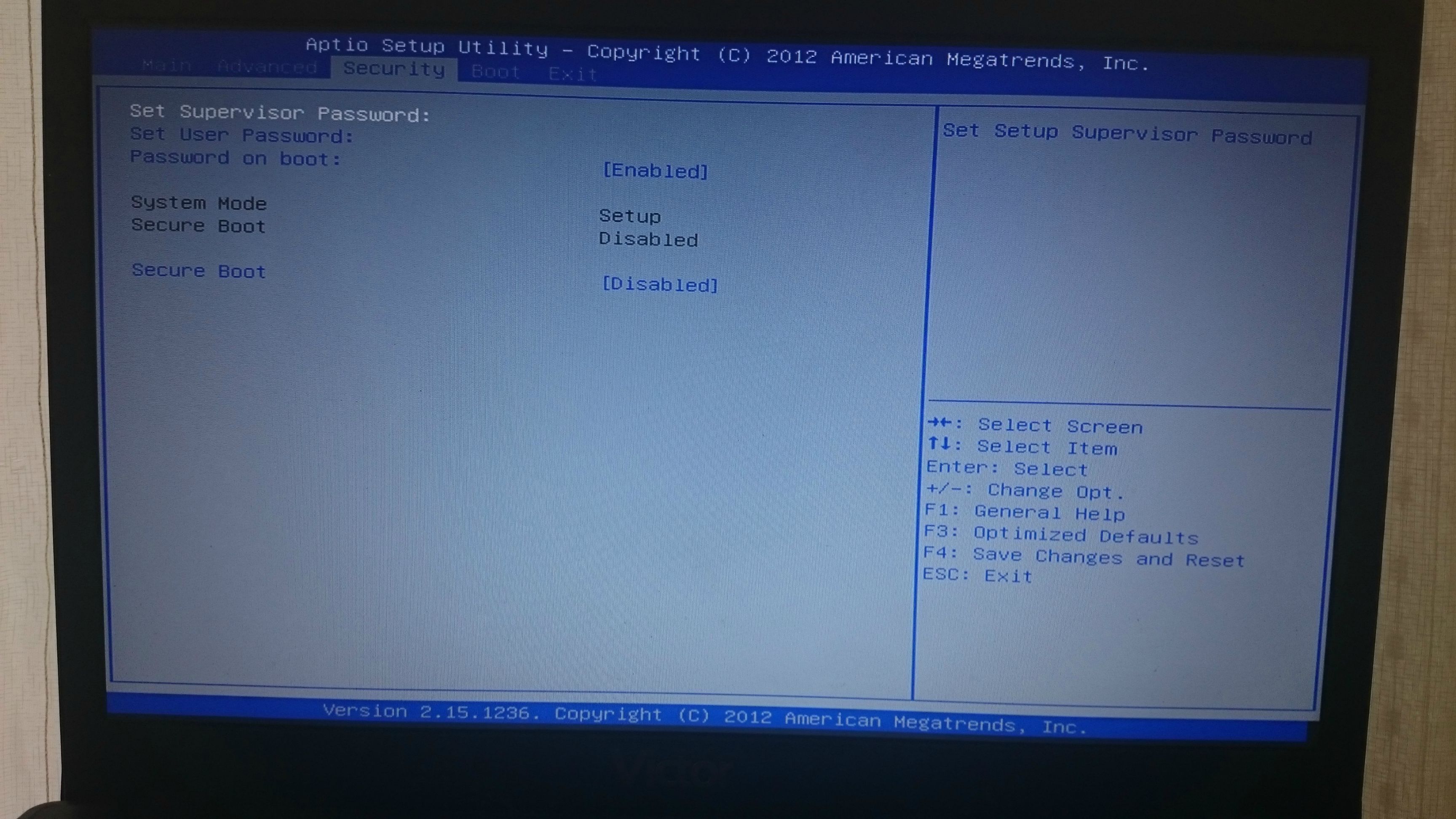
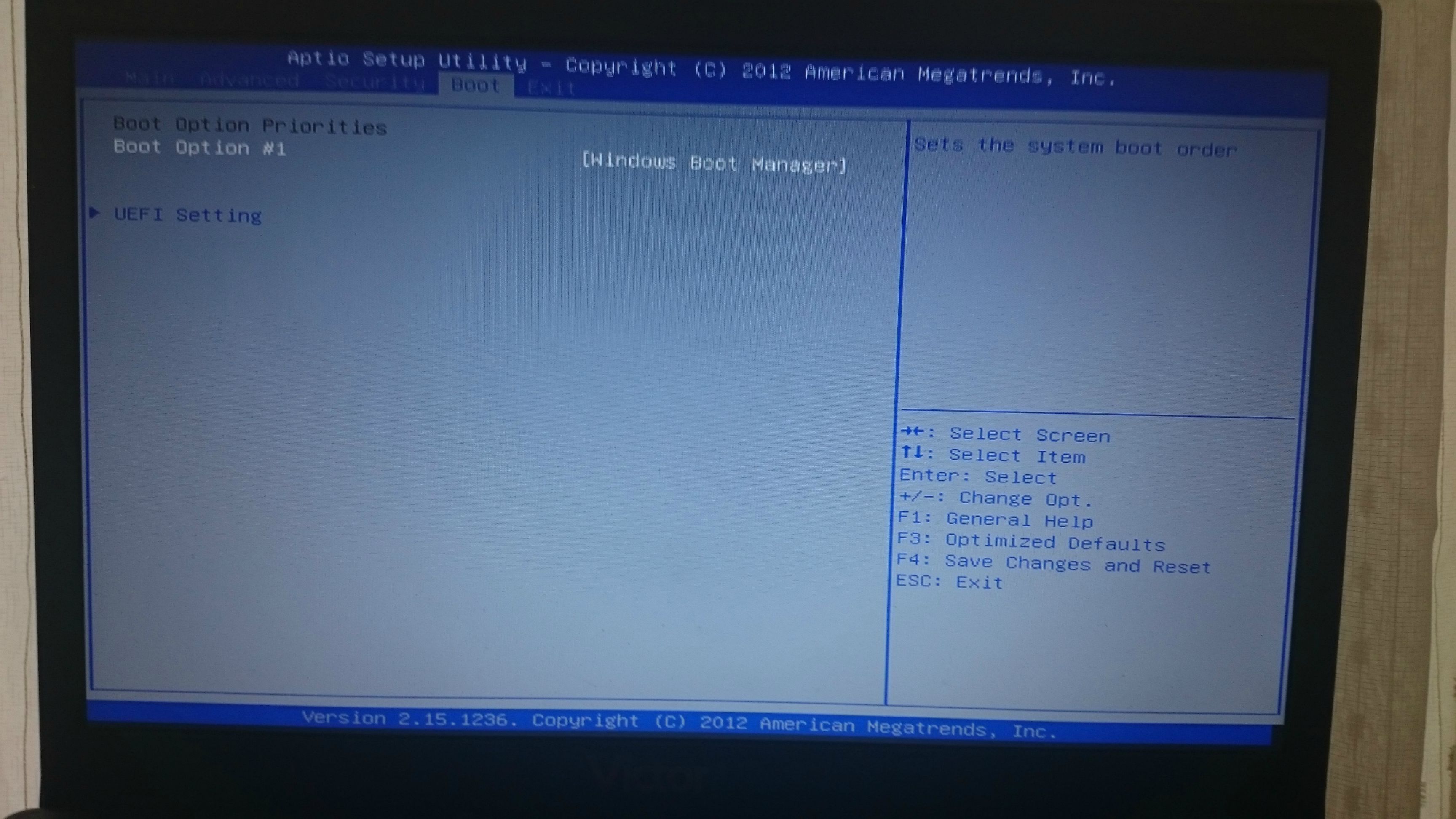
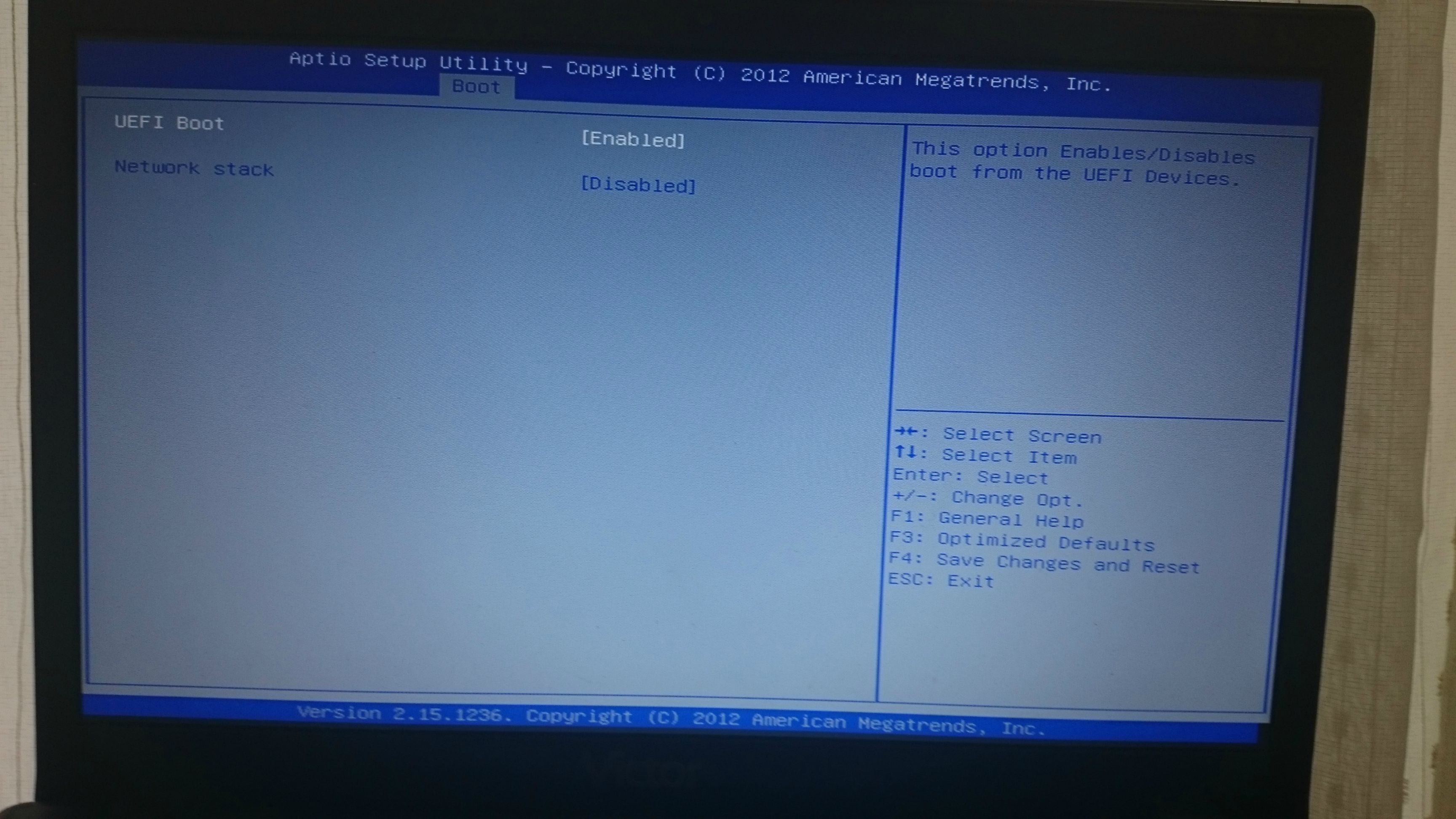
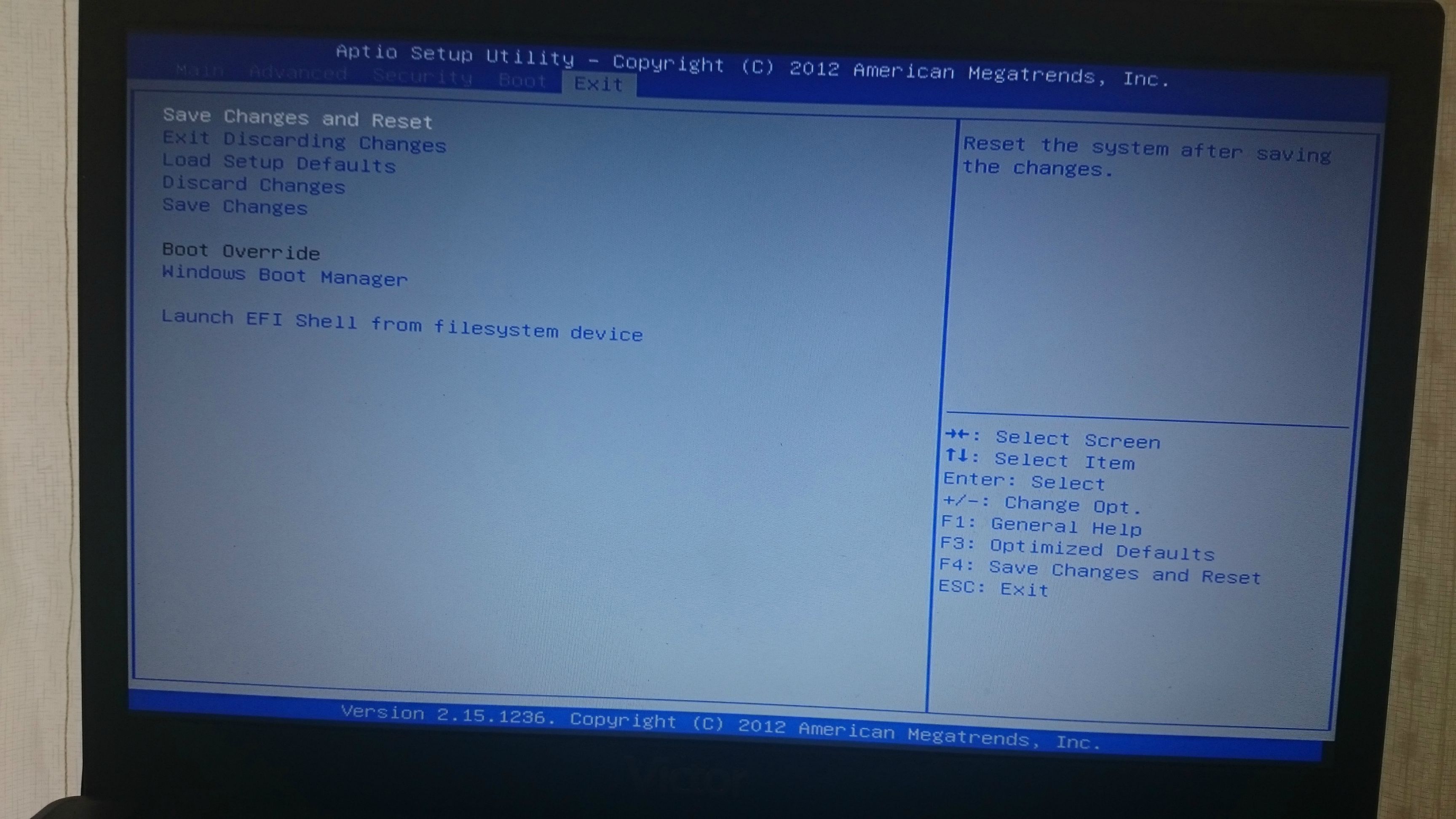
yes i booted
im sure i did all whats writing on guide.
My Computer
At a glance
win8.1 pro x64
- Computer type
- Laptop
- Computer Manufacturer/Model Number
- clevo
- OS
- win8.1 pro x64
- Local time
- 11:26 AM
- Messages
- 50,634
The error indicates the flash stick installer failed to boot and attempted to boot the hard drive and Windows instead.
This means the stick is not booting correctly. Try writing it again per my instructions above about Option One. Also make sure you're not trying to boot stick using a USB3 port which is normally blue inside.
If this fails try a DVD burned with Windows 7 USB-DVD Download Tool or another flash stick.
This means the stick is not booting correctly. Try writing it again per my instructions above about Option One. Also make sure you're not trying to boot stick using a USB3 port which is normally blue inside.
If this fails try a DVD burned with Windows 7 USB-DVD Download Tool or another flash stick.
Last edited:
The error indicates the flash stick installer failed to boot and attempted to boot the hard drive and Windows instead.
This means the stick is not booting correctly. Try writing it again per my instructions above about Option One.
If this fails try a DVD burned with Windows 7 USB-DVD Download Tool or another flash stick.
i tried make flash stick by rufus , cmd and some different ways but there is same problem.
i put in bootx64.efi file to correct folder also but idk what im missing.
im sure im doing correct every step.
My Computer
At a glance
win8.1 pro x64
- Computer type
- Laptop
- Computer Manufacturer/Model Number
- clevo
- OS
- win8.1 pro x64
Hi,
Did you already try with a DVD ?
This will be my next step... I'll let you know !
Did you already try with a DVD ?
This will be my next step... I'll let you know !
My Computer
At a glance
Windows 7 Home Premium 64 BitIntel® Core™ i7-4710HQ 3.5012 GB RAMATI R9 M265X
- Computer type
- Laptop
- Computer Manufacturer/Model Number
- Toshiba
- OS
- Windows 7 Home Premium 64 Bit
- CPU
- Intel® Core™ i7-4710HQ 3.50
- Memory
- 12 GB RAM
- Graphics Card(s)
- ATI R9 M265X
- Hard Drives
- HDD 1 TB
- Antivirus
- Windows Essential
- Browser
http://www.sevenforums.com/tutorial...vd-download-tool.html?filter=[2]=General TipsHi,
Did you already try with a DVD ?
This will be my next step... I'll let you know !
The Windows 7 USB/DVD Download Tool does not work with UEFI.
it wont work i think.
My Computer
At a glance
win8.1 pro x64
- Computer type
- Laptop
- Computer Manufacturer/Model Number
- clevo
- OS
- win8.1 pro x64
Reading the guide here http://www.sevenforums.com/tutorial...e-firmware-interface-install-windows-7-a.html
I thought it was possible because they mention both DVD and USB.
....unless using 'retail' DVD differs from a DVD burned from the ISO ..!
I thought it was possible because they mention both DVD and USB.
....unless using 'retail' DVD differs from a DVD burned from the ISO ..!
My Computer
At a glance
Windows 7 Home Premium 64 BitIntel® Core™ i7-4710HQ 3.5012 GB RAMATI R9 M265X
- Computer type
- Laptop
- Computer Manufacturer/Model Number
- Toshiba
- OS
- Windows 7 Home Premium 64 Bit
- CPU
- Intel® Core™ i7-4710HQ 3.50
- Memory
- 12 GB RAM
- Graphics Card(s)
- ATI R9 M265X
- Hard Drives
- HDD 1 TB
- Antivirus
- Windows Essential
- Browser
Need an answer from seven guruReading the guide here http://www.sevenforums.com/tutorial...e-firmware-interface-install-windows-7-a.html
I thought it was possible because they mention both DVD and USB.
....unless using 'retail' DVD differs from a DVD burned from the ISO ..!

My Computer
At a glance
win8.1 pro x64
- Computer type
- Laptop
- Computer Manufacturer/Model Number
- clevo
- OS
- win8.1 pro x64
- Local time
- 11:26 AM
- Messages
- 50,634
Yes you can use the download tool to burn the DVD. You only need the special Rufus tool to format UEFI flash stick
so i cant use that usb/dvd tool for make uefi usb stick, need rufus for it or i can do it on cmd but im doing it already but getting error what i posted on first postYes you can use the download tool to burn the DVD. You only need the special Rufus tool to format UEFI flash stick
My Computer
At a glance
win8.1 pro x64
- Computer type
- Laptop
- Computer Manufacturer/Model Number
- clevo
- OS
- win8.1 pro x64
That's what I suggest:
Burn DVD
Keep UEFI boot mode
Install from DVD and see if it works

Burn DVD
Keep UEFI boot mode
Install from DVD and see if it works
My Computer
At a glance
Windows 7 Home Premium 64 BitIntel® Core™ i7-4710HQ 3.5012 GB RAMATI R9 M265X
- Computer type
- Laptop
- Computer Manufacturer/Model Number
- Toshiba
- OS
- Windows 7 Home Premium 64 Bit
- CPU
- Intel® Core™ i7-4710HQ 3.50
- Memory
- 12 GB RAM
- Graphics Card(s)
- ATI R9 M265X
- Hard Drives
- HDD 1 TB
- Antivirus
- Windows Essential
- Browser
i dont have dvd atmThat's what I suggest:
Burn DVD
Keep UEFI boot mode
Install from DVD and see if it works

if u have can u try and let me know resoult ?

all shops closed atm ^^
My Computer
At a glance
win8.1 pro x64
- Computer type
- Laptop
- Computer Manufacturer/Model Number
- clevo
- OS
- win8.1 pro x64
I'll try next monday because I'm out of office !
If you have an ISO you could burn it, otherwise we have to wait
If you have an ISO you could burn it, otherwise we have to wait
My Computer
At a glance
Windows 7 Home Premium 64 BitIntel® Core™ i7-4710HQ 3.5012 GB RAMATI R9 M265X
- Computer type
- Laptop
- Computer Manufacturer/Model Number
- Toshiba
- OS
- Windows 7 Home Premium 64 Bit
- CPU
- Intel® Core™ i7-4710HQ 3.50
- Memory
- 12 GB RAM
- Graphics Card(s)
- ATI R9 M265X
- Hard Drives
- HDD 1 TB
- Antivirus
- Windows Essential
- Browser
- Local time
- 11:26 AM
- Messages
- 50,634
Are you using a USB2 port to try to boot the installation stick? There are no USB3 drivers in the Win7 installation media. A USB3 port is usually blue inside.
i tried on both but nothing changed.Are you using a USB2 port to try to boot the installation stick? There are no USB3 drivers in the Win7 installation media. A USB3 port is usually blue inside.
My Computer
At a glance
win8.1 pro x64
- Computer type
- Laptop
- Computer Manufacturer/Model Number
- clevo
- OS
- win8.1 pro x64
- Local time
- 11:26 AM
- Messages
- 50,634
As that is a WIndows 8 netbook, where did you get Win7? How do you plan to activate it?
If you already own a WIn7 license, for what version is it? How much RAM does the netbook have as you might want to install 32 bit if 3gb RAM or less, in which case you'd disable UEFI.
If you already own a WIn7 license, for what version is it? How much RAM does the netbook have as you might want to install 32 bit if 3gb RAM or less, in which case you'd disable UEFI.
I have win7 ultimate license and got 8gb ram so i cant use 32 bit. I know i can install if i disable uefi but i want install win7 with uefi modeAs that is a WIndows 8 netbook, where did you get Win7? How do you plan to activate it?
If you already own a WIn7 license, for what version is it? How much RAM does the netbook have as you might want to install 32 bit if 3gb RAM or less, in which case you'd disable UEFI.
My Computer
At a glance
win8.1 pro x64
- Computer type
- Laptop
- Computer Manufacturer/Model Number
- clevo
- OS
- win8.1 pro x64