Clock

mindinka

New member
Pro User
Local time
12:32 AM
Messages
161
Hi guys!
I am not using Clock on the toolbar, since I am surrounded by clocks and watches. But... All of a sudden I have Clock appeared in toolbar, I do know how to remove it, but...after reboot the clock appears again. Question: how to prevent it from appearing after reboot?
Thanks, I know somebody knows how to...
 

My Computer

Computer Manufacturer/Model Number
XGS PII Dragon "Asus"
OS
windows 7 Pro x64
CPU
AMD Phenom II X4 955 Deneb 45nm Technology
Motherboard
ASUSTeK Computer INC. M4A78 PRO (AM2)
Memory
8.0GB Dual-Channel DDR2 @ 401MHz (5-5-5-18)
Graphics Card(s)
ATI Radeon HD 4800 Series (ATI
Sound Card
VIA High Definition Audio
Monitor(s) Displays
DELL 1908FP @ 1280x1024
Screen Resolution
1280x1024
Hard Drives
977GB SAMSUNG SAMSUNG HD103SI ATA Device (IDE)
Keyboard
HID Keyboard Device
Mouse
HID-compliant mouse
Internet Speed
2 Mb/s so far...
How are you removing it?
Jerry
 

My Computer

Computer type
Laptop
Computer Manufacturer/Model Number
Sager NP9170
OS
Win 7 Pro x64 / Win 10 Pro
CPU
Intel(R) Core(TM) i7-3630QM CPU @ 2.40GHz
Motherboard
CLEVO P170EM
Memory
12 GB
Graphics Card(s)
(1) Intel(R) HD Graphics 4000 (2) NVIDIA GeForce GTX 675M
Sound Card
(1) Realtek High Definition Audio (2) Intel(R) Display Aud
Monitor(s) Displays
17.3
Screen Resolution
1920x1080
Hard Drives
(1) Samsung 860 EVO 500GB(OS) (1) Samsung 860 EVO 500GB(Data)
Keyboard
Backlite
Antivirus
MSE, Malwarebytes Pro
Browser
Firefox
Other Info
DESKTOP: Custom-built.
OS: Win 10 Pro x64.
CASE: Rosewill R5.
CPU: Intel I5 4670K CPU @ 3.40GHz.
CPU COOLER: Cool Master Hyper 212 EVO.
MOTHERBOARD: Asus Z87-A.
MEMORY: Kingston HyperX 2x4 GB.
GPU: Nvidia Geforce 650 TI.
PSU: Corsair TX750.
DRIVES: (1) Samsung 840 120 GB SSD (2) Western Digital blue 500 GB 7200 RPM.

My Computer

Computer type
PC/Desktop
Computer Manufacturer/Model Number
Custom Build
OS
Windows 10 Pro x64
CPU
Intel Core i5 4440 @Stock
Motherboard
Gigabyte Z97 D3H
Memory
4 x 4GB HyperX Fury DDR3
Graphics Card(s)
Gigabyte GTX 1050Ti O4G
Sound Card
Integrated
Monitor(s) Displays
Dell P2417H
Screen Resolution
1920 x 1080
Hard Drives
Samsung EVO 850 120GB / Toshiba DT01ACA050 1TB 7200prm 32MB
PSU
Riotoro Onyx 750W
Case
NZXT H500 Black-Red
Cooling
Stock CPU + NZXT 120mm + 2x120mm red fans
Keyboard
Modecom Volcano Lanparty
Mouse
Asus ROG Gladius / DeepCool E-Pad Plus
Internet Speed
DOCSIS 50/3 Mbit
Browser
Google Chrome
Other Info
Asus K55VJ(i5 3210M, GT635M / 2GB, 8GB DDR3, 500GB HDD)
That's the thing

I do know how to show or not to show clock, the question is to prevent it from showing after each reboot...
 

My Computer

Computer Manufacturer/Model Number
XGS PII Dragon "Asus"
OS
windows 7 Pro x64
CPU
AMD Phenom II X4 955 Deneb 45nm Technology
Motherboard
ASUSTeK Computer INC. M4A78 PRO (AM2)
Memory
8.0GB Dual-Channel DDR2 @ 401MHz (5-5-5-18)
Graphics Card(s)
ATI Radeon HD 4800 Series (ATI
Sound Card
VIA High Definition Audio
Monitor(s) Displays
DELL 1908FP @ 1280x1024
Screen Resolution
1280x1024
Hard Drives
977GB SAMSUNG SAMSUNG HD103SI ATA Device (IDE)
Keyboard
HID Keyboard Device
Mouse
HID-compliant mouse
Internet Speed
2 Mb/s so far...
Are you using User Accounts? Make sure you sign in with the same account if you do.
 

My Computer

Computer type
PC/Desktop
Computer Manufacturer/Model Number
Built 2/11/2011
OS
Windows 7 Pro-x64
CPU
i7-2600 3.4GHz - 3.8GHz Turbo
Motherboard
Intel DH67BL-B3
Memory
8Gb - 2x4GB, Muskin 991770 PC3-1333
Graphics Card(s)
Integrated Intel HD 2000
Sound Card
Integrated Intel 10.1 HD, RealTek ALC892
Monitor(s) Displays
Asus LCD VH222H, Haier HL24XSL2a
Screen Resolution
1920x1080, 1920x1080
Hard Drives
Crucial SSD C300-128Gb,
Western Digital WD5002AALX - 500Gb,
Western Digital WD7501AALS - 750Gb
PSU
Seasonic 650W 80+ Gold Modular
Case
Rosewill Defender
Cooling
Stock CPU, Four 120mm case fans, PCH fan added
Keyboard
Logitech EX100 Y-RBH94 Wireless
Mouse
Logitech EX100 M-RCE95 Wireless
Internet Speed
3.0/1.5 Mbs
Antivirus
Microsoft Security Essentials
Browser
Microsoft Internet Explorer 11
Other Info
Antec Veris Premier-Multimedia IR Station,
Cyber Accoustics-3602 Speakers,
AFT XM-5U Card Reader,
Hauppauge TV-HVR-2250,
Sony LX300 USB Turntable
The only one...

I am the only user, and I am administrator, and there is only one account...
The clock is there after single reboot...
 

My Computer

Computer Manufacturer/Model Number
XGS PII Dragon "Asus"
OS
windows 7 Pro x64
CPU
AMD Phenom II X4 955 Deneb 45nm Technology
Motherboard
ASUSTeK Computer INC. M4A78 PRO (AM2)
Memory
8.0GB Dual-Channel DDR2 @ 401MHz (5-5-5-18)
Graphics Card(s)
ATI Radeon HD 4800 Series (ATI
Sound Card
VIA High Definition Audio
Monitor(s) Displays
DELL 1908FP @ 1280x1024
Screen Resolution
1280x1024
Hard Drives
977GB SAMSUNG SAMSUNG HD103SI ATA Device (IDE)
Keyboard
HID Keyboard Device
Mouse
HID-compliant mouse
Internet Speed
2 Mb/s so far...
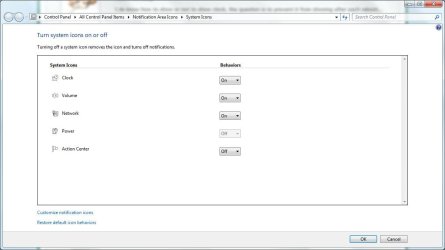
Just to double check:

Click Start and type clock in the Search field.

Click "Show or hide clock on the taskbar".

Change the default behaviour to Off and click OK.

Clock.JPG
 

My Computer

Computer Manufacturer/Model Number
HP Pavilion Elite 495UK
OS
Windows 7 Ultimate SP1 64-Bit
CPU
Intel Core i7 870 @ 2.93GHz
Motherboard
MSI 2A9C (CPU1)
Memory
8Gb Dual-Channel DDR3 @ 664MHz
Graphics Card(s)
nVidia GeForce GTX 460 1024MB dedicated RAM
Sound Card
Realtek HD Audio
Monitor(s) Displays
HP2310i
Screen Resolution
1920 x 1080
Hard Drives
1x1954GB Hitachi HDS22020ALA 330 (RAID), 1x1954GB Hitachi External for backup and storage
PSU
460W
Case
HP Elite
Cooling
Air cooled
Keyboard
Logitech K750 solar-powered keyboard
Mouse
Logitech Wireless M180 mouse
Internet Speed
2Mb
Other Info
Pure Avanti Flow Internet Radio with iPod Dock, 64Gb iPod, HP USB Speakers, Sony MDR-V500 Headphones, Sony Vaio F-Series Laptop
I did

seavixen32 I did check, I hide it, after reboot is back again. I believe something does not keep setting, but where? I do not know, for now...
 

My Computer

Computer Manufacturer/Model Number
XGS PII Dragon "Asus"
OS
windows 7 Pro x64
CPU
AMD Phenom II X4 955 Deneb 45nm Technology
Motherboard
ASUSTeK Computer INC. M4A78 PRO (AM2)
Memory
8.0GB Dual-Channel DDR2 @ 401MHz (5-5-5-18)
Graphics Card(s)
ATI Radeon HD 4800 Series (ATI
Sound Card
VIA High Definition Audio
Monitor(s) Displays
DELL 1908FP @ 1280x1024
Screen Resolution
1280x1024
Hard Drives
977GB SAMSUNG SAMSUNG HD103SI ATA Device (IDE)
Keyboard
HID Keyboard Device
Mouse
HID-compliant mouse
Internet Speed
2 Mb/s so far...

My Computer

Computer type
Laptop
Computer Manufacturer/Model Number
Sager NP9170
OS
Win 7 Pro x64 / Win 10 Pro
CPU
Intel(R) Core(TM) i7-3630QM CPU @ 2.40GHz
Motherboard
CLEVO P170EM
Memory
12 GB
Graphics Card(s)
(1) Intel(R) HD Graphics 4000 (2) NVIDIA GeForce GTX 675M
Sound Card
(1) Realtek High Definition Audio (2) Intel(R) Display Aud
Monitor(s) Displays
17.3
Screen Resolution
1920x1080
Hard Drives
(1) Samsung 860 EVO 500GB(OS) (1) Samsung 860 EVO 500GB(Data)
Keyboard
Backlite
Antivirus
MSE, Malwarebytes Pro
Browser
Firefox
Other Info
DESKTOP: Custom-built.
OS: Win 10 Pro x64.
CASE: Rosewill R5.
CPU: Intel I5 4670K CPU @ 3.40GHz.
CPU COOLER: Cool Master Hyper 212 EVO.
MOTHERBOARD: Asus Z87-A.
MEMORY: Kingston HyperX 2x4 GB.
GPU: Nvidia Geforce 650 TI.
PSU: Corsair TX750.
DRIVES: (1) Samsung 840 120 GB SSD (2) Western Digital blue 500 GB 7200 RPM.
It is saved...

Hi Jerry!
The theme is saved but... it's the same... As soon as I reboot the clock is back... It's interesting why..?
 

My Computer

Computer Manufacturer/Model Number
XGS PII Dragon "Asus"
OS
windows 7 Pro x64
CPU
AMD Phenom II X4 955 Deneb 45nm Technology
Motherboard
ASUSTeK Computer INC. M4A78 PRO (AM2)
Memory
8.0GB Dual-Channel DDR2 @ 401MHz (5-5-5-18)
Graphics Card(s)
ATI Radeon HD 4800 Series (ATI
Sound Card
VIA High Definition Audio
Monitor(s) Displays
DELL 1908FP @ 1280x1024
Screen Resolution
1280x1024
Hard Drives
977GB SAMSUNG SAMSUNG HD103SI ATA Device (IDE)
Keyboard
HID Keyboard Device
Mouse
HID-compliant mouse
Internet Speed
2 Mb/s so far...

My Computer

Computer type
Laptop
Computer Manufacturer/Model Number
Sager NP9170
OS
Win 7 Pro x64 / Win 10 Pro
CPU
Intel(R) Core(TM) i7-3630QM CPU @ 2.40GHz
Motherboard
CLEVO P170EM
Memory
12 GB
Graphics Card(s)
(1) Intel(R) HD Graphics 4000 (2) NVIDIA GeForce GTX 675M
Sound Card
(1) Realtek High Definition Audio (2) Intel(R) Display Aud
Monitor(s) Displays
17.3
Screen Resolution
1920x1080
Hard Drives
(1) Samsung 860 EVO 500GB(OS) (1) Samsung 860 EVO 500GB(Data)
Keyboard
Backlite
Antivirus
MSE, Malwarebytes Pro
Browser
Firefox
Other Info
DESKTOP: Custom-built.
OS: Win 10 Pro x64.
CASE: Rosewill R5.
CPU: Intel I5 4670K CPU @ 3.40GHz.
CPU COOLER: Cool Master Hyper 212 EVO.
MOTHERBOARD: Asus Z87-A.
MEMORY: Kingston HyperX 2x4 GB.
GPU: Nvidia Geforce 650 TI.
PSU: Corsair TX750.
DRIVES: (1) Samsung 840 120 GB SSD (2) Western Digital blue 500 GB 7200 RPM.

My Computer

Computer type
Laptop
Computer Manufacturer/Model Number
Sager NP9170
OS
Win 7 Pro x64 / Win 10 Pro
CPU
Intel(R) Core(TM) i7-3630QM CPU @ 2.40GHz
Motherboard
CLEVO P170EM
Memory
12 GB
Graphics Card(s)
(1) Intel(R) HD Graphics 4000 (2) NVIDIA GeForce GTX 675M
Sound Card
(1) Realtek High Definition Audio (2) Intel(R) Display Aud
Monitor(s) Displays
17.3
Screen Resolution
1920x1080
Hard Drives
(1) Samsung 860 EVO 500GB(OS) (1) Samsung 860 EVO 500GB(Data)
Keyboard
Backlite
Antivirus
MSE, Malwarebytes Pro
Browser
Firefox
Other Info
DESKTOP: Custom-built.
OS: Win 10 Pro x64.
CASE: Rosewill R5.
CPU: Intel I5 4670K CPU @ 3.40GHz.
CPU COOLER: Cool Master Hyper 212 EVO.
MOTHERBOARD: Asus Z87-A.
MEMORY: Kingston HyperX 2x4 GB.
GPU: Nvidia Geforce 650 TI.
PSU: Corsair TX750.
DRIVES: (1) Samsung 840 120 GB SSD (2) Western Digital blue 500 GB 7200 RPM.
@mindinka


There are 2 way you might wanna give it a try


Thru the Local Group Policy Editor

To access Local Group Policy Editor click on start and run enter gpedit.msc
On the left side navigate to User Configuration \ Administrative Templates \ Start Menu and Taskbar.
Now on the right side scroll down to “Remove Clock from the system notification area” and enable that setting.
Log off & on for it take effect.


Manual Registry Editor

To access the Registry Editor click on start and run enter regedit
Navigate to HKEY_CURRENT_USER\Software\Microsoft\Windows\CurrentVersion\Policies\Explorer
If the folder Explorer is not there create it, right click on Policies...new...key...rename the folder to Explorer
Click on explorer folder and on the right pane create a new DWORD and name it HideClock... enter a value data of 1 in Hexadecimal.
Log off & on for it take effect.


Take note

The above 2 method will permanently turn off the clock in the taskbar.
The clock option in the customize notification area will be grey out you will not be able to turn on or off.

If you wana bring the option back just delete the HideClock from the registry.


Ok that it.... hope the clock wouldn't turn on again in your next reboot.
 

My Computer

OS
ultimate x64
Thanks

Thanks Bulldog7!
Group Policy method did the job, +1 Rep is for you...
Thanks Bongo, seavixen32, carwiz for participation and Will to help.
Thanks everyone, love this forum...
 

My Computer

Computer Manufacturer/Model Number
XGS PII Dragon "Asus"
OS
windows 7 Pro x64
CPU
AMD Phenom II X4 955 Deneb 45nm Technology
Motherboard
ASUSTeK Computer INC. M4A78 PRO (AM2)
Memory
8.0GB Dual-Channel DDR2 @ 401MHz (5-5-5-18)
Graphics Card(s)
ATI Radeon HD 4800 Series (ATI
Sound Card
VIA High Definition Audio
Monitor(s) Displays
DELL 1908FP @ 1280x1024
Screen Resolution
1280x1024
Hard Drives
977GB SAMSUNG SAMSUNG HD103SI ATA Device (IDE)
Keyboard
HID Keyboard Device
Mouse
HID-compliant mouse
Internet Speed
2 Mb/s so far...
Back
Top