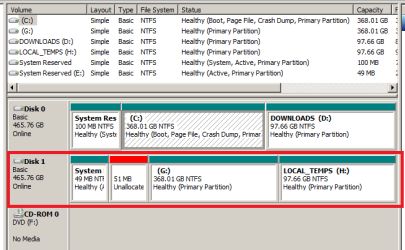
Clone drive C: (500 GB HDD - 2 partitions) onto 125 GB SSD ?

bawldiggle

GrayGhost2 ret.
Pro User
VIP
Local time
10:51 PM
Messages
895
Location
Australia
AOMEI Std only offers clone a partition with AOMEI PRO
- in AOMEI Std the feature is disabled and flagged with PRO icon

AOMEI Knowledge Base is outdated and does no show clone partition at all.

Q1: Short of deleting second data partition on the 500GB - HDD is there any way to clone the C partition. ?
Macrium help pages are all expressed for Reflect PRO and their products comparison webpage only states
'Partition Imageing", but no mention of limits with Free Macrium
Q2: Will Free Macrium clone just partition #0 (ie, C;\) ?

The cost of AOMEI here is au$75+ ... :(
- a lot cheaper than Macrioum Reflect
AOMEI is an excellent program, in the long run it will save me $$ over years, but just at the moment money is tight.

Thank you, (maybe I have answered my own question already :o) ... just hoping for a miracle. ;)
 

My Computer My Computer

At a glance

XP Pro (x86) | 7 HP (x86) & (x64) | 7 Pro (x64)
Computer type
PC/Desktop
Computer Manufacturer/Model Number
Toshiba, Lenovo (laptops) + 4 rigs
OS
XP Pro (x86) | 7 HP (x86) & (x64) | 7 Pro (x64)
Just use free (standard) aomei backupper to make an image of C. Then restore that image onto the other disk.
 

My Computers My Computers

  • At a glance

    7 X64i5 84002x8gb 3200mhz
    Computer type
    PC/Desktop
    OS
    7 X64
    CPU
    i5 8400
    Motherboard
    gigabyte b365m ds3h
    Memory
    2x8gb 3200mhz
    Hard Drives
    various
    PSU
    pure power 11 400w cm
    Case
    Coolermaster
    Cooling
    cryorig m9i
  • At a glance

    7x64g54008gb ddr4 2400
    Computer type
    PC/Desktop
    OS
    7x64
    CPU
    g5400
    Motherboard
    ga b365m ds3h
    Memory
    8gb ddr4 2400
    PSU
    xfx pro 450w
I concur with SIW2--it's usually considered a better practice to image and restore rather than doing a straight-across clone.

Nevertheless, if you do insist on cloning:

I don't normally use Aomei but I fired it up (BackUpper 3.5) on a testbed machine just to check. It offered a partition cloning option without requiring an upgrade to the Pro version, so I'm not sure why you're seeing something different. Which version are you using?

Unfortunately, it was an utter fail at cloning. It erroneously saw my blank (initialized but partition-less) second disk as containing a dozen tiny partitions and couldn't go any further. I tried reformatting my second disk with one giant NTFS partition, to no avail; it still insisted there were phantom partitions and couldn't continue.

I retested with Macrium Reflect Free 5.2, and it had no trouble at all. I'm not sure what Aomei was reacting to, but based on this quick test, I wouldn't deem Aomei to be completely reliable.

If you decide to try Macrium Reflect instead, beware that some people have indicated the latest free version has crippled some of the functionality of the previous free version. You can still get the older versions from filehippo.com.
 

My Computer My Computer

At a glance

Windows 7/8.1/10 multibootIntel Core i7-770048GB (2x16GB Crucial DDR4-3200 + 2x8GB Hynix ...Intel HD630 + AMD Radeon R7 450 PCIe
Computer type
PC/Desktop
Computer Manufacturer/Model Number
Dell Optiplex 7050
OS
Windows 7/8.1/10 multiboot
CPU
Intel Core i7-7700
Motherboard
Dell, Intel Q270 chipset
Memory
48GB (2x16GB Crucial DDR4-3200 + 2x8GB Hynix DDR4-2400)
Graphics Card(s)
Intel HD630 + AMD Radeon R7 450 PCIe
Monitor(s) Displays
Asus VC279 (27")
Screen Resolution
1920x1080
Hard Drives
Toshiba M.2 NVMe (256GB),
Samsung 960 Evo (500GB),
WD Red Plus 80EFBX (8TB)
Aomei Backupper Version 4.04 now, it works very well. The free version does not include system cloning - as @bawdgiggle said.
 

My Computers My Computers

  • At a glance

    7 X64i5 84002x8gb 3200mhz
    Computer type
    PC/Desktop
    OS
    7 X64
    CPU
    i5 8400
    Motherboard
    gigabyte b365m ds3h
    Memory
    2x8gb 3200mhz
    Hard Drives
    various
    PSU
    pure power 11 400w cm
    Case
    Coolermaster
    Cooling
    cryorig m9i
  • At a glance

    7x64g54008gb ddr4 2400
    Computer type
    PC/Desktop
    OS
    7x64
    CPU
    g5400
    Motherboard
    ga b365m ds3h
    Memory
    8gb ddr4 2400
    PSU
    xfx pro 450w
I've successfully cloned notebook HDDs to SSDs twice with Macrium Reflect. I've also cloned a variety of data drives to new backup drives many times. The only times (two or three) I ran into a problem was if there was something corrupted on the source drive.

I've also tested using Macrium Reflect to clone single partitions only without any problems. It is also possible to clone from a larger drive to a smaller one as long as the smaller drive has room for everything on the larger drive. For example, if you have a 500GB drive with only 100GB of space being used and you want to clone to a 250GB drive, Macrium Reflect is capable of doing so as long as it is still set to the default Intelligent Sector Copy.

I don't know why it would be considered better practice to image and restore instead of "straight-across" cloning. Why should one have to spend double the time and, if there isn't room for the image on the source drive, have to use an intermediary drive when cloning works just as well, is faster, and is easier.

Of course, there are times when imaging is better than cloning. It is far more suitable for backing up System files (OS and programs) than cloning, especially since images are more compact, taking up less space on a drive, allowing you to keep multiple images on a drive. Keeping multiple clones is nowhere nearly as easy or practical. Cloning is best for onetime replication of a drive onto another drive.
 

My Computer My Computer

At a glance

Win 7 Ultimate 64 bitIntel i7-3930KKingston HyperX Genesis 32GB Kit (8x4GB Modul...MSI R7850 Twin Frozr 2GD5/OC Radeon HD 7850 2...
Computer type
PC/Desktop
Computer Manufacturer/Model Number
Custom Build
OS
Win 7 Ultimate 64 bit
CPU
Intel i7-3930K
Motherboard
ASUS P9X79 WS
Memory
Kingston HyperX Genesis 32GB Kit (8x4GB Modules) 1600MHz DDR
Graphics Card(s)
MSI R7850 Twin Frozr 2GD5/OC Radeon HD 7850 2GB 256-bit GDDR
Sound Card
Asus Xonar Essence STX
Monitor(s) Displays
3x Asus VG248QE 24", Vizio 32" TV
Screen Resolution
1920 x 1080, ?
Hard Drives
Samsung 128GB 840 Pro SSD (1),
Samsung 4TB 850 EVO SSDs (4)
Samsung 4TB 850 EVO SSDs (16) external backup drives used in 2.5" hot swap bays in the computer.
PSU
Corsair HX750w
Case
Antec Two Hundred v2 (modified)
Cooling
Cooler Master GeminII S524 120mm (fan replaced with a 140mm)
Keyboard
Logitech G510s
Mouse
Logitech M525 (two in use)
Internet Speed
=< 32Mbps down, 8Mbps up
Antivirus
AVAST!, MBAM, SAS, Spybot S&D (all but MBAM free) Glary Util
Browser
IE11
Other Info
LSI 9211-8i HBA card (8 SATA III ports), 2.5" & 3.5" Hot Swap Bays, HooToo HT-CR001 PCI-E to USB 3.0 Internal Hub + 6 Slot Card Reader, and LG Model CH12LS28 BD-ROM Optical Drive. Also, ScanSnap S1500 ADF duplexing scanner, Canon 9000F flat bed scanner, Corsair SP2500 2.1 speakers, Samsung CLP 415nw laser color printer, Cyberpower PP2200SW UPS
Image or clone - whatever suits you.
I don't own a notebook but don't many just have space for one SSD/HDD?
Even on a desktop PC you need to connect the destination drive then swap it back to the source position. One advantage in using an imaging approach is that if something goes wrong you still have a working disconnected source drive before performing the system image restore.
 

My Computer My Computer

At a glance

Windows 7x64 Home Premium SP1Intel i7 2600kG.Skill Ripjaws (DDR3-1600) 2x4GBNvidia GeForce GTS 450; Intel HD Graphics 300...
Computer type
PC/Desktop
Computer Manufacturer/Model Number
Own build
OS
Windows 7x64 Home Premium SP1
CPU
Intel i7 2600k
Motherboard
ASUS P8Z68 Deluxe
Memory
G.Skill Ripjaws (DDR3-1600) 2x4GB
Graphics Card(s)
Nvidia GeForce GTS 450; Intel HD Graphics 3000(GT2+)
Monitor(s) Displays
Dell Ultrasharp IPS panel U2311H, Samsung SyncMaster P2350
Screen Resolution
1920x1080
Hard Drives
Samsung 850 Pro SSD 256GB, Samsung SSD 840 120GB, Seagates 1TB Barracuda ST31000528AS x2
PSU
Seasonic M12II 520W
Case
Lian Li Lancool PC-K60
Cooling
Case: 1x120mm, 3x140mm CPU: Hyper 212+
Keyboard
Logitech MK520 (wireless)
Mouse
Logitech MK520
Internet Speed
6-7 Mbps
Antivirus
Norton Security Premium, Malwarebytes on 2 (MSE on 3rd PC)
Browser
FireFox
Other Info
Audio: Logitech Z523 2.1
Image or clone - whatever suits you.
I don't own a notebook but don't many just have space for one SSD/HDD?
Even on a desktop PC you need to connect the destination drive then swap it back to the source position. One advantage in using an imaging approach is that if something goes wrong you still have a working disconnected source drive before performing the system image restore.

This isn't rocket science (thank God since I'm no rocket scientist). Cloning is easy and doesn't touch the source drive other than to read it so there is no danger. When I cloned the HDDs in my notebooks (both notebooks are single drive wonders) to SSDs, I just plugged the SSD into a dock connected to a USB port on the notebook, did a simple format so Macrium Reflect could find it, then made the clone. All the drive letters on the clone were changed, including the System Reserved, C:, and recovery partitions but, when I removed the HDD from each notebook, replaced it with the SSD, then rebooted, the System Reserved and the recovery partitions no longer had a drive letter and the OS partition had reverted to C:. Only the data partition kept the changed drive letter and that was quick and easy to change back to what it was on the HDD.
 

My Computer My Computer

At a glance

Win 7 Ultimate 64 bitIntel i7-3930KKingston HyperX Genesis 32GB Kit (8x4GB Modul...MSI R7850 Twin Frozr 2GD5/OC Radeon HD 7850 2...
Computer type
PC/Desktop
Computer Manufacturer/Model Number
Custom Build
OS
Win 7 Ultimate 64 bit
CPU
Intel i7-3930K
Motherboard
ASUS P9X79 WS
Memory
Kingston HyperX Genesis 32GB Kit (8x4GB Modules) 1600MHz DDR
Graphics Card(s)
MSI R7850 Twin Frozr 2GD5/OC Radeon HD 7850 2GB 256-bit GDDR
Sound Card
Asus Xonar Essence STX
Monitor(s) Displays
3x Asus VG248QE 24", Vizio 32" TV
Screen Resolution
1920 x 1080, ?
Hard Drives
Samsung 128GB 840 Pro SSD (1),
Samsung 4TB 850 EVO SSDs (4)
Samsung 4TB 850 EVO SSDs (16) external backup drives used in 2.5" hot swap bays in the computer.
PSU
Corsair HX750w
Case
Antec Two Hundred v2 (modified)
Cooling
Cooler Master GeminII S524 120mm (fan replaced with a 140mm)
Keyboard
Logitech G510s
Mouse
Logitech M525 (two in use)
Internet Speed
=< 32Mbps down, 8Mbps up
Antivirus
AVAST!, MBAM, SAS, Spybot S&D (all but MBAM free) Glary Util
Browser
IE11
Other Info
LSI 9211-8i HBA card (8 SATA III ports), 2.5" & 3.5" Hot Swap Bays, HooToo HT-CR001 PCI-E to USB 3.0 Internal Hub + 6 Slot Card Reader, and LG Model CH12LS28 BD-ROM Optical Drive. Also, ScanSnap S1500 ADF duplexing scanner, Canon 9000F flat bed scanner, Corsair SP2500 2.1 speakers, Samsung CLP 415nw laser color printer, Cyberpower PP2200SW UPS
I've got a couple of docking stations and have used them for cloning and backups including (many) system images.
Some people with notebooks/laptops may not be inclined to buy a dock or other sata to usb converter but do have at least one external backup drive. I'm sure many are also comfortable with making routine system images. In this case all they need is to buy the replacement SSD or HDD. I wouldn't go so far as to say it's better practice though except when your OS drives fails unexpectedly.
 

My Computer My Computer

At a glance

Windows 7x64 Home Premium SP1Intel i7 2600kG.Skill Ripjaws (DDR3-1600) 2x4GBNvidia GeForce GTS 450; Intel HD Graphics 300...
Computer type
PC/Desktop
Computer Manufacturer/Model Number
Own build
OS
Windows 7x64 Home Premium SP1
CPU
Intel i7 2600k
Motherboard
ASUS P8Z68 Deluxe
Memory
G.Skill Ripjaws (DDR3-1600) 2x4GB
Graphics Card(s)
Nvidia GeForce GTS 450; Intel HD Graphics 3000(GT2+)
Monitor(s) Displays
Dell Ultrasharp IPS panel U2311H, Samsung SyncMaster P2350
Screen Resolution
1920x1080
Hard Drives
Samsung 850 Pro SSD 256GB, Samsung SSD 840 120GB, Seagates 1TB Barracuda ST31000528AS x2
PSU
Seasonic M12II 520W
Case
Lian Li Lancool PC-K60
Cooling
Case: 1x120mm, 3x140mm CPU: Hyper 212+
Keyboard
Logitech MK520 (wireless)
Mouse
Logitech MK520
Internet Speed
6-7 Mbps
Antivirus
Norton Security Premium, Malwarebytes on 2 (MSE on 3rd PC)
Browser
FireFox
Other Info
Audio: Logitech Z523 2.1
LadyF, one of several reasons I prefer full imaging over cloning is that cloning eliminates any existing MFT content on the target just as it begins the cloning operation. Full imaging doesn't care what is already on the target backup HD just as long as there is enough byte-space for the upcoming full image.
 

My Computer My Computer

At a glance

Windows 7 Professional 64-bitDesktop i5; Acers i5 & i7desktop 16GB; 1 Acer 8GB & 1 Acer 16GB
Computer type
PC/Desktop
Computer Manufacturer/Model Number
Antec desktop; Acer Aspire laptops
OS
Windows 7 Professional 64-bit
CPU
Desktop i5; Acers i5 & i7
Memory
desktop 16GB; 1 Acer 8GB & 1 Acer 16GB
Hard Drives
1TB split into 2 equal partitions [OS and data] usable by RJS
Internet Speed
AT&T DSL
Browser
FF, GChrome, msIE
Other Info
Windows 7 Firewall, Emsisoft AM/AV, MSE [scan-only], SpywareBlaster, Ruiware/BillP combine
The new SSD is not recognized by WinExp - Computer

1_winexp.PNG

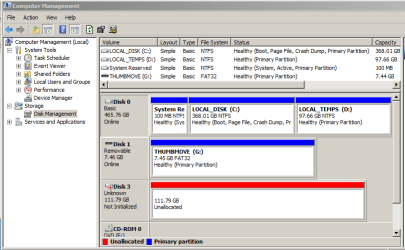
But it is listed in Computer Management -> Storage -> Disk Management.
- as disk 3 (SSD) is not initialized.

2_drive manager.PNG

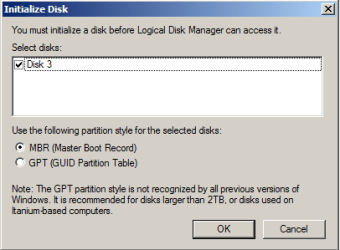
When Computer Management -> Storage -> Disk Management is opened this popup appears.

3_popup, initialize disk.png

Do I need to format the SSD ?
- if so MBR or GPT ?

Would I make an image (file) of source HDD C:\ drive
.... logically save to an external USB media.
... swap the raw SSD into the laptop
... and then "somehow" add/insert/restore the saved image onto the raw SSD ?

Reducing the source HDD to one partition would make cloning the HDD to the SSD simpler,
but I would like to learn how to add an image to an empty SSD (drive) ... if it can be done ?
Lady Fitzgerald. In another thread you described imaging the system (well outlined), now I cannot find your post.

Thank you :)
 

My Computer My Computer

At a glance

XP Pro (x86) | 7 HP (x86) & (x64) | 7 Pro (x64)
Computer type
PC/Desktop
Computer Manufacturer/Model Number
Toshiba, Lenovo (laptops) + 4 rigs
OS
XP Pro (x86) | 7 HP (x86) & (x64) | 7 Pro (x64)
@ RolandJS :)

I have 3 docks, but what I find a pain is taking the flimsy back off the (Lenovo) laptop to swap drives in and out.
- one old Toshiba fell apart (age) while trying to clone the HDD to a (hopefully) SSD backup/clone.
- now the Toshiba is disassembled while waiting for parts from offshore.

My ultimate aim is to have the SSD as the Lenovo archive clone and the HDD as the system in the Lenovo
I keep all my data on an external 1TB HDD so I can have all my stuff available to multiple PCS
 

My Computer My Computer

At a glance

XP Pro (x86) | 7 HP (x86) & (x64) | 7 Pro (x64)
Computer type
PC/Desktop
Computer Manufacturer/Model Number
Toshiba, Lenovo (laptops) + 4 rigs
OS
XP Pro (x86) | 7 HP (x86) & (x64) | 7 Pro (x64)
LadyF, one of several reasons I prefer full imaging over cloning is that cloning eliminates any existing MFT content on the target just as it begins the cloning operation. Full imaging doesn't care what is already on the target backup HD just as long as there is enough byte-space for the upcoming full image.
I'm missing the point here.
An image of selected partitions will surely replace the Master File Table of each of the selected partitions.
In the case of my OS SSD drive I've started wiping the drive with Partition Wizard (quick 0 fill) before running a Macrium image restore. I have a reason for doing this and am still deciding if it is absolutely necessary in all situations.
See here for reason:
Macrium system image restore after blue screen - Very confused.

Both utilities are on the same usb flash drive so I just run the wipe followed immediately by the restore.
 

My Computer My Computer

At a glance

Windows 7x64 Home Premium SP1Intel i7 2600kG.Skill Ripjaws (DDR3-1600) 2x4GBNvidia GeForce GTS 450; Intel HD Graphics 300...
Computer type
PC/Desktop
Computer Manufacturer/Model Number
Own build
OS
Windows 7x64 Home Premium SP1
CPU
Intel i7 2600k
Motherboard
ASUS P8Z68 Deluxe
Memory
G.Skill Ripjaws (DDR3-1600) 2x4GB
Graphics Card(s)
Nvidia GeForce GTS 450; Intel HD Graphics 3000(GT2+)
Monitor(s) Displays
Dell Ultrasharp IPS panel U2311H, Samsung SyncMaster P2350
Screen Resolution
1920x1080
Hard Drives
Samsung 850 Pro SSD 256GB, Samsung SSD 840 120GB, Seagates 1TB Barracuda ST31000528AS x2
PSU
Seasonic M12II 520W
Case
Lian Li Lancool PC-K60
Cooling
Case: 1x120mm, 3x140mm CPU: Hyper 212+
Keyboard
Logitech MK520 (wireless)
Mouse
Logitech MK520
Internet Speed
6-7 Mbps
Antivirus
Norton Security Premium, Malwarebytes on 2 (MSE on 3rd PC)
Browser
FireFox
Other Info
Audio: Logitech Z523 2.1
The new SSD is not recognized by WinExp - Computer

View attachment 399449

But it is listed in Computer Management -> Storage -> Disk Management.
- as disk 3 (SSD) is not initialized.

View attachment 399450

When Computer Management -> Storage -> Disk Management is opened this popup appears.

View attachment 399451

Do I need to format the SSD ?
- if so MBR or GPT ?

Would I make an image (file) of source HDD C:\ drive
.... logically save to an external USB media.
... swap the raw SSD into the laptop
... and then "somehow" add/insert/restore the saved image onto the raw SSD ?

Reducing the source HDD to one partition would make cloning the HDD to the SSD simpler,
but I would like to learn how to add an image to an empty SSD (drive) ... if it can be done ?
@Lady Fitzgerald. In another thread you described imaging the system (well outlined), now I cannot find your post.

Thank you :)

You will need to initialize and format the SSD before you can clone or restore an image to it. The type—MBR or GPT—should be the same as the source disk.

I've written a lot on imaging. I would have to also search for it and not knowing exactly what you are looking for would complicate the search.
 

My Computer My Computer

At a glance

Win 7 Ultimate 64 bitIntel i7-3930KKingston HyperX Genesis 32GB Kit (8x4GB Modul...MSI R7850 Twin Frozr 2GD5/OC Radeon HD 7850 2...
Computer type
PC/Desktop
Computer Manufacturer/Model Number
Custom Build
OS
Win 7 Ultimate 64 bit
CPU
Intel i7-3930K
Motherboard
ASUS P9X79 WS
Memory
Kingston HyperX Genesis 32GB Kit (8x4GB Modules) 1600MHz DDR
Graphics Card(s)
MSI R7850 Twin Frozr 2GD5/OC Radeon HD 7850 2GB 256-bit GDDR
Sound Card
Asus Xonar Essence STX
Monitor(s) Displays
3x Asus VG248QE 24", Vizio 32" TV
Screen Resolution
1920 x 1080, ?
Hard Drives
Samsung 128GB 840 Pro SSD (1),
Samsung 4TB 850 EVO SSDs (4)
Samsung 4TB 850 EVO SSDs (16) external backup drives used in 2.5" hot swap bays in the computer.
PSU
Corsair HX750w
Case
Antec Two Hundred v2 (modified)
Cooling
Cooler Master GeminII S524 120mm (fan replaced with a 140mm)
Keyboard
Logitech G510s
Mouse
Logitech M525 (two in use)
Internet Speed
=< 32Mbps down, 8Mbps up
Antivirus
AVAST!, MBAM, SAS, Spybot S&D (all but MBAM free) Glary Util
Browser
IE11
Other Info
LSI 9211-8i HBA card (8 SATA III ports), 2.5" & 3.5" Hot Swap Bays, HooToo HT-CR001 PCI-E to USB 3.0 Internal Hub + 6 Slot Card Reader, and LG Model CH12LS28 BD-ROM Optical Drive. Also, ScanSnap S1500 ADF duplexing scanner, Canon 9000F flat bed scanner, Corsair SP2500 2.1 speakers, Samsung CLP 415nw laser color printer, Cyberpower PP2200SW UPS
LadyF, one of several reasons I prefer full imaging over cloning is that cloning eliminates any existing MFT content on the target just as it begins the cloning operation. Full imaging doesn't care what is already on the target backup HD just as long as there is enough byte-space for the upcoming full image.

If you are using cloning for a backup, then that would be a problem, However, cloning is not the proper process to back up a drive. While cloning can be used for backing up a drive (many people here do just that), it is not the best way because it will essentially erase everything on the target drive (duh, that's what cloning is supposed to do) and it is a waste of resources because you can have only one clone, and only the clone, per drive. Imaging is usually the best way to backup a drive (the exception is to have a ready to go replacement drive handy for quick replacement if the original drive should totally die; I do that with my notebooks in case I need to do a quick field replacement but I also use images for backups on another drive).

Cloning is best used for replicating drives, not for making backups. If you are replicating a drive on another drive, you do not want any of the original content to remain on the target drive. Cloning is the most efficient way to transfer all of the contents of a drive to another drive, such as when replacing an HDD with another HDD or an SSD.
 

My Computer My Computer

At a glance

Win 7 Ultimate 64 bitIntel i7-3930KKingston HyperX Genesis 32GB Kit (8x4GB Modul...MSI R7850 Twin Frozr 2GD5/OC Radeon HD 7850 2...
Computer type
PC/Desktop
Computer Manufacturer/Model Number
Custom Build
OS
Win 7 Ultimate 64 bit
CPU
Intel i7-3930K
Motherboard
ASUS P9X79 WS
Memory
Kingston HyperX Genesis 32GB Kit (8x4GB Modules) 1600MHz DDR
Graphics Card(s)
MSI R7850 Twin Frozr 2GD5/OC Radeon HD 7850 2GB 256-bit GDDR
Sound Card
Asus Xonar Essence STX
Monitor(s) Displays
3x Asus VG248QE 24", Vizio 32" TV
Screen Resolution
1920 x 1080, ?
Hard Drives
Samsung 128GB 840 Pro SSD (1),
Samsung 4TB 850 EVO SSDs (4)
Samsung 4TB 850 EVO SSDs (16) external backup drives used in 2.5" hot swap bays in the computer.
PSU
Corsair HX750w
Case
Antec Two Hundred v2 (modified)
Cooling
Cooler Master GeminII S524 120mm (fan replaced with a 140mm)
Keyboard
Logitech G510s
Mouse
Logitech M525 (two in use)
Internet Speed
=< 32Mbps down, 8Mbps up
Antivirus
AVAST!, MBAM, SAS, Spybot S&D (all but MBAM free) Glary Util
Browser
IE11
Other Info
LSI 9211-8i HBA card (8 SATA III ports), 2.5" & 3.5" Hot Swap Bays, HooToo HT-CR001 PCI-E to USB 3.0 Internal Hub + 6 Slot Card Reader, and LG Model CH12LS28 BD-ROM Optical Drive. Also, ScanSnap S1500 ADF duplexing scanner, Canon 9000F flat bed scanner, Corsair SP2500 2.1 speakers, Samsung CLP 415nw laser color printer, Cyberpower PP2200SW UPS
@ RolandJS :)

I have 3 docks, but what I find a pain is taking the flimsy back off the (Lenovo) laptop to swap drives in and out.
- one old Toshiba fell apart (age) while trying to clone the HDD to a (hopefully) SSD backup/clone.
- now the Toshiba is disassembled while waiting for parts from offshore.
My ultimate aim is to have the SSD as the Lenovo archive clone and the HDD as the system in the Lenovo
I keep all my data on an external 1TB HDD so I can have all my stuff available to multiple PCS

Curious. The backs on the two Lenovo notebooks I'm using are an absolute joy to remove for cleaning or replacing RAM or the drive.

Back to the ranch topic... Why would you want to use the SSD as an archival drive? That's kind of like using a Mercedes as a backup vehicle for a Ford Focus. Data is data, no matter where it is stored. An HDD is just fine for archiving data so why not put the SSD into your computer after cloning so you can benefit from its increased speed and the better battery life it will give your computer and only keep the original HDD as a quick and dirty replacement to quickly get the computer up and running until you can get a replacement SSD if the SSD ever dies (that's what I did with the HDDs I removed from my notebooks; also, SSDs are actually more reliable in use than HDDs).

You should still use imaging for backing up the System files (OS and programs) and keep your data on another partition so you can use a more efficient folder/file syncing program for backing up the data. The backups should be kept on drives other than the archival HDD, ideally on an onsite backup drive and on an offsite backup drive.
 

My Computer My Computer

At a glance

Win 7 Ultimate 64 bitIntel i7-3930KKingston HyperX Genesis 32GB Kit (8x4GB Modul...MSI R7850 Twin Frozr 2GD5/OC Radeon HD 7850 2...
Computer type
PC/Desktop
Computer Manufacturer/Model Number
Custom Build
OS
Win 7 Ultimate 64 bit
CPU
Intel i7-3930K
Motherboard
ASUS P9X79 WS
Memory
Kingston HyperX Genesis 32GB Kit (8x4GB Modules) 1600MHz DDR
Graphics Card(s)
MSI R7850 Twin Frozr 2GD5/OC Radeon HD 7850 2GB 256-bit GDDR
Sound Card
Asus Xonar Essence STX
Monitor(s) Displays
3x Asus VG248QE 24", Vizio 32" TV
Screen Resolution
1920 x 1080, ?
Hard Drives
Samsung 128GB 840 Pro SSD (1),
Samsung 4TB 850 EVO SSDs (4)
Samsung 4TB 850 EVO SSDs (16) external backup drives used in 2.5" hot swap bays in the computer.
PSU
Corsair HX750w
Case
Antec Two Hundred v2 (modified)
Cooling
Cooler Master GeminII S524 120mm (fan replaced with a 140mm)
Keyboard
Logitech G510s
Mouse
Logitech M525 (two in use)
Internet Speed
=< 32Mbps down, 8Mbps up
Antivirus
AVAST!, MBAM, SAS, Spybot S&D (all but MBAM free) Glary Util
Browser
IE11
Other Info
LSI 9211-8i HBA card (8 SATA III ports), 2.5" & 3.5" Hot Swap Bays, HooToo HT-CR001 PCI-E to USB 3.0 Internal Hub + 6 Slot Card Reader, and LG Model CH12LS28 BD-ROM Optical Drive. Also, ScanSnap S1500 ADF duplexing scanner, Canon 9000F flat bed scanner, Corsair SP2500 2.1 speakers, Samsung CLP 415nw laser color printer, Cyberpower PP2200SW UPS
I'm missing the point here.
An image of selected partitions will surely replace the Master File Table of each of the selected partitions.
In the case of my OS SSD drive I've started wiping the drive with Partition Wizard (quick 0 fill) before running a Macrium image restore. I have a reason for doing this and am still deciding if it is absolutely necessary in all situations.
See here for reason:
Macrium system image restore after blue screen - Very confused.

Both utilities are on the same usb flash drive so I just run the wipe followed immediately by the restore.

I'm thinking the point is Roland is referring to using cloning for backing up drives. Imaging is more appropriate for backups. Cloning should be used only for replicating drives, not as a sole method of backing up drives.
 

My Computer My Computer

At a glance

Win 7 Ultimate 64 bitIntel i7-3930KKingston HyperX Genesis 32GB Kit (8x4GB Modul...MSI R7850 Twin Frozr 2GD5/OC Radeon HD 7850 2...
Computer type
PC/Desktop
Computer Manufacturer/Model Number
Custom Build
OS
Win 7 Ultimate 64 bit
CPU
Intel i7-3930K
Motherboard
ASUS P9X79 WS
Memory
Kingston HyperX Genesis 32GB Kit (8x4GB Modules) 1600MHz DDR
Graphics Card(s)
MSI R7850 Twin Frozr 2GD5/OC Radeon HD 7850 2GB 256-bit GDDR
Sound Card
Asus Xonar Essence STX
Monitor(s) Displays
3x Asus VG248QE 24", Vizio 32" TV
Screen Resolution
1920 x 1080, ?
Hard Drives
Samsung 128GB 840 Pro SSD (1),
Samsung 4TB 850 EVO SSDs (4)
Samsung 4TB 850 EVO SSDs (16) external backup drives used in 2.5" hot swap bays in the computer.
PSU
Corsair HX750w
Case
Antec Two Hundred v2 (modified)
Cooling
Cooler Master GeminII S524 120mm (fan replaced with a 140mm)
Keyboard
Logitech G510s
Mouse
Logitech M525 (two in use)
Internet Speed
=< 32Mbps down, 8Mbps up
Antivirus
AVAST!, MBAM, SAS, Spybot S&D (all but MBAM free) Glary Util
Browser
IE11
Other Info
LSI 9211-8i HBA card (8 SATA III ports), 2.5" & 3.5" Hot Swap Bays, HooToo HT-CR001 PCI-E to USB 3.0 Internal Hub + 6 Slot Card Reader, and LG Model CH12LS28 BD-ROM Optical Drive. Also, ScanSnap S1500 ADF duplexing scanner, Canon 9000F flat bed scanner, Corsair SP2500 2.1 speakers, Samsung CLP 415nw laser color printer, Cyberpower PP2200SW UPS
I'm thinking the point is Roland is referring to using cloning for backing up drives. Imaging is more appropriate for backups. Cloning should be used only for replicating drives, not as a sole method of backing up drives.
It still doesn't make sense.
Full imaging will replace (virtually) everything. You'll get a new MFT and contents consistent with what is in the image file. Differential and incremental imaging are a bit of an exception but I stick to full imaging and wouldn't even consider incremental.

My main working data drive contains fairly static data and I keep a clone of it so I can quickly replace the aging internal HDD if/when it fails. You need to complement this with more regular backups.
 

My Computer My Computer

At a glance

Windows 7x64 Home Premium SP1Intel i7 2600kG.Skill Ripjaws (DDR3-1600) 2x4GBNvidia GeForce GTS 450; Intel HD Graphics 300...
Computer type
PC/Desktop
Computer Manufacturer/Model Number
Own build
OS
Windows 7x64 Home Premium SP1
CPU
Intel i7 2600k
Motherboard
ASUS P8Z68 Deluxe
Memory
G.Skill Ripjaws (DDR3-1600) 2x4GB
Graphics Card(s)
Nvidia GeForce GTS 450; Intel HD Graphics 3000(GT2+)
Monitor(s) Displays
Dell Ultrasharp IPS panel U2311H, Samsung SyncMaster P2350
Screen Resolution
1920x1080
Hard Drives
Samsung 850 Pro SSD 256GB, Samsung SSD 840 120GB, Seagates 1TB Barracuda ST31000528AS x2
PSU
Seasonic M12II 520W
Case
Lian Li Lancool PC-K60
Cooling
Case: 1x120mm, 3x140mm CPU: Hyper 212+
Keyboard
Logitech MK520 (wireless)
Mouse
Logitech MK520
Internet Speed
6-7 Mbps
Antivirus
Norton Security Premium, Malwarebytes on 2 (MSE on 3rd PC)
Browser
FireFox
Other Info
Audio: Logitech Z523 2.1
It still doesn't make sense.
Full imaging will replace (virtually) everything. You'll get a new MFT and contents consistent with what is in the image file. Differential and incremental imaging are a bit of an exception but I stick to full imaging and wouldn't even consider incremental.

My main working data drive contains fairly static data and I keep a clone of it so I can quickly replace the aging internal HDD if/when it fails. You need to complement this with more regular backups.

What still doesn't make sense (hey, I'm old and confuse easily)?

All the backup drives of my data drives are essentially clones in that I can slap one into an internal hot swap bay in my computer and keep on chugging along until I get and install a replacement or I can just simply retrieve a one or more files as needed. The only difference is I don't use cloning to update them (or even make the initial backup most of the time). Cloning takes too long to rewrite the contents of the entire drive to the backup drive every time I update a data drive backup drive and it's inefficient when only a fraction of the data has changed (the same pretty much applies to imaging except you are writing to a new image instead of another drive). Instead, I use a folder/file syncing program that only has to write any new and changed data on the source drive to the destination drive and delete any data on the destination drive that's no longer on the source (the deleted data gets sent to a versioning folder).
 

My Computer My Computer

At a glance

Win 7 Ultimate 64 bitIntel i7-3930KKingston HyperX Genesis 32GB Kit (8x4GB Modul...MSI R7850 Twin Frozr 2GD5/OC Radeon HD 7850 2...
Computer type
PC/Desktop
Computer Manufacturer/Model Number
Custom Build
OS
Win 7 Ultimate 64 bit
CPU
Intel i7-3930K
Motherboard
ASUS P9X79 WS
Memory
Kingston HyperX Genesis 32GB Kit (8x4GB Modules) 1600MHz DDR
Graphics Card(s)
MSI R7850 Twin Frozr 2GD5/OC Radeon HD 7850 2GB 256-bit GDDR
Sound Card
Asus Xonar Essence STX
Monitor(s) Displays
3x Asus VG248QE 24", Vizio 32" TV
Screen Resolution
1920 x 1080, ?
Hard Drives
Samsung 128GB 840 Pro SSD (1),
Samsung 4TB 850 EVO SSDs (4)
Samsung 4TB 850 EVO SSDs (16) external backup drives used in 2.5" hot swap bays in the computer.
PSU
Corsair HX750w
Case
Antec Two Hundred v2 (modified)
Cooling
Cooler Master GeminII S524 120mm (fan replaced with a 140mm)
Keyboard
Logitech G510s
Mouse
Logitech M525 (two in use)
Internet Speed
=< 32Mbps down, 8Mbps up
Antivirus
AVAST!, MBAM, SAS, Spybot S&D (all but MBAM free) Glary Util
Browser
IE11
Other Info
LSI 9211-8i HBA card (8 SATA III ports), 2.5" & 3.5" Hot Swap Bays, HooToo HT-CR001 PCI-E to USB 3.0 Internal Hub + 6 Slot Card Reader, and LG Model CH12LS28 BD-ROM Optical Drive. Also, ScanSnap S1500 ADF duplexing scanner, Canon 9000F flat bed scanner, Corsair SP2500 2.1 speakers, Samsung CLP 415nw laser color printer, Cyberpower PP2200SW UPS
What still doesn't make sense (hey, I'm old and confuse easily)?
See my post #12.
Maybe RolandJS cares to comment what he is alluding to.
If the suggestion is that an image restore is generally a faster process than cloning then ok. Operationally the end result should be the same.
 

My Computer My Computer

At a glance

Windows 7x64 Home Premium SP1Intel i7 2600kG.Skill Ripjaws (DDR3-1600) 2x4GBNvidia GeForce GTS 450; Intel HD Graphics 300...
Computer type
PC/Desktop
Computer Manufacturer/Model Number
Own build
OS
Windows 7x64 Home Premium SP1
CPU
Intel i7 2600k
Motherboard
ASUS P8Z68 Deluxe
Memory
G.Skill Ripjaws (DDR3-1600) 2x4GB
Graphics Card(s)
Nvidia GeForce GTS 450; Intel HD Graphics 3000(GT2+)
Monitor(s) Displays
Dell Ultrasharp IPS panel U2311H, Samsung SyncMaster P2350
Screen Resolution
1920x1080
Hard Drives
Samsung 850 Pro SSD 256GB, Samsung SSD 840 120GB, Seagates 1TB Barracuda ST31000528AS x2
PSU
Seasonic M12II 520W
Case
Lian Li Lancool PC-K60
Cooling
Case: 1x120mm, 3x140mm CPU: Hyper 212+
Keyboard
Logitech MK520 (wireless)
Mouse
Logitech MK520
Internet Speed
6-7 Mbps
Antivirus
Norton Security Premium, Malwarebytes on 2 (MSE on 3rd PC)
Browser
FireFox
Other Info
Audio: Logitech Z523 2.1
Back to OP ...

Well disaster struck ... all my own fault :cry:
Using free MiniTools I shrunk the hidden System Recovery partion successfully, but that created unallocated space after System Recovery partition and before C:\ partition.
See image below
Free MiniTools 9.1 (bootable) does not merge partitions. So I reduced the unallocated space to a minimum (5GB?).
Then attempted to shrink C:\ partition from 368GB to approx 120GB to fit my 125 GB SSD
- free AOMEI BackUpper has edit/resize partitions crippled. (available in PRO only)

When Mini Tools lists changes before "applying" those changes one item on the list (bottom left of the bootable GUI) was a very long string that could not be read. GUI can't be resized, nor dragged ... no popup to show the entire string.
I hit "apply" ... and suddenly an empty system partition. Quit free MiniTools.

I have exterminated Windows partition in the source HDD :shock: :cry:
Confirmed when I rebooted, not even an opportunity access Recovery
Free bootable MiniTools (Linux) could not be booted :confused:

The source 500GB HDD had a huge C:\ drive partition plus D:\ partition with a small number of downloads
See image below
Fortunately I had the original HDD 350GB (I had earlier cloned to the 500GB HDD)
Swapped out the dead 500GB for the original 350GB HHD. Backups :party:

After several hours comparing features of Free MiniTools versus free AOMEI Partition Assistant Std. It is very obvious AOMEI Partition Assist is less crippled than MiniTools 10.2 .... but neither free versions merge partitions.

AOMEI offer a commercial package ... BackUpper PRO and Partition PRO which I have purchased, and everything works, no restricted features. Bonus is for 2 PCs and considerably cheaper than other contenders.
Now with the right tools (no crippled-ware) I can get this project done !

------------
QUESTION: my dead 500GB HDD ?

What do I do with this HDD ?
- try and recover the "lost" partition via Windows ... using AOMEI Partition Assist PRO ... ?
- or wipe the Disk and start again
- I would like to learn how to recover the lost partition, the HDD is spare and not critical

Device Manager, dead HDD.PNG

.
 

My Computer My Computer

At a glance

XP Pro (x86) | 7 HP (x86) & (x64) | 7 Pro (x64)
Computer type
PC/Desktop
Computer Manufacturer/Model Number
Toshiba, Lenovo (laptops) + 4 rigs
OS
XP Pro (x86) | 7 HP (x86) & (x64) | 7 Pro (x64)
Back
Top