Solved Clone HDD to larger SSD leaves space I can't reclaim

52yankee

New member
Local time
12:40 PM
Messages
31
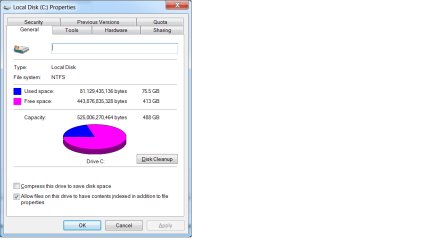
I used Acronis 15 Clone supplied with Crucial New SSD to clone a HDD of 500gb to a Crucial SSD 525gb and the new SSD shows a partition size of 489gb. System properties for the new C: drive shows 489gb in use and over a 100gb not used. Windows 7 pro disk management shows the 489gb and nothing else to expand to. None of the free partition managers can extend the partition either. I went though the motions of creating a backup with Acronis True Image 17 and then go through the motions of do a restore. Following their on screen prompts for changing the partition size even Acronis won't let me increase the partition size and make use of the missing 100gb. I've even tried bootable partition magic wizard and it won't let me expand the only partition on the SSD except for the system reserved one. Anybody got any idea of what I might be doing wrong or a way to get access to the rest of the hard drive? Oops my math is wrong. 525-489 = 36 not 100. sorry.
 

My Computer My Computer

At a glance

Windows 7 Professional 64bit
OS
Windows 7 Professional 64bit
Can you post a screen shot of your parition so we can see
 

My Computer My Computer

At a glance

win 8 32 bit
Computer type
PC/Desktop
OS
win 8 32 bit
Diskmanagement.png

Diskproperties.png
 

My Computer My Computer

At a glance

Windows 7 Professional 64bit
OS
Windows 7 Professional 64bit
Where does it show 100gb not used? 489gb is correct for a nominally 525gb disk. Manufacturers count gb a little differently form Windows. Drives always show as less than the manufacturer claim.

There is no "rest of the hard drive", it is all there.
 

My Computers My Computers

  • At a glance

    7 X64i5 84002x8gb 3200mhz
    Computer type
    PC/Desktop
    OS
    7 X64
    CPU
    i5 8400
    Motherboard
    gigabyte b365m ds3h
    Memory
    2x8gb 3200mhz
    Hard Drives
    various
    PSU
    pure power 11 400w cm
    Case
    Coolermaster
    Cooling
    cryorig m9i
  • At a glance

    7x64g54008gb ddr4 2400
    Computer type
    PC/Desktop
    OS
    7x64
    CPU
    g5400
    Motherboard
    ga b365m ds3h
    Memory
    8gb ddr4 2400
    PSU
    xfx pro 450w
I think I have egg all over my face. I have forgotten that windows uses 2 to the 30th power for giga and manufacturers often report bytes in millions.
I also screwed up subtracting 489 from 525 as a mentioned earlier. I am sorry.
 

My Computer My Computer

At a glance

Windows 7 Professional 64bit
OS
Windows 7 Professional 64bit
Back
Top