Cloned Drive with Windows 7

nvteleskier

New member
Local time
5:11 AM
Messages
8
I installed W7 on my D: drive and it was only 80GB, and had everything running to my satisfaction. Started adding a few programs from my Vista install and thought the drive was to small, so cloned the drive unto a backup drive and installed a 1TB drive. Cloned the image back unto the new drive, but when I try to dual boot, it doesn't see W7. I tried booting from the W7 disk, to do a startup repair, but it doesn't see W7 installed on the new drive.

Any ideas?
 

My Computer My Computer

OS
Windows 7 Professional 64bit
CPU
Q6600
Motherboard
Abit IP35 Pro
Memory
8GB DDR2 PC2 8500
Graphics Card(s)
GT260
Sound Card
Auzentech X-Plosion
Monitor(s) Displays
HP2207
Screen Resolution
1680X1050
Hard Drives
1TB, 500GB, 320GB, 80GB
PSU
OCZ700W
Case
Mountain Mods
Cooling
Water
Keyboard
Logitech MX3200
Mouse
Logitech
Can you post a screenshot of Disk Management?
 

My Computers My Computers

System One System Two

  • Computer type
    PC/Desktop
    OS
    7 X64
    CPU
    i5 8400
    Motherboard
    gigabyte b365m ds3h
    Memory
    2x8gb 3200mhz
    Hard Drives
    various
    PSU
    pure power 11 400w cm
    Case
    Coolermaster
    Cooling
    cryorig m9i
  • Computer type
    PC/Desktop
    OS
    7x64
    CPU
    g5400
    Motherboard
    ga b365m ds3h
    Memory
    8gb ddr4 2400
    PSU
    xfx pro 450w
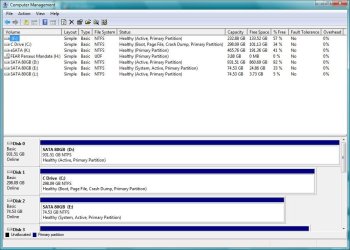
Here it is! Windows 7 is on Disk 0. Vista on Disk 1.
 

Attachments

  • Screen1.JPG
    Screen1.JPG
    104.8 KB · Views: 31

My Computer My Computer

OS
Windows 7 Professional 64bit
CPU
Q6600
Motherboard
Abit IP35 Pro
Memory
8GB DDR2 PC2 8500
Graphics Card(s)
GT260
Sound Card
Auzentech X-Plosion
Monitor(s) Displays
HP2207
Screen Resolution
1680X1050
Hard Drives
1TB, 500GB, 320GB, 80GB
PSU
OCZ700W
Case
Mountain Mods
Cooling
Water
Keyboard
Logitech MX3200
Mouse
Logitech
You are booting thru Disk 2, E - what is on there?

Which is the first 7 install and which is the cloned one?

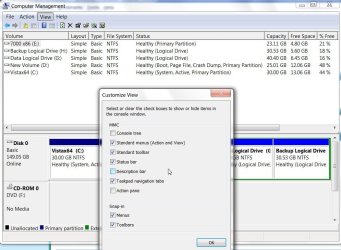
FYI the full window can be shown by going to View>Customize and unticking Console Tree and Action pane.

FULL DISK MANAGEMENT2009-05-16_145650.jpg
 

My Computers My Computers

System One System Two

  • Computer type
    PC/Desktop
    OS
    7 X64
    CPU
    i5 8400
    Motherboard
    gigabyte b365m ds3h
    Memory
    2x8gb 3200mhz
    Hard Drives
    various
    PSU
    pure power 11 400w cm
    Case
    Coolermaster
    Cooling
    cryorig m9i
  • Computer type
    PC/Desktop
    OS
    7x64
    CPU
    g5400
    Motherboard
    ga b365m ds3h
    Memory
    8gb ddr4 2400
    PSU
    xfx pro 450w
The L drive is actually 500GB usb 2 drive that I used to clone the drive I had W7 installed on. Disk 1 has Vista 64, which I'm using currently. I noticed that the 1TB disk says SATA80GB?
 

Attachments

  • Screen2.JPG
    Screen2.JPG
    87.5 KB · Views: 23

My Computer My Computer

OS
Windows 7 Professional 64bit
CPU
Q6600
Motherboard
Abit IP35 Pro
Memory
8GB DDR2 PC2 8500
Graphics Card(s)
GT260
Sound Card
Auzentech X-Plosion
Monitor(s) Displays
HP2207
Screen Resolution
1680X1050
Hard Drives
1TB, 500GB, 320GB, 80GB
PSU
OCZ700W
Case
Mountain Mods
Cooling
Water
Keyboard
Logitech MX3200
Mouse
Logitech
When you say you installed the 1TB drive, did you initialize and partition it?
 

My Computers My Computers

System One System Two

  • Computer type
    PC/Desktop
    OS
    7 X64
    CPU
    i5 8400
    Motherboard
    gigabyte b365m ds3h
    Memory
    2x8gb 3200mhz
    Hard Drives
    various
    PSU
    pure power 11 400w cm
    Case
    Coolermaster
    Cooling
    cryorig m9i
  • Computer type
    PC/Desktop
    OS
    7x64
    CPU
    g5400
    Motherboard
    ga b365m ds3h
    Memory
    8gb ddr4 2400
    PSU
    xfx pro 450w
I did, before I cloned from the usb drive.
 

My Computer My Computer

OS
Windows 7 Professional 64bit
CPU
Q6600
Motherboard
Abit IP35 Pro
Memory
8GB DDR2 PC2 8500
Graphics Card(s)
GT260
Sound Card
Auzentech X-Plosion
Monitor(s) Displays
HP2207
Screen Resolution
1680X1050
Hard Drives
1TB, 500GB, 320GB, 80GB
PSU
OCZ700W
Case
Mountain Mods
Cooling
Water
Keyboard
Logitech MX3200
Mouse
Logitech
A cloning app. - a decent one anyway, would give you the option to increase the clone to the size of the target drive - you can always shrink the free space afterwards.

Looks like the partition table - showing one 80gb partition was cloned back as well.

That's why the o/s thinks that's all there is.

You will notice both L and E are showing as 80gb.

I would use my Paragon program to correct the table.

Don't think Diskpart would do it.

You may need to boot the 7 dvd, start the install, go to drive options(advanced) and delete then reformat the remaining space.

Then abort the installation.
 

My Computers My Computers

System One System Two

  • Computer type
    PC/Desktop
    OS
    7 X64
    CPU
    i5 8400
    Motherboard
    gigabyte b365m ds3h
    Memory
    2x8gb 3200mhz
    Hard Drives
    various
    PSU
    pure power 11 400w cm
    Case
    Coolermaster
    Cooling
    cryorig m9i
  • Computer type
    PC/Desktop
    OS
    7x64
    CPU
    g5400
    Motherboard
    ga b365m ds3h
    Memory
    8gb ddr4 2400
    PSU
    xfx pro 450w
I have Paragon Partition Manager and it shows that the drive is indeed 900+GB. All of the Windows files are there.

I guess I'll just have to re-install, not exactly what I wanted to do.
 

My Computer My Computer

OS
Windows 7 Professional 64bit
CPU
Q6600
Motherboard
Abit IP35 Pro
Memory
8GB DDR2 PC2 8500
Graphics Card(s)
GT260
Sound Card
Auzentech X-Plosion
Monitor(s) Displays
HP2207
Screen Resolution
1680X1050
Hard Drives
1TB, 500GB, 320GB, 80GB
PSU
OCZ700W
Case
Mountain Mods
Cooling
Water
Keyboard
Logitech MX3200
Mouse
Logitech
Hi,

Try using Paragon to perform a partitioning operation on that drive - anything you like, create and format a partition out of the unallocated space .

You may find it updates the o/s partition table for you.
 

My Computers My Computers

System One System Two

  • Computer type
    PC/Desktop
    OS
    7 X64
    CPU
    i5 8400
    Motherboard
    gigabyte b365m ds3h
    Memory
    2x8gb 3200mhz
    Hard Drives
    various
    PSU
    pure power 11 400w cm
    Case
    Coolermaster
    Cooling
    cryorig m9i
  • Computer type
    PC/Desktop
    OS
    7x64
    CPU
    g5400
    Motherboard
    ga b365m ds3h
    Memory
    8gb ddr4 2400
    PSU
    xfx pro 450w
Hi,

Try using Paragon to perform a partitioning operation on that drive - anything you like, create and format a partition out of the unallocated space .

You may find it updates the o/s partition table for you.

SiW2,
Thanks a million for your help. I'm currently out of town on business and haven't had a chance to reply. I tried using Paragon to repartition the drive, but it doesn't work with a 64 bit OS. So, I downloaded a new W7, installed it on the previous W7 disk and it runs great. A few problems: it doesn't dual boot with my Vista 64 and when I was in W7, I tried to use Windows Easy Transfer, which I had used to create a transfer file in Vista to a spare external drive. When I try to transfer to W7 disk, W7 tells me there is not enough space on the drive. It's a 1TB drive and shows as a 900+GB partition in disk management.

When I have a chance, I'll try reformatting the disk and doing a new install.
Thanks again,
nvteleskier
 
Last edited:

My Computer My Computer

OS
Windows 7 Professional 64bit
CPU
Q6600
Motherboard
Abit IP35 Pro
Memory
8GB DDR2 PC2 8500
Graphics Card(s)
GT260
Sound Card
Auzentech X-Plosion
Monitor(s) Displays
HP2207
Screen Resolution
1680X1050
Hard Drives
1TB, 500GB, 320GB, 80GB
PSU
OCZ700W
Case
Mountain Mods
Cooling
Water
Keyboard
Logitech MX3200
Mouse
Logitech
I installed W7 on my D: drive and it was only 80GB, and had everything running to my satisfaction. Started adding a few programs from my Vista install and thought the drive was to small, so cloned the drive unto a backup drive and installed a 1TB drive. Cloned the image back unto the new drive, but when I try to dual boot, it doesn't see W7. I tried booting from the W7 disk, to do a startup repair, but it doesn't see W7 installed on the new drive.

Any ideas?

Ummm....

When you cloned the original 80 GB drive you only cloned the 'System' (aka boot) partition, not the 'boot' (aka System) partition that is usually around 100 MB in size....

Also, if you'll look at my setup:

View attachment 11405

You'll see me using a 60 GB partition - which I have yet to exceed, in terms of space.

Plus, my Tablet PC laptop has only an 80GB HD to begin with.

You;'ll be hard pressed to fill that up unless you do a boatload of large file downloading....
 

My Computers My Computers

System One System Two

  • Computer type
    PC/Desktop
    Computer Manufacturer/Model Number
    The Beast Model A (homebrew)
    OS
    Windows 11 21H2 Current build
    CPU
    AMD Ryzen 9 3950X
    Motherboard
    MSI MEG X570 GODLIKE
    Memory
    4 * 32 GB - Corsair Vengeance 3600 MHz
    Graphics Card(s)
    EVGA GeForce RTX 3080 Ti XC3 ULTRA GAMING (12G-P5-3955-KR)
    Sound Card
    Realtek® ALC1220 Codec
    Monitor(s) Displays
    2x Eve Spectrum ES07D03 4K Gaming Monitor (Matte) | Eve Spec
    Screen Resolution
    3x 3840 x 2160
    Hard Drives
    3x Samsung 980 Pro NVMe PCIe 4 M.2 2 TB SSD (MZ-V8P2T0B/AM) } 3x Sabrent Rocket NVMe 4.0 1 TB SSD
    PSU
    PC Power & Cooling’s Silencer Series 1050 Watt, 80 Plus Plat
    Case
    Fractal Design Define 7 XL Dark ATX Full Tower Case
    Cooling
    SteelSeries Apex Pro Wired Gaming Keyboard
    Keyboard
    SteelSeries Apex Pro
    Mouse
    Logitech MX Master 3S | MX Master 3 for business
    Internet Speed
    AT&T LightSpeed Gigabit Duplex Ftth
    Antivirus
    Windows Defender + MB 3
    Browser
    Nightly (default) + Firefox (stable),Chrome, Edge
  • Computer type
    PC/Desktop
    System Manufacturer/Model Number
    Dell Latitude E5470
    OS
    ChromeOS Flex Dev Channel (current)
    CPU
    Intel(R) Core(TM) i5-6300U CPU @ 2.40GHz, 2501 Mhz, 2 Core(s), 4 Logical Processor(s)
    Motherboard
    Dell
    Memory
    16 GB
    Graphics Card(s)
    Intel(R) HD Graphics 520
    Sound Card
    Intel(R) HD Graphics 520 + RealTek Audio
    Monitor(s) Displays
    Dell laptop display 15"
    Screen Resolution
    1920 * 1080
    Hard Drives
    Toshiba 128GB M.2 22300 drive
    INTEL Cherryville 520 Series SSDSC2CW180A 180 GB SATA III SSD
    PSU
    Dell
    Case
    Dell
    Cooling
    Dell
    Keyboard
    Dell
    Mouse
    Logitech MX Master 3S (shared w. Sys 1) | Dell TouchPad
    Internet Speed
    AT&T LightSpeed Gigabit Duplex Ftth
Back
Top