Solved Cloned existing drive to new HDD...can you have 2 Win 7 drives in box

trinaz

New member
Member
VIP
Local time
4:25 AM
Messages
477
Location
Phoenix
Tried my first attempt using Acronis clone feature to upgrade my Win 7 Pro 64bit system from a Hitachi Sata 2 750 GB drive to a Western Digital Sata 3 500 GB drive.

Cloning seemingly has gone flawlessly from within Windows 7 Acronis app/tools.
Now I don't remember how I setup the new drive partitions. I still have the original Hatachi drive in the box but it is not connected to a power cord.

The new system booted relatively smoothly...only activity was at first boot Windows showed the installing new hardware (new Western Digital drive) icon...install successful...please restart.

Restarted and alls seems well...question is can I reconnect the power to the old "C" drive and restart ? At this point both drives are 'named' the same: "Win 7 Hitachi 750 Main Drive"...but they had the same name after the innitial clone also

Do I have to change the status/partition setup on the old C: drive prior to reconnecting it and starting the system and if so how ?

Or...will the system/bios automatically correct the start up to the new "C" drive and re-assign a drive letter to the old "C" drive ? New WD drive is now on Sata 1 MB connection

At this point I plan on reformating the old "C" drive and using it for Media Center storage.

My concern is having 2 Windows 7 Pro 64bit "installations" in the same box ?
The bios has an option to set the boot drive...which was and is now Sata1...the new cloned drive.

No issues/problems having 2 Windows installation in the same box then ?

Thanks...TRinAz
 

My Computer My Computer

At a glance

Windows 7 Pro 64bit SP1AMD FX-6100 Six-Core Processor2ea Corsair-1333MHz-PC3-10666-240-pin-CMX4GX3...NVIDIA GeForce GT 630 - 1023MB (EVGA)
Computer type
PC/Desktop
Computer Manufacturer/Model Number
Self built
OS
Windows 7 Pro 64bit SP1
CPU
AMD FX-6100 Six-Core Processor
Motherboard
M5A78L-M LX PLUS
Memory
2ea Corsair-1333MHz-PC3-10666-240-pin-CMX4GX3M1A1333C9
Graphics Card(s)
NVIDIA GeForce GT 630 - 1023MB (EVGA)
Sound Card
OnBoard Via High Def Audio
Monitor(s) Displays
Samsung 204B main - ASUS VS228 secondary
Screen Resolution
1920x1080 main - 1920x1080 secondary
Hard Drives
Samsung SSD 840 128GB Win7 Pro 64bit - Western Digital WDC 465GB - Seagate 640GB Sata B/U - Maxtor 500GB Sata B/U - Maxtor 200GB Sata
PSU
Antec 650 watt
Cooling
Multiple case fans
Keyboard
MS USB dual Wireless Keyboard - IntelliType Pro
Mouse
MS USB dual Wireless Mouse - IntelliPoint
Internet Speed
Cox Cable
Antivirus
Bitdefender IS 2014
Browser
FireFox Primary - IE 11
Other Info
Hauppaguge Win TV HVR-1250 (Model 22xxx, Hybrid ATSC/QAM)
Samsung HD103SI USB 1TB Desktop Drive - Backup & Disk Image storage
Could you change the boot device?:

how to select boot device - Bing Images

If anything goes wrong, just change the order back. That should do the trick. Should be able to try it. It may have a BIOS pop up when you start the computer asking which windows to load. Select the right one and boot up. That could be tricky in the event they look the exact same.
 

My Computer My Computer

At a glance

Microsoft Windows 8.1 Pro 64-bitIntel(R) Core(TM) i3-4130 CPU @ 3.40GHz8.00 GBNone
Computer type
PC/Desktop
Computer Manufacturer/Model Number
Custom Asus Build
OS
Microsoft Windows 8.1 Pro 64-bit
CPU
Intel(R) Core(TM) i3-4130 CPU @ 3.40GHz
Motherboard
B85M-E
Memory
8.00 GB
Graphics Card(s)
None
Sound Card
Realtek High Definition Audio
Monitor(s) Displays
Asus 23.6" Monitor
Screen Resolution
1920 x 1080 x 32 bits (4294967296 colors) @ 60 Hz
Hard Drives
INTEL SSDSC2BW180A4
Samsung SSD 840 PRO Series
PSU
Seasonic S12II-380Bronze
Case
Lian Li
Cooling
Fan, Passive
Keyboard
Logitech K120
Mouse
Microsoft Touch Mouse
Internet Speed
4ms Ping, 19.0 Mbps Download, 19.0 Mbps Upload
Antivirus
Eset Endpoint
Browser
Internet Explorer, Chrome
If anything goes wrong, just change the order back. That should do the trick..../QUOTE]


Reconnect worked fine...Bios has option for which Sata channel is boot device.

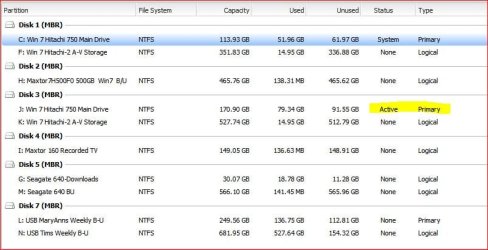
Nesx question is can I change the old drive to logical (its' still active/primary in attached jpg) and...can I later change it back to active/primary in case I decide to use it as a cloned backup of my C: drive ?

Thanks...
 

Attachments

  • partition2.jpg
    partition2.jpg
    54.2 KB · Views: 31

My Computer My Computer

At a glance

Windows 7 Pro 64bit SP1AMD FX-6100 Six-Core Processor2ea Corsair-1333MHz-PC3-10666-240-pin-CMX4GX3...NVIDIA GeForce GT 630 - 1023MB (EVGA)
Computer type
PC/Desktop
Computer Manufacturer/Model Number
Self built
OS
Windows 7 Pro 64bit SP1
CPU
AMD FX-6100 Six-Core Processor
Motherboard
M5A78L-M LX PLUS
Memory
2ea Corsair-1333MHz-PC3-10666-240-pin-CMX4GX3M1A1333C9
Graphics Card(s)
NVIDIA GeForce GT 630 - 1023MB (EVGA)
Sound Card
OnBoard Via High Def Audio
Monitor(s) Displays
Samsung 204B main - ASUS VS228 secondary
Screen Resolution
1920x1080 main - 1920x1080 secondary
Hard Drives
Samsung SSD 840 128GB Win7 Pro 64bit - Western Digital WDC 465GB - Seagate 640GB Sata B/U - Maxtor 500GB Sata B/U - Maxtor 200GB Sata
PSU
Antec 650 watt
Cooling
Multiple case fans
Keyboard
MS USB dual Wireless Keyboard - IntelliType Pro
Mouse
MS USB dual Wireless Mouse - IntelliPoint
Internet Speed
Cox Cable
Antivirus
Bitdefender IS 2014
Browser
FireFox Primary - IE 11
Other Info
Hauppaguge Win TV HVR-1250 (Model 22xxx, Hybrid ATSC/QAM)
Samsung HD103SI USB 1TB Desktop Drive - Backup & Disk Image storage
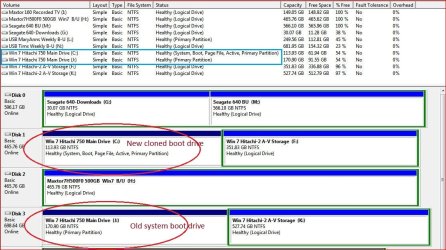
Mark Partition Active the cloned Win7 now. It appears to already have the System Boot files. Having the Active flag in place assures the boot cannot be derailed during repairs or reinstall. Make sure the WD HD remains HD set to boot first in BIOS setup.

You can relabel the HD in C Properties box.

Best way is to wipe the old HD with Diskpart Clean Command from Win7 on new HD. Make sure you choose the right HD or use free Partition Wizard to have a picture of what you're doing.

Then repartition as desired in Disk Mgmt. Partition or Volume - Create New
or using free Partition Wizard if you want it Logical.
 
Mark Partition Active the cloned Win7 now. It appears to already have the System Boot files. Having the Active flag in place assures the boot cannot be derailed during repairs or reinstall. Make sure the WD HD remains HD set to boot first in BIOS setup.

OK...think I have it right now (jpg). Whats' the difference between a 'primary' partition and an 'logical' partition

Thanks...as always
 

Attachments

  • partition3.jpg
    partition3.jpg
    130.6 KB · Views: 22

My Computer My Computer

At a glance

Windows 7 Pro 64bit SP1AMD FX-6100 Six-Core Processor2ea Corsair-1333MHz-PC3-10666-240-pin-CMX4GX3...NVIDIA GeForce GT 630 - 1023MB (EVGA)
Computer type
PC/Desktop
Computer Manufacturer/Model Number
Self built
OS
Windows 7 Pro 64bit SP1
CPU
AMD FX-6100 Six-Core Processor
Motherboard
M5A78L-M LX PLUS
Memory
2ea Corsair-1333MHz-PC3-10666-240-pin-CMX4GX3M1A1333C9
Graphics Card(s)
NVIDIA GeForce GT 630 - 1023MB (EVGA)
Sound Card
OnBoard Via High Def Audio
Monitor(s) Displays
Samsung 204B main - ASUS VS228 secondary
Screen Resolution
1920x1080 main - 1920x1080 secondary
Hard Drives
Samsung SSD 840 128GB Win7 Pro 64bit - Western Digital WDC 465GB - Seagate 640GB Sata B/U - Maxtor 500GB Sata B/U - Maxtor 200GB Sata
PSU
Antec 650 watt
Cooling
Multiple case fans
Keyboard
MS USB dual Wireless Keyboard - IntelliType Pro
Mouse
MS USB dual Wireless Mouse - IntelliPoint
Internet Speed
Cox Cable
Antivirus
Bitdefender IS 2014
Browser
FireFox Primary - IE 11
Other Info
Hauppaguge Win TV HVR-1250 (Model 22xxx, Hybrid ATSC/QAM)
Samsung HD103SI USB 1TB Desktop Drive - Backup & Disk Image storage
Primary can be used to install OS's while Logical are more commonly used for data partitions.

However you can store your data on Primary. Just make sure it doesn't get marked Active to derail the System Boot files during a repair or reinstall - and unplug all other HD's during reinstall/reimaging to assure this.

And you can install OS's on Logical as long as there is a Primary partition for the boot files to reside upon.

You can have four total primary partitions on a Basic HD, or three Primary and unlimited Logical. Sometimes it requires a partition manager to press these limits, since Disk Mgmt may want to convert to Dynamic in some cases which is perilous.
 
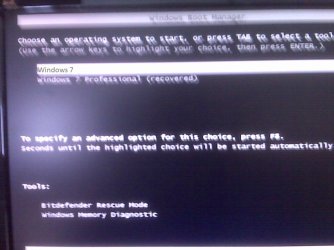
Opps...one more issue with this. I decided (just to be safe) to run the startup disk just to see if it showed the 2nd "J" drive as an installation. At first it didn't BUT it did say there were boot errors that should be fixed

So I ran the repair boot option...it said issues repaired and log is placed 'somewhere' and to restart.

Restarted but now I get the following Boot screen at startup which I think never appeared before)

It does show the "J" drive "Windows 7 Professional (recovered)" ?

In the jpg..the glare covered the 1st option so I typed it in as is for clarity.

1) should I care about this ?
2) should I return to the saved boot record and how ?
3) is there a way to skip this screen at startup ?

Thanks...
 

Attachments

  • IMG00176.jpg
    IMG00176.jpg
    72.3 KB · Views: 12

My Computer My Computer

At a glance

Windows 7 Pro 64bit SP1AMD FX-6100 Six-Core Processor2ea Corsair-1333MHz-PC3-10666-240-pin-CMX4GX3...NVIDIA GeForce GT 630 - 1023MB (EVGA)
Computer type
PC/Desktop
Computer Manufacturer/Model Number
Self built
OS
Windows 7 Pro 64bit SP1
CPU
AMD FX-6100 Six-Core Processor
Motherboard
M5A78L-M LX PLUS
Memory
2ea Corsair-1333MHz-PC3-10666-240-pin-CMX4GX3M1A1333C9
Graphics Card(s)
NVIDIA GeForce GT 630 - 1023MB (EVGA)
Sound Card
OnBoard Via High Def Audio
Monitor(s) Displays
Samsung 204B main - ASUS VS228 secondary
Screen Resolution
1920x1080 main - 1920x1080 secondary
Hard Drives
Samsung SSD 840 128GB Win7 Pro 64bit - Western Digital WDC 465GB - Seagate 640GB Sata B/U - Maxtor 500GB Sata B/U - Maxtor 200GB Sata
PSU
Antec 650 watt
Cooling
Multiple case fans
Keyboard
MS USB dual Wireless Keyboard - IntelliType Pro
Mouse
MS USB dual Wireless Mouse - IntelliPoint
Internet Speed
Cox Cable
Antivirus
Bitdefender IS 2014
Browser
FireFox Primary - IE 11
Other Info
Hauppaguge Win TV HVR-1250 (Model 22xxx, Hybrid ATSC/QAM)
Samsung HD103SI USB 1TB Desktop Drive - Backup & Disk Image storage
It is not correct and should be fixed.

What's happened is that the repair function likely found the source OS and added it to a dual boot. Try booting into each entry to see.

Install EasyBCD to see how many listings it shows. Determine the unwanted listing and remove it on Edit OS Entry tab. EasyBCD (free Download at bottom of page - no name or email required)

When ready you can wipe the source HD to avoid problems in the future, then save a Win7 backup image to that HD which is the correct way to back up an image. Backup Complete Computer - Create an Image Backup
 

Attachments

  • malware_boot.jpg
    malware_boot.jpg
    49.1 KB · Views: 3

My Computer My Computer

At a glance

Windows 7 Pro 64bit SP1AMD FX-6100 Six-Core Processor2ea Corsair-1333MHz-PC3-10666-240-pin-CMX4GX3...NVIDIA GeForce GT 630 - 1023MB (EVGA)
Computer type
PC/Desktop
Computer Manufacturer/Model Number
Self built
OS
Windows 7 Pro 64bit SP1
CPU
AMD FX-6100 Six-Core Processor
Motherboard
M5A78L-M LX PLUS
Memory
2ea Corsair-1333MHz-PC3-10666-240-pin-CMX4GX3M1A1333C9
Graphics Card(s)
NVIDIA GeForce GT 630 - 1023MB (EVGA)
Sound Card
OnBoard Via High Def Audio
Monitor(s) Displays
Samsung 204B main - ASUS VS228 secondary
Screen Resolution
1920x1080 main - 1920x1080 secondary
Hard Drives
Samsung SSD 840 128GB Win7 Pro 64bit - Western Digital WDC 465GB - Seagate 640GB Sata B/U - Maxtor 500GB Sata B/U - Maxtor 200GB Sata
PSU
Antec 650 watt
Cooling
Multiple case fans
Keyboard
MS USB dual Wireless Keyboard - IntelliType Pro
Mouse
MS USB dual Wireless Mouse - IntelliPoint
Internet Speed
Cox Cable
Antivirus
Bitdefender IS 2014
Browser
FireFox Primary - IE 11
Other Info
Hauppaguge Win TV HVR-1250 (Model 22xxx, Hybrid ATSC/QAM)
Samsung HD103SI USB 1TB Desktop Drive - Backup & Disk Image storage
It's one of the most reliable tools we use here, thousands of times over three years.....

Ok...figured out what happened - post on EASYBCD forum:
QUOTE=Mak 2.0;72172 You have an infection or something else on your system. Cause when I go to neosmart.net and select EasyBCD, I am taken to this page:

EasyBCD Download Registration Page NeoSmart Technologies

That is completely different than the page you are trying to load. So either you didn't get to this page or your browser is being hijacked. I downloaded EasyBCD with no issues at all.

OK...after reproducing this multiple times and still getting the 'warning' message...I was finally able to figure it out.

Downloaded off CNet forums (EasyBCD 2.1.2.exe) without issue...athough there was a posting there on Malware warnings also.

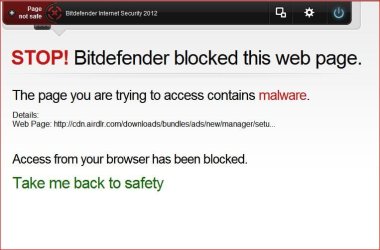
What happened is on the page that comes up after the registration (name/email page ) there is a large blue download window (jpg attached). I looked at the "Donate" info and didn't notice the 'advertisement' and hit the Download>> large blue button

That's when the Malware Warning page popped up...and it still does for the ad that was there yesterday when I visited ( http://alwaysdownloads.com/downloads/manager/?t202id=9231&c1=cngu&t202kw=New%20Version%20Of%20Windows) WARNING !! This link will still bring up the Malware alert still today

Apologies for inadvertently indicating EasyBCD but question why links on the download page for EasyBCD should cause issues ?

Thanks...TRinAz
I installed EasyBCD and corrected my boot issue quickly and smoothly !!

Thanks....TRinAz
 

Attachments

  • download.jpg
    download.jpg
    59.5 KB · Views: 6
Last edited:

My Computer My Computer

At a glance

Windows 7 Pro 64bit SP1AMD FX-6100 Six-Core Processor2ea Corsair-1333MHz-PC3-10666-240-pin-CMX4GX3...NVIDIA GeForce GT 630 - 1023MB (EVGA)
Computer type
PC/Desktop
Computer Manufacturer/Model Number
Self built
OS
Windows 7 Pro 64bit SP1
CPU
AMD FX-6100 Six-Core Processor
Motherboard
M5A78L-M LX PLUS
Memory
2ea Corsair-1333MHz-PC3-10666-240-pin-CMX4GX3M1A1333C9
Graphics Card(s)
NVIDIA GeForce GT 630 - 1023MB (EVGA)
Sound Card
OnBoard Via High Def Audio
Monitor(s) Displays
Samsung 204B main - ASUS VS228 secondary
Screen Resolution
1920x1080 main - 1920x1080 secondary
Hard Drives
Samsung SSD 840 128GB Win7 Pro 64bit - Western Digital WDC 465GB - Seagate 640GB Sata B/U - Maxtor 500GB Sata B/U - Maxtor 200GB Sata
PSU
Antec 650 watt
Cooling
Multiple case fans
Keyboard
MS USB dual Wireless Keyboard - IntelliType Pro
Mouse
MS USB dual Wireless Mouse - IntelliPoint
Internet Speed
Cox Cable
Antivirus
Bitdefender IS 2014
Browser
FireFox Primary - IE 11
Other Info
Hauppaguge Win TV HVR-1250 (Model 22xxx, Hybrid ATSC/QAM)
Samsung HD103SI USB 1TB Desktop Drive - Backup & Disk Image storage
Back
Top