can you have more than 1 Win 7 Pro installation in the same box ?

trinaz

New member
Member
VIP
Local time
12:41 PM
Messages
477
Location
Phoenix
If I clone my Win 7 Pro 64bit installation to another drive in the box...can I leave both drives attached and "live"...or do I need to unplug one of the two drives.

Both on Sata drives and bios allows boot up configuration...ie...which drive is the boot drive ?

Or is it better to leave the clone unconnected to the Sata/power lines in PC

Thanks, Tim
 

My Computer My Computer

At a glance

Windows 7 Pro 64bit SP1AMD FX-6100 Six-Core Processor2ea Corsair-1333MHz-PC3-10666-240-pin-CMX4GX3...NVIDIA GeForce GT 630 - 1023MB (EVGA)
Computer type
PC/Desktop
Computer Manufacturer/Model Number
Self built
OS
Windows 7 Pro 64bit SP1
CPU
AMD FX-6100 Six-Core Processor
Motherboard
M5A78L-M LX PLUS
Memory
2ea Corsair-1333MHz-PC3-10666-240-pin-CMX4GX3M1A1333C9
Graphics Card(s)
NVIDIA GeForce GT 630 - 1023MB (EVGA)
Sound Card
OnBoard Via High Def Audio
Monitor(s) Displays
Samsung 204B main - ASUS VS228 secondary
Screen Resolution
1920x1080 main - 1920x1080 secondary
Hard Drives
Samsung SSD 840 128GB Win7 Pro 64bit - Western Digital WDC 465GB - Seagate 640GB Sata B/U - Maxtor 500GB Sata B/U - Maxtor 200GB Sata
PSU
Antec 650 watt
Cooling
Multiple case fans
Keyboard
MS USB dual Wireless Keyboard - IntelliType Pro
Mouse
MS USB dual Wireless Mouse - IntelliPoint
Internet Speed
Cox Cable
Antivirus
Bitdefender IS 2014
Browser
FireFox Primary - IE 11
Other Info
Hauppaguge Win TV HVR-1250 (Model 22xxx, Hybrid ATSC/QAM)
Samsung HD103SI USB 1TB Desktop Drive - Backup & Disk Image storage
You would dual boot via the BIOS, setting preferred HD as first HD to boot in BIOS setup (after DVD drive) then triggering the other HD using the Fkey given on first bootup screen for one-time Boot Menu.

You are in a grey zone with activation there. The EULA states you can only have one install per machine, but the hardware signature may show both installs to be the same to MS activation computers. If not, just keep one unplugged.
 
I have a perhaps related question: I had my old XP Pro SP3 running on one machine, then added Win7 Ultimate on that same machine on a separate HDD.

Because of a reported rootkit infection (my AV named it, but did nothing about it), I decided to bite the bullet and wipe XP by installing another separate copy of Win7 Ultimate instead. I ended up with a dual-boot configuration of Win7 and Win7! Little point in this, so how can I best uninstall the first installation of Win7- in the process freeing up a separate licence for use elsewhere...?
Is there a quick way to uninstall the O/S while keeping some files (data etc) intact?

Cheers,

LMH
 

My Computer My Computer

At a glance

Win 7 Ultimate 64-bit, Win7 N 32-bit, WHSAMD 64 X2 3600+, AMD Phenom II X3 720BE4GB DDR2 OCZ dual-channel, 6GB DDR2 CorsairGigabyte HD 4850 on the dual-booter, built-in...
Computer Manufacturer/Model Number
2 x home-brew
OS
Win 7 Ultimate 64-bit, Win7 N 32-bit, WHS
CPU
AMD 64 X2 3600+, AMD Phenom II X3 720BE
Motherboard
Gigabyte MA770-UD3, Gigabyte MA790GP-4UDH4, GA-890GPA-UDH3
Memory
4GB DDR2 OCZ dual-channel, 6GB DDR2 Corsair
Graphics Card(s)
Gigabyte HD 4850 on the dual-booter, built-in on others
Sound Card
2 x onboard
Monitor(s) Displays
LG Flatron W2353V
Screen Resolution
1920 x 1080
Hard Drives
Seagates, Samsung, WD
PSU
Corsair HX 620, Corsair 450, Kamariki et al.
Case
Lian Li PC-7F, Antec Sonata, Macase
Keyboard
Logitech diNovo Edge
Mouse
Logitech MX Revolution
Internet Speed
1500kb/s
Other Info
There's a few other PCs in my 'office', all older machines, running Ubuntu 9.10, Vista Ultimate and one surviving Windows ME machine (due to some old programs that I haven't moved...). I believe another 'veteran' still runs OpenSuse...
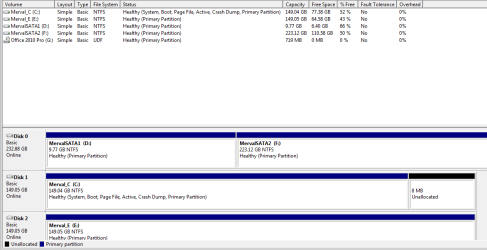
Please post back a screenshot of your full Disk Management drive map and listings, using SNipping Tool in Start Menu, attach file using paper clip in Reply Box.

Tell us which HD contains the Win7 you wish to keep, which you want to delete, and if you want to format the deleted HD for data storage or remove it.

We'll give you the steps.
 
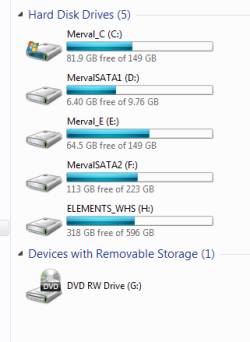
New win7 installation is on Merval_C, old one on Merval_E which I would want to format...

Tks 4 ur help,

LMH

file attached
 

Attachments

  • Capture.PNG
    Capture.PNG
    8.7 KB · Views: 2

My Computer My Computer

At a glance

Win 7 Ultimate 64-bit, Win7 N 32-bit, WHSAMD 64 X2 3600+, AMD Phenom II X3 720BE4GB DDR2 OCZ dual-channel, 6GB DDR2 CorsairGigabyte HD 4850 on the dual-booter, built-in...
Computer Manufacturer/Model Number
2 x home-brew
OS
Win 7 Ultimate 64-bit, Win7 N 32-bit, WHS
CPU
AMD 64 X2 3600+, AMD Phenom II X3 720BE
Motherboard
Gigabyte MA770-UD3, Gigabyte MA790GP-4UDH4, GA-890GPA-UDH3
Memory
4GB DDR2 OCZ dual-channel, 6GB DDR2 Corsair
Graphics Card(s)
Gigabyte HD 4850 on the dual-booter, built-in on others
Sound Card
2 x onboard
Monitor(s) Displays
LG Flatron W2353V
Screen Resolution
1920 x 1080
Hard Drives
Seagates, Samsung, WD
PSU
Corsair HX 620, Corsair 450, Kamariki et al.
Case
Lian Li PC-7F, Antec Sonata, Macase
Keyboard
Logitech diNovo Edge
Mouse
Logitech MX Revolution
Internet Speed
1500kb/s
Other Info
There's a few other PCs in my 'office', all older machines, running Ubuntu 9.10, Vista Ultimate and one surviving Windows ME machine (due to some old programs that I haven't moved...). I believe another 'veteran' still runs OpenSuse...
Need screenshot of Disk Management.

Start Orb>rightclick Computer>Manage>Disk mgmt.
 
sorry, once more with feeling...
 

Attachments

  • Capture2.PNG
    Capture2.PNG
    14.6 KB · Views: 14

My Computer My Computer

At a glance

Win 7 Ultimate 64-bit, Win7 N 32-bit, WHSAMD 64 X2 3600+, AMD Phenom II X3 720BE4GB DDR2 OCZ dual-channel, 6GB DDR2 CorsairGigabyte HD 4850 on the dual-booter, built-in...
Computer Manufacturer/Model Number
2 x home-brew
OS
Win 7 Ultimate 64-bit, Win7 N 32-bit, WHS
CPU
AMD 64 X2 3600+, AMD Phenom II X3 720BE
Motherboard
Gigabyte MA770-UD3, Gigabyte MA790GP-4UDH4, GA-890GPA-UDH3
Memory
4GB DDR2 OCZ dual-channel, 6GB DDR2 Corsair
Graphics Card(s)
Gigabyte HD 4850 on the dual-booter, built-in on others
Sound Card
2 x onboard
Monitor(s) Displays
LG Flatron W2353V
Screen Resolution
1920 x 1080
Hard Drives
Seagates, Samsung, WD
PSU
Corsair HX 620, Corsair 450, Kamariki et al.
Case
Lian Li PC-7F, Antec Sonata, Macase
Keyboard
Logitech diNovo Edge
Mouse
Logitech MX Revolution
Internet Speed
1500kb/s
Other Info
There's a few other PCs in my 'office', all older machines, running Ubuntu 9.10, Vista Ultimate and one surviving Windows ME machine (due to some old programs that I haven't moved...). I believe another 'veteran' still runs OpenSuse...
Thanks for that - it's almost TOO easy! Last time I tried such a stunt I got an error message that said, in effect, 'forbidden'...

Cheers,

LMH
 

My Computer My Computer

At a glance

Win 7 Ultimate 64-bit, Win7 N 32-bit, WHSAMD 64 X2 3600+, AMD Phenom II X3 720BE4GB DDR2 OCZ dual-channel, 6GB DDR2 CorsairGigabyte HD 4850 on the dual-booter, built-in...
Computer Manufacturer/Model Number
2 x home-brew
OS
Win 7 Ultimate 64-bit, Win7 N 32-bit, WHS
CPU
AMD 64 X2 3600+, AMD Phenom II X3 720BE
Motherboard
Gigabyte MA770-UD3, Gigabyte MA790GP-4UDH4, GA-890GPA-UDH3
Memory
4GB DDR2 OCZ dual-channel, 6GB DDR2 Corsair
Graphics Card(s)
Gigabyte HD 4850 on the dual-booter, built-in on others
Sound Card
2 x onboard
Monitor(s) Displays
LG Flatron W2353V
Screen Resolution
1920 x 1080
Hard Drives
Seagates, Samsung, WD
PSU
Corsair HX 620, Corsair 450, Kamariki et al.
Case
Lian Li PC-7F, Antec Sonata, Macase
Keyboard
Logitech diNovo Edge
Mouse
Logitech MX Revolution
Internet Speed
1500kb/s
Other Info
There's a few other PCs in my 'office', all older machines, running Ubuntu 9.10, Vista Ultimate and one surviving Windows ME machine (due to some old programs that I haven't moved...). I believe another 'veteran' still runs OpenSuse...
That was because boot critical files were on the partition. Look for "System Active Boot" to all be on the OS you want to save and none on the one you intend to delete.

If not, recover them back onto the intend-to-keep partition by marking Win7/Vista active then running Startup Repair 3 times. XP requires a special line command or Repair Install.
 
Thanks, got it quick-formatted now after some hiccups (because it let me start the Format then eventually failed because I had only 'switched user' to admin and Win7 'saw' that the disk was still being available to another program, i.e. the user switching thingo...)

My next step will be to learn how to have XP in a virtual box, just in case I need one of those old apps.

Cheers,

LMH
 

My Computer My Computer

At a glance

Win 7 Ultimate 64-bit, Win7 N 32-bit, WHSAMD 64 X2 3600+, AMD Phenom II X3 720BE4GB DDR2 OCZ dual-channel, 6GB DDR2 CorsairGigabyte HD 4850 on the dual-booter, built-in...
Computer Manufacturer/Model Number
2 x home-brew
OS
Win 7 Ultimate 64-bit, Win7 N 32-bit, WHS
CPU
AMD 64 X2 3600+, AMD Phenom II X3 720BE
Motherboard
Gigabyte MA770-UD3, Gigabyte MA790GP-4UDH4, GA-890GPA-UDH3
Memory
4GB DDR2 OCZ dual-channel, 6GB DDR2 Corsair
Graphics Card(s)
Gigabyte HD 4850 on the dual-booter, built-in on others
Sound Card
2 x onboard
Monitor(s) Displays
LG Flatron W2353V
Screen Resolution
1920 x 1080
Hard Drives
Seagates, Samsung, WD
PSU
Corsair HX 620, Corsair 450, Kamariki et al.
Case
Lian Li PC-7F, Antec Sonata, Macase
Keyboard
Logitech diNovo Edge
Mouse
Logitech MX Revolution
Internet Speed
1500kb/s
Other Info
There's a few other PCs in my 'office', all older machines, running Ubuntu 9.10, Vista Ultimate and one surviving Windows ME machine (due to some old programs that I haven't moved...). I believe another 'veteran' still runs OpenSuse...
Back
Top