
Cloning of EVO 840 to new HD fails - Notice file in SYS VOL Dir??

Woods Glen

New member
Local time
3:16 PM
Messages
5
I've tried everything, so far Macrium Reflect is the only program that has come close.


Before I try some other suggestions on this forum, I'm cloning to a new drive on my HP P6331P.

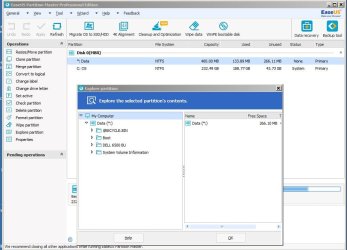
In the sys reserve folder I noticed a directory "M6500 Backup "... M6500 i s my dell laptop. How would that be in there. Can I delete it. Is it the source of my clone not fully booting windows?


I noticed a thread that suggested making a backup of my computer and restoring that to a newly formatted drive. I kringe at the amout of time it will take to fully start from scratch and reload and reautohrize the number of programs i use ( music , video production, flight sims, etc. )


I' retired so a lot of my computer skills have not kept up as time marches on.

Thanks for any insight.


WG
 

Attachments
  • sys vol dir.JPG
    sys vol dir.JPG
    77 KB · Views: 0

My Computer My Computer

At a glance

Win 7 pro and Home Premium 64bitQuad Core AMD16 gigsNvidia 760 GTX
Computer type
PC/Desktop
Computer Manufacturer/Model Number
Hp P6331p Pavilion
OS
Win 7 pro and Home Premium 64bit
CPU
Quad Core AMD
Memory
16 gigs
Graphics Card(s)
Nvidia 760 GTX
Hard Drives
Samsung 840 EVO SSD
Antivirus
Kasperski
Browser
Firefox
Welcome to the forum. It's not clear what's going on your trying to clone an SSD drive to what a bigger drive or same size SSD and how is it failing what errors how are you cloning is booting a mr boot disk or other?
 

My Computer My Computer

At a glance

win 8 32 bit
Computer type
PC/Desktop
OS
win 8 32 bit
Sorry.. I have a 250GB EVO 840 as my C Drive. I'm cloning up to a 1TB EVO 860. to avoid having to reset the EVO 860 every time it's failed, I' run test clones on another HDD 500GB all are MBR.


Every program, Samsung migratio and EASEUS, both failed suggesting I ChkDSK my drive. ( which i tried including /f, etc.)


Macrium Reflect went with no problems and said clone was successful.


When I cloned to the 1TB SSD it gets to the windows logo ( after the fly in dots ), then windows sits there. I have a Win7 install disk ( that was sealed with activation code ) and using repair and also the thread to restore Boot Sector Code. No luck.


So, I'm assuming the "M6500 BU directory" that's in what I presume is my "System Reserved Partition " has no bearing on windows starting?... in other words, I could have any file in there and It would not affect my problem.


And... I have no clue how or when it ended up in there. I must tried to BU my M6500 to a drive on my Desktop??


Thanks for your help.


WG
 

My Computer My Computer

At a glance

Win 7 pro and Home Premium 64bitQuad Core AMD16 gigsNvidia 760 GTX
Computer type
PC/Desktop
Computer Manufacturer/Model Number
Hp P6331p Pavilion
OS
Win 7 pro and Home Premium 64bit
CPU
Quad Core AMD
Memory
16 gigs
Graphics Card(s)
Nvidia 760 GTX
Hard Drives
Samsung 840 EVO SSD
Antivirus
Kasperski
Browser
Firefox
"M6500 BU directory"

I don't know what that is. It could be a Dell backup of the bcd store. It may be unrelated to your issue.
 

My Computers My Computers

  • At a glance

    7 X64i5 84002x8gb 3200mhz
    Computer type
    PC/Desktop
    OS
    7 X64
    CPU
    i5 8400
    Motherboard
    gigabyte b365m ds3h
    Memory
    2x8gb 3200mhz
    Hard Drives
    various
    PSU
    pure power 11 400w cm
    Case
    Coolermaster
    Cooling
    cryorig m9i
  • At a glance

    7x64g54008gb ddr4 2400
    Computer type
    PC/Desktop
    OS
    7x64
    CPU
    g5400
    Motherboard
    ga b365m ds3h
    Memory
    8gb ddr4 2400
    PSU
    xfx pro 450w
If the disk is failing then cloning it will copy any bad sector's to the new drive and it can't be reversed second you don't know what is corrupted so it's never going to be a good out come. It may be a pain but a clean install is the only sensible option
 

My Computer My Computer

At a glance

win 8 32 bit
Computer type
PC/Desktop
OS
win 8 32 bit
Crystal disc info says the drive is healthy, as does the Samsung Utility. I can only think that there's some issue with HP.


the motherboard failed years ago. I purchased an exact HP replacement and swapped my Processor , Ram, etc. I did get a clone to come to life, but I get a message that I'm not using a valid Copy if windows ( or what ever the wording is ). I'ts the same windows thats been on the machine since day one, so I can only think that changing the motherboard is an issue.


I have a "new" valid copy of Win 7 SP1. I think doing a fresh install is my only solution to know something is not going to lead to more problems. I've read that I just copy / or point to my drivestore directory when it starts asking for drivers??


thanks for looking at my problem. Appreciate the help.
WG
 

My Computer My Computer

At a glance

Win 7 pro and Home Premium 64bitQuad Core AMD16 gigsNvidia 760 GTX
Computer type
PC/Desktop
Computer Manufacturer/Model Number
Hp P6331p Pavilion
OS
Win 7 pro and Home Premium 64bit
CPU
Quad Core AMD
Memory
16 gigs
Graphics Card(s)
Nvidia 760 GTX
Hard Drives
Samsung 840 EVO SSD
Antivirus
Kasperski
Browser
Firefox
While I'm here, Is there any way I can migrate ( backup / restore ) my programs, etc... from my existing copy of windows to a fresh install?
 

My Computer My Computer

At a glance

Win 7 pro and Home Premium 64bitQuad Core AMD16 gigsNvidia 760 GTX
Computer type
PC/Desktop
Computer Manufacturer/Model Number
Hp P6331p Pavilion
OS
Win 7 pro and Home Premium 64bit
CPU
Quad Core AMD
Memory
16 gigs
Graphics Card(s)
Nvidia 760 GTX
Hard Drives
Samsung 840 EVO SSD
Antivirus
Kasperski
Browser
Firefox
OK Everyone, thanks. I'm going to put this project on the back burner since it could be time consuming and I have a video to get out. As long as it's working I'm not going to risk breaking it until I can take the down time.


thanks Again!
WG
 

My Computer My Computer

At a glance

Win 7 pro and Home Premium 64bitQuad Core AMD16 gigsNvidia 760 GTX
Computer type
PC/Desktop
Computer Manufacturer/Model Number
Hp P6331p Pavilion
OS
Win 7 pro and Home Premium 64bit
CPU
Quad Core AMD
Memory
16 gigs
Graphics Card(s)
Nvidia 760 GTX
Hard Drives
Samsung 840 EVO SSD
Antivirus
Kasperski
Browser
Firefox
Back
Top