Solved Close Restore minimize

Trevers1987

Giz a Kiss
Guru
Local time
5:18 AM
Messages
386
Location
London
Here's one for the man with the payware tool's Bongo of course :)
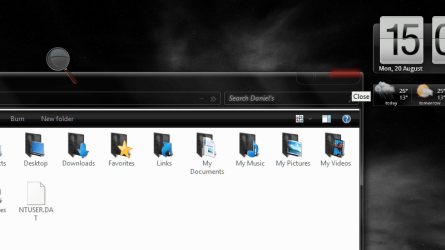
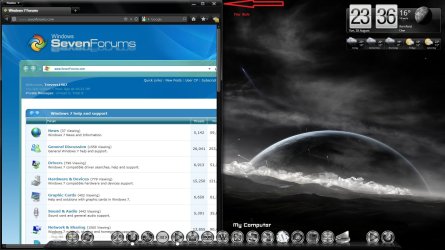
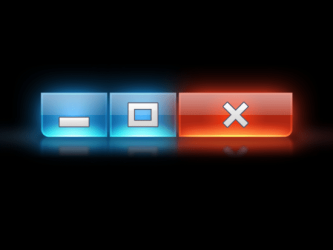
Could you do me a massive favor and add If possible white sign's to my theme for the close, restore, minimize tab's, I have added a pic below of what i would like and what i am seeing at the moment.

I would be most grateful to you or any one else who can help with this little problem or just point me in the right direction to do so my self.

Thank you Daniel


I've included msstyles folder i assuming that's what will be needed.
 

Attachments
  • geek_wallpaper_550.png
    geek_wallpaper_550.png
    19.9 KB · Views: 10
  • Untitled.png
    Untitled.png
    141.1 KB · Views: 12

My Computer

Computer Manufacturer/Model Number
Custom Build
OS
Win7 64bit Ult
CPU
Intel Q8200 Skt 775
Motherboard
Asus
Memory
8gb Corsair DDR3 @ 1333mhz
Graphics Card(s)
Nvidia 9500gt 1gb
Sound Card
Onboard
Monitor(s) Displays
Acer Daul 22"
Screen Resolution
1600 * 900
Hard Drives
O/S 500gb 3x 1tb bkups
PSU
1000w
Case
Icute jet terbine
Cooling
Air Cooled mainly Zalmans
Keyboard
Microsoft Media
Mouse
Rat 9
Internet Speed
Talk Talk upto 10mb
What theme am I supposed to add them to, the .msstyles in the zip folder you posted is the default Aero theme?
Jerry
 

My Computer

Computer type
Laptop
Computer Manufacturer/Model Number
Sager NP9170
OS
Win 7 Pro x64 / Win 10 Pro
CPU
Intel(R) Core(TM) i7-3630QM CPU @ 2.40GHz
Motherboard
CLEVO P170EM
Memory
12 GB
Graphics Card(s)
(1) Intel(R) HD Graphics 4000 (2) NVIDIA GeForce GTX 675M
Sound Card
(1) Realtek High Definition Audio (2) Intel(R) Display Aud
Monitor(s) Displays
17.3
Screen Resolution
1920x1080
Hard Drives
(1) Samsung 860 EVO 500GB(OS) (1) Samsung 860 EVO 500GB(Data)
Keyboard
Backlite
Antivirus
MSE, Malwarebytes Pro
Browser
Firefox
Other Info
DESKTOP: Custom-built.
OS: Win 10 Pro x64.
CASE: Rosewill R5.
CPU: Intel I5 4670K CPU @ 3.40GHz.
CPU COOLER: Cool Master Hyper 212 EVO.
MOTHERBOARD: Asus Z87-A.
MEMORY: Kingston HyperX 2x4 GB.
GPU: Nvidia Geforce 650 TI.
PSU: Corsair TX750.
DRIVES: (1) Samsung 840 120 GB SSD (2) Western Digital blue 500 GB 7200 RPM.
Lol Sorry about that the theme can be found here. I have previously ask the creator of this theme if i can mod it for personal use. rflfn's deviantART gallery

Thanks again
 

My Computer

Computer Manufacturer/Model Number
Custom Build
OS
Win7 64bit Ult
CPU
Intel Q8200 Skt 775
Motherboard
Asus
Memory
8gb Corsair DDR3 @ 1333mhz
Graphics Card(s)
Nvidia 9500gt 1gb
Sound Card
Onboard
Monitor(s) Displays
Acer Daul 22"
Screen Resolution
1600 * 900
Hard Drives
O/S 500gb 3x 1tb bkups
PSU
1000w
Case
Icute jet terbine
Cooling
Air Cooled mainly Zalmans
Keyboard
Microsoft Media
Mouse
Rat 9
Internet Speed
Talk Talk upto 10mb
I left a note to the creator of that theme asking for permission to do that, I'll have to wait and see what his reply is first.
Jerry
 

My Computer

Computer type
Laptop
Computer Manufacturer/Model Number
Sager NP9170
OS
Win 7 Pro x64 / Win 10 Pro
CPU
Intel(R) Core(TM) i7-3630QM CPU @ 2.40GHz
Motherboard
CLEVO P170EM
Memory
12 GB
Graphics Card(s)
(1) Intel(R) HD Graphics 4000 (2) NVIDIA GeForce GTX 675M
Sound Card
(1) Realtek High Definition Audio (2) Intel(R) Display Aud
Monitor(s) Displays
17.3
Screen Resolution
1920x1080
Hard Drives
(1) Samsung 860 EVO 500GB(OS) (1) Samsung 860 EVO 500GB(Data)
Keyboard
Backlite
Antivirus
MSE, Malwarebytes Pro
Browser
Firefox
Other Info
DESKTOP: Custom-built.
OS: Win 10 Pro x64.
CASE: Rosewill R5.
CPU: Intel I5 4670K CPU @ 3.40GHz.
CPU COOLER: Cool Master Hyper 212 EVO.
MOTHERBOARD: Asus Z87-A.
MEMORY: Kingston HyperX 2x4 GB.
GPU: Nvidia Geforce 650 TI.
PSU: Corsair TX750.
DRIVES: (1) Samsung 840 120 GB SSD (2) Western Digital blue 500 GB 7200 RPM.
OK mate had it installed like this for some time now, so another couple of day's won't do any harm :D
 

My Computer

Computer Manufacturer/Model Number
Custom Build
OS
Win7 64bit Ult
CPU
Intel Q8200 Skt 775
Motherboard
Asus
Memory
8gb Corsair DDR3 @ 1333mhz
Graphics Card(s)
Nvidia 9500gt 1gb
Sound Card
Onboard
Monitor(s) Displays
Acer Daul 22"
Screen Resolution
1600 * 900
Hard Drives
O/S 500gb 3x 1tb bkups
PSU
1000w
Case
Icute jet terbine
Cooling
Air Cooled mainly Zalmans
Keyboard
Microsoft Media
Mouse
Rat 9
Internet Speed
Talk Talk upto 10mb
OK I got permission to do it, but am having a little difficulty there has been something changed in the .msstyles after putting the symbols back in their place they do not show up and I cannot find what was changed.
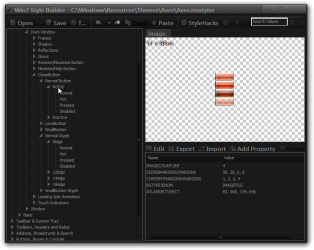
Look at the screenshots below, it shows you how the symbols are separate from the buttons that is in the default aero.msstyles
a1.pnga2.png


The creator did say that they are going to put them symbols back in the final version.
theme.JPG


The only other way to do it would be to put the symbols right on the image.
DWMWindow_CloseButton.Active_NormalImage.pngDWMWindow_RestoreButton.Active_NormalImage.pngDWMWindow_MinimizeButton.Active_NormalImage.png


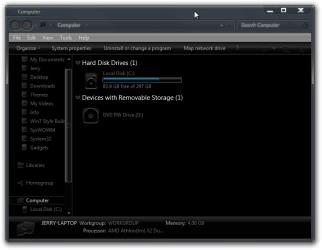
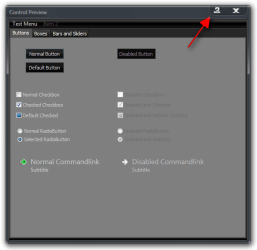
Look at the two screenshots below of what it would look like you will notice in the second screenshot that the ? and the - symbols are on top of each other that is because they share the same button image.
Computer.pngControl Preview.png


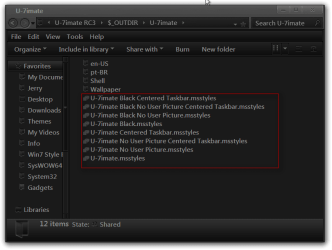
It would take considerable amount time to do that to each individual button but if you would like me to I could try, if so which one of the 8 of that theme are you using?
U-7imate.png

Jerry
 

My Computer

Computer type
Laptop
Computer Manufacturer/Model Number
Sager NP9170
OS
Win 7 Pro x64 / Win 10 Pro
CPU
Intel(R) Core(TM) i7-3630QM CPU @ 2.40GHz
Motherboard
CLEVO P170EM
Memory
12 GB
Graphics Card(s)
(1) Intel(R) HD Graphics 4000 (2) NVIDIA GeForce GTX 675M
Sound Card
(1) Realtek High Definition Audio (2) Intel(R) Display Aud
Monitor(s) Displays
17.3
Screen Resolution
1920x1080
Hard Drives
(1) Samsung 860 EVO 500GB(OS) (1) Samsung 860 EVO 500GB(Data)
Keyboard
Backlite
Antivirus
MSE, Malwarebytes Pro
Browser
Firefox
Other Info
DESKTOP: Custom-built.
OS: Win 10 Pro x64.
CASE: Rosewill R5.
CPU: Intel I5 4670K CPU @ 3.40GHz.
CPU COOLER: Cool Master Hyper 212 EVO.
MOTHERBOARD: Asus Z87-A.
MEMORY: Kingston HyperX 2x4 GB.
GPU: Nvidia Geforce 650 TI.
PSU: Corsair TX750.
DRIVES: (1) Samsung 840 120 GB SSD (2) Western Digital blue 500 GB 7200 RPM.
OK I got permission to do it, but am having a little difficulty there has been something changed in the .msstyles after putting the symbols back in their place they do not show up and I cannot find what was changed.
Look at the screenshots below, it shows you how the symbols are separate from the buttons that is in the default aero.msstyles
View attachment 228539View attachment 228540


The creator did say that they are going to put them symbols back in the final version.
View attachment 228547


The only other way to do it would be to put the symbols right on the image.
View attachment 228544View attachment 228545View attachment 228546


Look at the two screenshots below of what it would look like you will notice in the second screenshot that the ? and the - symbols are on top of each other that is because they share the same button image.
View attachment 228541View attachment 228542


It would take considerable amount time to do that to each individual button but if you would like me to I could try, if so which one of the 8 of that theme are you using?
View attachment 228543

Jerry

Hi Jerry I wouldn't want to put you out to much so having the symbols overlapping would perfectly fine, as this will be fixed in the final release of the theme. I just want them back as a reference point of what I'm clicking, gets really annoying when you keep hitting the wrong button.
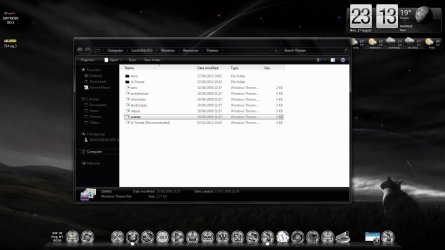
I'm using the recommended version of the theme as shown below it was the only one I installed the rest went in the trash :shock:
Thanks again for your time it is greatly appreciated
Dan
 

Attachments

  • U7 Recommended.jpg
    U7 Recommended.jpg
    107.8 KB · Views: 8

My Computer

Computer Manufacturer/Model Number
Custom Build
OS
Win7 64bit Ult
CPU
Intel Q8200 Skt 775
Motherboard
Asus
Memory
8gb Corsair DDR3 @ 1333mhz
Graphics Card(s)
Nvidia 9500gt 1gb
Sound Card
Onboard
Monitor(s) Displays
Acer Daul 22"
Screen Resolution
1600 * 900
Hard Drives
O/S 500gb 3x 1tb bkups
PSU
1000w
Case
Icute jet terbine
Cooling
Air Cooled mainly Zalmans
Keyboard
Microsoft Media
Mouse
Rat 9
Internet Speed
Talk Talk upto 10mb
I will work on it, but you need to tell me which version you are using, look Personalization and tell me what it says so I'm not guessing.
Jerry
 

My Computer

Computer type
Laptop
Computer Manufacturer/Model Number
Sager NP9170
OS
Win 7 Pro x64 / Win 10 Pro
CPU
Intel(R) Core(TM) i7-3630QM CPU @ 2.40GHz
Motherboard
CLEVO P170EM
Memory
12 GB
Graphics Card(s)
(1) Intel(R) HD Graphics 4000 (2) NVIDIA GeForce GTX 675M
Sound Card
(1) Realtek High Definition Audio (2) Intel(R) Display Aud
Monitor(s) Displays
17.3
Screen Resolution
1920x1080
Hard Drives
(1) Samsung 860 EVO 500GB(OS) (1) Samsung 860 EVO 500GB(Data)
Keyboard
Backlite
Antivirus
MSE, Malwarebytes Pro
Browser
Firefox
Other Info
DESKTOP: Custom-built.
OS: Win 10 Pro x64.
CASE: Rosewill R5.
CPU: Intel I5 4670K CPU @ 3.40GHz.
CPU COOLER: Cool Master Hyper 212 EVO.
MOTHERBOARD: Asus Z87-A.
MEMORY: Kingston HyperX 2x4 GB.
GPU: Nvidia Geforce 650 TI.
PSU: Corsair TX750.
DRIVES: (1) Samsung 840 120 GB SSD (2) Western Digital blue 500 GB 7200 RPM.
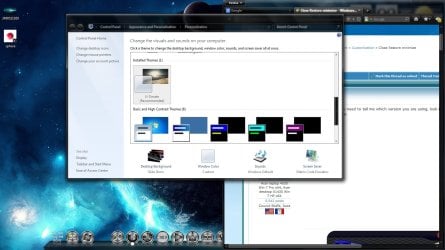
Hi Jerry I am using the U-7imate (Recommended) version of the theme.
I downloaded the latest exe file from Deviant art and did the install manually only picking this version of the theme screen provided below.
 

Attachments

  • U7.jpg
    U7.jpg
    138.7 KB · Views: 5

My Computer

Computer Manufacturer/Model Number
Custom Build
OS
Win7 64bit Ult
CPU
Intel Q8200 Skt 775
Motherboard
Asus
Memory
8gb Corsair DDR3 @ 1333mhz
Graphics Card(s)
Nvidia 9500gt 1gb
Sound Card
Onboard
Monitor(s) Displays
Acer Daul 22"
Screen Resolution
1600 * 900
Hard Drives
O/S 500gb 3x 1tb bkups
PSU
1000w
Case
Icute jet terbine
Cooling
Air Cooled mainly Zalmans
Keyboard
Microsoft Media
Mouse
Rat 9
Internet Speed
Talk Talk upto 10mb
OK I will work on it today a little and finish it up tomorrow then I will PM you a link to it.
Jerry
 

My Computer

Computer type
Laptop
Computer Manufacturer/Model Number
Sager NP9170
OS
Win 7 Pro x64 / Win 10 Pro
CPU
Intel(R) Core(TM) i7-3630QM CPU @ 2.40GHz
Motherboard
CLEVO P170EM
Memory
12 GB
Graphics Card(s)
(1) Intel(R) HD Graphics 4000 (2) NVIDIA GeForce GTX 675M
Sound Card
(1) Realtek High Definition Audio (2) Intel(R) Display Aud
Monitor(s) Displays
17.3
Screen Resolution
1920x1080
Hard Drives
(1) Samsung 860 EVO 500GB(OS) (1) Samsung 860 EVO 500GB(Data)
Keyboard
Backlite
Antivirus
MSE, Malwarebytes Pro
Browser
Firefox
Other Info
DESKTOP: Custom-built.
OS: Win 10 Pro x64.
CASE: Rosewill R5.
CPU: Intel I5 4670K CPU @ 3.40GHz.
CPU COOLER: Cool Master Hyper 212 EVO.
MOTHERBOARD: Asus Z87-A.
MEMORY: Kingston HyperX 2x4 GB.
GPU: Nvidia Geforce 650 TI.
PSU: Corsair TX750.
DRIVES: (1) Samsung 840 120 GB SSD (2) Western Digital blue 500 GB 7200 RPM.
I just PM you with the download link.
Switch to the default Aero theme > logoff/logon then
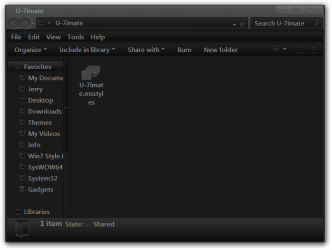
Replace the U-7imate.msstyles in C:\Windows\Resources\Themes\U-7imate with the one in the zip you download.
Jerry
U-7imate.png
 

My Computer

Computer type
Laptop
Computer Manufacturer/Model Number
Sager NP9170
OS
Win 7 Pro x64 / Win 10 Pro
CPU
Intel(R) Core(TM) i7-3630QM CPU @ 2.40GHz
Motherboard
CLEVO P170EM
Memory
12 GB
Graphics Card(s)
(1) Intel(R) HD Graphics 4000 (2) NVIDIA GeForce GTX 675M
Sound Card
(1) Realtek High Definition Audio (2) Intel(R) Display Aud
Monitor(s) Displays
17.3
Screen Resolution
1920x1080
Hard Drives
(1) Samsung 860 EVO 500GB(OS) (1) Samsung 860 EVO 500GB(Data)
Keyboard
Backlite
Antivirus
MSE, Malwarebytes Pro
Browser
Firefox
Other Info
DESKTOP: Custom-built.
OS: Win 10 Pro x64.
CASE: Rosewill R5.
CPU: Intel I5 4670K CPU @ 3.40GHz.
CPU COOLER: Cool Master Hyper 212 EVO.
MOTHERBOARD: Asus Z87-A.
MEMORY: Kingston HyperX 2x4 GB.
GPU: Nvidia Geforce 650 TI.
PSU: Corsair TX750.
DRIVES: (1) Samsung 840 120 GB SSD (2) Western Digital blue 500 GB 7200 RPM.
Thank you so much, if you wasn't across the pond I would take you for a beer now Top Man.
:thumbsup:
 

Attachments

  • Jerry's the dom.jpg
    Jerry's the dom.jpg
    143 KB · Views: 7

My Computer

Computer Manufacturer/Model Number
Custom Build
OS
Win7 64bit Ult
CPU
Intel Q8200 Skt 775
Motherboard
Asus
Memory
8gb Corsair DDR3 @ 1333mhz
Graphics Card(s)
Nvidia 9500gt 1gb
Sound Card
Onboard
Monitor(s) Displays
Acer Daul 22"
Screen Resolution
1600 * 900
Hard Drives
O/S 500gb 3x 1tb bkups
PSU
1000w
Case
Icute jet terbine
Cooling
Air Cooled mainly Zalmans
Keyboard
Microsoft Media
Mouse
Rat 9
Internet Speed
Talk Talk upto 10mb
You're very welcome.
Go-ahead and marked this as solved.
 

My Computer

Computer type
Laptop
Computer Manufacturer/Model Number
Sager NP9170
OS
Win 7 Pro x64 / Win 10 Pro
CPU
Intel(R) Core(TM) i7-3630QM CPU @ 2.40GHz
Motherboard
CLEVO P170EM
Memory
12 GB
Graphics Card(s)
(1) Intel(R) HD Graphics 4000 (2) NVIDIA GeForce GTX 675M
Sound Card
(1) Realtek High Definition Audio (2) Intel(R) Display Aud
Monitor(s) Displays
17.3
Screen Resolution
1920x1080
Hard Drives
(1) Samsung 860 EVO 500GB(OS) (1) Samsung 860 EVO 500GB(Data)
Keyboard
Backlite
Antivirus
MSE, Malwarebytes Pro
Browser
Firefox
Other Info
DESKTOP: Custom-built.
OS: Win 10 Pro x64.
CASE: Rosewill R5.
CPU: Intel I5 4670K CPU @ 3.40GHz.
CPU COOLER: Cool Master Hyper 212 EVO.
MOTHERBOARD: Asus Z87-A.
MEMORY: Kingston HyperX 2x4 GB.
GPU: Nvidia Geforce 650 TI.
PSU: Corsair TX750.
DRIVES: (1) Samsung 840 120 GB SSD (2) Western Digital blue 500 GB 7200 RPM.
Back
Top