
Solved CMD defrag has stopped working

outlawed

Removed by request
Local time
3:23 PM
Messages
43
Everything was working fine last night, and I haven't made any changes to my system whatsoever and now when I booted up this morning my cmd line defrag doesn't want to work anymore.

Disk defragmenter via system tools still works, it's just the cmd line part doesn't want to work anymore.

Any ideas on what could be causing this?
 

Attachments
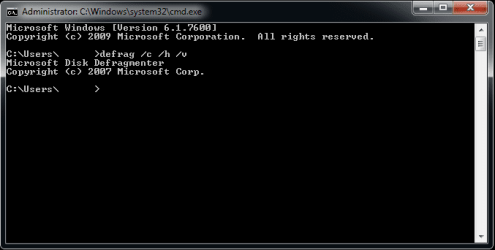
  • defrag.png
    defrag.png
    7.3 KB · Views: 60

My Computer

OS
Windows 7 Home Premium SP1 x64
Take a look here. Defrag
It appears the command is written wrong from examples shown.

You may want to bookmark the below page. Reference for all CMD's.
http://windows.microsoft.com/en-US/windows7/Command-Reference-Overview


To defragment the volume on drive C while providing progress and verbose output, type: defrag C: /U /V

To defragment the volumes on drives C and D in parallel in the background, type: defrag C: D: /M

To perform a fragmentation analysis of a volume mounted on drive C and provide progress, type: defrag C: mountpoint /A /U

To defragment all volumes with normal priority and provide verbose output, type: Defrag /C /H /V
 

My Computer

Computer Manufacturer/Model Number
Hopalong/ Godzilla
OS
Windows7 Pro 64bit SP-1; Windows XP Pro 32bit
CPU
Intel Core i7-870 Lynnfield 2.93GHz LGA 1156 95W Quad-Core
Motherboard
ASUS P7P55D-E PRO
Memory
8GB@1400MHz Crucial Ballistix DDR3-1600 4x2GB
Graphics Card(s)
ASUS ENGTX460 DirectCU/2DI/1GD5 1GB 256-bit GDDR5
Sound Card
VIA Onboard
Monitor(s) Displays
Asus VS248H-P 24"; Samsung SyncMaster 941BW 19"ws
Screen Resolution
1920x1080; 1440x900
Hard Drives
Samsung 830 120GB SSD
Intel 320 120GB SSD
Western Digital Caviar Black WD7501AALS 750GB 7200 RPM SATA 3.0Gb/s
Western Digital Caviar Black WD6401AALS 640GB 7200 RPM SATA 3.0Gb/s
PSU
COOLER MASTER Silent Pro RS850-AMBAJ3-US 850W Modular
Case
COOLER MASTER HAF 932 RC-932-KKN5-GP Black
Cooling
Scythe "Mugen-2 Rev.B" (2 ScytheKaze-Jyuni PWM fans)
Keyboard
Logitech K-320
Mouse
Kensington
Antivirus
Avast Inernet Suite
Browser
IE 9 ; Chrome
Take a look here. Defrag
It appears the command is written wrong from examples shown.

The command is correct, as it's the same command I have been using.

The /c parameter invokes on ALL volumes.

The command I use is even used as an example when defrag /? is done:

Examples:

defrag C: /U /V
defrag C: D: /M
defrag C:\mountpoint /A /U
defrag /C /H /V
 

My Computer

OS
Windows 7 Home Premium SP1 x64

My Computer

Computer Manufacturer/Model Number
Samsung NP550P5C-S02IN
OS
Windows 7 Ultimate - 64-bit | Windows 8 Pro - 64-bit
CPU
Intel® Core™ i7 Processor 3,610QM (2.30Hz, 6MB L3 Cach
Memory
8 GB
Graphics Card(s)
NVIDIA® GeForce® GT 650M 2GB Graphics, Optimus™ techno
Sound Card
SoundAlive™ JBL 3 Speakers (With sub-Woofer)
Monitor(s) Displays
39.62cm (15.6) SuperBright 300nit HD+ LED Display
Screen Resolution
1,600 x 900, Anti-Reflective
Hard Drives
1TB S-ATA II Hard Drive (5,400RPM)

Thanks for the link, however I know how to do defrag via command prompt as I've been doing it for as long as Microsoft has been allowing it. :P

I did a defrag via cmd last night with the "defrag /c /h /v" line and everything worked perfectly, just that it stopped working when I booted this morning.

Will give the sfc /scannow a go and post results when it finishes. :)

UPDATE: sfc /scannow has finished and found nothing wrong:

Windows Resource Protection did not find any integrity violations.
 

My Computer

OS
Windows 7 Home Premium SP1 x64

My Computer

Computer Manufacturer/Model Number
Samsung NP550P5C-S02IN
OS
Windows 7 Ultimate - 64-bit | Windows 8 Pro - 64-bit
CPU
Intel® Core™ i7 Processor 3,610QM (2.30Hz, 6MB L3 Cach
Memory
8 GB
Graphics Card(s)
NVIDIA® GeForce® GT 650M 2GB Graphics, Optimus™ techno
Sound Card
SoundAlive™ JBL 3 Speakers (With sub-Woofer)
Monitor(s) Displays
39.62cm (15.6) SuperBright 300nit HD+ LED Display
Screen Resolution
1,600 x 900, Anti-Reflective
Hard Drives
1TB S-ATA II Hard Drive (5,400RPM)
What happens if you enter defrag /?
 

My Computer

Computer type
PC/Desktop
Computer Manufacturer/Model Number
Lenovo IdeaCenter 450
OS
Windows 10 Pro X64
CPU
Intel Quad Core i7-4770 @ 3.4Ghz
Memory
16.0GB PC3-12800 DDR3 SDRAM 1600 MHz
Graphics Card(s)
Intel Integrated HD Graphics
Sound Card
Realtek HD Audio
Monitor(s) Displays
HP 22" LCD
Screen Resolution
1680 x 1050
Hard Drives
250GB Samsung EVO SATA-3 SSD
2TB Seagate ST2000DM001 SATA-2
1.5TB Seagate ST3150041AS SATA
Keyboard
Dell USB
Mouse
Lenovo USB
Internet Speed
Cable via Road Runner 3MB Upload, 30MB Download
Antivirus
Windows Defender, MBAM Pro, MBAE
Browser
Seamonkey
Other Info
UEFI/GPT
PLDS DVD-RW DH16AERSH
What happens if you enter defrag /?

This:

Code:
C:\Users\>defrag /?
Microsoft Disk Defragmenter
Copyright (c) 2007 Microsoft Corp.

Description:

        Locates and consolidates fragmented files on local volumes to
        improve system performance.

Syntax:

        defrag <volumes> | /C | /E <volumes>    [/H] [/M | [/U] [/V]]
        defrag <volumes> | /C | /E <volumes> /A [/H] [/M | [/U] [/V]]
        defrag <volumes> | /C | /E <volumes> /X [/H] [/M | [/U] [/V]]
        defrag <volume>                      /T [/H]       [/U] [/V]

Parameters:

        Value   Description

        /A      Perform analysis on the specified volumes.

        /C      Perform the operation on all volumes.

        /E      Perform the operation on all volumes except those specified.

        /H      Run the operation at normal priority (default is low).

        /M      Run the operation on each volume in parallel in the background.

        /T      Track an operation already in progress on the specified volume.

        /U      Print the progress of the operation on the screen.

        /V      Print verbose output containing the fragmentation statistics.

        /X      Perform free space consolidation on the specified volumes.

Examples:

        defrag C: /U /V
        defrag C: D: /M
        defrag C:\mountpoint /A /U
        defrag /C /H /V
 

My Computer

OS
Windows 7 Home Premium SP1 x64
Okay, same as I see.

I tried this with Win 7 Ultimate running under Oracle Virtual box and it would not run. Said insufficient permissions.

I then opened an Elevated Command Prompt (right click on Command Prompt and select Run as Administrator) and it ran correctly. Try that, see if it helps.
 

My Computer

Computer type
PC/Desktop
Computer Manufacturer/Model Number
Lenovo IdeaCenter 450
OS
Windows 10 Pro X64
CPU
Intel Quad Core i7-4770 @ 3.4Ghz
Memory
16.0GB PC3-12800 DDR3 SDRAM 1600 MHz
Graphics Card(s)
Intel Integrated HD Graphics
Sound Card
Realtek HD Audio
Monitor(s) Displays
HP 22" LCD
Screen Resolution
1680 x 1050
Hard Drives
250GB Samsung EVO SATA-3 SSD
2TB Seagate ST2000DM001 SATA-2
1.5TB Seagate ST3150041AS SATA
Keyboard
Dell USB
Mouse
Lenovo USB
Internet Speed
Cable via Road Runner 3MB Upload, 30MB Download
Antivirus
Windows Defender, MBAM Pro, MBAE
Browser
Seamonkey
Other Info
UEFI/GPT
PLDS DVD-RW DH16AERSH
Back
Top