Cmd.exe doesn't work when opened through Windows search bar

Schw1341

New member
Local time
10:16 PM
Messages
2
This is probably something that has a really simple fix, but I have no idea why it's happening. When i type cmd.exe into the Windows search bar and open it, everything I type in (like ipconfig) doesn't work, and it gives me the message "'ipconfig' is not recognized as an internal or external command, operable program or batch file." It should also be noted that the command line that I'm typing into says: C:\Users\Grant>

On the other hand, if I search cmd.exe, right click on it, click on Open file location and then double click cmd.exe in the System32 folder, it will open and if I type in things like ipconfig it will work just fine. The command line this time says: C:\Windows\System32>

Why is it that I can't just open it up the short way and do it?
 

My Computer

Computer type
Laptop
Computer Manufacturer/Model Number
Dell
OS
Windows 7 Professional 64bit
CPU
XPS L702X
Memory
6.00 GB RAM
Antivirus
Bitdefender
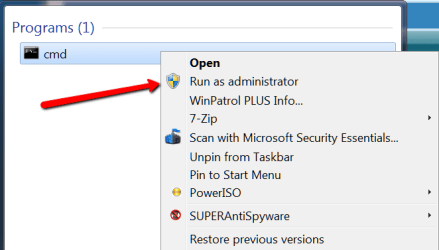
You have to run as admin
 

Attachments

  • 2016-04-13_1608.png
    2016-04-13_1608.png
    10.2 KB · Views: 18

My Computer

Computer Manufacturer/Model Number
HP, Dell, Gateway, Toshiba - 4 laptops and 2 desktops
OS
Vista, Windows7, Mint Mate, Zorin, Windows 8
CPU
from 1.6GHz Duo to i7
Monitor(s) Displays
2x HP w2207
Hard Drives
5x HDD, 7x SSD, 12x Externals
Keyboard
with trackball - no mices
Mouse
Trackball mice
Internet Speed
DSL 6000
The profile I'm logged in under is the administrator. Why do I have to choose to run it as the administrator? Shouldn't the computer know that already?
 

My Computer

Computer type
Laptop
Computer Manufacturer/Model Number
Dell
OS
Windows 7 Professional 64bit
CPU
XPS L702X
Memory
6.00 GB RAM
Antivirus
Bitdefender
Does your PATH variable include C:\WINDOWS\SYSTEM32 or the equivalent path to your O/S installation?

Kevin
 

My Computer

Computer type
PC/Desktop
Computer Manufacturer/Model Number
Gateway DX4850
OS
Windows 7
The profile I'm logged in under is the administrator. Why do I have to choose to run it as the administrator? Shouldn't the computer know that already?
You are not THAT admin. Just do as I suggested.
 

My Computer

Computer Manufacturer/Model Number
HP, Dell, Gateway, Toshiba - 4 laptops and 2 desktops
OS
Vista, Windows7, Mint Mate, Zorin, Windows 8
CPU
from 1.6GHz Duo to i7
Monitor(s) Displays
2x HP w2207
Hard Drives
5x HDD, 7x SSD, 12x Externals
Keyboard
with trackball - no mices
Mouse
Trackball mice
Internet Speed
DSL 6000
Hi Schw1341,

As Kkehoe has caught on, your PATH environment variable may be missing or damaged.

In an Elevated Command Prompt, run the below command. Then open a new CMD instance, and try Ipconfig.
Code:
setx /m Path "%SystemRoot%\system32;%SystemRoot%;%SystemRoot%\System32\Wbem;%SYSTEMROOT%\System32\WindowsPowerShell\v1.0\\"
 

My Computer

Computer type
PC/Desktop
OS
Windows 10, Windows 8.1 Pro, Windows 7 Professional, OS X El Capitan
Back
Top