cmd.exe height? i run a command and i receive a long list,i can't see

savinio0

New member
Member
Local time
11:49 PM
Messages
73
cmd.exe height? i run a command and i receive a long list,i can't see the entire list
I will give u a short example,can u Imagine i have this list

start 26sept.:
blah1
blah2
blah3
blah4
blah5
etc

i can see only:
blah3
blah4
blah5
etc...
 

My Computer My Computer

At a glance

windows xp c86
Computer type
PC/Desktop
OS
windows xp c86
Going back to distant and faded memory a ' /p ' on the end of the cmd line paused the list one screen at a time. Hit spacebar to next view. Might still work.

Art.
 

My Computer My Computer

At a glance

Win7 sp1 Pro 64bit / XP sp2 Pro (games only)Intel Core 2 Duo E8400 @ 3.00GHz8.00 GB Dual-Channel DDR2 @ 400MHz (5-5-5-18)1024MB GeForce GTX 560
Computer type
PC/Desktop
Computer Manufacturer/Model Number
Home built
OS
Win7 sp1 Pro 64bit / XP sp2 Pro (games only)
CPU
Intel Core 2 Duo E8400 @ 3.00GHz
Motherboard
Intel Corporation DP35DP (CPU1)
Memory
8.00 GB Dual-Channel DDR2 @ 400MHz (5-5-5-18)
Graphics Card(s)
1024MB GeForce GTX 560
Sound Card
NVIDIA High Definition Audio
Monitor(s) Displays
SyncMaster (2048x1152@60Hz)
Hard Drives
240GB Sandisc Extreme Pro SSD
244GB Seagate ST3250410AS
488GB Seagate ST500DM002-1BD142
931GB Western Digital WDC WD1003FZEX
PSU
Corsair 720
Case
ATX
Keyboard
HID Keyboard Device Logitech
Mouse
HID-compliant mouse Microsoft
Other Info
TSSTcorp CDDVDW SH-S223L

HL-DT-ST BD-RE BH12LS35
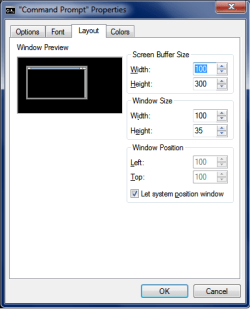
Click on the icon in the upper left corner of the CMD window and select Properties.
You can adjust the Screen Buffer size and the Window size.

CMD_Layout.png
 

My Computer My Computer

At a glance

Multi-Boot W7_Pro_x64 W8.1_Pro_x64 W10_Pro_x6...AMD Athlon II x4 6206GB GSkill DDR2 800AMD 4670 GPU + AMD 4200 IGP
Computer type
PC/Desktop
Computer Manufacturer/Model Number
home built
OS
Multi-Boot W7_Pro_x64 W8.1_Pro_x64 W10_Pro_x64 +Linux_VMs +Chromium_VM
CPU
AMD Athlon II x4 620
Motherboard
Gigabyte GA-MA785G-UD3H
Memory
6GB GSkill DDR2 800
Graphics Card(s)
AMD 4670 GPU + AMD 4200 IGP
Sound Card
on board Realtek ALC889A
Monitor(s) Displays
RCA 40" LCD TV, Insignia 32" LCD TV, HP 15" LCD monitor
Screen Resolution
1680 x 1050
Hard Drives
OCZ Vertex 3 120GB,
Samsung F3 1TB (3),
Several others - WD, Seagate, Hitachi, ...
PSU
Corsair 500 W
Case
Rosewill mid tower
Cooling
CM 90mm rifle
Keyboard
Gyration wireless, Logitech wireless, Dell USB wired
Mouse
Gyration wireless, Logitech wireless, V7 USB wired
Internet Speed
Spectrum - 100Mbps D / 10Mbps U
Antivirus
Avast, MBAM3, EMET, WinPatrol
Browser
Pale Moon, Firefox, IE
Other Info
2 multi-boot PC's
Mainly HTPC/Office/Gen purpose (no gaming).
Trendnet USB KVM.
LG DVD burner/Blue Ray Player.
Tray system for removable SATA backup drives.

Not currently OCd, under-volted.
I use Hybrid sleep, rarely re-boot or shutdown.

Hauppauge HD-PVR, Avermedia PCIe TV Tuner, Hauppauge PCI TV Tuner.
You can scroll anyway but you can type the results to get file is dir >test.txt
 

My Computer My Computer

At a glance

win 8 32 bit
Computer type
PC/Desktop
OS
win 8 32 bit
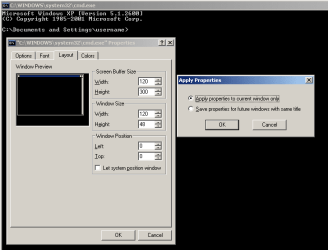
You can click on the bottom part of the window's edge and drag it to the desired height, then do as DavidE suggested to save the settings. If you are really using XP, then you should see a second window like this:

Capture.PNG

You will probably want to save the properties to future windows with the same title.
 

My Computer My Computer

At a glance

W7 Pro SP1 64biti78GBIntel HD Graphics
Computer type
Laptop
Computer Manufacturer/Model Number
Employer provided Dell Latitude
OS
W7 Pro SP1 64bit
CPU
i7
Memory
8GB
Graphics Card(s)
Intel HD Graphics
Hard Drives
crappy SSD
Antivirus
Employer mandated Symantec Endpoint Protection
Browser
Pale Moon 64bit, IE11 64bit & Chrome 64bit
You can click on the bottom part of the window's edge and drag it to the desired height, then do as DavidE suggested to save the settings. If you are really using XP, then you should see a second window like this:

View attachment 392137

You will probably want to save the properties to future windows with the same title.

i have windows 7 but i can't see that option to save the changes
 

My Computer My Computer

At a glance

windows xp c86
Computer type
PC/Desktop
OS
windows xp c86
You can click on the bottom part of the window's edge and drag it to the desired height, then do as DavidE suggested to save the settings. If you are really using XP, then you should see a second window like this:

View attachment 392137

You will probably want to save the properties to future windows with the same title.

i have windows 7 but i can't see that option to save the changes
Windows 7 does not a second window with those two options.
That screenshot was from an XP computer.
(which is what you are telling us you are using):
XP.png
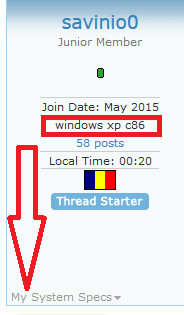
You should update your system specs in the forum.
http://www.sevenforums.com/profile.php?do=extra

Is the window the size that you want now...
...or do you need more help?
 

My Computer My Computer

At a glance

W7 Pro SP1 64biti78GBIntel HD Graphics
Computer type
Laptop
Computer Manufacturer/Model Number
Employer provided Dell Latitude
OS
W7 Pro SP1 64bit
CPU
i7
Memory
8GB
Graphics Card(s)
Intel HD Graphics
Hard Drives
crappy SSD
Antivirus
Employer mandated Symantec Endpoint Protection
Browser
Pale Moon 64bit, IE11 64bit & Chrome 64bit
Click on the icon in the upper left corner of the CMD window and select Properties.
You can adjust the Screen Buffer size and the Window size.
"Alt + Spacebar" will open that menu too.

You can also right click anywhere on the Command Prompt Titlebar to bring up the context menu (apart from the window buttons). :)
 
Last edited:

My Computer My Computer

At a glance

W7 Ultimate SP1, LM19.2 MATE, W10 Home 1703, ...AMD Phenom II x6 1100T, 3.3 GHz12GB DDR3 1333 G-Skill (4GB x 2), G-Skill (2G...NVIDIA GeForce GTX 660
Computer type
PC/Desktop
Computer Manufacturer/Model Number
n/a
OS
W7 Ultimate SP1, LM19.2 MATE, W10 Home 1703, W10 Pro 1703 VM, #All 64 bit
CPU
AMD Phenom II x6 1100T, 3.3 GHz
Motherboard
ASUS M4A88T-M/USB3 (AM3)
Memory
12GB DDR3 1333 G-Skill (4GB x 2), G-Skill (2GB x 2)
Graphics Card(s)
NVIDIA GeForce GTX 660
Sound Card
Realtek?
Monitor(s) Displays
Samsung S23B350
Screen Resolution
1920x1080
Hard Drives
WD Green 2TB (SATA), WD Green 3TB (SATA), WD Blue 4TB (SATA), WD Blue 6TB (SATA)
PSU
Cooler Master
Case
Antec GX300 Tower
Cooling
3x Antec TRICOOL 120mm Fans
Mouse
Wired Optical
Internet Speed
DSL
Antivirus
Avast
Browser
Pale Moon (64 bit)
Other Info
2018-12-27 Upgraded HDDs
2015-12-10 Upgraded case, graphics card, storage
2015-08-15 Upgraded motherboard & RAM
2015-07-15 Upgraded LM17.1 to LM17.2
You can click on the bottom part of the window's edge and drag it to the desired height, then do as DavidE suggested to save the settings. If you are really using XP, then you should see a second window like this:

View attachment 392137

You will probably want to save the properties to future windows with the same title.

i have windows 7 but i can't see that option to save the changes
Windows 7 does not a second window with those two options.
That screenshot was from an XP computer.
(which is what you are telling us you are using):
View attachment 392153
You should update your system specs in the forum.
http://www.sevenforums.com/profile.php?do=extra

Is the window the size that you want now...
...or do you need more help?

yes but is for my VPS ,laptop windows 7,sorry
have a nice day, thanks a lot
 

My Computer My Computer

At a glance

windows xp c86
Computer type
PC/Desktop
OS
windows xp c86
Back
Top