
CMD Prompt has malfunctioning IPCONFIG

Zephyre14

New member
Local time
9:36 PM
Messages
4
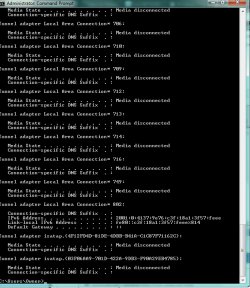
So somehow when I put in ipconfig into my Cmd prompt window I get this:

Tunnel adapter Local Area Connection* 714:

Media State . . . . . . . . . . . : Media disconnected
Connection-specific DNS Suffix . :

Tunnel adapter Local Area Connection* 716:

Media State . . . . . . . . . . . : Media disconnected
Connection-specific DNS Suffix . :

Tunnel adapter Local Area Connection* 749:

Media State . . . . . . . . . . . : Media disconnected
Connection-specific DNS Suffix . :

Tunnel adapter Local Area Connection* 802:

Connection-specific DNS Suffix . :
IPv6 Address. . . . . . . . . . . : 2001:0:4137:9e76:c3f:18a1:3f57:feee
Link-local IPv6 Address . . . . . : fe80::c3f:18a1:3f57:feee%814
Default Gateway . . . . . . . . . : ::

Tunnel adapter isatap.{4F12FD4D-81DE-4DBB-B41A-C1C87F71162C}:

Media State . . . . . . . . . . . : Media disconnected
Connection-specific DNS Suffix . :

Tunnel adapter isatap.{03F06AA9-701D-422A-9DB3-F90A29EB4785}:

Media State . . . . . . . . . . . : Media disconnected
Connection-specific DNS Suffix . :

I am running it as administrator. I have also already checked the location of the ipconfig and it comes up as C:\Windows\System32\ipconfig.exe

Anyone have any idea how to get it to display properly or what I am doing wrong? I need to do this for my college course work and am very confused.
 

Attachments
  • ipconfig.png
    ipconfig.png
    18.5 KB · Views: 3

My Computer

Computer type
Laptop
Computer Manufacturer/Model Number
Asus
OS
Windows 7 Home Premium 64 bit Service Pack 1
CPU
Intel Core 2 Duo P7350 2.00 GHz
Graphics Card(s)
NVIDIA GEFORCE GTX 260M
Antivirus
Microsoft Security Essentials
Browser
Firefox/Chrome/IE
Welcome to the Seven Forums.

You have so many tunnel adapters that the info that you are interested in has already buffered out of the command prompt window. What exactly are you required to do for the class?
 

My Computer

Computer type
Laptop
Computer Manufacturer/Model Number
Employer provided Dell Latitude
OS
W7 Pro SP1 64bit
CPU
i7
Memory
8GB
Graphics Card(s)
Intel HD Graphics
Hard Drives
crappy SSD
Antivirus
Employer mandated Symantec Endpoint Protection
Browser
Pale Moon 64bit, IE11 64bit & Chrome 64bit
All I need to be able to do is run the ipconfig command then read and screen shot the "proper" response.
Meaning the IP Adress, Subnet Mask, and Default Gateway.

I am guessing I will somehow need to make it filter the tunnel results or get rid of them?
 

My Computer

Computer type
Laptop
Computer Manufacturer/Model Number
Asus
OS
Windows 7 Home Premium 64 bit Service Pack 1
CPU
Intel Core 2 Duo P7350 2.00 GHz
Graphics Card(s)
NVIDIA GEFORCE GTX 260M
Antivirus
Microsoft Security Essentials
Browser
Firefox/Chrome/IE

My Computer

Computer type
Laptop
Computer Manufacturer/Model Number
Employer provided Dell Latitude
OS
W7 Pro SP1 64bit
CPU
i7
Memory
8GB
Graphics Card(s)
Intel HD Graphics
Hard Drives
crappy SSD
Antivirus
Employer mandated Symantec Endpoint Protection
Browser
Pale Moon 64bit, IE11 64bit & Chrome 64bit
Thank you. I am running the application in that other thread now. It is taking quite some time I will edit this when I know if it works.

It successfully deleted all of the tunnels.
Now I have this:

Microsoft Windows [Version 6.1.7601]
Copyright (c) 2009 Microsoft Corporation. All rights reserved.

C:\Users\Owner>ipconfig

Windows IP Configuration


Wireless LAN adapter Wireless Network Connection 2:

Media State . . . . . . . . . . . : Media disconnected
Connection-specific DNS Suffix . :

Ethernet adapter Local Area Connection:

Media State . . . . . . . . . . . : Media disconnected
Connection-specific DNS Suffix . :

Wireless LAN adapter Wireless Network Connection:

Connection-specific DNS Suffix . :
Link-local IPv6 Address . . . . . : fe80::18bf:9a1e:864e:2655%9
IPv4 Address. . . . . . . . . . . : 192.168.1.17
Subnet Mask . . . . . . . . . . . : 255.255.255.0
Default Gateway . . . . . . . . . : 192.168.1.1

Tunnel adapter isatap.{4F12FD4D-81DE-4DBB-B41A-C1C87F71162C}:

Media State . . . . . . . . . . . : Media disconnected
Connection-specific DNS Suffix . :

Tunnel adapter Local Area Connection* 802:

Connection-specific DNS Suffix . :
IPv6 Address. . . . . . . . . . . : 2001:0:5ef5:79fd:c18:466:3f57:feee
Link-local IPv6 Address . . . . . : fe80::c18:466:3f57:feee%509
Default Gateway . . . . . . . . . : ::


Should all of that be present or is there something else I should/could delete?
 
Last edited:

My Computer

Computer type
Laptop
Computer Manufacturer/Model Number
Asus
OS
Windows 7 Home Premium 64 bit Service Pack 1
CPU
Intel Core 2 Duo P7350 2.00 GHz
Graphics Card(s)
NVIDIA GEFORCE GTX 260M
Antivirus
Microsoft Security Essentials
Browser
Firefox/Chrome/IE
Here is the network adaptors I still have.

Like I just asked is there anything else I should be deleting?
 

Attachments

  • Network Adaptors.png
    Network Adaptors.png
    4.8 KB · Views: 17

My Computer

Computer type
Laptop
Computer Manufacturer/Model Number
Asus
OS
Windows 7 Home Premium 64 bit Service Pack 1
CPU
Intel Core 2 Duo P7350 2.00 GHz
Graphics Card(s)
NVIDIA GEFORCE GTX 260M
Antivirus
Microsoft Security Essentials
Browser
Firefox/Chrome/IE
Thank you. I am running the application in that other thread now. It is taking quite some time I will edit this when I know if it works.

It successfully deleted all of the tunnels.
Now I have this:

Microsoft Windows [Version 6.1.7601]
Copyright (c) 2009 Microsoft Corporation. All rights reserved.

C:\Users\Owner>ipconfig

Windows IP Configuration


Wireless LAN adapter Wireless Network Connection 2:

Media State . . . . . . . . . . . : Media disconnected
Connection-specific DNS Suffix . :

Ethernet adapter Local Area Connection:

Media State . . . . . . . . . . . : Media disconnected
Connection-specific DNS Suffix . :

Wireless LAN adapter Wireless Network Connection:

Connection-specific DNS Suffix . :
Link-local IPv6 Address . . . . . : fe80::18bf:9a1e:864e:2655%9
IPv4 Address. . . . . . . . . . . : 192.168.1.17
Subnet Mask . . . . . . . . . . . : 255.255.255.0
Default Gateway . . . . . . . . . : 192.168.1.1

Tunnel adapter isatap.{4F12FD4D-81DE-4DBB-B41A-C1C87F71162C}:

Media State . . . . . . . . . . . : Media disconnected
Connection-specific DNS Suffix . :

Tunnel adapter Local Area Connection* 802:

Connection-specific DNS Suffix . :
IPv6 Address. . . . . . . . . . . : 2001:0:5ef5:79fd:c18:466:3f57:feee
Link-local IPv6 Address . . . . . : fe80::c18:466:3f57:feee%509
Default Gateway . . . . . . . . . : ::


Should all of that be present or is there something else I should/could delete?
I'm not positive want normal would be for any one given computer... it depends on what hardware and software is installed. Your screenshot should do fine. Make sure the classwork did not want you to do ipconfig/all.
(The space between ipconfig and the command line switch is optional.)


Here is the network adaptors I still have.

Like I just asked is there anything else I should be deleting?
Pretty much the same answer - I'm not positive want normal would be for any one given computer...
 

My Computer

Computer type
Laptop
Computer Manufacturer/Model Number
Employer provided Dell Latitude
OS
W7 Pro SP1 64bit
CPU
i7
Memory
8GB
Graphics Card(s)
Intel HD Graphics
Hard Drives
crappy SSD
Antivirus
Employer mandated Symantec Endpoint Protection
Browser
Pale Moon 64bit, IE11 64bit & Chrome 64bit
Here is the network adaptors I still have.

Like I just asked is there anything else I should be deleting?

Personally I would remove the second ISATAP adapter since you already have one.

Also unless you planning on using IPv6 I would remove the teredo tunnel adapter which encapsulates IPv6 into and IPv4 packet.

Just my opinion,
Josh :)
 

My Computer

Computer type
PC/Desktop
Computer Manufacturer/Model Number
Custom Built
OS
Windows 7 Professional x64 SP1 ; Windows Server 2012 R2 Standard
CPU
Intel Core i5 2400 @ 3.10GHz
Motherboard
Foxconn H67MP-S/-V/H67MP
Memory
8.0GB DDR3 @ 665MHz (2GBx4)
Graphics Card(s)
AMD Radeon HD 6870
Sound Card
Realtek High Definition Audio
Monitor(s) Displays
AOC 2243W & SMB1930NW
Screen Resolution
1440x900 & 1920x1080
Hard Drives
977GB Seagate ST31000524AS ATA Drive (SATA)
250GB WD iSCSI attached Drive
PSU
750W Gaming PSU
Case
Novatech Night
Cooling
Fan
Keyboard
Dell Standard PS/2 Keyboard
Mouse
R.A.T 07 Gaming Mouse
Internet Speed
Download: 10 Mbps Ping: 30ms Upload: 0.81 Mbps
Browser
Google Chrome
Other Info
Optiarc DVD RW AD-5260S ATA Device
Thank you. I am running the application in that other thread now. It is taking quite some time I will edit this when I know if it works.

It successfully deleted all of the tunnels.
Now I have this:

Microsoft Windows [Version 6.1.7601]
Copyright (c) 2009 Microsoft Corporation. All rights reserved.

C:\Users\Owner>ipconfig

Windows IP Configuration


Wireless LAN adapter Wireless Network Connection 2:

Media State . . . . . . . . . . . : Media disconnected
Connection-specific DNS Suffix . :

Ethernet adapter Local Area Connection:

Media State . . . . . . . . . . . : Media disconnected
Connection-specific DNS Suffix . :

Wireless LAN adapter Wireless Network Connection:

Connection-specific DNS Suffix . :
Link-local IPv6 Address . . . . . : fe80::18bf:9a1e:864e:2655%9
IPv4 Address. . . . . . . . . . . : 192.168.1.17
Subnet Mask . . . . . . . . . . . : 255.255.255.0
Default Gateway . . . . . . . . . : 192.168.1.1

Tunnel adapter isatap.{4F12FD4D-81DE-4DBB-B41A-C1C87F71162C}:

Media State . . . . . . . . . . . : Media disconnected
Connection-specific DNS Suffix . :

Tunnel adapter Local Area Connection* 802:

Connection-specific DNS Suffix . :
IPv6 Address. . . . . . . . . . . : 2001:0:5ef5:79fd:c18:466:3f57:feee
Link-local IPv6 Address . . . . . : fe80::c18:466:3f57:feee%509
Default Gateway . . . . . . . . . : ::


Should all of that be present or is there something else I should/could delete?

Yes it's normal now. Nothing there needs to be deleted.

I would be surprised if that connection worked at all with that many tunnel adaptors.

You are welcome for the tunnel adaptor removal tool, I was about to post that but Username beat me to it. :)
 

My Computer

Computer type
PC/Desktop
Computer Manufacturer/Model Number
Home built
OS
Windows 7 Ult, Windows 8.1 Pro,
CPU
Q9650-4.275GHz, E8600 4.5GHz, E6750-3.8GHz
Motherboard
Evga 780i FTW
Memory
G.Skill PC2 9600 1200Mhz 5 5 5 15 2T
Graphics Card(s)
GTX480
Sound Card
Asus Xonar D2
Monitor(s) Displays
HannsG
Screen Resolution
1680X1050
Hard Drives
GSkill Phoenix Pro 120GB SSD
PSU
ThermalTake Toughpower 1000Watt modular
Case
ThermalTake XaserV
Cooling
Xigmatek S1283
Keyboard
Logitech G15
Mouse
Logitech G9
Internet Speed
T1
Back
Top