
You are using an out of date browser. It may not display this or other websites correctly.
You should upgrade or use an alternative browser.
You should upgrade or use an alternative browser.
Solved CMD
- Thread starter khoshtipi
- Start date
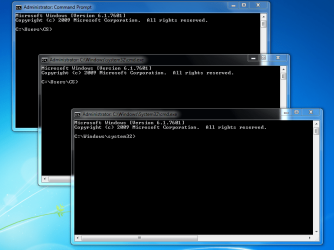

Those are standard cmd windows. Looks like you opened cmd 3 times.
My Computer
- Computer Manufacturer/Model Number
- HP, Dell, Gateway, Toshiba - 4 laptops and 2 desktops
- OS
- Vista, Windows7, Mint Mate, Zorin, Windows 8
- CPU
- from 1.6GHz Duo to i7
- Monitor(s) Displays
- 2x HP w2207
- Hard Drives
- 5x HDD, 7x SSD, 12x Externals
- Keyboard
- with trackball - no mices
- Mouse
- Trackball mice
- Internet Speed
- DSL 6000
x BlueRobot
Closed by request
- Local time
- 12:57 PM
- Messages
- 6,784
Two of the CMD prompts look like you clicked and opened twice, and the one with the System32, seems to be when launched a elevated command prompt with administrative privileges.
Here's my Standard Command Prompt when I just launch the Command Prompt normally:

Here is when I launch a Elevated Command Prompt which has Administrative Privileges:
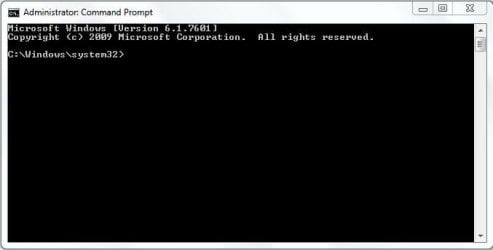
I get a UAC prompt when I launch a Elevated Command Prompt, did you?
Here's my Standard Command Prompt when I just launch the Command Prompt normally:
Here is when I launch a Elevated Command Prompt which has Administrative Privileges:
I get a UAC prompt when I launch a Elevated Command Prompt, did you?
My Computer
- Computer type
- Laptop
Two of the CMD prompts look like you clicked and opened twice, and the one with the System32, seems to be when launched a elevated command prompt with administrative privileges.
Here's my Standard Command Prompt when I just launch the Command Prompt normally:
View attachment 272040
Here is when I launch a Elevated Command Prompt which has Administrative Privileges:
View attachment 272041
I get a UAC prompt when I launch a Elevated Command Prompt, did you?
UAC!?
I think no.
My Computer
- OS
- windows 7 Ultimate X86

- Local time
- 4:57 AM
- Messages
- 6,830
UAC is User Access Control . You click on Yes to continue .
My Computer
- Computer Manufacturer/Model Number
- Custom Built
- OS
- Windows 7 Ultimate 32-Bit & Windows 7 Ultimate 64-Bit
- CPU
- Intel Core i7 CPU 950 @ 3.07GHz
- Motherboard
- ASUS P6T DELUXE V2
- Memory
- OCZ 6GB (3 x 2GB) 240-Pin DDR3 SDRAM DDR3 1600 OCZ3X1600R2
- Graphics Card(s)
- ATI Radeon HD 5700 Series
- Sound Card
- OnBoard
- Hard Drives
- WD6400AACS-00M3B0 (640GB SATA )
- PSU
- CORSAIR 850w
- Case
- NZXT LEXA
- Cooling
- Intel Stock Heatsink Fan
- Keyboard
- Microsoft Wireless Laser Keyboard 7000
- Mouse
- Microsoft Wireless Laser Mouse 7000
UAC is User Access Control . You click on Yes to continue .
OW, OK. No, I decreased it's level to lowest level. So it never asks me anymore.
Thank you all.
My Computer
- OS
- windows 7 Ultimate X86

Then to protect your system I would strongly recommend tht you set the UAC back to the default setting. It is there to protect you. Why have you set it to minimum protection?UAC is User Access Control . You click on Yes to continue .
OW, OK. No, I decreased it's level to lowest level. So it never asks me anymore.
Thank you all.
My Computer
- Computer type
- PC/Desktop
- OS
- Microsoft Windows 7 Home Premium 64-bit 7601 Multiprocessor Free Service Pack 1
- CPU
- Intel(R) Core(TM) i7-3770 CPU @ 3.40GHz
- Motherboard
- ASUSTeK COMPUTER INC. P8H77-M
- Memory
- 8.00 GB
- Graphics Card(s)
- Intel(R) HD Graphics 4000
- Sound Card
- On Board
- Monitor(s) Displays
- Dell 24"
- Screen Resolution
- 1920 x 1080
- Hard Drives
- (1) INTEL SSDSC2CT180A3 ATA Device (2) ST500DM002-1BD142 ATA Device (3) WDC WD3200AAKS-75L9A0 ATA Device (4) Generic- Compact Flash USB Device (5) Generic- MS/MS-Pro USB Device (6) Generic- SD/MMC USB Device (7) Generic- SM/xD-Picture USB
- PSU
- 500w Corsair
- Case
- Cooler Master
- Cooling
- 3 Fans
- Keyboard
- Logitech MK300
- Mouse
- Logitech WOM
- Internet Speed
- 75Mb
- Antivirus
- Norton 360
- Browser
- Firefox, Opera, IE
I hate that pop up window asks me anytime I want to run or do some important thing. When my Windows defender is up to date and also my Kaspersky Internet security is so and I'm cautious for my Web surfing and for almost everything as well, I don't think that bothering UAC windows be needed. You don't think so!?
My Computer
- OS
- windows 7 Ultimate X86
If you are willing to take unnecessary risks then that is your choice, but I have just been reading through your most recent posts and from your quesions I would assume that you would not regard yourself as an expert user of Windiows 7. I do not mean to be rude to you but it looks that way to me. That being so, ask yourself why the majority of experienced users on this Forum would, I feel, recommend that you turn the UAC on to the default setting! It is only one click to accept the task in question but if that is too much trouble for you then that is up to you!I hate that pop up window asks me anytime I want to run or do some important thing. When my Windows defender is up to date and also my Kaspersky Internet security is so and I'm cautious for my Web surfing and for almost everything as well, I don't think that bothering UAC windows be needed. You don't think so!?
My Computer
- Computer type
- PC/Desktop
- OS
- Microsoft Windows 7 Home Premium 64-bit 7601 Multiprocessor Free Service Pack 1
- CPU
- Intel(R) Core(TM) i7-3770 CPU @ 3.40GHz
- Motherboard
- ASUSTeK COMPUTER INC. P8H77-M
- Memory
- 8.00 GB
- Graphics Card(s)
- Intel(R) HD Graphics 4000
- Sound Card
- On Board
- Monitor(s) Displays
- Dell 24"
- Screen Resolution
- 1920 x 1080
- Hard Drives
- (1) INTEL SSDSC2CT180A3 ATA Device (2) ST500DM002-1BD142 ATA Device (3) WDC WD3200AAKS-75L9A0 ATA Device (4) Generic- Compact Flash USB Device (5) Generic- MS/MS-Pro USB Device (6) Generic- SD/MMC USB Device (7) Generic- SM/xD-Picture USB
- PSU
- 500w Corsair
- Case
- Cooler Master
- Cooling
- 3 Fans
- Keyboard
- Logitech MK300
- Mouse
- Logitech WOM
- Internet Speed
- 75Mb
- Antivirus
- Norton 360
- Browser
- Firefox, Opera, IE
Thank you for your explanations. I understand your meaning.
My previous posts about some infected machines were not about my own machine. I sometimes fix my friend's or costumer's machines which probably are infected and one part of those posts were about them and another part of those posts were for raising my info.
I return the UAC to its default settings when I find out that despite those defenses tools I should do that yet.
!
My previous posts about some infected machines were not about my own machine. I sometimes fix my friend's or costumer's machines which probably are infected and one part of those posts were about them and another part of those posts were for raising my info.
I return the UAC to its default settings when I find out that despite those defenses tools I should do that yet.
!
My Computer
- OS
- windows 7 Ultimate X86
- Local time
- 5:57 AM
- Messages
- 8,138
Please understand that there are plenty of infections that Kaspersky (or any antivirus tool) will not catch and good websites do get infected.
See my post here:
http://www.sevenforums.com/general-...use-uac-user-account-control.html#post2430606
See my post here:
http://www.sevenforums.com/general-...use-uac-user-account-control.html#post2430606
My Computer
- Computer type
- Laptop
- Computer Manufacturer/Model Number
- Employer provided Dell Latitude
- OS
- W7 Pro SP1 64bit
- CPU
- i7
- Memory
- 8GB
- Graphics Card(s)
- Intel HD Graphics
- Hard Drives
- crappy SSD
- Antivirus
- Employer mandated Symantec Endpoint Protection
- Browser
- Pale Moon 64bit, IE11 64bit & Chrome 64bit
I also repair computers and when I get a machine with half a dozen suspicious toolbars plus installed malware such as rogue registry cleaners and driver updaters invariably the UAC is set to standard. The average joe sees the UAC as an irritation and clicks through to make it go away. In fact they don't even know what it is.
My Computer
- Computer type
- PC/Desktop
- Computer Manufacturer/Model Number
- self build
- OS
- Windows 7 pro x64 SP1
- CPU
- Intel i7-2600k o/c to 4.6GHz
- Motherboard
- MSI Z68-GD80
- Memory
- 8GB Mushkin 1866MHz
- Graphics Card(s)
- Nvidia GTX 750 Ti 2GB
- Sound Card
- integrated
- Monitor(s) Displays
- Liyama ProLite 27"
- Screen Resolution
- 1920*1080 px
- Hard Drives
- Seagate 2TB
- PSU
- Coolermaster GX 750W
- Case
- Antec 300 case + 5 fans
- Cooling
- Dark Rock Pro
- Internet Speed
- 62Mbit down 18Mbit up
- Antivirus
- MSE
- Browser
- Firefox
- Other Info
- Blackgold BGT3650 Quad HD TV card. Also have various 3770 + 4770K render boxes.
- Local time
- 5:57 AM
- Messages
- 8,138
And when I see a computer/user like that, I try my best to convince them to run as a standard user with the UAC turned all the way up.I also repair computers and when I get a machine with half a dozen suspicious toolbars plus installed malware such as rogue registry cleaners and driver updaters invariably the UAC is set to standard. The average joe sees the UAC as an irritation and clicks through to make it go away. In fact they don't even know what it is.

I explain to them that they should not be seeing that UAC pop-up while simply visiting a website. Hopefully, the extra time that it takes to put in the admin user's password will be enough for my warnings to them to come back to mind.
My Computer
- Computer type
- Laptop
- Computer Manufacturer/Model Number
- Employer provided Dell Latitude
- OS
- W7 Pro SP1 64bit
- CPU
- i7
- Memory
- 8GB
- Graphics Card(s)
- Intel HD Graphics
- Hard Drives
- crappy SSD
- Antivirus
- Employer mandated Symantec Endpoint Protection
- Browser
- Pale Moon 64bit, IE11 64bit & Chrome 64bit
As I said, 'tis your choice but it sounds like buying an Inurance Policy after your house burns down!Thank you for your explanations. I understand your meaning.
I return the UAC to its default settings when I find out that despite those defenses tools I should do that yet.
!

My Computer
- Computer type
- PC/Desktop
- OS
- Microsoft Windows 7 Home Premium 64-bit 7601 Multiprocessor Free Service Pack 1
- CPU
- Intel(R) Core(TM) i7-3770 CPU @ 3.40GHz
- Motherboard
- ASUSTeK COMPUTER INC. P8H77-M
- Memory
- 8.00 GB
- Graphics Card(s)
- Intel(R) HD Graphics 4000
- Sound Card
- On Board
- Monitor(s) Displays
- Dell 24"
- Screen Resolution
- 1920 x 1080
- Hard Drives
- (1) INTEL SSDSC2CT180A3 ATA Device (2) ST500DM002-1BD142 ATA Device (3) WDC WD3200AAKS-75L9A0 ATA Device (4) Generic- Compact Flash USB Device (5) Generic- MS/MS-Pro USB Device (6) Generic- SD/MMC USB Device (7) Generic- SM/xD-Picture USB
- PSU
- 500w Corsair
- Case
- Cooler Master
- Cooling
- 3 Fans
- Keyboard
- Logitech MK300
- Mouse
- Logitech WOM
- Internet Speed
- 75Mb
- Antivirus
- Norton 360
- Browser
- Firefox, Opera, IE
Although it's very wonderful for me that why Microsoft can offer that insurance in the UAC but can not offer in Windows defender or other Microsoft built-in tools, but I try the default settings of UAC. Thanks guys.
More brief and meaningful info is appreciated.
More brief and meaningful info is appreciated.
My Computer
- OS
- windows 7 Ultimate X86