COD4 profile backup

csanino

New member
Local time
7:44 PM
Messages
6
Location
Alpharetta, GA
Hey everyone, where could I find the profile folder for COD4 in x64 7 beta? Im trying to back everything up so i can install RC this weekend.

-Carlo
 

My Computer

Computer Manufacturer/Model Number
Home Made
OS
Windows 7 Ultimate 64bit
CPU
Intel Core2 Quad Q8200
Motherboard
Gigabyte P43-DS3L
Memory
4 Gig Ocz Reaper PC29600
Graphics Card(s)
Nvidia 8500GT 512mb
Sound Card
On board Reatek HD Audio
Monitor(s) Displays
17" Proview LCD
Hard Drives
80gig SATAII Primary
300gig Seagate barracuda Backup
Case
Thermaltak Tsunami Dream
Mouse
Logitech MX58
Internet Speed
http://www.speedtest.net/result/406582218.png
Hey csanino, have you looked through the game folders?

~Lordbob
 

My Computer

Computer Manufacturer/Model Number
Hera
OS
Windows 7 Ultimate x64, Mint 9
CPU
Intel i5-2500k
Motherboard
ASUS P8P67 Pro
Memory
2x 4Gb Corsair VENGEANCE DDR3-1600
Graphics Card(s)
NVidia GeForce N260GTX Twin Frozr
Sound Card
Realtek HD OnBoard Audio
Monitor(s) Displays
ASUS 24" Monitor
Screen Resolution
1920x1080
Hard Drives
G.SKILL Phoenix Series 60GB SATA II MLC Internal Solid State Drive (SSD)
SAMSUNG Spinpoint F3R 1TB 7200 RPM 32MB Cache SATA II
PSU
Cooler Master Real Power Pro 750W
Case
Cooler Master Haf 932
Cooling
Fans
Keyboard
Razer Tarantula
Mouse
Razer Lachesis
Internet Speed
not fast enough
Hey csanino, have you looked through the game folders?

~Lordbob


Ya I found a folder labeled "profiles" but I remember seeing here at one point someone saying that the save folder was stored in a different place on W7 vs XP

-Carlo
 

My Computer

Computer Manufacturer/Model Number
Home Made
OS
Windows 7 Ultimate 64bit
CPU
Intel Core2 Quad Q8200
Motherboard
Gigabyte P43-DS3L
Memory
4 Gig Ocz Reaper PC29600
Graphics Card(s)
Nvidia 8500GT 512mb
Sound Card
On board Reatek HD Audio
Monitor(s) Displays
17" Proview LCD
Hard Drives
80gig SATAII Primary
300gig Seagate barracuda Backup
Case
Thermaltak Tsunami Dream
Mouse
Logitech MX58
Internet Speed
http://www.speedtest.net/result/406582218.png
Ya I found a folder labeled "profiles" but I remember seeing here at one point someone saying that the save folder was stored in a different place on W7 vs XP

-Carlo

yeah, some games do pop up in a 'saved games' folder. but a lot just save in
my documents\my games, or just My Documents in some cases. you could always do a search in the taskbar, that should find it.
 

My Computer

Computer Manufacturer/Model Number
eMachines W3502
OS
Windows 7 Ultimate x32
CPU
Intel Celeron D 3.2 Ghz 533 fsb (LGA 775)
Motherboard
Intel D101GGC
Memory
1 GB (2x512MB) PC-3200 DDR @ 200Mhz
Graphics Card(s)
Nvidia GeForce 9400GT- 1GB
Sound Card
Sound Blaster X-Fi Xtreame Gamer
Monitor(s) Displays
19" LCD HDtv
Screen Resolution
1360x768 @ 60Htz
Hard Drives
SeaGate Barracuda 750GB
SeaGate Barracuda 100GB
Toshiba CD/DVDW/ TS-H552D [DVD+R, DL]
PSU
stock (idk)
Case
The busted remains of the stock case
Cooling
Dust cooled, waitwut?
Keyboard
Stock. Missing a few keys.
Mouse
Logitech LX8 5-btn mouse (wireless)
Internet Speed
TWC 10Mb
Other Info
Keeps going, and going, and going.......
COD4 keeps it in C:\Program files\Activision\Call of duty 4\profiles
 

My Computer

Computer Manufacturer/Model Number
Home built
OS
Windows 7 Home Premium x64
CPU
Phenom II X4 955 BE
Motherboard
Asus Sabertooth 990FX
Memory
8 GB OCZ BE 1667
Graphics Card(s)
EVGA GeForce GTX470 SC
Monitor(s) Displays
BenQ 19"
Screen Resolution
1280x1024
Hard Drives
256 GB OCZ Vertex 3 SSD
2x WD 1 TB
1x WD 2 TB
PSU
Thermaltake 850W
Case
Coolermaster Cosmos 1000
Cooling
Air
Keyboard
Logitech
Mouse
Cyborg R.A.T 7
Internet Speed
Standard RR
C:\Users\Carlo\AppData\Local\VirtualStore\Program Files (x86)\Activision\Call of Duty 4 - Modern Warfare\players\profiles

I knew it was something stupid like that.

Trick was to showing hidden files & folders.

Found it on accident when I navigated to C:\Program files\Activision\Call of duty 4\profiles and saw a button on the top that said "Compatibility files" Clicked it, and it took me str8 to the hidden folder.

PHEW!

-Carlo
 

My Computer

Computer Manufacturer/Model Number
Home Made
OS
Windows 7 Ultimate 64bit
CPU
Intel Core2 Quad Q8200
Motherboard
Gigabyte P43-DS3L
Memory
4 Gig Ocz Reaper PC29600
Graphics Card(s)
Nvidia 8500GT 512mb
Sound Card
On board Reatek HD Audio
Monitor(s) Displays
17" Proview LCD
Hard Drives
80gig SATAII Primary
300gig Seagate barracuda Backup
Case
Thermaltak Tsunami Dream
Mouse
Logitech MX58
Internet Speed
http://www.speedtest.net/result/406582218.png
C:\Users\Carlo\AppData\Local\VirtualStore\Program Files (x86)\Activision\Call of Duty 4 - Modern Warfare\players\profiles

I knew it was something stupid like that.

Trick was to showing hidden files & folders.

-Carlo
Thats how it usually is....

~Lordbob
 

My Computer

Computer Manufacturer/Model Number
Hera
OS
Windows 7 Ultimate x64, Mint 9
CPU
Intel i5-2500k
Motherboard
ASUS P8P67 Pro
Memory
2x 4Gb Corsair VENGEANCE DDR3-1600
Graphics Card(s)
NVidia GeForce N260GTX Twin Frozr
Sound Card
Realtek HD OnBoard Audio
Monitor(s) Displays
ASUS 24" Monitor
Screen Resolution
1920x1080
Hard Drives
G.SKILL Phoenix Series 60GB SATA II MLC Internal Solid State Drive (SSD)
SAMSUNG Spinpoint F3R 1TB 7200 RPM 32MB Cache SATA II
PSU
Cooler Master Real Power Pro 750W
Case
Cooler Master Haf 932
Cooling
Fans
Keyboard
Razer Tarantula
Mouse
Razer Lachesis
Internet Speed
not fast enough
C:\Users\Carlo\AppData\Local\VirtualStore\Program Files (x86)\Activision\Call of Duty 4 - Modern Warfare\players\profiles

I knew it was something stupid like that.

Trick was to showing hidden files & folders.

Found it on accident when I navigated to C:\Program files\Activision\Call of duty 4\profiles and saw a button on the top that said "Compatibility files" Clicked it, and it took me str8 to the hidden folder.

PHEW!

-Carlo

There is no trick and you don't need to show hidden folders, it's not in AppDatta it just in C:/Program(x86)/Activision/Call of Duty 4 Modern Warfare/players/profiles/ :confused:
 

My Computer

Computer Manufacturer/Model Number
Home Brew
OS
Windows 7 Ultimate Vista Ultimate x64
CPU
Core 2 Duo E8500 3.16Ghz @ 3.8Ghz
Motherboard
eVGA 750i FTW
Memory
2x2Gigs Patriot PC2-6400 LL
Graphics Card(s)
Inno3D GeForce GTX260 216 SP
Monitor(s) Displays
ASUS VW222U 22" 2ms Response time
Screen Resolution
1680x1050
Hard Drives
SATA 150GB
SATA II 250GB
USB IDE 750GB Ext.
PSU
HYTEC 600W & Thermaltake 650W Toughpower Power Exp
Case
Thermaltake Armor LCS (Liquid Cooling System)
Cooling
Liquid Cooling System
Keyboard
Logitech G15 Gaming Keyboard
Mouse
Logitech G9 Gaming Mouse
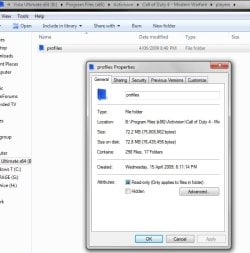
First picture shows the location C:/Program(x86)/Activision/Call of Duty 4 Modern Warfare/players/profiles/

The folder properties show 0 files, 0 folders, 0 bytes

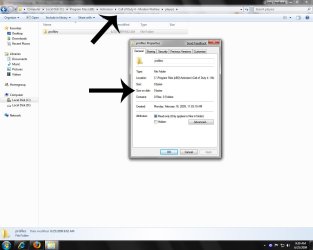
Second picture shows the location
C:\Users\Carlo\AppData\Local\VirtualStore\Program Files (x86)\Activision\Call of Duty 4 - Modern Warfare\players\profiles

The folder properties show 30 files, 3 folders, 5.90mb of info

I cant explain why guys, but its just the way it is on my machine? I have installed COD4 a million times and I did nothing different each time.

-Carlo
 

Attachments

  • 1.jpg
    1.jpg
    82.9 KB · Views: 2,135
  • 2.jpg
    2.jpg
    87.3 KB · Views: 1,478

My Computer

Computer Manufacturer/Model Number
Home Made
OS
Windows 7 Ultimate 64bit
CPU
Intel Core2 Quad Q8200
Motherboard
Gigabyte P43-DS3L
Memory
4 Gig Ocz Reaper PC29600
Graphics Card(s)
Nvidia 8500GT 512mb
Sound Card
On board Reatek HD Audio
Monitor(s) Displays
17" Proview LCD
Hard Drives
80gig SATAII Primary
300gig Seagate barracuda Backup
Case
Thermaltak Tsunami Dream
Mouse
Logitech MX58
Internet Speed
http://www.speedtest.net/result/406582218.png
Strange indeed, here's mine where it's always been.

2009-06-25_235356.jpg
 

My Computer

Computer Manufacturer/Model Number
Home Brew
OS
Windows 7 Ultimate Vista Ultimate x64
CPU
Core 2 Duo E8500 3.16Ghz @ 3.8Ghz
Motherboard
eVGA 750i FTW
Memory
2x2Gigs Patriot PC2-6400 LL
Graphics Card(s)
Inno3D GeForce GTX260 216 SP
Monitor(s) Displays
ASUS VW222U 22" 2ms Response time
Screen Resolution
1680x1050
Hard Drives
SATA 150GB
SATA II 250GB
USB IDE 750GB Ext.
PSU
HYTEC 600W & Thermaltake 650W Toughpower Power Exp
Case
Thermaltake Armor LCS (Liquid Cooling System)
Cooling
Liquid Cooling System
Keyboard
Logitech G15 Gaming Keyboard
Mouse
Logitech G9 Gaming Mouse
The only time I have seen any player info in that location on W7...is when I was farting around w/ the compatibility settings, and I changed them to simulate XP. Mine's set to simulate Vista and it saves it in that other location.

-Carlo
 

My Computer

Computer Manufacturer/Model Number
Home Made
OS
Windows 7 Ultimate 64bit
CPU
Intel Core2 Quad Q8200
Motherboard
Gigabyte P43-DS3L
Memory
4 Gig Ocz Reaper PC29600
Graphics Card(s)
Nvidia 8500GT 512mb
Sound Card
On board Reatek HD Audio
Monitor(s) Displays
17" Proview LCD
Hard Drives
80gig SATAII Primary
300gig Seagate barracuda Backup
Case
Thermaltak Tsunami Dream
Mouse
Logitech MX58
Internet Speed
http://www.speedtest.net/result/406582218.png
Please dont forget the most important step... Backup your serial key if you want to play it online, or your data will be lost since your XP online is associated with that serial you normally use.
 

My Computer

Computer Manufacturer/Model Number
Custom Built Pc
OS
Windows 7 Ultimate x64 7127
CPU
AMD Phenom X4 9950 B.E.
Motherboard
Gigabyte GA-MA790X
Memory
4 x 2GB 1066MHz Gskill DDRII (5-5-5-15)
Graphics Card(s)
XFX ATI HD4890 1GB
Sound Card
Soundblaster Xi-Fi Faltal1ty
Monitor(s) Displays
HP TFT W20 20"
Screen Resolution
1680x1050
Hard Drives
6 x 500GB WD + 1x WD Raptor 320GB
PSU
OCZ Powerstream 650w
Case
Thermaltake Shark Case
Cooling
Typical Case Fans & Stock Cooler
Keyboard
Razer Tarantula
Mouse
Razer Diamondback
Internet Speed
100Mb Fiber
Please dont forget the most important step... Backup your serial key if you want to play it online, or your data will be lost since your XP online is associated with that serial you normally use.
I learned that the hard way lol
 

My Computer

Computer Manufacturer/Model Number
Self-built // Gateway FX P-6860
OS
Windows 7 Ultimate retail // Windows 7 build 7264 x64, Vista Home Premium SP2 x64
CPU
Intel Core i7 920 // Intel Core2Duo T-5550 1.86x1.86
Motherboard
EVGA x58 SLI LE //
Memory
12 GB Corsair XMS3 Tri-channel 1333 // 4 GB DDR2
Graphics Card(s)
EVGA GTX 295 // Nvidia GeForce 8800 GTS
Sound Card
Integrated Realtek // RealTek HD integrated sound
Monitor(s) Displays
19" Acer flatpanel // Laptop Display, Secondary CRT
Screen Resolution
1440 x 900 1152x864 // 1440x900, 1152x864
Hard Drives
750 GB WD Caviar Black 7200 RPM - in desktop
320 GB -laptop
80 GB - laptop secondary drive
PSU
Corsair HX1000w // Laptop PSU?
Case
Thermaltake Armor+
Cooling
Assload of fans, intel stock cpu cooler // GearHead Fan dock
Keyboard
Razer Lycosa // laptop keyboard
Mouse
Razer DeathAdder // Logitech Laser
Internet Speed
3.0 MB down/ 768 Kb up
Other Info
Just built my computer in 12/09
There is no trick and you don't need to show hidden folders, it's not in AppDatta it just in C:/Program(x86)/Activision/Call of Duty 4 Modern Warfare/players/profiles/ :confused:

This is the correct folder. I do this all the time with wiping and reinstalling. This is all you need. Just copy from the players folder, not the profiles. Voila, 100% configuration and game data saved. Nothing is worse than loosing your legitimate Rank 55 and challenges...not to mention the weapon unlocks!
 

My Computer

OS
Windows 7 (Build 7068)

My Computer

Computer Manufacturer/Model Number
Custom Built Pc
OS
Windows 7 Ultimate x64 7127
CPU
AMD Phenom X4 9950 B.E.
Motherboard
Gigabyte GA-MA790X
Memory
4 x 2GB 1066MHz Gskill DDRII (5-5-5-15)
Graphics Card(s)
XFX ATI HD4890 1GB
Sound Card
Soundblaster Xi-Fi Faltal1ty
Monitor(s) Displays
HP TFT W20 20"
Screen Resolution
1680x1050
Hard Drives
6 x 500GB WD + 1x WD Raptor 320GB
PSU
OCZ Powerstream 650w
Case
Thermaltake Shark Case
Cooling
Typical Case Fans & Stock Cooler
Keyboard
Razer Tarantula
Mouse
Razer Diamondback
Internet Speed
100Mb Fiber
Like Csanino my profile is hidden away in the AppData folder. You saved me a great deal of time looking for it (the search function in Windows wan't much help at all).
 

My Computer

Computer Manufacturer/Model Number
My Own Fair Hands.com
OS
Windows 7
CPU
Athlon 6000+
Memory
4GB
Graphics Card(s)
NVidia 260XT
Monitor(s) Displays
24" 1920x1040
Hard Drives
1x1TB, 1x750GB, 1x 500GB
PSU
Zalman
Case
Zalman GS1000
Cooling
Zalman
You can back it up by going in to your documents then finding where the cod 4 save folder is then copy it wen you reinstall it on the new OP system just make the same user name again in the same way it was spelt word for word exit game then copy over the backed up data in to the documents folder where the game is saved and it should work fine hope this helps.
 

My Computer

Computer Manufacturer/Model Number
Intel
OS
Windows 7 32 & 64 bit
CPU
Intel E5400
Motherboard
Foxconn
Memory
4GB
Graphics Card(s)
Nvidia
Sound Card
Realteck
Monitor(s) Displays
20" lcd
Hard Drives
Samsung 750 SATA II
PSU
450 watts
Case
Custom
Cooling
Intel standerd
64 bit vs 32 bit

In windows 7, the reason it has it in strange places and sometimes it doest is because 64 bit mucks everything up, hence the virtual store rubbish. 32 bit keeps everything (mainly) in the right spot, the reason I know this is because I (mistakenly) installed both bit types on different comps lol and it gets soo annoying trying to find stuff.
 

My Computer

Computer Manufacturer/Model Number
I have too many comps to put them all here
OS
Windows 7/Windows XP
CPU
I cbf finding out
Motherboard
Dunno
Memory
2 gig up to 5 gig
Graphics Card(s)
Good ones
Sound Card
Dodgy ones
Monitor(s) Displays
1655 x 1080 or do I have to say inches? Also use 58 inch tv
Hard Drives
270 gig mostly
PSU
Dunno
Case
Box
Cooling
Cooler master or something
Profile Location

C:\Users\”USER NAME”\AppData\Local\VirtualStore\Program Files (x86)\Activision\Call of Duty 4 - Modern Warfare\players

- or -

C:\Program Files (x86)\Activision\Call of Duty 4 - Modern Warfare\players
 

My Computer

Computer type
PC/Desktop
Computer Manufacturer/Model Number
Custom Build
OS
Windows 7 x64
CPU
Core i5 3rd Gen
Memory
12GB
Back
Top