(Code 43)

szalajko

New member
Local time
6:33 PM
Messages
35
when i try hooking up usb ddevices to my port ANY of them i get unknown device and when i double click that from device manager i get that error

Windows has stopped this device because it has reported problems. (Code 43)

plz help i dont mean to spam but this is actually a new problem i guess:mad:
 

My Computer

Computer Manufacturer/Model Number
hp pavilion dv8301nr
OS
windows 7 7600 rtm
CPU
adm turion 64-ml34
Motherboard
ati
Memory
1.256
Graphics Card(s)
ati express 200m 128 ded/128 shar = 256
Hard Drives
80gig internal maxtor

My Computer

Computer type
PC/Desktop
Computer Manufacturer/Model Number
LENOVO K450 @3.0GHZ
OS
64-bit Windows 8.1 Pro
CPU
Core(TM) i5 CPU 4330 Haswell @ 3.20GHz
Motherboard
LENOVO
Memory
12.00 GB
Graphics Card(s)
Intel(R) HD Graphics
Sound Card
Intel HD integtrated
Monitor(s) Displays
HP 25' ISP Monitor
Screen Resolution
1900/1020
Hard Drives
(1) ST1000DM003-1CH162 (2) Generic STORAGE DEVICE USB Device (3) Generic STORAGE DEVICE USB Device
Internet Speed
100mb down/10mb up

My Computer

Computer Manufacturer/Model Number
hp pavilion dv8301nr
OS
windows 7 7600 rtm
CPU
adm turion 64-ml34
Motherboard
ati
Memory
1.256
Graphics Card(s)
ati express 200m 128 ded/128 shar = 256
Hard Drives
80gig internal maxtor

My Computer

Computer Manufacturer/Model Number
Self Build 64bit
OS
Vista Ult64, Win7600
CPU
Intel Core 2 Quad Q6600 @ 2400 MHz 64bit OS
Motherboard
Asus P5E3 Deluxe WiFi @p 64 bit OS
Memory
4096 MB DDR3-SDRAM
Graphics Card(s)
ATI Radeon HD 3870 Series x2 Crossfired
Sound Card
Realtek on board
Monitor(s) Displays
Samsung SyncMaster - 23 inches
Screen Resolution
1680x1050 pixels at 60 Hz in True Colors
Hard Drives
Hitachi (250 GB)/Samsung 750 GB. /Barracuda 160 GB.
My Book 1 TB external..
PSU
Cooler Master 1000w
Case
Cooler Master Cosmos 1000.
Cooling
Fans and fresh air,
Keyboard
Wireless
Mouse
Wireless
Internet Speed
Never fast enough
Other Info
I use a Magnum.
i have a hp pavillion dv8301nr windows 7 (64bit) 7600 rtm, allthou this happens in every version, i have a amd turion 64 ml-34 processor, and phenix f.54 (latest) bios, and i can only suspect i have the latest chipset drivers, i installed them from hp site, if someone knows a place where i can get the chipset drivers please provide me with a html link. i dunno which mobo i have i think ati something. anyways my problem is...

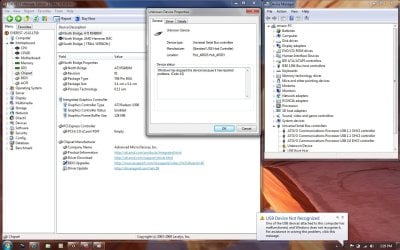
i have 4 USB ports, 3 are 1.1 and 1 is 2.0, no matter what i try to connect, the windows detects the device but says unknown device detected? i have tried everything to fix this, plz help, in device mngr it shows 3 usb communication processor controllers 2 are OHCI 1.1 and one is EHCI 2.0 under them i have 3 usb root hubs, when i plug something in an extra one pops up for every device and is named unknown device with a yellow exp. point. PLZ SOMEONE HELP ME, maybe you can find my mobo chipset drivers for me, i am not sure but i think ati makes my mobo since the internal gfx card is a 200m express ati. here is a similar problem but in the other post i havent mentioned about the 43 error, i think it is dif problem or it might be related thats why i started dif thred, and attached is my desktop scren shoot 620-220 16bit color for ez dl, it in sludes everest mobo specks and problem shoot when attaching a device, also what it looks like in device manager

View attachment 28045
 

Attachments

  • here2.jpg
    here2.jpg
    162.8 KB · Views: 53,941
Last edited:

My Computer

Computer Manufacturer/Model Number
hp pavilion dv8301nr
OS
windows 7 7600 rtm
CPU
adm turion 64-ml34
Motherboard
ati
Memory
1.256
Graphics Card(s)
ati express 200m 128 ded/128 shar = 256
Hard Drives
80gig internal maxtor
I have same problem
 

My Computer

OS
PC
CPU
AMD Athlon x2 64 5000+ 2.6Ghz
Motherboard
Biostar 8100 ME+
Memory
2x1Gb
Graphics Card(s)
Nvidia GeForce 8500GT 512Mb
Sound Card
Realteck HD Sound
Monitor(s) Displays
Philips 19" Wide
Hard Drives
Samsung 250Gb
Same Problem

I have the same problem, although i know why, i have an external hard drive which worked fine before, but recently the cable has been damaged and ever since i have had this problem.

I just thought it would be helpful for you to know this and that the problem might be that it has been damaged in some way.
 

My Computer

OS
Windows 7
Please update your bios and chipset drivers. Then in bios, disable all unused ports like serial, parallel, floppy, com....etc...

Yes Boothy. The error means things aren't communicating well. How you fixed it and what I say above are possible ways or alleviating. Yours is much more rare than my fixes. Good find!
 

My Computer

OS
Win7

Yes but as of now they don't have any official error codes with that number range posted anywhere. I've looked and the only thing MS has that I could find are XP error codes, and I'm going to bet my testicle that they mean the same thing. =P Why change error code meanings now? That'd piss some hard core tech's off.
 

My Computer

Computer Manufacturer/Model Number
Custom
OS
Windows 7, Linux
CPU
AMD Phemon II x2 3@3750
Motherboard
ASRock M3A770DE
Memory
1G Crucial 1666
Graphics Card(s)
8800GT OC (custom OC)
Sound Card
Sound Blaster Live! (never changes!)
Monitor(s) Displays
Vivitron 22"
Screen Resolution
1600x1200
Hard Drives
Western Digital 120G/160G SATA
Maxtor 80G IDE
PSU
450w
Case
Unknown
Cooling
Custom Air cooled
Keyboard
Logitech
Mouse
Logitech M-BZ15A Laser
Internet Speed
Cable 10mbit
Back
Top