
Code 52 error- Windows cannot verify digital signature for USB drivers

Husaberger

New member
Member
VIP
Local time
6:56 PM
Messages
141
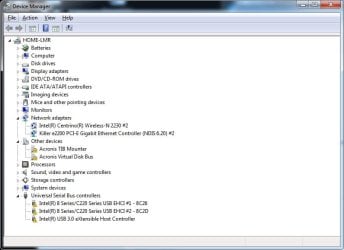
Help! Cannot use USB keyboard or mouse due to Code 52 error
'Windows cannot verify digital signature for USB drivers'
Have updated drivers
Have uninstalled and reinstalled drivers from Intel
Have reinstalled drivers from MSI motherboard driver DVD
Have tried manually disabling "digital driver enforcement" during boot
Have also tried to bypass unsigned driver with DSOE Driver Signature Enforcement Overrider 1.3b
All with no luck
A little help here?
 

Attachments
  • SF_20-05-2014.zip
    SF_20-05-2014.zip
    1.7 MB · Views: 36
  • Device manager screenshot.jpg
    Device manager screenshot.jpg
    46 KB · Views: 3

My Computer

Computer Manufacturer/Model Number
Self built
OS
Microsoft Windows 7 Professional 64-bit 7601 Multiprocessor Free Service Pack 1
CPU
Intel(R) Core(TM) i7-2600K CPU @ 3.40GHz
Motherboard
ASUSTeK Computer INC. P8P67 PRO
Memory
G Skill F3-17000CL9-4GBXLD 16.00 GB
Graphics Card(s)
(1) NVIDIA GeForce GTX 560 Ti (2) LogMeIn Mirror Driver
Sound Card
(1) Bluetooth Audio Device (2) NVIDIA High Definition Audi
Hard Drives
(1) INTEL SSDSC2MH120A2
(2) ST33000651AS
(3) WDC WD2001FASS-00W2B0
(4) WDC WD20 01FASS-00W2B0 SCSI Disk Device
(5) WDC WD20 01FASS-00W2B0 SCSI Disk Device
A little help here??
 

My Computer

Computer Manufacturer/Model Number
Self built
OS
Microsoft Windows 7 Professional 64-bit 7601 Multiprocessor Free Service Pack 1
CPU
Intel(R) Core(TM) i7-2600K CPU @ 3.40GHz
Motherboard
ASUSTeK Computer INC. P8P67 PRO
Memory
G Skill F3-17000CL9-4GBXLD 16.00 GB
Graphics Card(s)
(1) NVIDIA GeForce GTX 560 Ti (2) LogMeIn Mirror Driver
Sound Card
(1) Bluetooth Audio Device (2) NVIDIA High Definition Audi
Hard Drives
(1) INTEL SSDSC2MH120A2
(2) ST33000651AS
(3) WDC WD2001FASS-00W2B0
(4) WDC WD20 01FASS-00W2B0 SCSI Disk Device
(5) WDC WD20 01FASS-00W2B0 SCSI Disk Device
Did you install Acronis True Image at one time? Is it currently uninstalled?

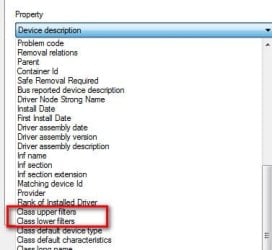
Right click each USB Controllers ->Properties->Details tab. Use the pull down menu to look for Class Upper Filters and Class Lower Filters. Look closely one, both or neither may exist. For each that exist, select then copy/paste what windows displays.
 

Attachments

  • Filters.jpg
    Filters.jpg
    18.7 KB · Views: 26

My Computer

Computer type
PC/Desktop
Computer Manufacturer/Model Number
Dell Optiplex 360 and Optiplex 755
OS
Desk 1: Win 7 Pro x32; Desk 2: Windows 10 x64
Hard Drives
500GB Crucial SSD in both Desktops
Other Info
Buffalo 6TB NAS, Raid 1
Thanks CG
Acronis is currently installed
Neither class filter exists for usb controllers
 

My Computer

Computer Manufacturer/Model Number
Self built
OS
Microsoft Windows 7 Professional 64-bit 7601 Multiprocessor Free Service Pack 1
CPU
Intel(R) Core(TM) i7-2600K CPU @ 3.40GHz
Motherboard
ASUSTeK Computer INC. P8P67 PRO
Memory
G Skill F3-17000CL9-4GBXLD 16.00 GB
Graphics Card(s)
(1) NVIDIA GeForce GTX 560 Ti (2) LogMeIn Mirror Driver
Sound Card
(1) Bluetooth Audio Device (2) NVIDIA High Definition Audi
Hard Drives
(1) INTEL SSDSC2MH120A2
(2) ST33000651AS
(3) WDC WD2001FASS-00W2B0
(4) WDC WD20 01FASS-00W2B0 SCSI Disk Device
(5) WDC WD20 01FASS-00W2B0 SCSI Disk Device
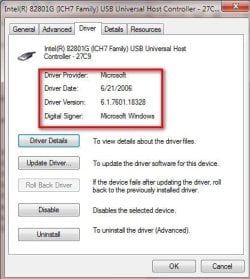
Which version of Acronis are you running? I don't know if it's related to your problem, but you shouldn't have those two "Acronis devices appear as "Other". (That means those 2 Acronis devices are missing their driver). I suggest you uninstall/reinstall Acronis..

If that doesn't help your problem.. For each USB controller
  1. Right click->Properties->Driver tab.
  2. Does it show the driver digitally signed?
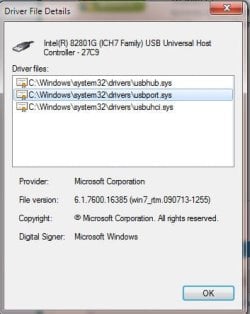
  3. Now click the Driver Details button. You'll see a list of driver files. Select each driver file. Does each one show it's digitally signed?
I'm running Win x32 so don't worry if driver version #'s are different. But
a) For your Enhanced controllers: Are all driver files from Microsoft?
b) For your USB 3 controller, are all driver files from Intel??
 

Attachments

  • P1.jpg
    P1.jpg
    32.5 KB · Views: 24
  • P2.jpg
    P2.jpg
    22.1 KB · Views: 24

My Computer

Computer type
PC/Desktop
Computer Manufacturer/Model Number
Dell Optiplex 360 and Optiplex 755
OS
Desk 1: Win 7 Pro x32; Desk 2: Windows 10 x64
Hard Drives
500GB Crucial SSD in both Desktops
Other Info
Buffalo 6TB NAS, Raid 1
Which version of Acronis are you running? True Image 2013

I don't know if it's related to your problem, but you shouldn't have those two "Acronis devices appear as "Other". (That means those 2 Acronis devices are missing their driver). I suggest you uninstall/reinstall Acronis..- Acronis uninstalled. No change


If that doesn't help your problem.. For each USB controller
  1. Right click->Properties->Driver tab.
  2. Does it show the driver digitally signed?- no. ergo error 52
  3. Now click the Driver Details button. You'll see a list of driver files. Select each driver file. Does each one show it's digitally signed?
All are unsigned

I'm running Win x32 so don't worry if driver version #'s are different. But

a) For your Enhanced controllers: Are all driver files from Microsoft?- yes
b) For your USB 3 controller, are all driver files from Intel??- yes
 

My Computer

Computer Manufacturer/Model Number
Self built
OS
Microsoft Windows 7 Professional 64-bit 7601 Multiprocessor Free Service Pack 1
CPU
Intel(R) Core(TM) i7-2600K CPU @ 3.40GHz
Motherboard
ASUSTeK Computer INC. P8P67 PRO
Memory
G Skill F3-17000CL9-4GBXLD 16.00 GB
Graphics Card(s)
(1) NVIDIA GeForce GTX 560 Ti (2) LogMeIn Mirror Driver
Sound Card
(1) Bluetooth Audio Device (2) NVIDIA High Definition Audi
Hard Drives
(1) INTEL SSDSC2MH120A2
(2) ST33000651AS
(3) WDC WD2001FASS-00W2B0
(4) WDC WD20 01FASS-00W2B0 SCSI Disk Device
(5) WDC WD20 01FASS-00W2B0 SCSI Disk Device
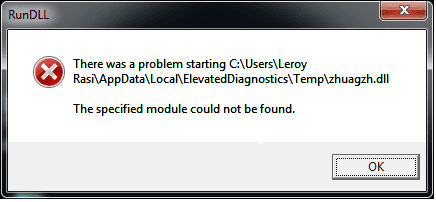
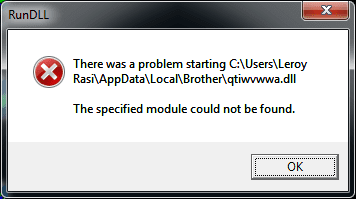
also getting the attached errors at startup
 

Attachments

  • 1.png
    1.png
    6.4 KB · Views: 23
  • 2.png
    2.png
    6.4 KB · Views: 23

My Computer

Computer Manufacturer/Model Number
Self built
OS
Microsoft Windows 7 Professional 64-bit 7601 Multiprocessor Free Service Pack 1
CPU
Intel(R) Core(TM) i7-2600K CPU @ 3.40GHz
Motherboard
ASUSTeK Computer INC. P8P67 PRO
Memory
G Skill F3-17000CL9-4GBXLD 16.00 GB
Graphics Card(s)
(1) NVIDIA GeForce GTX 560 Ti (2) LogMeIn Mirror Driver
Sound Card
(1) Bluetooth Audio Device (2) NVIDIA High Definition Audi
Hard Drives
(1) INTEL SSDSC2MH120A2
(2) ST33000651AS
(3) WDC WD2001FASS-00W2B0
(4) WDC WD20 01FASS-00W2B0 SCSI Disk Device
(5) WDC WD20 01FASS-00W2B0 SCSI Disk Device
Some quick comments before i'm off to bed for the night

Try THIS MS KB tho at best that KB applies to USB 2.0. I'm really puzzled how both your USB 2 and 3 are now unsigned :confused:

That said, those last 2 screen strongly indicate (to me) that you have or had a malware infection. Malware might be the source of the driver corruption.

I'm relatively new here so not sure if seven forums has a malware removal help thread (you can go look). I do know that bleepingcomputer and TechSpot have them if need be. You can try running the following on your own (plus your own a/v) but if they don't help i think you should be checked out to see that malware has been removed
> Malwarebytes
> SuperAntispyware
> AdwCleaner
 

My Computer

Computer type
PC/Desktop
Computer Manufacturer/Model Number
Dell Optiplex 360 and Optiplex 755
OS
Desk 1: Win 7 Pro x32; Desk 2: Windows 10 x64
Hard Drives
500GB Crucial SSD in both Desktops
Other Info
Buffalo 6TB NAS, Raid 1
p.s. just to explain... those rather random sounding .dll names are often signs of a malware that "recreates" itself. The dll's may have been removed but references to them still exist so you get those errors.

The virus may create 2 or 3 instances of itself (generating these random names). Unless you (or your a/v) can kill all instances at the same time, any remaining instances just generate new instances with new random names!

/* EDIT */
One more thought. You had Acronis installed. When was the last time you imaged your disk? Restoring a disk image might be the quickest solution???
 

My Computer

Computer type
PC/Desktop
Computer Manufacturer/Model Number
Dell Optiplex 360 and Optiplex 755
OS
Desk 1: Win 7 Pro x32; Desk 2: Windows 10 x64
Hard Drives
500GB Crucial SSD in both Desktops
Other Info
Buffalo 6TB NAS, Raid 1
Some quick comments before i'm off to bed for the night
Thank you

Try THIS MS KB tho at best that KB applies to USB 2.0.
Done with no improvement

I'm really puzzled how both your USB 2 and 3 are now unsigned :confused:
Me too!

That said, those last 2 screen strongly indicate (to me) that you have or had a malware infection. Malware might be the source of the driver corruption.
?

I'm relatively new here so not sure if seven forums has a malware removal help thread (you can go look). I do know that bleepingcomputer and TechSpot have them if need be. You can try running the following on your own (plus your own a/v) but if they don't help i think you should be checked out to see that malware has been removed
> Malwarebytes
> SuperAntispyware
> AdwCleaner
Done with no improvement
 

My Computer

Computer Manufacturer/Model Number
Self built
OS
Microsoft Windows 7 Professional 64-bit 7601 Multiprocessor Free Service Pack 1
CPU
Intel(R) Core(TM) i7-2600K CPU @ 3.40GHz
Motherboard
ASUSTeK Computer INC. P8P67 PRO
Memory
G Skill F3-17000CL9-4GBXLD 16.00 GB
Graphics Card(s)
(1) NVIDIA GeForce GTX 560 Ti (2) LogMeIn Mirror Driver
Sound Card
(1) Bluetooth Audio Device (2) NVIDIA High Definition Audi
Hard Drives
(1) INTEL SSDSC2MH120A2
(2) ST33000651AS
(3) WDC WD2001FASS-00W2B0
(4) WDC WD20 01FASS-00W2B0 SCSI Disk Device
(5) WDC WD20 01FASS-00W2B0 SCSI Disk Device
p.s. just to explain... those rather random sounding .dll names are often signs of a malware that "recreates" itself. The dll's may have been removed but references to them still exist so you get those errors.

The virus may create 2 or 3 instances of itself (generating these random names). Unless you (or your a/v) can kill all instances at the same time, any remaining instances just generate new instances with new random names!

/* EDIT */
One more thought. You had Acronis installed. When was the last time you imaged your disk? Restoring a disk image might be the quickest solution???
Was installed but last backup was Jan...
 

My Computer

Computer Manufacturer/Model Number
Self built
OS
Microsoft Windows 7 Professional 64-bit 7601 Multiprocessor Free Service Pack 1
CPU
Intel(R) Core(TM) i7-2600K CPU @ 3.40GHz
Motherboard
ASUSTeK Computer INC. P8P67 PRO
Memory
G Skill F3-17000CL9-4GBXLD 16.00 GB
Graphics Card(s)
(1) NVIDIA GeForce GTX 560 Ti (2) LogMeIn Mirror Driver
Sound Card
(1) Bluetooth Audio Device (2) NVIDIA High Definition Audi
Hard Drives
(1) INTEL SSDSC2MH120A2
(2) ST33000651AS
(3) WDC WD2001FASS-00W2B0
(4) WDC WD20 01FASS-00W2B0 SCSI Disk Device
(5) WDC WD20 01FASS-00W2B0 SCSI Disk Device
Well, if this meets your needs OK:
> Backup only the areas containing your personal data (My Docs, DEsktop, music, video, etc.... )
> Restore the January image
> Over write with your data backups

You'd have to do all the Windows and programs updates and and repeat any new installs needed.

Otherwise, do the malware route
 

My Computer

Computer type
PC/Desktop
Computer Manufacturer/Model Number
Dell Optiplex 360 and Optiplex 755
OS
Desk 1: Win 7 Pro x32; Desk 2: Windows 10 x64
Hard Drives
500GB Crucial SSD in both Desktops
Other Info
Buffalo 6TB NAS, Raid 1
Well, if this meets your needs OK:
> Backup only the areas containing your personal data (My Docs, DEsktop, music, video, etc.... )
> Restore the January image
> Over write with your data backups

You'd have to do all the Windows and programs updates and and repeat any new installs needed.

Otherwise, do the malware route

HI CG
Have run into problems restoring my Jan Acronis image. Even though everything went smoothly during recovery and I can see all of the folders are in their normal position, I cannot boot and get BOOTMGR missing error.
When I try to use install or repair disk to fix I get the 'This version of System Recovery Options is not compatible' error
Any suggestions?
 

My Computer

Computer Manufacturer/Model Number
Self built
OS
Microsoft Windows 7 Professional 64-bit 7601 Multiprocessor Free Service Pack 1
CPU
Intel(R) Core(TM) i7-2600K CPU @ 3.40GHz
Motherboard
ASUSTeK Computer INC. P8P67 PRO
Memory
G Skill F3-17000CL9-4GBXLD 16.00 GB
Graphics Card(s)
(1) NVIDIA GeForce GTX 560 Ti (2) LogMeIn Mirror Driver
Sound Card
(1) Bluetooth Audio Device (2) NVIDIA High Definition Audi
Hard Drives
(1) INTEL SSDSC2MH120A2
(2) ST33000651AS
(3) WDC WD2001FASS-00W2B0
(4) WDC WD20 01FASS-00W2B0 SCSI Disk Device
(5) WDC WD20 01FASS-00W2B0 SCSI Disk Device
You recovered Win 7 SP1. Are you using a Win 7 (pre-sp1) disk?
1) There are downloadable (legit) copies of Win 7 available (referred to in these forums as well. But would have to go find/remember those links0
2) For now, it's probably good to also start new thread in another forum for this specific boot up problem. (Maybe in forum for installation problems? IDK). Probably good to solicit help from others as well for this issue

meantime, also let me know if it's an SP1 vs non-SP1 issue. Can try to find those download links

/* EDIT */
I found a reference if you need an SP1 disk. http://www.w7forums.com/threads/official-windows-7-sp1-iso-image-downloads.12325/
 

My Computer

Computer type
PC/Desktop
Computer Manufacturer/Model Number
Dell Optiplex 360 and Optiplex 755
OS
Desk 1: Win 7 Pro x32; Desk 2: Windows 10 x64
Hard Drives
500GB Crucial SSD in both Desktops
Other Info
Buffalo 6TB NAS, Raid 1
Using SP1 disks
Ok. Will post elsewhere
 

My Computer

Computer Manufacturer/Model Number
Self built
OS
Microsoft Windows 7 Professional 64-bit 7601 Multiprocessor Free Service Pack 1
CPU
Intel(R) Core(TM) i7-2600K CPU @ 3.40GHz
Motherboard
ASUSTeK Computer INC. P8P67 PRO
Memory
G Skill F3-17000CL9-4GBXLD 16.00 GB
Graphics Card(s)
(1) NVIDIA GeForce GTX 560 Ti (2) LogMeIn Mirror Driver
Sound Card
(1) Bluetooth Audio Device (2) NVIDIA High Definition Audi
Hard Drives
(1) INTEL SSDSC2MH120A2
(2) ST33000651AS
(3) WDC WD2001FASS-00W2B0
(4) WDC WD20 01FASS-00W2B0 SCSI Disk Device
(5) WDC WD20 01FASS-00W2B0 SCSI Disk Device
Back
Top