Solved Code 80092004 with updates KB4493132 and KB4512506 (and other issues)

Ladyhawk

New member
Local time
6:47 AM
Messages
8
I first noticed there was a problem when cmd.exe disappeared. I used Windows PowerShell to run sfc /scannow and there are definitely errors. When I try to download and install updates KB4493132 and KB4512506 I get error code 80092004. The system seems unstable. Google Chrome keeps crashing and while I was writing this I got a BSOD. So, please help me if you can.

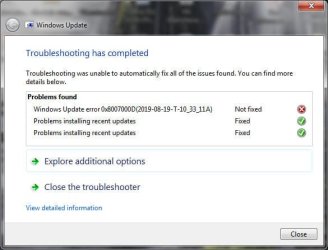
1. SURT gave me the attached error.
2. sfc /scannow produced lots of errors in the CBS.log (attached as CBS.zip)
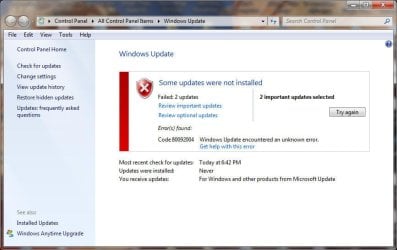
3. Error 80092004 while trying to download and install updates KB4493132 and KB4512506 (image attached).

Things I've tried that were good ideas:

1. Full virus scan with ZA and Malwarebytes
2. chkdsk c: /f /r /x (it found and fixed some things, but I'm still having issues)
3. Windows repair (boot from DVD)

Things I tried that might not have been such a good idea:

1. Installing Windows6.1-KB947821-v34-x64.msu
2. Tried installing SSU KB4490628. Says it's already installed
3. Tried installing SHA-2 Update KB4474419. Says it's already installed.

A lot more has happened, but let's keep not cloud the issue any further.
 

My Computer My Computer

At a glance

Windows 7 Home Premium 64-bit SP1Intel Core i7 2600K Sandy Bridge 32nm8 GB Single Channel DDR3 @802MHz2048MB ATI AMD Radeon HD6970
Computer type
PC/Desktop
Computer Manufacturer/Model Number
Custom Build
OS
Windows 7 Home Premium 64-bit SP1
CPU
Intel Core i7 2600K Sandy Bridge 32nm
Motherboard
Gigabyte Z68A-D3H-B3 (Socket 1155)
Memory
8 GB Single Channel DDR3 @802MHz
Graphics Card(s)
2048MB ATI AMD Radeon HD6970
Hard Drives
Main: 931 Western Digital WDC WD10EZRX-00A3KB0 SATA
Two Backups: 931 Western Digital WD1001FALS-00J7B0 SATA
Two External: 1397 Samsung HD155UI USB
Antivirus
Zone Alarm and Malwarebytes
Browser
Google Chrome
Hi Ladyhawk
Welcome to SevenForums!
chkdsk c: /f /r /x (it found and fixed some things, but I'm still having issues)
please run
sfc /scannow
reboot
run SURT64
& post CBS folder

FYI: chkdsk /r would have sufficed /f implied by /r /x not needed
 

My Computer My Computer

At a glance

Win 10 x64, Linux Lite, Win 7 x64, BlackArch,...
Computer type
PC/Desktop
Computer Manufacturer/Model Number
HP Desktop & Compaq Laptop
OS
Win 10 x64, Linux Lite, Win 7 x64, BlackArch, & Kali
Hard Drives
Samsung 850 Pro 256Gb,
Hitachi HDD 1Tb,
Crucial MX SSD 250Gb
Segate 3Tb USB 3.0 Ext. Backup HDD
Internet Speed
150Mbps dn, 20Mbps up
Antivirus
Avast Free, Malwarebytes Anti-Exploit & Anti-Ransomware
Browser
Firefox, Chrome, Opera, & VPN
OK, I thought I attached those things to my OP. Regardless, I followed your instructions and did everything again.

I'll try attaching the new files...oh, the upload button wasn't showing in the attachments window. I thought it might be something like that. Here goes.

Also, I had a MEMORY_MANAGEMENT BSOD in the night...ugh. And my HDD is running constantly and I'm not sure why. Any help would be very much appreciated.
 

Attachments

  • SURT Windows Update Error.jpg
    SURT Windows Update Error.jpg
    29.8 KB · Views: 21
  • Windows Update Error 80092004.jpg
    Windows Update Error 80092004.jpg
    50.8 KB · Views: 0

My Computer My Computer

At a glance

Windows 7 Home Premium 64-bit SP1Intel Core i7 2600K Sandy Bridge 32nm8 GB Single Channel DDR3 @802MHz2048MB ATI AMD Radeon HD6970
Computer type
PC/Desktop
Computer Manufacturer/Model Number
Custom Build
OS
Windows 7 Home Premium 64-bit SP1
CPU
Intel Core i7 2600K Sandy Bridge 32nm
Motherboard
Gigabyte Z68A-D3H-B3 (Socket 1155)
Memory
8 GB Single Channel DDR3 @802MHz
Graphics Card(s)
2048MB ATI AMD Radeon HD6970
Hard Drives
Main: 931 Western Digital WDC WD10EZRX-00A3KB0 SATA
Two Backups: 931 Western Digital WD1001FALS-00J7B0 SATA
Two External: 1397 Samsung HD155UI USB
Antivirus
Zone Alarm and Malwarebytes
Browser
Google Chrome

My Computer My Computer

At a glance

Win 7 HP SP1 64-bit Vista HB SP2 32-bit Linux...Intel(R) Pentium(R) CPU P6200 @ 2.13GHz4.00 GBIntel(R) Graphics Media Accelerator HD
Computer type
Laptop
Computer Manufacturer/Model Number
Fujitsu LIFEBOOK
OS
Win 7 HP SP1 64-bit Vista HB SP2 32-bit Linux Mint 18.3
CPU
Intel(R) Pentium(R) CPU P6200 @ 2.13GHz
Motherboard
FUJITSU FJNBB06
Memory
4.00 GB
Graphics Card(s)
Intel(R) Graphics Media Accelerator HD
Sound Card
[1] Realtek High Definition Audio [2] Intel(R) Display Audio
Screen Resolution
1366 x 768 x 32 bits (4294967296 colors) @ 59 Hz
Hard Drives
TOSHIBA MK5076GSX
Antivirus
AVG FREE
Yes. The steps I took after reading that page are in the OP:

2. Tried installing SSU KB4490628. Says it's already installed
3. Tried installing SHA-2 Update KB4474419. Says it's already installed.

Is there something I missed? On edit: the direct download links at the bottom of the post. OK.

I thought about trying to download these manually and install them, but I'm a bit nervous about doing that. I can always do a system restore, I suppose.
 

My Computer My Computer

At a glance

Windows 7 Home Premium 64-bit SP1Intel Core i7 2600K Sandy Bridge 32nm8 GB Single Channel DDR3 @802MHz2048MB ATI AMD Radeon HD6970
Computer type
PC/Desktop
Computer Manufacturer/Model Number
Custom Build
OS
Windows 7 Home Premium 64-bit SP1
CPU
Intel Core i7 2600K Sandy Bridge 32nm
Motherboard
Gigabyte Z68A-D3H-B3 (Socket 1155)
Memory
8 GB Single Channel DDR3 @802MHz
Graphics Card(s)
2048MB ATI AMD Radeon HD6970
Hard Drives
Main: 931 Western Digital WDC WD10EZRX-00A3KB0 SATA
Two Backups: 931 Western Digital WD1001FALS-00J7B0 SATA
Two External: 1397 Samsung HD155UI USB
Antivirus
Zone Alarm and Malwarebytes
Browser
Google Chrome
Hi Ladyhawk,

Is there something I missed? On edit: the direct download links at the bottom of the post. OK.

I thought about trying to download these manually and install them, but I'm a bit nervous about doing that. I can always do a system restore, I suppose.

I don't quite understand what you mean by On edit: the direct download links at the bottom of the post.

You could try downloading the .msu files and run them directly or run/install them using wusa!
 

My Computer My Computer

At a glance

Win 7 HP SP1 64-bit Vista HB SP2 32-bit Linux...Intel(R) Pentium(R) CPU P6200 @ 2.13GHz4.00 GBIntel(R) Graphics Media Accelerator HD
Computer type
Laptop
Computer Manufacturer/Model Number
Fujitsu LIFEBOOK
OS
Win 7 HP SP1 64-bit Vista HB SP2 32-bit Linux Mint 18.3
CPU
Intel(R) Pentium(R) CPU P6200 @ 2.13GHz
Motherboard
FUJITSU FJNBB06
Memory
4.00 GB
Graphics Card(s)
Intel(R) Graphics Media Accelerator HD
Sound Card
[1] Realtek High Definition Audio [2] Intel(R) Display Audio
Screen Resolution
1366 x 768 x 32 bits (4294967296 colors) @ 59 Hz
Hard Drives
TOSHIBA MK5076GSX
Antivirus
AVG FREE
If you have bad hardware then making further changes might just further corrupt your windows installation. My suggestion is to do a system restore back to when you were stable. MEMORY_MANAGEMENT BSOD often indicates bad ram, so after the restore I would run these two tools.

404 - Content Not Found | Microsoft Docs)
Memtest86+ - Advanced Memory Diagnostic Tool
If they run with no errors chances are your memory is okay, if not you could next try running with just one DIMM instead of two (assuming you have two!), if the system runs fine with one but not the other then you know which one is bad.

Your symptoms could also be a bad motherboard or boot drive.
 

My Computer My Computer

At a glance

Win7 pro x64stock i7 7700kCorsair Vengeance LPX 16GB (2x8GB) DDR4 @ 320...integrated Intel HD 630
Computer type
PC/Desktop
Computer Manufacturer/Model Number
diy
OS
Win7 pro x64
CPU
stock i7 7700k
Motherboard
Gigabyte Z270N-WIFI mini-ITX
Memory
Corsair Vengeance LPX 16GB (2x8GB) DDR4 @ 3200MHz
Graphics Card(s)
integrated Intel HD 630
Sound Card
onboard Realtek ALC1220
Monitor(s) Displays
two vertically mounted samsung 55" 4k un55mu8000
Screen Resolution
1920x1280
Hard Drives
256GB Samsung EVO 960 M.2 pci-e NVMe SSD
PSU
SilverStone Nightjar ST45NF 450Watt Fanless
Case
No case. Motherboard is mounted directly onto power supply
Cooling
Evercool low profile 815EP with Panaflow 12L fan at 7v
Keyboard
Ortek MCK-86 mini
Mouse
Belkin 5-button USB
Internet Speed
spectrum 400mbps
Well, the installation failed.

In truth, I am worried about hardware failure because 10 days ago or so, a piece came off of the front panel and the affected USB port shorted and caused a complete crash. At first I thought it wasn't going to come back on at all. But it did. To my surprise, it was actually stable...for awhile. That incident could have fried motherboard components, memory, who knows what? I've been hoping it simply corrupted my Windows installation.

I do have an image I could restore to...I just want to find a different HDD to put it on. Probably that should be my next step. Maybe it should have been my first. I can use the Win CD to run a memory scan to see if the RAM was affected. But if so, there could be other issues, as well.
 

Attachments

  • Windows Update KB4512506 not installed.jpg
    Windows Update KB4512506 not installed.jpg
    18.6 KB · Views: 20

My Computer My Computer

At a glance

Windows 7 Home Premium 64-bit SP1Intel Core i7 2600K Sandy Bridge 32nm8 GB Single Channel DDR3 @802MHz2048MB ATI AMD Radeon HD6970
Computer type
PC/Desktop
Computer Manufacturer/Model Number
Custom Build
OS
Windows 7 Home Premium 64-bit SP1
CPU
Intel Core i7 2600K Sandy Bridge 32nm
Motherboard
Gigabyte Z68A-D3H-B3 (Socket 1155)
Memory
8 GB Single Channel DDR3 @802MHz
Graphics Card(s)
2048MB ATI AMD Radeon HD6970
Hard Drives
Main: 931 Western Digital WDC WD10EZRX-00A3KB0 SATA
Two Backups: 931 Western Digital WD1001FALS-00J7B0 SATA
Two External: 1397 Samsung HD155UI USB
Antivirus
Zone Alarm and Malwarebytes
Browser
Google Chrome
I do have an image I could restore to...I just want to find a different HDD to put it on.


That is the best thing. If the restored image on a different hd works ok, then you know that problem is the current windows installation you are struggling with - or the hd it is on.
 

My Computers My Computers

  • At a glance

    7 X64i5 84002x8gb 3200mhz
    Computer type
    PC/Desktop
    OS
    7 X64
    CPU
    i5 8400
    Motherboard
    gigabyte b365m ds3h
    Memory
    2x8gb 3200mhz
    Hard Drives
    various
    PSU
    pure power 11 400w cm
    Case
    Coolermaster
    Cooling
    cryorig m9i
  • At a glance

    7x64g54008gb ddr4 2400
    Computer type
    PC/Desktop
    OS
    7x64
    CPU
    g5400
    Motherboard
    ga b365m ds3h
    Memory
    8gb ddr4 2400
    PSU
    xfx pro 450w
If you have bad hardware then making further changes might just further corrupt your windows installation. My suggestion is to do a system restore back to when you were stable. MEMORY_MANAGEMENT BSOD often indicates bad ram, so after the restore I would run these two tools.

404 - Content Not Found | Microsoft Docs)
Memtest86+ - Advanced Memory Diagnostic Tool
If they run with no errors chances are your memory is okay, if not you could next try running with just one DIMM instead of two (assuming you have two!), if the system runs fine with one but not the other then you know which one is bad.

Your symptoms could also be a bad motherboard or boot drive.

Your first link doesn't work. Could you please re-post?

So, this evening Windows Explorer crashed and the system is much more stable without it. I just restarted Windows Explorer and I expect problems soon. Windows Explorer wasn't exactly reliable before the computer got zapped, sometimes hanging up on right-clicks, etc., but if I go to a point in time before the USB port zapped the system, maybe Windows will be more amenable to fixing. I'm hoping the zap corrupted windows and that my attempts to fix it only made it worse. I'm hoping there is no hardware damage.

I've been getting rid of unnecessary hardware, like a DVD-ROM that the system recognized as SCSI because it was on a PCI card with IDE connectors. In BIOS, the system (of course) couldn't see it. I'm going to rip out a PCI card with USB ports on it. I've suspected the card of causing issues. I'm going to completely disconnect the malfunctioning front panel USB, which is simply taped over right now. The fewer pieces of hardware, the easier it should be to figure out if the main components have any issues.

As for files, I think there are only a few photos, videos, etc. I'll need to re-add to my system after an image restore.

I'll do the memory test after the restore...looks like it requires making a bootable DVD or thumb drive. I'll worry about that later.
 

My Computer My Computer

At a glance

Windows 7 Home Premium 64-bit SP1Intel Core i7 2600K Sandy Bridge 32nm8 GB Single Channel DDR3 @802MHz2048MB ATI AMD Radeon HD6970
Computer type
PC/Desktop
Computer Manufacturer/Model Number
Custom Build
OS
Windows 7 Home Premium 64-bit SP1
CPU
Intel Core i7 2600K Sandy Bridge 32nm
Motherboard
Gigabyte Z68A-D3H-B3 (Socket 1155)
Memory
8 GB Single Channel DDR3 @802MHz
Graphics Card(s)
2048MB ATI AMD Radeon HD6970
Hard Drives
Main: 931 Western Digital WDC WD10EZRX-00A3KB0 SATA
Two Backups: 931 Western Digital WD1001FALS-00J7B0 SATA
Two External: 1397 Samsung HD155UI USB
Antivirus
Zone Alarm and Malwarebytes
Browser
Google Chrome

My Computer My Computer

At a glance

Win7 pro x64stock i7 7700kCorsair Vengeance LPX 16GB (2x8GB) DDR4 @ 320...integrated Intel HD 630
Computer type
PC/Desktop
Computer Manufacturer/Model Number
diy
OS
Win7 pro x64
CPU
stock i7 7700k
Motherboard
Gigabyte Z270N-WIFI mini-ITX
Memory
Corsair Vengeance LPX 16GB (2x8GB) DDR4 @ 3200MHz
Graphics Card(s)
integrated Intel HD 630
Sound Card
onboard Realtek ALC1220
Monitor(s) Displays
two vertically mounted samsung 55" 4k un55mu8000
Screen Resolution
1920x1280
Hard Drives
256GB Samsung EVO 960 M.2 pci-e NVMe SSD
PSU
SilverStone Nightjar ST45NF 450Watt Fanless
Case
No case. Motherboard is mounted directly onto power supply
Cooling
Evercool low profile 815EP with Panaflow 12L fan at 7v
Keyboard
Ortek MCK-86 mini
Mouse
Belkin 5-button USB
Internet Speed
spectrum 400mbps
First of all, I ran memtest and everything checked out OK, but restoring an image from the day my computer crashed didn't work because the problem apparently pre-dates the crash...ugh.

I'm back to square one, but in some ways, that's good maybe? I haven't done anything destructive to try to fix the problem. I'm just going to do a sfc /scannow (which probably won't accomplish anything) and run the system update readiness program and try again

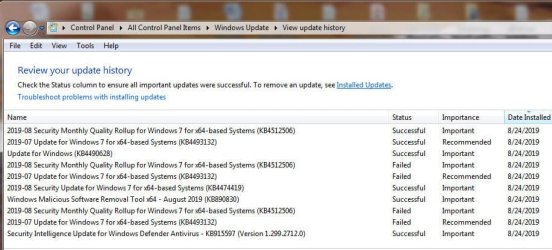
Perhaps someone could help me pinpoint the dates this corruption could have happened? Right now, Windows is telling me it has never updated, but based on the updates that will not install--for example, KB4512506 is a monthly rollup update--maybe you can help me figure out the last similar update I installed? I'll attach a very short list of updates that either succeeded or failed.

Doing a clean installation right now is simply out of the question. I'm not even sure I want to restore an old image. The problem is I need a working Windows 7 computer, but I also need to build a new Windows 10 computer. I used to keep up with hardware news, but I haven't bothered in many years, so I'm worried about building a new system. I'm also worried about losing certain programs that won't run on a Windows 10 system.

I could really use some help here. I've been working on this for what seems like forever. I had planned to keep this machine for Win 7 and then build a new PC for Win 10. But it isn't looking good.

Is there a way to do an in-place reinstallation of Windows? Using repair options from the Win 7 disc have failed.
 

Attachments

  • Installed Windows Updates.jpg
    Installed Windows Updates.jpg
    47.4 KB · Views: 0

My Computer My Computer

At a glance

Windows 7 Home Premium 64-bit SP1Intel Core i7 2600K Sandy Bridge 32nm8 GB Single Channel DDR3 @802MHz2048MB ATI AMD Radeon HD6970
Computer type
PC/Desktop
Computer Manufacturer/Model Number
Custom Build
OS
Windows 7 Home Premium 64-bit SP1
CPU
Intel Core i7 2600K Sandy Bridge 32nm
Motherboard
Gigabyte Z68A-D3H-B3 (Socket 1155)
Memory
8 GB Single Channel DDR3 @802MHz
Graphics Card(s)
2048MB ATI AMD Radeon HD6970
Hard Drives
Main: 931 Western Digital WDC WD10EZRX-00A3KB0 SATA
Two Backups: 931 Western Digital WD1001FALS-00J7B0 SATA
Two External: 1397 Samsung HD155UI USB
Antivirus
Zone Alarm and Malwarebytes
Browser
Google Chrome
OK, I think the update error was a Microsoft issue and not an issue with my PC. The zap it got on the 8th made me worried about my hardware and corruption of windows, but the hardware tests fine. I still think there may be other issues with my Windows installation, but these two updates finally installed after I went back in time to an image created on the 8th and started troubleshooting again. Somehow, this time the correct version of KB4490628 allowed my system to download and install these two updates. I needed the SHA-2 "stuff." I knew I needed those two files the first time I tried to fix it, but before I downloaded them, I also installed a Windows file I shouldn't have. It probably kept the fix from working.

Now I need to make a restore point and finish updating Windows.

Thanks to everyone!
 

Attachments

  • Success!.jpg
    Success!.jpg
    71.6 KB · Views: 0

My Computer My Computer

At a glance

Windows 7 Home Premium 64-bit SP1Intel Core i7 2600K Sandy Bridge 32nm8 GB Single Channel DDR3 @802MHz2048MB ATI AMD Radeon HD6970
Computer type
PC/Desktop
Computer Manufacturer/Model Number
Custom Build
OS
Windows 7 Home Premium 64-bit SP1
CPU
Intel Core i7 2600K Sandy Bridge 32nm
Motherboard
Gigabyte Z68A-D3H-B3 (Socket 1155)
Memory
8 GB Single Channel DDR3 @802MHz
Graphics Card(s)
2048MB ATI AMD Radeon HD6970
Hard Drives
Main: 931 Western Digital WDC WD10EZRX-00A3KB0 SATA
Two Backups: 931 Western Digital WD1001FALS-00J7B0 SATA
Two External: 1397 Samsung HD155UI USB
Antivirus
Zone Alarm and Malwarebytes
Browser
Google Chrome
Back
Top