
Codec Problem w/ Clean install

TheTalker

New member
Member
VIP
Local time
8:18 AM
Messages
143
I'm using Windows 7 Ultimate x64

I've had a lot of problems with my computer due to me being a nut so I decided to do a complete clean install. It's completely clean.

So I needed a codec. I installed K-Lite Codec Pack. But it's not working. My audio and video both sound and look horrible. There's these rainbow colors across firefox. The videos have rainbow colors/white lines across it.

My album covers in media player are all rainbow colored.

I uninstalled K-Lite, restarted, and it's still not working. I also updated my audio and video drivers to the latest.

Can anyone help me please?!

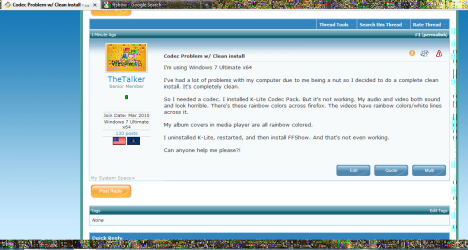
Included is a picture showing the discoloration in FireFox. That is the color I'm seeing all over my computer.
 

Attachments
  • Untitled.png
    Untitled.png
    65.8 KB · Views: 38

My Computer

Computer type
PC/Desktop
Computer Manufacturer/Model Number
Custom build
OS
Windows 7 Home Premium x64
CPU
Intel Core i5-4690k
Motherboard
Gigabyte H97 SATA Express M.2 SSD UEFI DualBIOS DDR3 1600 LG
Memory
8GB
Graphics Card(s)
EVGA GeForce GTX 970
Monitor(s) Displays
2
Hard Drives
2:
- Samsung 850 EVO 250GB 2.5-Inch SATA III Internal SSD (MZ-75E250B/AM)
- Crucial MX300 275GB SATA 2.5 Inch Internal Solid State Drive - CT275MX300SSD1
PSU
Corsair 650x
Case
C70
Cooling
4 Fans
Internet Speed
Comcast Cable 22mbs
Antivirus
Microsoft Security Essentials
Browser
Chrome
I'm using Windows 7 Ultimate x64

I've had a lot of problems with my computer due to me being a nut so I decided to do a complete clean install. It's completely clean.

So I needed a codec. I installed K-Lite Codec Pack. But it's not working. My audio and video both sound and look horrible. There's these rainbow colors across firefox. The videos have rainbow colors/white lines across it.

My album covers in media player are all rainbow colored.

I uninstalled K-Lite, restarted, and it's still not working. I also updated my audio and video drivers to the latest.

Can anyone help me please?!

Included is a picture showing the discoloration in FireFox. That is the color I'm seeing all over my computer.

It just looks like FF is glassed and showing the wallpaper. Why did you need a codec?
 

My Computer

Computer Manufacturer/Model Number
HP Pavillion dv-7 1005 Tx
OS
Win 8 Release candidate 8400
CPU
[email protected]
Memory
4 gigs
Graphics Card(s)
Nvidia 9600M
Sound Card
HD built-in
Monitor(s) Displays
17" Wxga
Screen Resolution
1440x900
Cooling
none
Internet Speed
45Mb down 5Mb up
K-Lite is uninstalled and I'm still seeing that rainbow discoloration. Also, I watch videos with the .mkv file extension so I need a codec.

Thank you very much for replying.
 

My Computer

Computer type
PC/Desktop
Computer Manufacturer/Model Number
Custom build
OS
Windows 7 Home Premium x64
CPU
Intel Core i5-4690k
Motherboard
Gigabyte H97 SATA Express M.2 SSD UEFI DualBIOS DDR3 1600 LG
Memory
8GB
Graphics Card(s)
EVGA GeForce GTX 970
Monitor(s) Displays
2
Hard Drives
2:
- Samsung 850 EVO 250GB 2.5-Inch SATA III Internal SSD (MZ-75E250B/AM)
- Crucial MX300 275GB SATA 2.5 Inch Internal Solid State Drive - CT275MX300SSD1
PSU
Corsair 650x
Case
C70
Cooling
4 Fans
Internet Speed
Comcast Cable 22mbs
Antivirus
Microsoft Security Essentials
Browser
Chrome
K-Lite is uninstalled and I'm still seeing that rainbow discoloration. Also, I watch videos with the .mkv file extension so I need a codec.

Thank you very much for replying.


What are you using for the player? Codecs sometimes dont have the best un-installers.
 

My Computer

Computer Manufacturer/Model Number
HP Pavillion dv-7 1005 Tx
OS
Win 8 Release candidate 8400
CPU
[email protected]
Memory
4 gigs
Graphics Card(s)
Nvidia 9600M
Sound Card
HD built-in
Monitor(s) Displays
17" Wxga
Screen Resolution
1440x900
Cooling
none
Internet Speed
45Mb down 5Mb up
Maybe the video driver got borked by the codec pack? You could try to re-install the video driver.

Or perhaps a Sytem Restore might be in order at this point. With any luck at all, Windows made a Restore point when you installed the codecs...
 

My Computer

Computer Manufacturer/Model Number
Dell E520
OS
Windows 7 Enterprise x64 SP1, Ubuntu 11.04 x64
CPU
Core2Quad Q6700 - 2.66 GHz
Motherboard
Whatever the heck Dell put in there...
Memory
8 Gig Mushkin DDR2 800 MHz
Graphics Card(s)
EVGA NVIDIA 9800GT - 512MB DDR3
Monitor(s) Displays
2 x 19" ViewSonic LCD
Screen Resolution
2560x1024
Hard Drives
1 Intel X25-M 120G SSD, 1 300G VelociRaptor, 1 WD Caviar Black 1TB
PSU
PCPower & Cooling Silencer 500 Watt
Internet Speed
15/2 Roadrunner Cable
Other Info
NOD32 AV - Malwarebytes
K-Lite is uninstalled and I'm still seeing that rainbow discoloration. Also, I watch videos with the .mkv file extension so I need a codec.

Thank you very much for replying.

What are you using for the player? Codecs sometimes dont have the best un-installers.


I'm using the VLC player. It worked fine before I formatted and it's working fine on my siblings PC's right now. So it's not the player as far I can see.

Since codecs sometimes don't have the best un-installers then what should I do? Maybe I'll try Ed's advice.

Maybe the video driver got borked by the codec pack? You could try to re-install the video driver.

Or perhaps a Sytem Restore might be in order at this point. With any luck at all, Windows made a Restore point when you installed the codecs...

I'll try the system restore first and then if that doesn't work I'll re-install the driver.
 

My Computer

Computer type
PC/Desktop
Computer Manufacturer/Model Number
Custom build
OS
Windows 7 Home Premium x64
CPU
Intel Core i5-4690k
Motherboard
Gigabyte H97 SATA Express M.2 SSD UEFI DualBIOS DDR3 1600 LG
Memory
8GB
Graphics Card(s)
EVGA GeForce GTX 970
Monitor(s) Displays
2
Hard Drives
2:
- Samsung 850 EVO 250GB 2.5-Inch SATA III Internal SSD (MZ-75E250B/AM)
- Crucial MX300 275GB SATA 2.5 Inch Internal Solid State Drive - CT275MX300SSD1
PSU
Corsair 650x
Case
C70
Cooling
4 Fans
Internet Speed
Comcast Cable 22mbs
Antivirus
Microsoft Security Essentials
Browser
Chrome
I just wanna throw out there that I re-installed the drivers and that didn't work. Please, anyone, help me.
 

My Computer

Computer type
PC/Desktop
Computer Manufacturer/Model Number
Custom build
OS
Windows 7 Home Premium x64
CPU
Intel Core i5-4690k
Motherboard
Gigabyte H97 SATA Express M.2 SSD UEFI DualBIOS DDR3 1600 LG
Memory
8GB
Graphics Card(s)
EVGA GeForce GTX 970
Monitor(s) Displays
2
Hard Drives
2:
- Samsung 850 EVO 250GB 2.5-Inch SATA III Internal SSD (MZ-75E250B/AM)
- Crucial MX300 275GB SATA 2.5 Inch Internal Solid State Drive - CT275MX300SSD1
PSU
Corsair 650x
Case
C70
Cooling
4 Fans
Internet Speed
Comcast Cable 22mbs
Antivirus
Microsoft Security Essentials
Browser
Chrome
Back
Top