codecs problems... with AVI

egozi44

New member
Member
VIP
Local time
6:20 PM
Messages
207
hi there

since i install CCCP 2011 (both of 2011 versions) some old programs stop to detect AVI formats in my pc and keep telling me it unknown format, video players working fine, and even editer programs such as movie maker, premier, and sony vegas, but old programs such as: 123 AVI to GIF Converter,Ulead GIF Animator 5,Gif Creator, and EximiousSoft GIF Creator v5.75 stop detected AVI!

i assume the new cccp stop using some sort of filter or codec, i also notice that even progrems like movie maker edit my videos in totaly low quality.. no mattar what i change in the options (and yea , i done clean install to cccp 2011 , delete the old one, restart, delete leftover, install cccp 2011). there is any kind of codec that can run AVI files without interfere with cccp?
 

My Computer

Computer type
PC/Desktop
Computer Manufacturer/Model Number
Self built custom
OS
Windows 7 SP1 Ultimate x64 bit
CPU
Intel I7 3770
Motherboard
Asus maximus v gene BIOS Version 1903
Memory
G.Skill Ares Quad Channel Low Profile 16 GB (4x4GB) DDR3
Graphics Card(s)
Asus GTX980 Ti 6GB STRIX-GTX980TI-DC3OC-6GD5-GAMING DirectCU
Monitor(s) Displays
AOC 24G2U/BK + DELL U2410 A010
Screen Resolution
1920x1080
Hard Drives
Samsung SSD 860 EVO 1TB


TOSHIBA MK1002TSKB 1TB 24/7, 7200 RPM, 64MB, SATA II


TOSHIBA MK1002TSKB 1TB 24/7, 7200 RPM, 64MB, SATA II
PSU
AcBel R88 1100W
Case
Corsair Carbide Series 500R White Mid-Tower Case
Cooling
ZALMAN CPU COOLER CNPS9900A LED + 2 more fans in the case
Keyboard
SteelSeries APEX 7
Mouse
SteelSeries Sensei 310
i end up trying Divx codec pack but it made explorer crash so i delete it... .. and it made my AVI tech preview which was work just fine...to stop working as well... *-*
 

My Computer

Computer type
PC/Desktop
Computer Manufacturer/Model Number
Self built custom
OS
Windows 7 SP1 Ultimate x64 bit
CPU
Intel I7 3770
Motherboard
Asus maximus v gene BIOS Version 1903
Memory
G.Skill Ares Quad Channel Low Profile 16 GB (4x4GB) DDR3
Graphics Card(s)
Asus GTX980 Ti 6GB STRIX-GTX980TI-DC3OC-6GD5-GAMING DirectCU
Monitor(s) Displays
AOC 24G2U/BK + DELL U2410 A010
Screen Resolution
1920x1080
Hard Drives
Samsung SSD 860 EVO 1TB


TOSHIBA MK1002TSKB 1TB 24/7, 7200 RPM, 64MB, SATA II


TOSHIBA MK1002TSKB 1TB 24/7, 7200 RPM, 64MB, SATA II
PSU
AcBel R88 1100W
Case
Corsair Carbide Series 500R White Mid-Tower Case
Cooling
ZALMAN CPU COOLER CNPS9900A LED + 2 more fans in the case
Keyboard
SteelSeries APEX 7
Mouse
SteelSeries Sensei 310
here make my question in order so it be easier

1. i'm sure there is AVI codec to download somewhere.. do anyone by any chance know one or know good site which i can get it from it?

2. if i install that Avi codec... it will interfre with CCCP up to the level it make it stop working or have bad time with video files?

3. as i said before.... my AVI tech preview are now gone after i delete and reinstall some players in that order: Quick time, itunes, divx without codecs ( i also try divx 7 codecs and then delete it and clean all the leftover because i saw it didn't help and ran back to 8 )
, and cccp itself. there is any chance i ruin something in the codec pack? even if i install CCCP the last and rergister the filters and rest the settings? (and ofc cancel any interfrence from divx)? i've done totally clean install to anyone of them before i reinstall them+ restart for each one. or there is chance that the AVI preview not was supported in cccp 2011 in the first place and Divx done something to make it show up?
 

My Computer

Computer type
PC/Desktop
Computer Manufacturer/Model Number
Self built custom
OS
Windows 7 SP1 Ultimate x64 bit
CPU
Intel I7 3770
Motherboard
Asus maximus v gene BIOS Version 1903
Memory
G.Skill Ares Quad Channel Low Profile 16 GB (4x4GB) DDR3
Graphics Card(s)
Asus GTX980 Ti 6GB STRIX-GTX980TI-DC3OC-6GD5-GAMING DirectCU
Monitor(s) Displays
AOC 24G2U/BK + DELL U2410 A010
Screen Resolution
1920x1080
Hard Drives
Samsung SSD 860 EVO 1TB


TOSHIBA MK1002TSKB 1TB 24/7, 7200 RPM, 64MB, SATA II


TOSHIBA MK1002TSKB 1TB 24/7, 7200 RPM, 64MB, SATA II
PSU
AcBel R88 1100W
Case
Corsair Carbide Series 500R White Mid-Tower Case
Cooling
ZALMAN CPU COOLER CNPS9900A LED + 2 more fans in the case
Keyboard
SteelSeries APEX 7
Mouse
SteelSeries Sensei 310
You should NOT install external codec packs into Win7.

You do NOT need CCCP, Shark, Klite, or any other codec pack. Win7 has built-in support for virtually every audio/video codec, including Divx/Xvid. There are 3rd-party media player programs (e.g. VideoLAN VLC, Winamp, etc.) that can be used to play the handful of files which use audio/video codecs that are not natively supported by Win7, but you should not install CCCP, Shark, Klite or other codec packs.

Note that AVI is not a "codec". Rather it is a "wrapper", with the A/V data streams inside it being compressed with a codec.


Anyway, see this other thread with my suggestions to another poster who is also having problems with AVI... again due to installation of outside 3rd-party external codec packs.

If you can't play a video (which happens to be in AVI format) then you may need a codec, but until you know what you need you shouldn't do things known to "break" Win7's multimedia foundation. And these external codec packs WILL break Win7.

Basically, I recommend UNINSTALLING all of the external codec packs and external Divx that you've installed so far. If you're lucky, you will revert back to native Win7 multimedia support... if you're lucky.

Then, as the instructions in that other thread describe, you should install (a) FFDSHOW and (b) Haali Splitter (Matroska), both of which are "safe" and relevant. Note that I also indicate that when you install FFDSHOW you should UN-CHECK many of the pre-checked audio/video codec items in order to retain Win7's built-in support for these audio/video formats. Again you do NOT want to interfere with Win7's built-in capabilities, even with FFDSHOW.

Finally, you should install GSpot Video Codec Appliance, which is a program that will read your problem AVI files and tell you what audio/video codecs are used inside of it and whether or not those codecs are installed on your system. This is what you should use to determine what you need on your system, and come back here if you have missing audio/video codecs required to play one of your AVI's.

But do NOT install CCCP, Shark, or Klite.

Read my other post for details.
 

My Computer

Computer type
PC/Desktop
Computer Manufacturer/Model Number
Home-built, two systems (1) and (2)
OS
Windows 7 Pro x64 (1), Win7 Pro X64 (2)
CPU
i5-3350p 3.1Ghz/6MB-cache (1); E8400 3.0Ghz/6MB-cache (2)
Motherboard
ASUS P8Z77-V Pro (1); ASUS P5Q3 (2)
Memory
8GB PC3-12800 DDR3 (1); 4GB PC3-10600 DDR3 (2)
Graphics Card(s)
ATI HD7750 (1), (see TV cards); ATI R7 250 (2)
Sound Card
Realtek ALC892 HD Audio (1); Realtek ALC1200 HD Audio (2)
Monitor(s) Displays
Eizo HD2441W LCD, Eizo S2433W (1); Eizo 24" S2433W (2)
Screen Resolution
1920x1200, 1920x1200 (1); 1920x1200 (2)
Hard Drives
(1) 1TB SATA-II (7200RPM), 2x2TB SATA-III (7200RPM), 250GB SATA-III (10000RPM) for OS; 2x2TB external USB 3.0

(2) 320GB SATA-II (7200RPM), 750GB SATA-II (7200RPM), 150GB SATA-II (10000RPM) for OS; 2TB external USB 3.0
PSU
Nesteq ECS-6001 600W (1); Nesteq ECS-5001 500W (2)
Case
Acousti-Case 360 (1) and (2)
Cooling
Noctua NH-U12P SE2 for CPU, 2x120mm case fans (1) and (2)
Keyboard
IBM PS/2 (1) and (2)
Mouse
Logitech MX Revolution wireless (1); Microsoft wired (2)
Internet Speed
100mbps down / 10mbps up
Antivirus
Microsoft Security Essentials; Malwarebyte Anti-Malware Pro
Browser
Firefox
Other Info
Ceton InfiniTV 4-tuner cablecard-enabled TV card as well as Hauppauge HVR-2250 OTA/ATSC 2-tuner TV card in (1), running under Win7 WMC
thanks for your help but you see...
i love to watch animes so CCCP is something that i must as one that don't understand in codecs xD (all come set and ready for play) and also my problem is not that i can't run avi file... i can run any video file without problem.. it just that old programs seems to stop detect AVI format, i have 2 theorys

one is that the cccp last version drop ceration codec that was needed (i use cccp 2009 till 3 months ago.. than pass to 10 and then after i happen to format my pc i pass to 11, and i not happend to check if version 2010 and 2011 was what that make the programs to stop working)

two is that the codecs too newer.. and the old progrems just not recognize them.

also i not 100% agree with you that win7 can run ANTHING without the necessary codec and filter, and even if it can most... the codecs and filters give it more options and add more stuff that make it easier and nive for the user
 

My Computer

Computer type
PC/Desktop
Computer Manufacturer/Model Number
Self built custom
OS
Windows 7 SP1 Ultimate x64 bit
CPU
Intel I7 3770
Motherboard
Asus maximus v gene BIOS Version 1903
Memory
G.Skill Ares Quad Channel Low Profile 16 GB (4x4GB) DDR3
Graphics Card(s)
Asus GTX980 Ti 6GB STRIX-GTX980TI-DC3OC-6GD5-GAMING DirectCU
Monitor(s) Displays
AOC 24G2U/BK + DELL U2410 A010
Screen Resolution
1920x1080
Hard Drives
Samsung SSD 860 EVO 1TB


TOSHIBA MK1002TSKB 1TB 24/7, 7200 RPM, 64MB, SATA II


TOSHIBA MK1002TSKB 1TB 24/7, 7200 RPM, 64MB, SATA II
PSU
AcBel R88 1100W
Case
Corsair Carbide Series 500R White Mid-Tower Case
Cooling
ZALMAN CPU COOLER CNPS9900A LED + 2 more fans in the case
Keyboard
SteelSeries APEX 7
Mouse
SteelSeries Sensei 310
also i not 100% agree with you that win7 can run ANTHING without the necessary codec and filter, and even if it can most... the codecs and filters give it more options and add more stuff that make it easier and nive for the user
I do agree with you, that Win7 doesn't truly support 100% of all media formats. That's true. So yes, sometimes external codecs must be installed... and keep your fingers crossed that there is no incompatibility with Win7's foundation which will result in other unexpected problems.

But it's also true that installing external codec packs into Win7 that were mostly developed originally for WinXP can cause significant problems in Win7. So you need to be reasonably selective as to what codecs you do install additionally.


Anyway, you should install the GSpot Codec Information Appliance, and then open your problem AVI files in it. The GSPot program will tell you exactly what audio/video codecs are internal to the AVI files, and whether or not you have them properly installed on your Windows 7 system.

You can also use GSpot to attempt to render the AVI (inside its own audio/video window) to confirm or deny that you do or do not have proper audio/video codecs installed to play your AVIs.

I'm not denying that you still are having problems playing certain AVI problems as you state. But I'm trying to get to the cause of the problem, which certainly may be codec-related. That's why you should install GSpot to actually investigate what codecs are inside of your problem AVI files. Then we can go from there.


Also, have you tried playing the problem clips using VideoLAN VLC?

This is a very popular and powerful media player and has much capability built into it "native", without requiring external codecs to be installed. Give it a try on your problem AVI's and see what happens.
 

My Computer

Computer type
PC/Desktop
Computer Manufacturer/Model Number
Home-built, two systems (1) and (2)
OS
Windows 7 Pro x64 (1), Win7 Pro X64 (2)
CPU
i5-3350p 3.1Ghz/6MB-cache (1); E8400 3.0Ghz/6MB-cache (2)
Motherboard
ASUS P8Z77-V Pro (1); ASUS P5Q3 (2)
Memory
8GB PC3-12800 DDR3 (1); 4GB PC3-10600 DDR3 (2)
Graphics Card(s)
ATI HD7750 (1), (see TV cards); ATI R7 250 (2)
Sound Card
Realtek ALC892 HD Audio (1); Realtek ALC1200 HD Audio (2)
Monitor(s) Displays
Eizo HD2441W LCD, Eizo S2433W (1); Eizo 24" S2433W (2)
Screen Resolution
1920x1200, 1920x1200 (1); 1920x1200 (2)
Hard Drives
(1) 1TB SATA-II (7200RPM), 2x2TB SATA-III (7200RPM), 250GB SATA-III (10000RPM) for OS; 2x2TB external USB 3.0

(2) 320GB SATA-II (7200RPM), 750GB SATA-II (7200RPM), 150GB SATA-II (10000RPM) for OS; 2TB external USB 3.0
PSU
Nesteq ECS-6001 600W (1); Nesteq ECS-5001 500W (2)
Case
Acousti-Case 360 (1) and (2)
Cooling
Noctua NH-U12P SE2 for CPU, 2x120mm case fans (1) and (2)
Keyboard
IBM PS/2 (1) and (2)
Mouse
Logitech MX Revolution wireless (1); Microsoft wired (2)
Internet Speed
100mbps down / 10mbps up
Antivirus
Microsoft Security Essentials; Malwarebyte Anti-Malware Pro
Browser
Firefox
Other Info
Ceton InfiniTV 4-tuner cablecard-enabled TV card as well as Hauppauge HVR-2250 OTA/ATSC 2-tuner TV card in (1), running under Win7 WMC
thanks and sorry i take so much time to reply (was busy)
, i will try what you said, actually i think the only way to solve the problem is by installing some specific codec that is missing... i wish i know what codec to delete from divx so i can use ONLY the avi codecs... but in divx 8 installation there is not option to choose like it was in divx 7... it to install all the codec pack or nothing..... and the dam MKV codecs making the explorer to crash because they show tech preview (divx i hate you@! : O) .

also CCCP abandon the XP support so i believe it use codecs that mostly for win7 and vista now.
as for VideoLAN VLC i know that player but i love MPC more, as i mention before i can play any file i want... playing videos is not the problem.... the problems come when i want to use old programs to edit these avi files (not progrems like movie maker and etc but old progrems like 123 AVI to GIF Converter,Ulead GIF Animator 5,Gif Creator, and EximiousSoft GIF Creator v5.75) so i don't see any reason to use that player as i don't seem to be needing it right now
 

My Computer

Computer type
PC/Desktop
Computer Manufacturer/Model Number
Self built custom
OS
Windows 7 SP1 Ultimate x64 bit
CPU
Intel I7 3770
Motherboard
Asus maximus v gene BIOS Version 1903
Memory
G.Skill Ares Quad Channel Low Profile 16 GB (4x4GB) DDR3
Graphics Card(s)
Asus GTX980 Ti 6GB STRIX-GTX980TI-DC3OC-6GD5-GAMING DirectCU
Monitor(s) Displays
AOC 24G2U/BK + DELL U2410 A010
Screen Resolution
1920x1080
Hard Drives
Samsung SSD 860 EVO 1TB


TOSHIBA MK1002TSKB 1TB 24/7, 7200 RPM, 64MB, SATA II


TOSHIBA MK1002TSKB 1TB 24/7, 7200 RPM, 64MB, SATA II
PSU
AcBel R88 1100W
Case
Corsair Carbide Series 500R White Mid-Tower Case
Cooling
ZALMAN CPU COOLER CNPS9900A LED + 2 more fans in the case
Keyboard
SteelSeries APEX 7
Mouse
SteelSeries Sensei 310
i will try what you said, actually i think the only way to solve the problem is by installing some specific codec that is missing.
That's why I am recommending that you install GSpot.

It is a program that will tell you specifically what specific audio/video codecs are used inside your AVI, MPG, etc. video files, and whether or not they're already installed on your system.


.. i wish i know what codec to delete from divx so i can use ONLY the avi codecs... but in divx 8 installation there is not option to choose like it was in divx 7... it to install all the codec pack or nothing..
Just to be accurate, AVI is not a codec. It is a "wrapper" (like MPG, MKV, etc.), inside of which audio and data streams are carried but in some kind of compressed form.

The particular mechanism used to do the compression is the "codec". Examples are MPEG-2, MPEG-4, H.264, Indeo, Divx, xVid, etc. for video, MP3, WAV, etc. for audio. These are all various forms of compression methods, and the facility to do the encode-to-compressed and decode-from-compressed for each one is the "codec" for that compression method.

So you could, if you wanted to, carry the same compressed audio/video streams inside of either AVI or MPG "wrapper" formats. You'd still be using and needing the same "codec" to decode (i.e. play back) the compressed audio/video in a player program, no matter whether the "wrapper" was AVI or MPG format.

What we need to find for your particular AVI videos, is what type of audio/video compression is used inside of it. And for that you use GSpot, which will tell you. Then we can figure out from where and how to get that codec onto your system, if you don't already have it installed.


.. playing videos is not the problem.... the problems come when i want to use old programs to edit these avi files (not progrems like movie maker and etc but old progrems like 123 AVI to GIF Converter,Ulead GIF Animator 5,Gif Creator, and EximiousSoft GIF Creator v5.75)
Fair enough. Therefore, as you say, VideoLAN is not a solution for you, because playing video is not the problem.

You want to use older programs to edit the AVI files (i.e. to get to the underlying compressed audio/video streams inside of the AVI files), and for this you need to have the right codecs installed on your system... for Win7.

Again... use GSpot to examine these AVI files and tell you exactly what the audio/video codecs are in these AVI files, so that we can proceed from there.
 

My Computer

Computer type
PC/Desktop
Computer Manufacturer/Model Number
Home-built, two systems (1) and (2)
OS
Windows 7 Pro x64 (1), Win7 Pro X64 (2)
CPU
i5-3350p 3.1Ghz/6MB-cache (1); E8400 3.0Ghz/6MB-cache (2)
Motherboard
ASUS P8Z77-V Pro (1); ASUS P5Q3 (2)
Memory
8GB PC3-12800 DDR3 (1); 4GB PC3-10600 DDR3 (2)
Graphics Card(s)
ATI HD7750 (1), (see TV cards); ATI R7 250 (2)
Sound Card
Realtek ALC892 HD Audio (1); Realtek ALC1200 HD Audio (2)
Monitor(s) Displays
Eizo HD2441W LCD, Eizo S2433W (1); Eizo 24" S2433W (2)
Screen Resolution
1920x1200, 1920x1200 (1); 1920x1200 (2)
Hard Drives
(1) 1TB SATA-II (7200RPM), 2x2TB SATA-III (7200RPM), 250GB SATA-III (10000RPM) for OS; 2x2TB external USB 3.0

(2) 320GB SATA-II (7200RPM), 750GB SATA-II (7200RPM), 150GB SATA-II (10000RPM) for OS; 2TB external USB 3.0
PSU
Nesteq ECS-6001 600W (1); Nesteq ECS-5001 500W (2)
Case
Acousti-Case 360 (1) and (2)
Cooling
Noctua NH-U12P SE2 for CPU, 2x120mm case fans (1) and (2)
Keyboard
IBM PS/2 (1) and (2)
Mouse
Logitech MX Revolution wireless (1); Microsoft wired (2)
Internet Speed
100mbps down / 10mbps up
Antivirus
Microsoft Security Essentials; Malwarebyte Anti-Malware Pro
Browser
Firefox
Other Info
Ceton InfiniTV 4-tuner cablecard-enabled TV card as well as Hauppauge HVR-2250 OTA/ATSC 2-tuner TV card in (1), running under Win7 WMC
thanks for your great support dsperber =) i don't saw such support some time (most people will just not reply if they don't know the answer in other forums, or just start to fight with you about their viewpoint as for why for example i don't want to use VideoLan as they said.. well at least that the stuff i get in some other forums)

can you plz give me a link to GSpot so i can check what compressed audio/video streams it use?

also i kida lose you when you start talk about codecs (i understand half of it, maybe because it all in english which is not my first language.. but i can sub it i guess, or it because i read it when i a bit sleepy... and when you sleeply ... to look into 24 inch screen can make your eyes even more sleepy he he) ,basically do you meant that i can install the AVI necessary "codec" as underlying compressed that won't interfere with cccp? : D


also one last question.. as i mention... divx killed my avi previews in windows 7... is it safe to install the AVI reg from here http://www.sevenforums.com/tutorials/19449-default-file-type-associations-restore.html so it can rest my reg to how it was when i only installed windows ? (i used these reg before... sometimes they worked.. sometimes they worked and case other stuff to stop work...)
 
Last edited:

My Computer

Computer type
PC/Desktop
Computer Manufacturer/Model Number
Self built custom
OS
Windows 7 SP1 Ultimate x64 bit
CPU
Intel I7 3770
Motherboard
Asus maximus v gene BIOS Version 1903
Memory
G.Skill Ares Quad Channel Low Profile 16 GB (4x4GB) DDR3
Graphics Card(s)
Asus GTX980 Ti 6GB STRIX-GTX980TI-DC3OC-6GD5-GAMING DirectCU
Monitor(s) Displays
AOC 24G2U/BK + DELL U2410 A010
Screen Resolution
1920x1080
Hard Drives
Samsung SSD 860 EVO 1TB


TOSHIBA MK1002TSKB 1TB 24/7, 7200 RPM, 64MB, SATA II


TOSHIBA MK1002TSKB 1TB 24/7, 7200 RPM, 64MB, SATA II
PSU
AcBel R88 1100W
Case
Corsair Carbide Series 500R White Mid-Tower Case
Cooling
ZALMAN CPU COOLER CNPS9900A LED + 2 more fans in the case
Keyboard
SteelSeries APEX 7
Mouse
SteelSeries Sensei 310
oh sorry *-* i forgot you gave me one allready, i will try it but not now... i need to sleep... i was awake from 8 am to 6 am... i take a good nap and than report to you what the codecs are
 

My Computer

Computer type
PC/Desktop
Computer Manufacturer/Model Number
Self built custom
OS
Windows 7 SP1 Ultimate x64 bit
CPU
Intel I7 3770
Motherboard
Asus maximus v gene BIOS Version 1903
Memory
G.Skill Ares Quad Channel Low Profile 16 GB (4x4GB) DDR3
Graphics Card(s)
Asus GTX980 Ti 6GB STRIX-GTX980TI-DC3OC-6GD5-GAMING DirectCU
Monitor(s) Displays
AOC 24G2U/BK + DELL U2410 A010
Screen Resolution
1920x1080
Hard Drives
Samsung SSD 860 EVO 1TB


TOSHIBA MK1002TSKB 1TB 24/7, 7200 RPM, 64MB, SATA II


TOSHIBA MK1002TSKB 1TB 24/7, 7200 RPM, 64MB, SATA II
PSU
AcBel R88 1100W
Case
Corsair Carbide Series 500R White Mid-Tower Case
Cooling
ZALMAN CPU COOLER CNPS9900A LED + 2 more fans in the case
Keyboard
SteelSeries APEX 7
Mouse
SteelSeries Sensei 310
can you plz give me a link to GSpot so i can check what compressed audio/video streams it use?
You can the get the GSpot Codec Information Appliance program here.

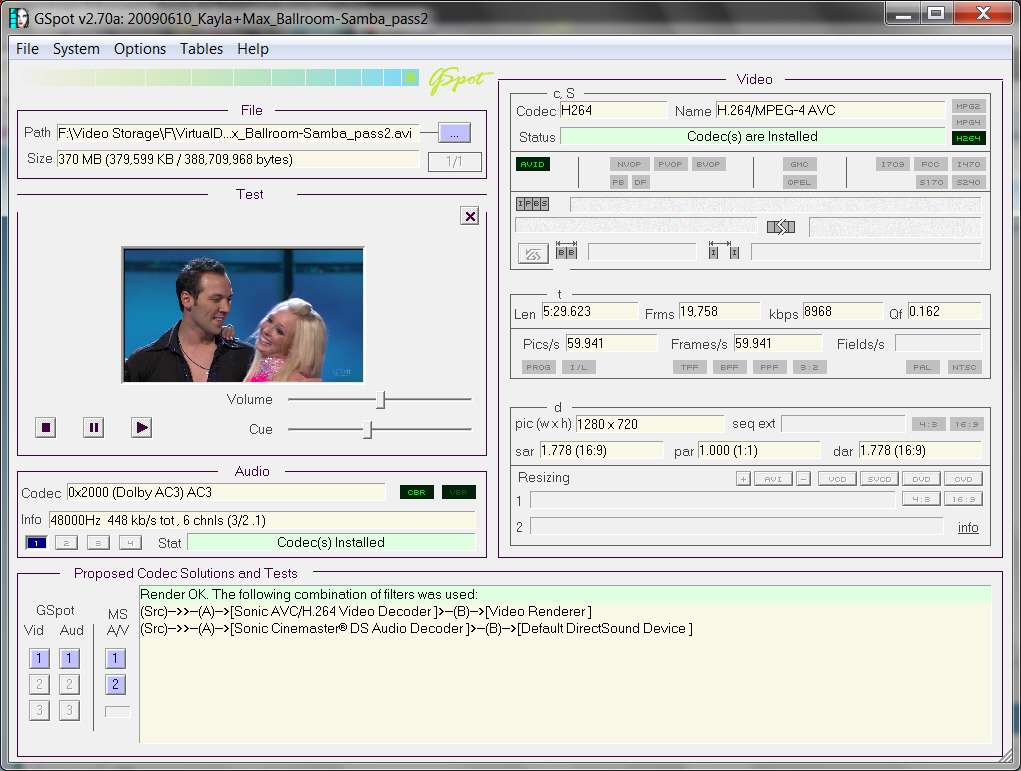
Here's an example of what it shows you. I've opened one of my AVI files which is actually created from an original 1280x720p HDTV program recording, which uses MPEG-2 compression and DD5.1 audio. The production of the AVI used the H.264 codec for video, and the AC3 codec (which is really the same as Dolby Digital) for the audio (i.e. the original HDTV DD5.1 audio was just passed on untouched into the AVI, and it shows as "AC3").

gspot2o.jpg


One more thing... I do NOT have any external codec packs installed on my Win7. The only thing I've installed is (a) FFDSHOW with all of the audio/video codecs UN-CHECKED where Win7 itself already provided support for that codec, and (b) Haali Matroska splitter. And with just this installed, this AVI plays perfectly in Windows Media Player.


also i kida lose you when you start talk about codecs (i understand half of it, maybe because it all in english which is not my first language.
Not a problem. You seem to be doing very well indeed.

I've tried to express myself with technical words and terms to be precise, but using English that's fairly easy to understand. Hopefully the important points can be understood.


,basically do you meant that i can install the AVI necessary "codec" as underlying compressed that won't interfere with cccp?
I want to try and solve the problem one step at a time.

Apparently your Anime videos require some other codec that is not part of standard Win7, but apparently is part of CCCP. That's why you installed CCCP, in order to properly be able to view and edit your Anime videos (among others as well, I would guess) using your older editing programs.

If we can find out exactly what the required codec is in these Anime videos using GSpot, then we can research whether there is any way to specifically get just that codec installed... and NOT have to use all of CCCP. That's the ideal. But it may not turn out that way.

Anyway, let's find out what's in that video first.


also one last question.. as i mention... divx killed my avi previews in windows 7... is it safe to install the AVI reg from here http://www.sevenforums.com/tutorials/19449-default-file-type-associations-restore.html so it can rest my reg to how it was when i only installed windows ? (i used these reg before... sometimes they worked.. sometimes they worked and case other stuff to stop work...)
I don't know the answer without a bit more detail. I don't quite understand what the actual failure is.

When you say "Divx killed my AVI previews" what do you mean? Is there an error message? Are you browsing with Windows Explorer and clicking on videos and expecting to see a small preview thumbnail somewhere, that's not appearing? Do you get audio but no video?

Can you take a screenshot of what you mean by "Divx killed my AVI previews" and attach it here?
 

My Computer

Computer type
PC/Desktop
Computer Manufacturer/Model Number
Home-built, two systems (1) and (2)
OS
Windows 7 Pro x64 (1), Win7 Pro X64 (2)
CPU
i5-3350p 3.1Ghz/6MB-cache (1); E8400 3.0Ghz/6MB-cache (2)
Motherboard
ASUS P8Z77-V Pro (1); ASUS P5Q3 (2)
Memory
8GB PC3-12800 DDR3 (1); 4GB PC3-10600 DDR3 (2)
Graphics Card(s)
ATI HD7750 (1), (see TV cards); ATI R7 250 (2)
Sound Card
Realtek ALC892 HD Audio (1); Realtek ALC1200 HD Audio (2)
Monitor(s) Displays
Eizo HD2441W LCD, Eizo S2433W (1); Eizo 24" S2433W (2)
Screen Resolution
1920x1200, 1920x1200 (1); 1920x1200 (2)
Hard Drives
(1) 1TB SATA-II (7200RPM), 2x2TB SATA-III (7200RPM), 250GB SATA-III (10000RPM) for OS; 2x2TB external USB 3.0

(2) 320GB SATA-II (7200RPM), 750GB SATA-II (7200RPM), 150GB SATA-II (10000RPM) for OS; 2TB external USB 3.0
PSU
Nesteq ECS-6001 600W (1); Nesteq ECS-5001 500W (2)
Case
Acousti-Case 360 (1) and (2)
Cooling
Noctua NH-U12P SE2 for CPU, 2x120mm case fans (1) and (2)
Keyboard
IBM PS/2 (1) and (2)
Mouse
Logitech MX Revolution wireless (1); Microsoft wired (2)
Internet Speed
100mbps down / 10mbps up
Antivirus
Microsoft Security Essentials; Malwarebyte Anti-Malware Pro
Browser
Firefox
Other Info
Ceton InfiniTV 4-tuner cablecard-enabled TV card as well as Hauppauge HVR-2250 OTA/ATSC 2-tuner TV card in (1), running under Win7 WMC
I have not had a problem with .avi being recognized, but I regularly have a problem with VLC being able to play them without fixing them first. For this reason, I try to avoid creating video files in that format, and am converting what I have to either .mp4 or .mkv.
 

My Computer

Computer Manufacturer/Model Number
DIY
OS
W7x64 Pro, SuSe 12.1/** W7 x64 Pro, XP MCE
CPU
Phenom II 1090T w/Noctua NH-D14 /**4400+ X2 w/CM Hyper TX 3
Motherboard
ASRock 890FX Deluxe 4/**A8N-SLI
Memory
2 x 2GB Patriot PGS34g1600LLKA/**4x1GB Corsair VS
Graphics Card(s)
EVGA GTX460 SC/**EVGA 8800GTS
Sound Card
Asus Xonar D2X/**Xonar D1
Monitor(s) Displays
Acer X233H, Dell E152FPc /**LG M237-WD
Screen Resolution
1920x1080 & 1024x768/**1980x1080
Hard Drives
WDC 2TB, 1.5TB, 1TB, 500GB,Seagate 500GB , Maxtor 80GB /**500GB Seagate & WDC 1TB Black
PSU
CM RS600 w/ APC BX1000G/**Antec 500 TP w/ APC BX1000
Case
HAF922/**Antec 1040IIB
Cooling
3x200mm, 1x140 and 1x120mm/**5x80mm fans
Keyboard
Logitech Media USB/**Saitek Eclipse
Mouse
Cordless Trackman Wheel/**Ditto
Internet Speed
3.3Mbps
Other Info
SB 560 5.1 w/ Sennheiser RS140/**Creative T20 speakers, Dvico FusionHDTV7 Gold RT, Cisco E3000, HP 5510V AIO, Linksys E3000, Belkin F5U237 hub and **F5D8055 adapter
(** = 2nd rig)
thanks
i upload pics from 4 avi files i test (every file have 2 pics because the container list was too long)

file 1

avi11h.jpg


part 2

avi12.jpg


file 2

avi21.jpg


part 2

avi22.jpg


file 3

avi31.jpg


part 2

avi32.jpg


file 4

avi41.jpg


part 2

avi42.jpg


i also upload for you list of cccp codecs so you will know what it install

cccp20110730codecs.png


also i be really gald if you can reply about the last two questions i was asking (about the AVI reg, and what i thought you meant about codecs)
 

My Computer

Computer type
PC/Desktop
Computer Manufacturer/Model Number
Self built custom
OS
Windows 7 SP1 Ultimate x64 bit
CPU
Intel I7 3770
Motherboard
Asus maximus v gene BIOS Version 1903
Memory
G.Skill Ares Quad Channel Low Profile 16 GB (4x4GB) DDR3
Graphics Card(s)
Asus GTX980 Ti 6GB STRIX-GTX980TI-DC3OC-6GD5-GAMING DirectCU
Monitor(s) Displays
AOC 24G2U/BK + DELL U2410 A010
Screen Resolution
1920x1080
Hard Drives
Samsung SSD 860 EVO 1TB


TOSHIBA MK1002TSKB 1TB 24/7, 7200 RPM, 64MB, SATA II


TOSHIBA MK1002TSKB 1TB 24/7, 7200 RPM, 64MB, SATA II
PSU
AcBel R88 1100W
Case
Corsair Carbide Series 500R White Mid-Tower Case
Cooling
ZALMAN CPU COOLER CNPS9900A LED + 2 more fans in the case
Keyboard
SteelSeries APEX 7
Mouse
SteelSeries Sensei 310
thanks

i actually allready explain it in my second and third replys

3. as i said before.... my AVI tech preview are now gone after i delete and reinstall some players in that order: Quick time, itunes, divx without codecs ( i also try divx 7 codecs and then delete it and clean all the leftover because i saw it didn't help and ran back to divx 8 )
, and cccp itself. there is any chance i ruin something in the codec pack? even if i install CCCP the last and re-register the filters and rest the settings? (and ofc cancel any interfrence from divx)? i've done totally clean install to anyone of them before i reinstall them+ restart for each one.

but i explain it again anyway, after i play a bit with different codecs and delete them (you can see the list in the Quote above) my AVI tech preview or you can call it preview thumbnail had stop working, i can open pics and avi files and etc but the AVI files only showing "AVI" icon insted of preview no matter what video player i set it up with, my guess is that divx take control over it ... and made the windows to disable it previews insted, and when i delete divx... i just end up without
previews at all =(


*here i add some pics


how it was (the pic not corrupted or anything btw... it from some white place that in the video.. )

avihehe2.jpg


and how it is now =(

avihehe.jpg
 
Last edited:

My Computer

Computer type
PC/Desktop
Computer Manufacturer/Model Number
Self built custom
OS
Windows 7 SP1 Ultimate x64 bit
CPU
Intel I7 3770
Motherboard
Asus maximus v gene BIOS Version 1903
Memory
G.Skill Ares Quad Channel Low Profile 16 GB (4x4GB) DDR3
Graphics Card(s)
Asus GTX980 Ti 6GB STRIX-GTX980TI-DC3OC-6GD5-GAMING DirectCU
Monitor(s) Displays
AOC 24G2U/BK + DELL U2410 A010
Screen Resolution
1920x1080
Hard Drives
Samsung SSD 860 EVO 1TB


TOSHIBA MK1002TSKB 1TB 24/7, 7200 RPM, 64MB, SATA II


TOSHIBA MK1002TSKB 1TB 24/7, 7200 RPM, 64MB, SATA II
PSU
AcBel R88 1100W
Case
Corsair Carbide Series 500R White Mid-Tower Case
Cooling
ZALMAN CPU COOLER CNPS9900A LED + 2 more fans in the case
Keyboard
SteelSeries APEX 7
Mouse
SteelSeries Sensei 310
ummm... hello? dsperber ? can you plz watch my post and see if the pics help u? *-*

(sorry... i don't know how to PM here.. and even though i add u to contact list i can't see u there..., so i thought if i write new reply it will trigger the post in "last air posts" or something... and than you be able to see it)
 

My Computer

Computer type
PC/Desktop
Computer Manufacturer/Model Number
Self built custom
OS
Windows 7 SP1 Ultimate x64 bit
CPU
Intel I7 3770
Motherboard
Asus maximus v gene BIOS Version 1903
Memory
G.Skill Ares Quad Channel Low Profile 16 GB (4x4GB) DDR3
Graphics Card(s)
Asus GTX980 Ti 6GB STRIX-GTX980TI-DC3OC-6GD5-GAMING DirectCU
Monitor(s) Displays
AOC 24G2U/BK + DELL U2410 A010
Screen Resolution
1920x1080
Hard Drives
Samsung SSD 860 EVO 1TB


TOSHIBA MK1002TSKB 1TB 24/7, 7200 RPM, 64MB, SATA II


TOSHIBA MK1002TSKB 1TB 24/7, 7200 RPM, 64MB, SATA II
PSU
AcBel R88 1100W
Case
Corsair Carbide Series 500R White Mid-Tower Case
Cooling
ZALMAN CPU COOLER CNPS9900A LED + 2 more fans in the case
Keyboard
SteelSeries APEX 7
Mouse
SteelSeries Sensei 310
(Sorry for not replying sooner)

First, it does appear that GSpot is showing that "codecs are installed" for your AVI video, being DIVX (DIVX 4). So you should certainly have no problem PLAYING the video... and you shouldn't have needed outside codec packs either. Support for DIVX is included in Win7 natively. But then you already knew you could play these (although we're not really sure which DIVX codec is being used, since you also installed the external DIVX product package as well as the external CCCP codec package, which itself further includes the FFDSHOW package which also supports DIVX).


Second, when using GSpot you should probably "maximize" the window, or at least stretch it out a bit in window form, so that more of the areas are visible all at one time.

Also, at the bottom-left of the GSpot window there are buttons for the audio, video, and A/V test renderings of your video (in the "proposed codec" area). You can push 1 first for each of these and see what information shows up on the right side. If 1 is minimally successful the 2 button will light up and you can then push the 2 button.

If playback of the video is possible, the "container" and "meta-data" areas will change into a "test" area with an audio/video play window and player controls and your video should start playback.


Third, I would like to see what Windows thinks your installed codecs are.

Open Windows Media Player, click Help, click "About Windows Media Player". Then at the bottom-left of the About window there is a "Technical support information" link. Click on that link, to open your browser to show the relevant information.

Down a bit in the information shown are two sections for audio/video codecs. On my system I have only installed external packages for (1) FFDSHOW with most options un-checked, (2) XVIDFVW, (3) Haali Matroska Splitter. I have not installed external DIVX or external CCCP, Shark, or KLite packages. No Quicktime, no RealAudio... nothing to screw with the Windows 7 basic foundation support for multimedia. Just pure Win7 and its built-in codec support for the most part, plus some 3rd-party players and video editors (which themselves do not rely on any other codecs to be installed).

Here is what my "Technical support information" from my Windows Media Player looks like:

wmpcodecs.jpg


Can you please do the same thing and post the one or two screenshots to show your setup. Don't forget to spread the window first, so that we can see all the text.


Finally, I now see that the "broken preview" screenshot you provided seems to suggest that whatever you've done has somehow broken your WMC setup (as you of course already knew). I believe this came from the CCCP package.

But it's WMC that's been affected, not standard Win7 components. This is unfortunate to be sure, but also a bit "unsupported" except by those experts who know more about that WMC level of audio/video play/edit.

I myself am honestly not qualified to talk about WMC because I do not have it installed on my system. I don't have any need to play/edit any audio/video files that cannot be played or edited using standard Windows programs or using one of the 3rd-party products (free or non-free) that I also have to support my own audio/video needs.

Can you please provide a URL so that I can download just one of your files to my own machine, which is part of the problem definition. I'd like to investigate more about it, but I need a sample to play with.

If it's relatively small you could email it to me, but if it's large then a URL for download would be appropriate.

I'm actually curious to know if I can play/edit your file with my own setup and 3rd-party programs (though they may not be free).
 

My Computer

Computer type
PC/Desktop
Computer Manufacturer/Model Number
Home-built, two systems (1) and (2)
OS
Windows 7 Pro x64 (1), Win7 Pro X64 (2)
CPU
i5-3350p 3.1Ghz/6MB-cache (1); E8400 3.0Ghz/6MB-cache (2)
Motherboard
ASUS P8Z77-V Pro (1); ASUS P5Q3 (2)
Memory
8GB PC3-12800 DDR3 (1); 4GB PC3-10600 DDR3 (2)
Graphics Card(s)
ATI HD7750 (1), (see TV cards); ATI R7 250 (2)
Sound Card
Realtek ALC892 HD Audio (1); Realtek ALC1200 HD Audio (2)
Monitor(s) Displays
Eizo HD2441W LCD, Eizo S2433W (1); Eizo 24" S2433W (2)
Screen Resolution
1920x1200, 1920x1200 (1); 1920x1200 (2)
Hard Drives
(1) 1TB SATA-II (7200RPM), 2x2TB SATA-III (7200RPM), 250GB SATA-III (10000RPM) for OS; 2x2TB external USB 3.0

(2) 320GB SATA-II (7200RPM), 750GB SATA-II (7200RPM), 150GB SATA-II (10000RPM) for OS; 2TB external USB 3.0
PSU
Nesteq ECS-6001 600W (1); Nesteq ECS-5001 500W (2)
Case
Acousti-Case 360 (1) and (2)
Cooling
Noctua NH-U12P SE2 for CPU, 2x120mm case fans (1) and (2)
Keyboard
IBM PS/2 (1) and (2)
Mouse
Logitech MX Revolution wireless (1); Microsoft wired (2)
Internet Speed
100mbps down / 10mbps up
Antivirus
Microsoft Security Essentials; Malwarebyte Anti-Malware Pro
Browser
Firefox
Other Info
Ceton InfiniTV 4-tuner cablecard-enabled TV card as well as Hauppauge HVR-2250 OTA/ATSC 2-tuner TV card in (1), running under Win7 WMC
ok first here the pics (there is one problem though... it in hebrow...)

rdtl.jpg


drtdrd.jpg


serstdr.jpg


also i don't believe that CCCP was the case for my preview lost because it not use AVI in it default settings.. .and on the other hand Divx player do it.. and the divx codecs (which i try and delete several times use AVI and Divx preview that force the explorer to crash too...) anyway i bet on divx...

also there is any way to fix my AVI previews?

and i kida lost you in alot of ways.. about the GSpot program and how to work with it :sarc: ...sorry about it...

oh and i just happend to test the videos with cccp 2009 on other pc.. is work with cccp 2009 and stop to work with 2010-2011... maybe they drop codec or the new version of the codecs just can't be detected by older programs...


as for the video sample all i done was to convert the file to AVI via "Allok Video to MP4 Converter" or "Allok 3GP PSP MP4 iPod Video Converter"... these programs help me alot and i've been using them for about 3-4 years till now...

but i guess it be the best if i send you sample anyway so it will use my codecs or what-not....

but i do it later because today i be really busy, also i take my time to try and making really small file so i can send it to you via mail... if it won't work i just send you url
 

My Computer

Computer type
PC/Desktop
Computer Manufacturer/Model Number
Self built custom
OS
Windows 7 SP1 Ultimate x64 bit
CPU
Intel I7 3770
Motherboard
Asus maximus v gene BIOS Version 1903
Memory
G.Skill Ares Quad Channel Low Profile 16 GB (4x4GB) DDR3
Graphics Card(s)
Asus GTX980 Ti 6GB STRIX-GTX980TI-DC3OC-6GD5-GAMING DirectCU
Monitor(s) Displays
AOC 24G2U/BK + DELL U2410 A010
Screen Resolution
1920x1080
Hard Drives
Samsung SSD 860 EVO 1TB


TOSHIBA MK1002TSKB 1TB 24/7, 7200 RPM, 64MB, SATA II


TOSHIBA MK1002TSKB 1TB 24/7, 7200 RPM, 64MB, SATA II
PSU
AcBel R88 1100W
Case
Corsair Carbide Series 500R White Mid-Tower Case
Cooling
ZALMAN CPU COOLER CNPS9900A LED + 2 more fans in the case
Keyboard
SteelSeries APEX 7
Mouse
SteelSeries Sensei 310
actually forgot what i just said.. i have here other file that i edit the same way, i even cut it a bit more so it take something like 700 kb

anyway where i can find your email ? : P

p.s can you plz tell me how i PM here = ( i new here and don't know anything about how to pm here and how to add you to the friend list ( i actually try but it still show u not there)
___________________________________________________________________________________

* ok i send you the file... i really need help on my other questions through.. especially the AVI one (i want to see Avi previews again so much that i can even pay for it lol....)

well i be off for some time, i be back later
 
Last edited:

My Computer

Computer type
PC/Desktop
Computer Manufacturer/Model Number
Self built custom
OS
Windows 7 SP1 Ultimate x64 bit
CPU
Intel I7 3770
Motherboard
Asus maximus v gene BIOS Version 1903
Memory
G.Skill Ares Quad Channel Low Profile 16 GB (4x4GB) DDR3
Graphics Card(s)
Asus GTX980 Ti 6GB STRIX-GTX980TI-DC3OC-6GD5-GAMING DirectCU
Monitor(s) Displays
AOC 24G2U/BK + DELL U2410 A010
Screen Resolution
1920x1080
Hard Drives
Samsung SSD 860 EVO 1TB


TOSHIBA MK1002TSKB 1TB 24/7, 7200 RPM, 64MB, SATA II


TOSHIBA MK1002TSKB 1TB 24/7, 7200 RPM, 64MB, SATA II
PSU
AcBel R88 1100W
Case
Corsair Carbide Series 500R White Mid-Tower Case
Cooling
ZALMAN CPU COOLER CNPS9900A LED + 2 more fans in the case
Keyboard
SteelSeries APEX 7
Mouse
SteelSeries Sensei 310
actually forgot what i just said.. i have here other file that i edit the same way, i even cut it a bit more so it take something like 700 kb

anyway where i can find your email ? : P
I sent you a "visitor message". I think you should see it if you click on your own "Egozi44" link, and then select the "view public profile" link.

Let me know if you got it.
 

My Computer

Computer type
PC/Desktop
Computer Manufacturer/Model Number
Home-built, two systems (1) and (2)
OS
Windows 7 Pro x64 (1), Win7 Pro X64 (2)
CPU
i5-3350p 3.1Ghz/6MB-cache (1); E8400 3.0Ghz/6MB-cache (2)
Motherboard
ASUS P8Z77-V Pro (1); ASUS P5Q3 (2)
Memory
8GB PC3-12800 DDR3 (1); 4GB PC3-10600 DDR3 (2)
Graphics Card(s)
ATI HD7750 (1), (see TV cards); ATI R7 250 (2)
Sound Card
Realtek ALC892 HD Audio (1); Realtek ALC1200 HD Audio (2)
Monitor(s) Displays
Eizo HD2441W LCD, Eizo S2433W (1); Eizo 24" S2433W (2)
Screen Resolution
1920x1200, 1920x1200 (1); 1920x1200 (2)
Hard Drives
(1) 1TB SATA-II (7200RPM), 2x2TB SATA-III (7200RPM), 250GB SATA-III (10000RPM) for OS; 2x2TB external USB 3.0

(2) 320GB SATA-II (7200RPM), 750GB SATA-II (7200RPM), 150GB SATA-II (10000RPM) for OS; 2TB external USB 3.0
PSU
Nesteq ECS-6001 600W (1); Nesteq ECS-5001 500W (2)
Case
Acousti-Case 360 (1) and (2)
Cooling
Noctua NH-U12P SE2 for CPU, 2x120mm case fans (1) and (2)
Keyboard
IBM PS/2 (1) and (2)
Mouse
Logitech MX Revolution wireless (1); Microsoft wired (2)
Internet Speed
100mbps down / 10mbps up
Antivirus
Microsoft Security Essentials; Malwarebyte Anti-Malware Pro
Browser
Firefox
Other Info
Ceton InfiniTV 4-tuner cablecard-enabled TV card as well as Hauppauge HVR-2250 OTA/ATSC 2-tuner TV card in (1), running under Win7 WMC
Ok, got your AVI. Seems to be handled perfectly by my own Win7 system (at least as far as "playback" and "preview" is concerned) using standard Windows Media Player. I saw it play visually, and I heard its sound.

Again, I do not have anything external installed other than what I have already enumerated (FFDSHOW with much un-checked, Haali Matroska splitter, XVidVFW for editing to produce AVI using VirtualDub). I have no CCCP, no WMC, no Shark/KLite. And absolutely no external Divx product or Quicktime.


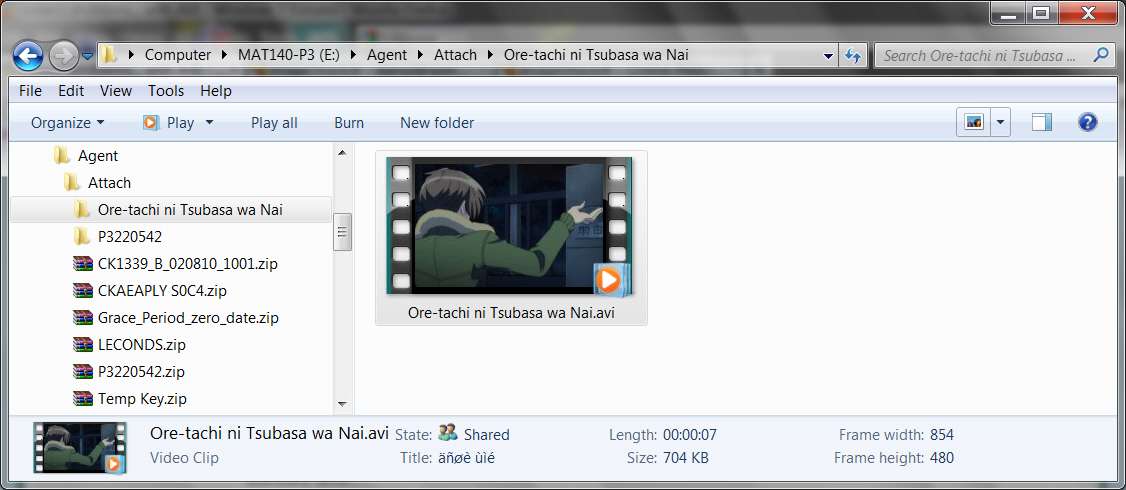
Ok, here's what the "preview" looked like using standard Windows Explorer when opening to the folder containing the AVI:

aviplay.jpg


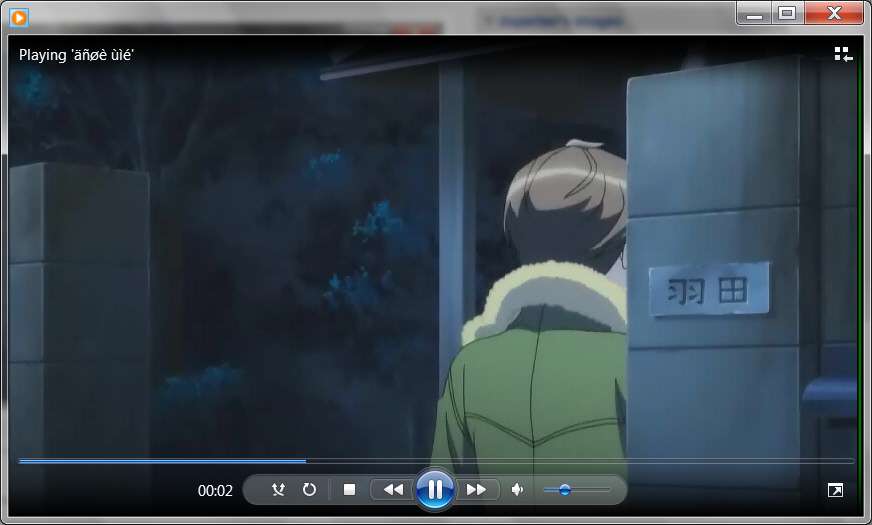
Here's what Windows Media Player from Win7 looked like playing it back. Again, this is not WMC... it's standard WMP.

aviplay.jpg


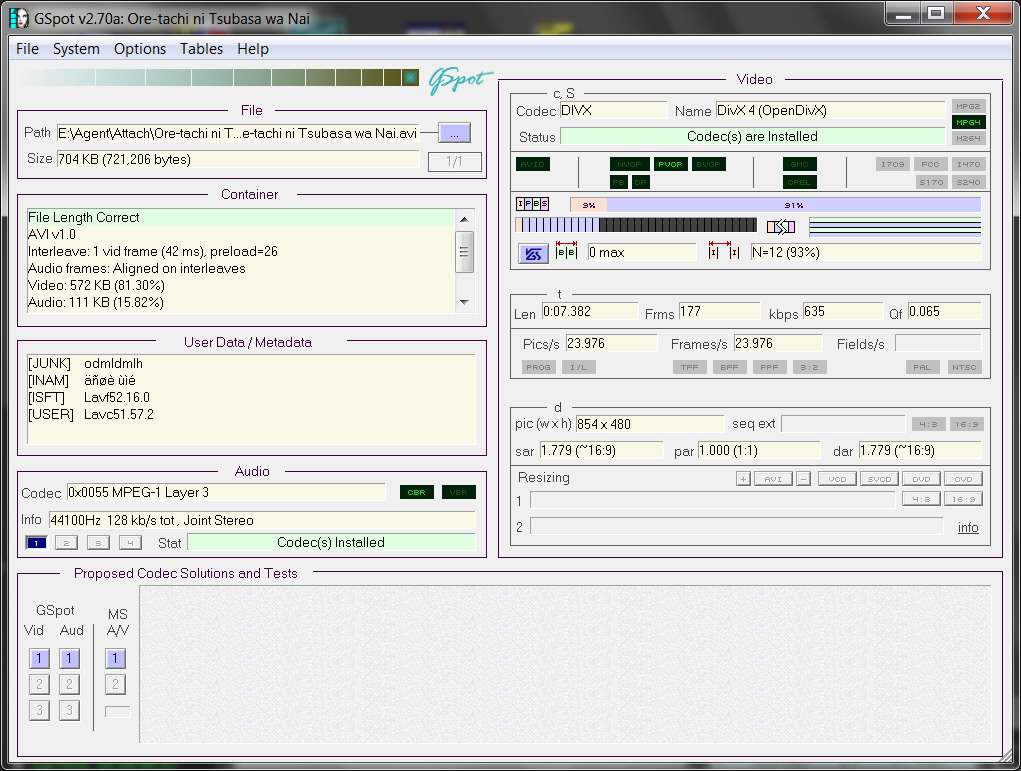
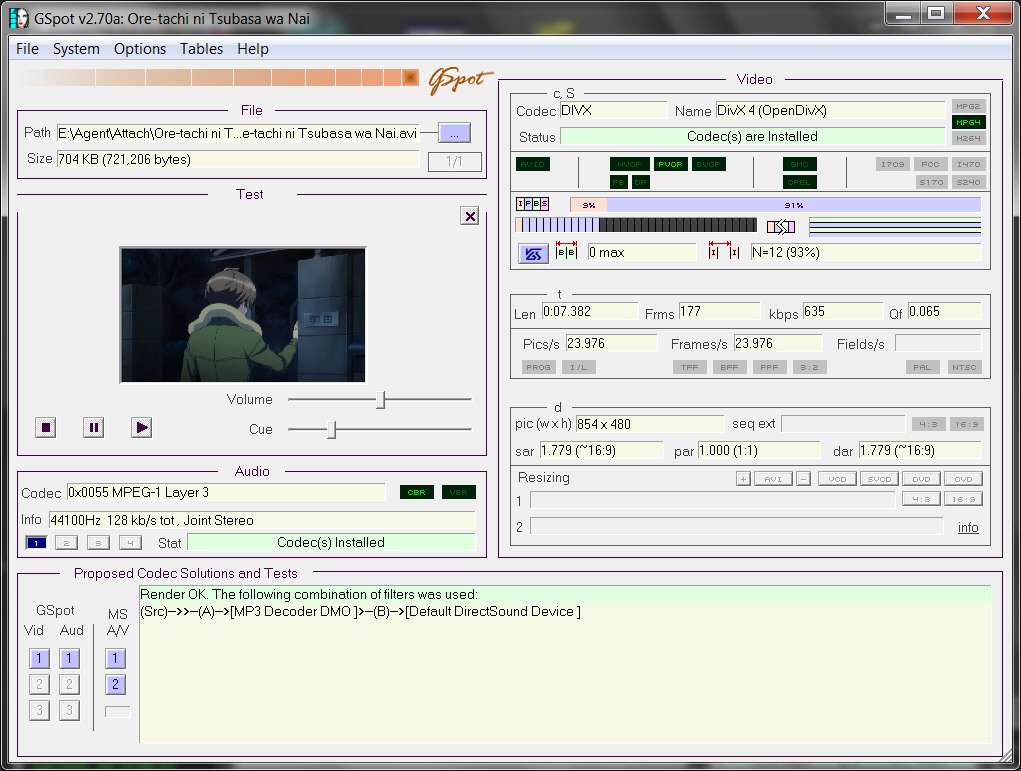
And here's what GSpot showed for the AVI file:

avigspot.jpg


And when I pushed the GSpot separate audio and video test rendering buttons 1 and 2 (in the lower-left corner of GSpot), it seemed to produce all "failed to connect" messages. Admittedly, this was unexpected, but maybe this is supposed to pertain to non-Windows codecs, filters, etc. I don't really know the answer.

However when I pushed the 1 button for MS A/V, sure enough it now worked fine. I then pushed the 2 button for MS A/V and the audio and video were now properly rendered in the player frame in the upper part of the GSpot window that is now labeled "test".

avigspotrender.jpg


So as as playback of your AVI is concerned, there is nothing special or extra from any outside codec pack that is required. And there's no need for WMC to play the AVI. Standard WMP in Win7 seems to work perfectly.

Furthermore, Win7 contains built-in support for DIVX 4 (and in fact I have support for Divx turned off in my FFDSHOW video configuration, so it's absolutely only Win7's DIVX support which is getting used here). There is no need for any external codecs (specifically to support DIVX 4) that are required, at least for playback.

And the Win7 preview (using WMP, not WMC) also seems to work perfectly on my system. So once again, WMP can obviously correctly interpret the DIVX 4 compression inside this AVI and the preview is successful, as you see in my screenshot.


Now... to editing.

Can you provide me with one of the programs you're trying to use? Depending on size, either URL or email attachment?
 

My Computer

Computer type
PC/Desktop
Computer Manufacturer/Model Number
Home-built, two systems (1) and (2)
OS
Windows 7 Pro x64 (1), Win7 Pro X64 (2)
CPU
i5-3350p 3.1Ghz/6MB-cache (1); E8400 3.0Ghz/6MB-cache (2)
Motherboard
ASUS P8Z77-V Pro (1); ASUS P5Q3 (2)
Memory
8GB PC3-12800 DDR3 (1); 4GB PC3-10600 DDR3 (2)
Graphics Card(s)
ATI HD7750 (1), (see TV cards); ATI R7 250 (2)
Sound Card
Realtek ALC892 HD Audio (1); Realtek ALC1200 HD Audio (2)
Monitor(s) Displays
Eizo HD2441W LCD, Eizo S2433W (1); Eizo 24" S2433W (2)
Screen Resolution
1920x1200, 1920x1200 (1); 1920x1200 (2)
Hard Drives
(1) 1TB SATA-II (7200RPM), 2x2TB SATA-III (7200RPM), 250GB SATA-III (10000RPM) for OS; 2x2TB external USB 3.0

(2) 320GB SATA-II (7200RPM), 750GB SATA-II (7200RPM), 150GB SATA-II (10000RPM) for OS; 2TB external USB 3.0
PSU
Nesteq ECS-6001 600W (1); Nesteq ECS-5001 500W (2)
Case
Acousti-Case 360 (1) and (2)
Cooling
Noctua NH-U12P SE2 for CPU, 2x120mm case fans (1) and (2)
Keyboard
IBM PS/2 (1) and (2)
Mouse
Logitech MX Revolution wireless (1); Microsoft wired (2)
Internet Speed
100mbps down / 10mbps up
Antivirus
Microsoft Security Essentials; Malwarebyte Anti-Malware Pro
Browser
Firefox
Other Info
Ceton InfiniTV 4-tuner cablecard-enabled TV card as well as Hauppauge HVR-2250 OTA/ATSC 2-tuner TV card in (1), running under Win7 WMC
Back
Top