Solved Color Folder Text

DDjusD

New member
Member
Local time
7:06 PM
Messages
25
Location
Chickamauga, Georgia, USA
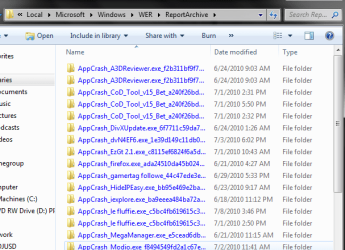
Okay, it's been a while since I have posted here but while scanning through folders on my computer in an attempt to find my desktop background, that I deleted but still have set as my desktop background that I want to keep when I do a clean install, I came across two folders that had blue text (image below) and I was wanting to know how I can make other folders colored too.

EDIT: I went to open the folders with colored text and ALL of the folders and files within them had blue text too.
 

Attachments
  • Colortext.png
    Colortext.png
    34.3 KB · Views: 46
  • coloredfile.png
    coloredfile.png
    1.8 KB · Views: 35
  • moarfolders.png
    moarfolders.png
    69.3 KB · Views: 69
  • moarfiles.png
    moarfiles.png
    7.8 KB · Views: 34
Last edited:

My Computer

OS
Windows 7 Ultimate x64
When a folder/file name is in blue, it's indicating that said file/folder is compressed. It's not a customization feature. Sorry!
 
Last edited by a moderator:

My Computer

Computer Manufacturer/Model Number
Alienware X51
OS
Windows 7 Home Premium x64
CPU
Intel Core i7-2600 @3.40GHz
Memory
8.00GB DDR3
Graphics Card(s)
NVIDIA GeForce GTX 555 w/1.0GB RAM
Monitor(s) Displays
BenQ XL2420TX
Screen Resolution
1920x1080@120Hz
Hard Drives
1TB
PSU
330-watt
Keyboard
Logitech Wireless Illuminated Keyboard K800
Mouse
Razer Orochi
Internet Speed
Campus Internet
No problem!
 

My Computer

Computer Manufacturer/Model Number
Alienware X51
OS
Windows 7 Home Premium x64
CPU
Intel Core i7-2600 @3.40GHz
Memory
8.00GB DDR3
Graphics Card(s)
NVIDIA GeForce GTX 555 w/1.0GB RAM
Monitor(s) Displays
BenQ XL2420TX
Screen Resolution
1920x1080@120Hz
Hard Drives
1TB
PSU
330-watt
Keyboard
Logitech Wireless Illuminated Keyboard K800
Mouse
Razer Orochi
Internet Speed
Campus Internet
You wouldn't happen to know how I can find my current desktop background, not the original file because I deleted it but the one that my computer is loading as the background, so I can set it as my desktop background when I do a clean install.
 

My Computer

OS
Windows 7 Ultimate x64
I used:

http://www.sevenforums.com/tutorials/91330-folder-background-change.htmlhttp://www.door2windows.com/windows...ders-background-text-color-in-windows-7vista/

It did exactly what you're asking for, an extra feature I didn't need was the folder background change. Just remember to switch things back to normal if you want to change back to defaults as it doesn't undo them when removed!

EDITED: I hope that helps and that's what you were looking for!

strange, the link is not what I put up! This is the program I used:
http://www.thewindowsclub.com/windows-7-folder-background-changer-released worked great for changing text colour!
 
Last edited:

My Computer

Computer Manufacturer/Model Number
Hp Compaq CQ56 156SA
OS
windows 7 Home Premium 64 Bit
CPU
AMD V140
Memory
2GB
Graphics Card(s)
ATI Mobility Radeon HD 4250
Sound Card
Realtek
Monitor(s) Displays
Generic
Screen Resolution
1366 x 768
Hard Drives
Hitachi
Mouse
Wireless LG
Internet Speed
Finger-licking good
Other Info
Windows 7 Home Premium Pre-Installed.
Old Machine: HP Pavilion DV6 1120sa (R.I.P)
If you're looking for the folder where Windows stores the desktop wallpapers the path is:-
C:\Windows\Web\Wallpaper. Inside that there will be several folders, it'll be in one of them.
 

My Computer

OS
Windows 7 x64
this works for me give it a try..


  1. Open the Control Panel from the Start menu.
  2. Open Folder Options in the Control Panel.
  3. Note: If Folder Options is not available, change View by to Large icons at the top right of the Control Panel.
  4. Select the View tab in the Folder Options window.
  5. Uncheck Show encrypted or compressed NTFS files in
    .
  6. Click OK to save the changes.
 

My Computer

OS
Windows 7
Back
Top