Colour printing stopped

Chris Gregory

New member
Local time
4:16 AM
Messages
2
I have Windows 7 Home Premium and an HP930c printer. One day last week I selected the black and white option when printing a document. I have never done this before. Although I have checked that the colour option is now selected, I just cannot get a document or test page to display any colour. I have tried two brand new HP original cartridges. I believe the problem must relate to the pc, as opposed to the printer, since the printer was working fine until I opted to print in black and white. There must be another box to tick somewhere, perhaps?
 

My Computer

OS
Windows 7 Home Premium
Load a color document in the application (Word etc.) and check the print preview. If the preview you are getting is B&W then check the application's print settings. If the preview is in color then check the printer settings.
 

My Computer

Computer Manufacturer/Model Number
Toshiba Satellite P775-S7232
OS
MS Windows 7 Ultimate 64-bit SP1
CPU
i5-2410M 2.3GHz (2.9GHz Turbo-Boost) Sandy Bridge 32nm
Motherboard
Toshiba PHRAA ver. PSBY1U-00F003
Memory
4GB+4GB Samsung DDR3 PC3-10700 (1333 MHz)
Graphics Card(s)
Video Intel(R) HD Graphics Family, 1696MB available memory
Sound Card
Realtek High Definition Audio version=6.0.1.6323
Monitor(s) Displays
17.3 " Trubrite TFT LCD, LED Backlit
Screen Resolution
1600x900 32 bit, Native support for 720P content
Hard Drives
TOSHIBA MK6476GSXN
580.614 [GB] partitioned C: 80GB and D: 500GB with hidden recovery partitons.

Spare bay for 2nd HDD but no SATA connector :-(
PSU
Toshiba AC/DC Adapter
Case
Notebook
Cooling
Built-in Fan
Keyboard
Premium Raised Tile keyboard
Mouse
Logitech M215 wireless mouse
Internet Speed
Not fast enough
Other Info
Built-in Harman Kardon speakers with Dolby Advanced Audio, Waves MaxxAudio® 3. HDMI, 1xUSB3+3xUSB2 ports, WebCam, Battery life 4hrs 11mins, 4GB Readyboost SDHC card, WD My Book Essential Ext HDDs 2 TB, 2x1TB, My Passport SE 1TB and WDTV 1st Gen for Multimedia playing on a Sony Wega 32" LCD.
Recent addition to my toys are Asus Transformer Pad TF300T with 32GB onboard sd card + 32GB microsd card.
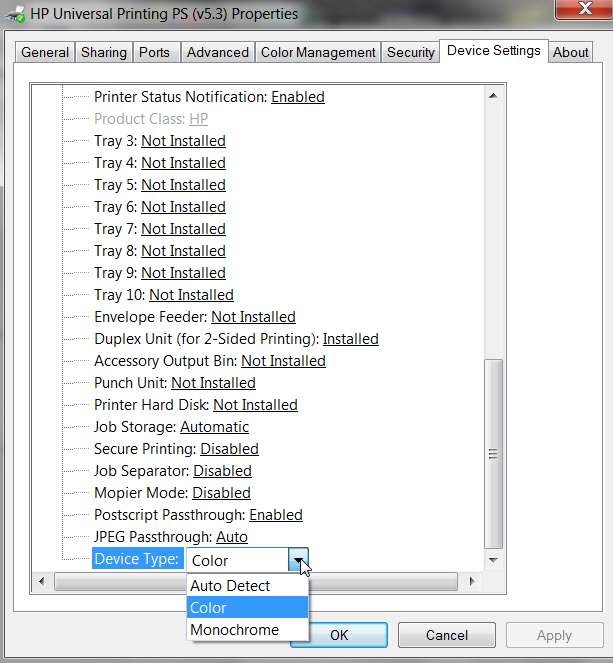
Just to double-check that you haven't maybe upgraded your printer driver and gotten the defaults, which for my HP 2605dn laserjet printer was device type "auto" (in Device Settings tab, of Printer Properties).

Due to a bug in the driver, "auto detect" actually forces "monochrome", aka black and white.

So for my 2605dn you MUST change that device type to "color", to force color mode.

You might check your own Printer Properties -> Device Settings -> device type, for your printer, specifically the device type value at the very bottom of the list of device settings. If it shows "auto detect" try changing it to "color" and see if that makes a difference. If your printer is properly set to color mode, you should see a color page in Printing Preferences -> Finishing tab. If that page shows in black and white then your printer is still not configured correctly.

hpcolor.jpg
 

My Computer

Computer type
PC/Desktop
Computer Manufacturer/Model Number
Home-built, two systems (1) and (2)
OS
Windows 7 Pro x64 (1), Win7 Pro X64 (2)
CPU
i5-3350p 3.1Ghz/6MB-cache (1); E8400 3.0Ghz/6MB-cache (2)
Motherboard
ASUS P8Z77-V Pro (1); ASUS P5Q3 (2)
Memory
8GB PC3-12800 DDR3 (1); 4GB PC3-10600 DDR3 (2)
Graphics Card(s)
ATI HD7750 (1), (see TV cards); ATI R7 250 (2)
Sound Card
Realtek ALC892 HD Audio (1); Realtek ALC1200 HD Audio (2)
Monitor(s) Displays
Eizo HD2441W LCD, Eizo S2433W (1); Eizo 24" S2433W (2)
Screen Resolution
1920x1200, 1920x1200 (1); 1920x1200 (2)
Hard Drives
(1) 1TB SATA-II (7200RPM), 2x2TB SATA-III (7200RPM), 250GB SATA-III (10000RPM) for OS; 2x2TB external USB 3.0

(2) 320GB SATA-II (7200RPM), 750GB SATA-II (7200RPM), 150GB SATA-II (10000RPM) for OS; 2TB external USB 3.0
PSU
Nesteq ECS-6001 600W (1); Nesteq ECS-5001 500W (2)
Case
Acousti-Case 360 (1) and (2)
Cooling
Noctua NH-U12P SE2 for CPU, 2x120mm case fans (1) and (2)
Keyboard
IBM PS/2 (1) and (2)
Mouse
Logitech MX Revolution wireless (1); Microsoft wired (2)
Internet Speed
100mbps down / 10mbps up
Antivirus
Microsoft Security Essentials; Malwarebyte Anti-Malware Pro
Browser
Firefox
Other Info
Ceton InfiniTV 4-tuner cablecard-enabled TV card as well as Hauppauge HVR-2250 OTA/ATSC 2-tuner TV card in (1), running under Win7 WMC
Hi, I'm afraid neither of the two suggestions received to date have resolved the issue. The print preview does show up in colour, but as I said, despite selecting the colour option, as opposed to black and white, it still prints in black and white! Regarding the second reply, I don't have the options as shown in the screen shot. So, a, still stuck with no colour printing. Am getting desperate!
 

My Computer

OS
Windows 7 Home Premium
Back
Top