
You are using an out of date browser. It may not display this or other websites correctly.
You should upgrade or use an alternative browser.
You should upgrade or use an alternative browser.
COM Surrogate Windows 7 64bit
- Thread starter azulblueaoi
- Start date
PunisherR007
New member
- Local time
- 3:15 AM
- Messages
- 1
COM surrogate would have to be one of the smallest processes out there yet it has all the world on it's shoulders and it has problems. how can microsoft think that the tiny little dllhost.exe process called COM surrogate be in charge of all my icons, loading the icons on ever page that i open with windows explorer, and pretty much just showing up everywhere. How can microsoft say this file has not got problems, so many people say they have problems with COM surrogate, and all there cases match eachother, yet the techies are blaming wrong or faulty codecs, yet we use these codecs everyday to play our music and movies. You can't blame the codec makers for your stupid process that takes care of icons and info on files, seriously microsoft if your OS breaks just cause it can't have the exact codecs it want's yet alot of the new media out there require you to update your codecs. and im telling you right now, klite codecs is fine, i use basic pack, and it don't make any other program on my pc do anything strange, all my games are fine, steam, origin etc....., the only problem i have is, i have to reboot my pc every now and then cause of the stupid COM surrogate process.
My Computer
- Computer type
- PC/Desktop
- Computer Manufacturer/Model Number
- custom build
- OS
- Windows 7 Professional x64
- CPU
- AMD FX8350
- Motherboard
- Gigabyte GA-990FXA-D3 (rev.1.x)
- Memory
- 16GB Corsair Vengeance DDR3 1600Mhz
- Graphics Card(s)
- Gigabyte 560 GTX TI OC 1GB
- Hard Drives
- 2x Seagate SATA2 1TB
- Antivirus
- MSE (microsoft security essentials)
- Browser
- Firefox
trebor0926
New member
- Local time
- 12:15 PM
- Messages
- 1
I'm afraid that setting this on 64-bit does not work.
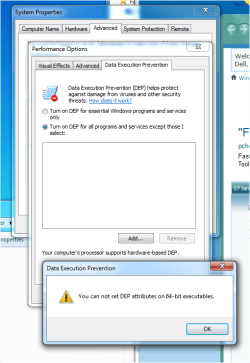
Hey dude, this turning off DEP for 64-bit does not work because it shows that you can not set
DEP attributes for 64-bit machines, which he explained at the beginning of his post.
DUDE, I thought you were exceptional in Window 7 64-bit machines?
It would be much better if you would have explained that this is only for 32-bit machines
Also, changing the DEP settings may solve the problem for you;
Regards....Mike Connor
Hey dude, this turning off DEP for 64-bit does not work because it shows that you can not set
DEP attributes for 64-bit machines, which he explained at the beginning of his post.
DUDE, I thought you were exceptional in Window 7 64-bit machines?
It would be much better if you would have explained that this is only for 32-bit machines
My Computer
- Computer type
- PC/Desktop
- Computer Manufacturer/Model Number
- Custom Build
- OS
- Windows 7 64-bit Ultimate
- CPU
- Intel i5-3570l CPU @ 3.40Ghz
- Memory
- 8GB RAM
- Antivirus
- AVG
- Browser
- FireFox
Hello to every body. I faced the same problem a few days ago. I almost did everything suggested here and some other web pages, even though some of them was really strange to even suggest let alone to do or even to consider related to the problem, but to no avail. I found the problem anyway. Mine was laying in the AMD Radeon Graphics Drivers. The instance that I remove the drivers the problem vanished from the face of the OS.
I found the solution somewhere else, but still thought might help you.
They said that the amd people are trying to solve the problem with their driver.
If you are worry that you might not be able to run some high end graphics using games, let me ease your mind that I have played Need For Speed - Hot Persuit 2010, Need for Speed Carbon, Need For speed - Most Wanted, PES 2013 and Counter Strike - Global Offensive with this graphic processor and they all run smoothly.
I found the solution somewhere else, but still thought might help you.
They said that the amd people are trying to solve the problem with their driver.
If you are worry that you might not be able to run some high end graphics using games, let me ease your mind that I have played Need For Speed - Hot Persuit 2010, Need for Speed Carbon, Need For speed - Most Wanted, PES 2013 and Counter Strike - Global Offensive with this graphic processor and they all run smoothly.
My Computer
- Computer type
- Laptop
- Computer Manufacturer/Model Number
- HP Probook 4530s
- OS
- Microsoft Windows 7 Enterprise x64 & Microsoft Windows 8.1 Enterprise x64
- CPU
- Intel(R) Core(TM) i5-2410M CPU @ 2.30GHz 2.30
- Motherboard
- Hewlett-Packard 167C
- Memory
- Samsung DDR3 4GB
- Graphics Card(s)
- Intel HD Graphics 3000 & AMD Radeon HD 7470
- Hard Drives
- Hitachi HTS547564A9E384
- Antivirus
- Avira AntiVir Free
- Browser
- Opera Next, Firefox, Google Chrome
Bernard Rother
New member
- Local time
- 8:15 PM
- Messages
- 1
My Com Surrogate Error also solved.
Also had the Com Surrogate error. In my system it was related to XnView. When I uninstalled XnView everything went back to normal. Updated XnView to the latest 2.25 with no luck. Then I rolled back the video drivers for the GTX 9800 from 335.23 ---> 327.23 and rebooted. Com Surrogate solved. There may have been newer drivers between the releases mentioned above but those were the only ones I had on hand.
Also had the Com Surrogate error. In my system it was related to XnView. When I uninstalled XnView everything went back to normal. Updated XnView to the latest 2.25 with no luck. Then I rolled back the video drivers for the GTX 9800 from 335.23 ---> 327.23 and rebooted. Com Surrogate solved.
There may have been newer drivers between the releases mentioned above but those were the only ones I had on hand.My Computer
- Computer type
- PC/Desktop
- Computer Manufacturer/Model Number
- Asus
- OS
- Windows 7 x64
- CPU
- AMD Phenom II
- Motherboard
- Asus M3A78
- Memory
- 8 gigs A Data
- Graphics Card(s)
- Nvidea GTX 9800
- Hard Drives
- Crucial SSD 120 gigs
- Antivirus
- Avast
- Browser
- Firefox
stephenjhon
New member
- Local time
- 12:15 PM
- Messages
- 2
Com Surrogate Has Stopped Working Error ( Solved)
When you are browsing photos from your hard drive, the pup up will open like "Com Surrogate Has Stopped Working". I also faced this problems many times. But some methods recover the problem.
Follow steps -
In your windows, open command prompt in administrator mode. After that you have to just enter this commands in your command prompt.
The commands are regsvr32 vbscript.dll regsvr32 jscript.dll. This is are the two commands you have to enter in your command prompt.
This commands will re-register few dll files with windows and solves the com surrogate has stopped working error.
If above method not works then try this ones -com surrogate has stopped working
When you are browsing photos from your hard drive, the pup up will open like "Com Surrogate Has Stopped Working". I also faced this problems many times. But some methods recover the problem.
Follow steps -
In your windows, open command prompt in administrator mode. After that you have to just enter this commands in your command prompt.
The commands are regsvr32 vbscript.dll regsvr32 jscript.dll. This is are the two commands you have to enter in your command prompt.
This commands will re-register few dll files with windows and solves the com surrogate has stopped working error.
If above method not works then try this ones -com surrogate has stopped working
My Computer
- Computer type
- PC/Desktop
- OS
- Windows 8
Also, changing the DEP settings may solve the problem for you;
ethod 2 – Turn off DEP or Add Exception
Another way to possible solve this problem is to turn off DEP or Data Execution Prevention. You can do this in Windows 7 by right-clicking on My Computer, choosing Properties, and clicking Advanced system settings.
Click on the Advanced tab and then click on Settings under the Performance section.
Finally, click on Data Execution Prevention and click on Turn on DEP for all programs except those I select and add dllhost.exe to the list.
QUOTED FROM Fix COM Surrogate has Stopped Working in Windows 7
<http://thebackroomtech.com/2010/08/27/fix-com-surrogate-has-stopped-working-in-windows-7/>
Regards....Mike Connor


If you try this and are using 64-bit Windows 7, be sure to switch from the default System32 folder, which is what opens by default after you click the [ Add … ] button, to the SysWOW64 folder ( i.e. C:\Windows\SysWOW64) and point to the dllhost.exe file there instead. If you point to the dllhost.exe file in C:\Windows\System32 (and are using 64-bit Windows 7) you'll get an error message pop-up telling you you can't set DEP attributes on 64-bit executables.
Last edited:
My Computer
- OS
- Windows® 7 (64-bit)
- CPU
- intel® Core™ i5-4690 @ 3.50 GHz
- Motherboard
- GIGABYTE™ H97-D3H
- Memory
- 8 GB DDR3